
Quiz
CompTIA A+ Exam prep cert 1
Este quiz tem tipos de pergunta que abrem no player de sempre.
Perguntas do quiz (30)
1[blank_start]EMP[blank_end] means electromagnetic pulse.
- AEMP
2The three types of EMP are; [blank_start]Electrostatic discharge[blank_end], [blank_start]Electromagnetic[blank_end] interference, and [blank_start]Radio Frequency interference[blank_end].
- ARadio Frequency interference
- BElectrostatic discharge
- CElectromagnetic
3We can use an anti-static [blank_start]bag[blank_end], an anti-static/ESD [blank_start]mat[blank_end], and an anti-static/ESD [blank_start]wrist wrap[blank_end] to prevent EMP.
- Abag
- Bmat
- Cwrist wrap
4You can test input voltage by using a [blank_start]voltage[blank_end] tester or a [blank_start]volt-ohm[blank_end] meter.
- Avoltage
- Bvolt-ohm
5What is the first step in the troubleshooting theory?
- AIdentify the problem; Question the user, Enquire regarding environmental or infrastructure changes. Review system and application logs.
- BEstablish a theory of probable cause (question the obvious);
- CTest the theory to determine cause; If theory isn’t confirmed, re-establish new theory. Escalate the issue, if necessary.
- DEstablish a plan of action, to resolve the problem and implement the solution;
- EDocument findings, actions, and outcomes;
- FVerify full system functionality and, if applicable, implement preventative strategies; e.g. would you mind testing it to see if everythings okay? Preventative strategies can range from a casual reminder, to more serious strategies, like documentation, new company policies etc.
6The system unit contains the CPU, RAM, and other components
- AVerdadeiro
- BFalso
7Monitors and web cameras provide [blank_start]visual output[blank_end].
- Avisual output
8Printers create [blank_start]paper output[blank_end].
- Apaper output
9Speakers and headsets make [blank_start]audio output[blank_end].
- Aaudio output
10Identify common connector types.
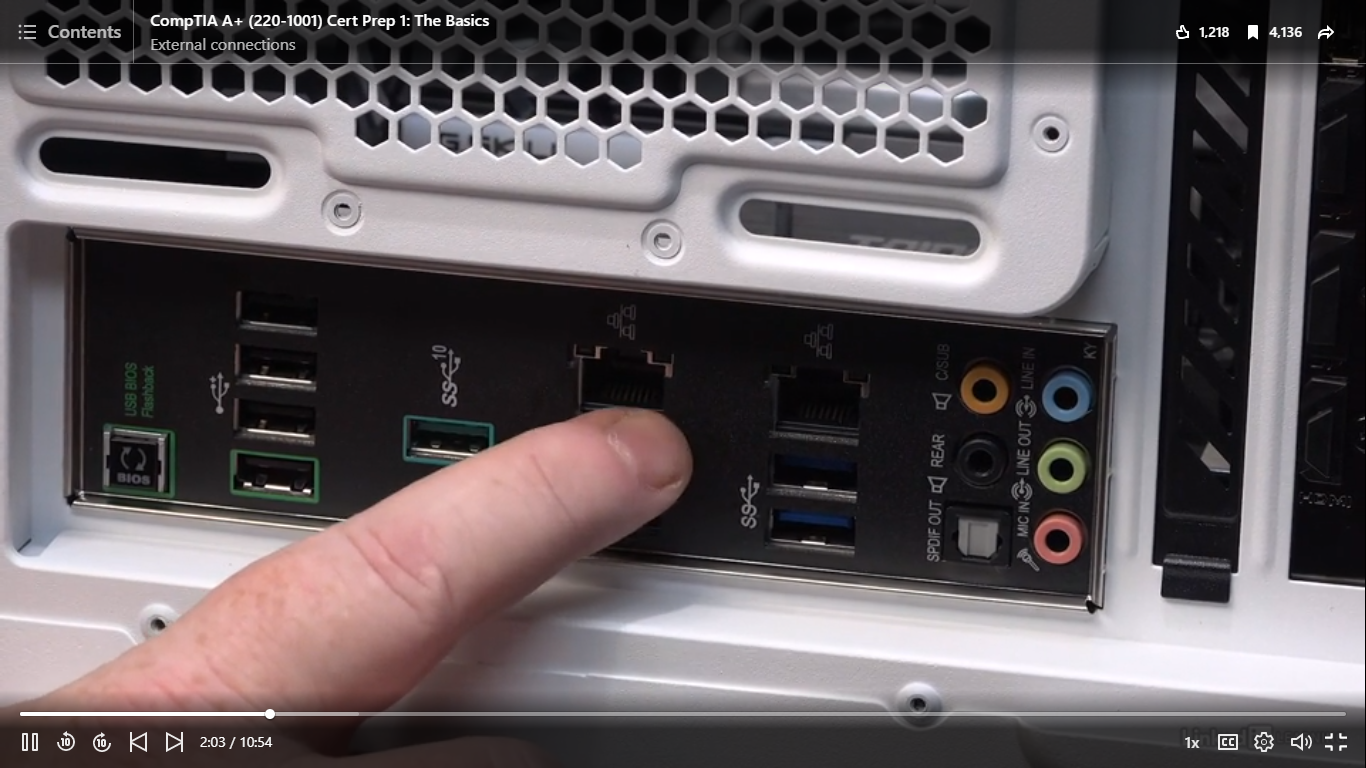
- ARJ45
11What types of connectors are these?
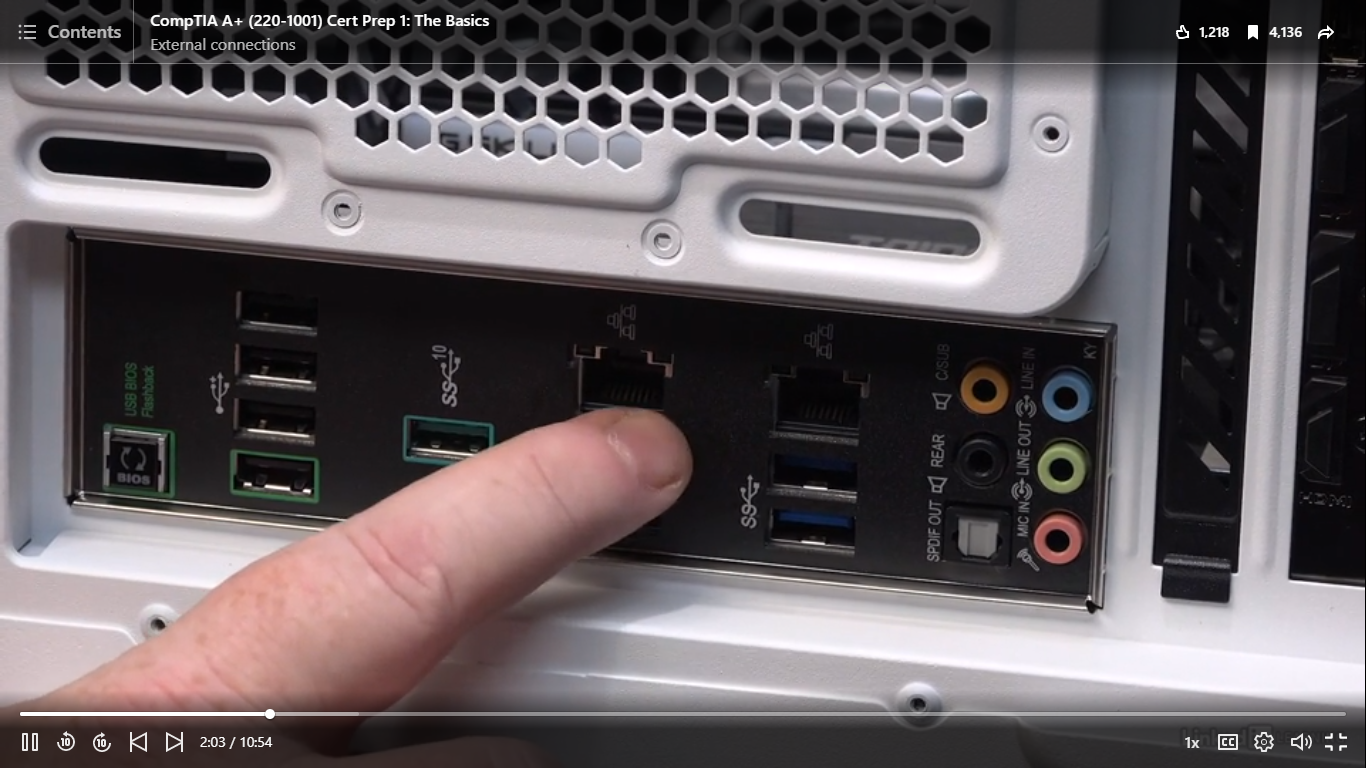
- ASound connectors
- Bfibre optic connection
12 Identify common connector types.
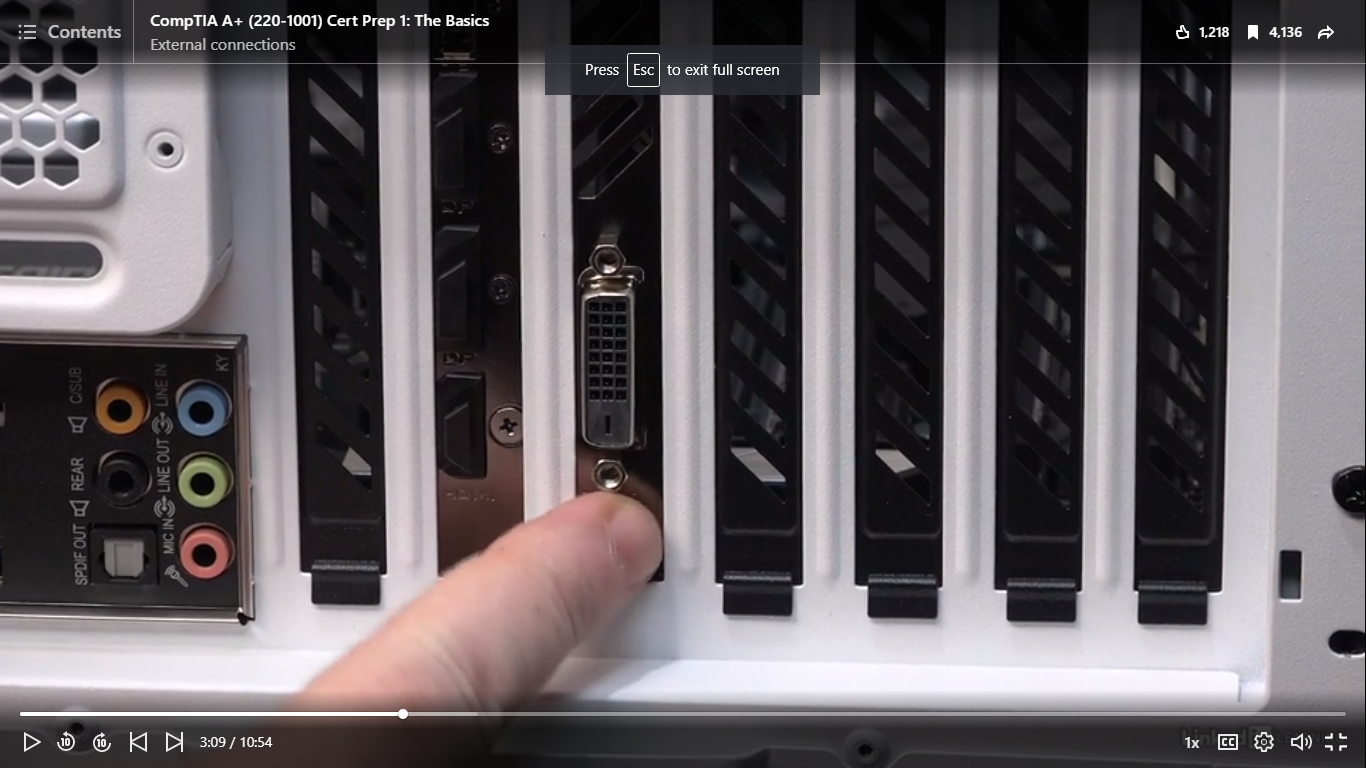
- Adigital visual interface DVI
13Identify common connector types:
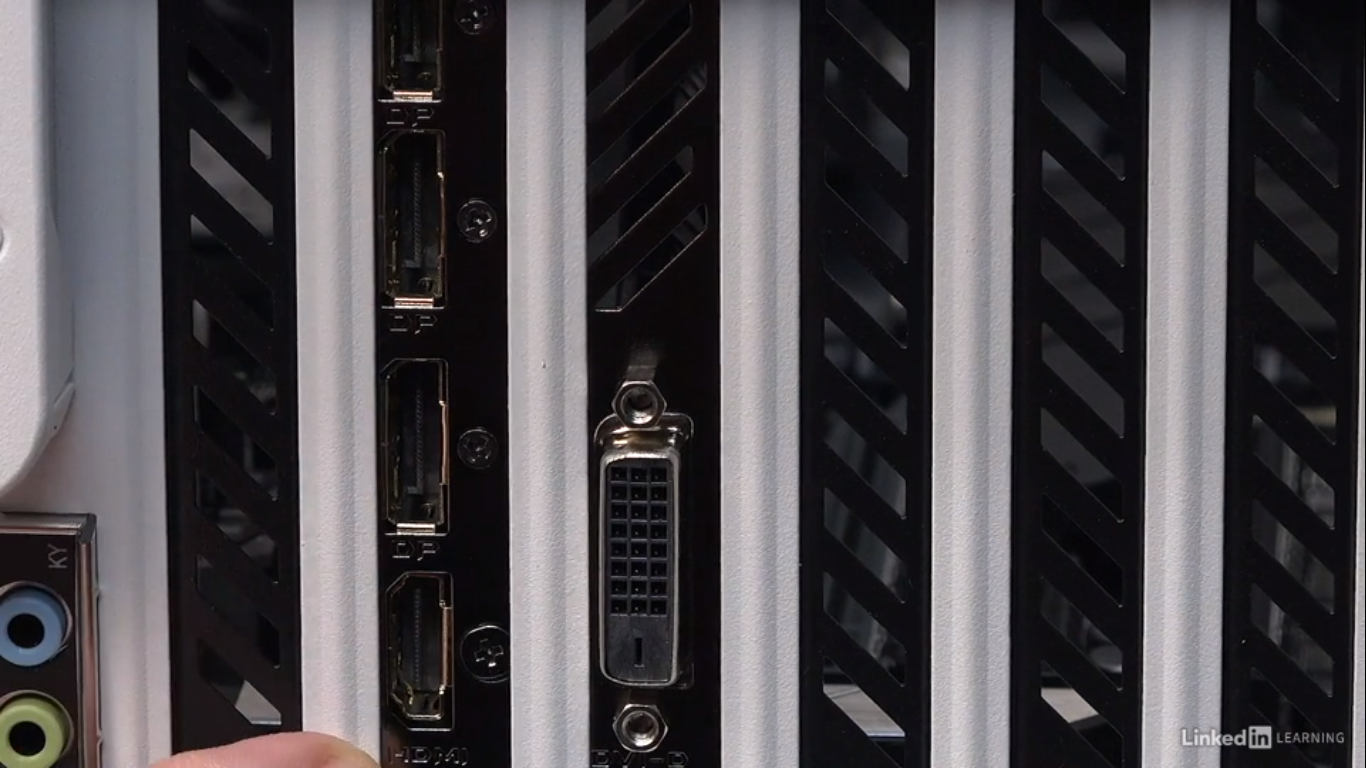
- ADisplayport
- BHDMI
14Label some older types of connectors.
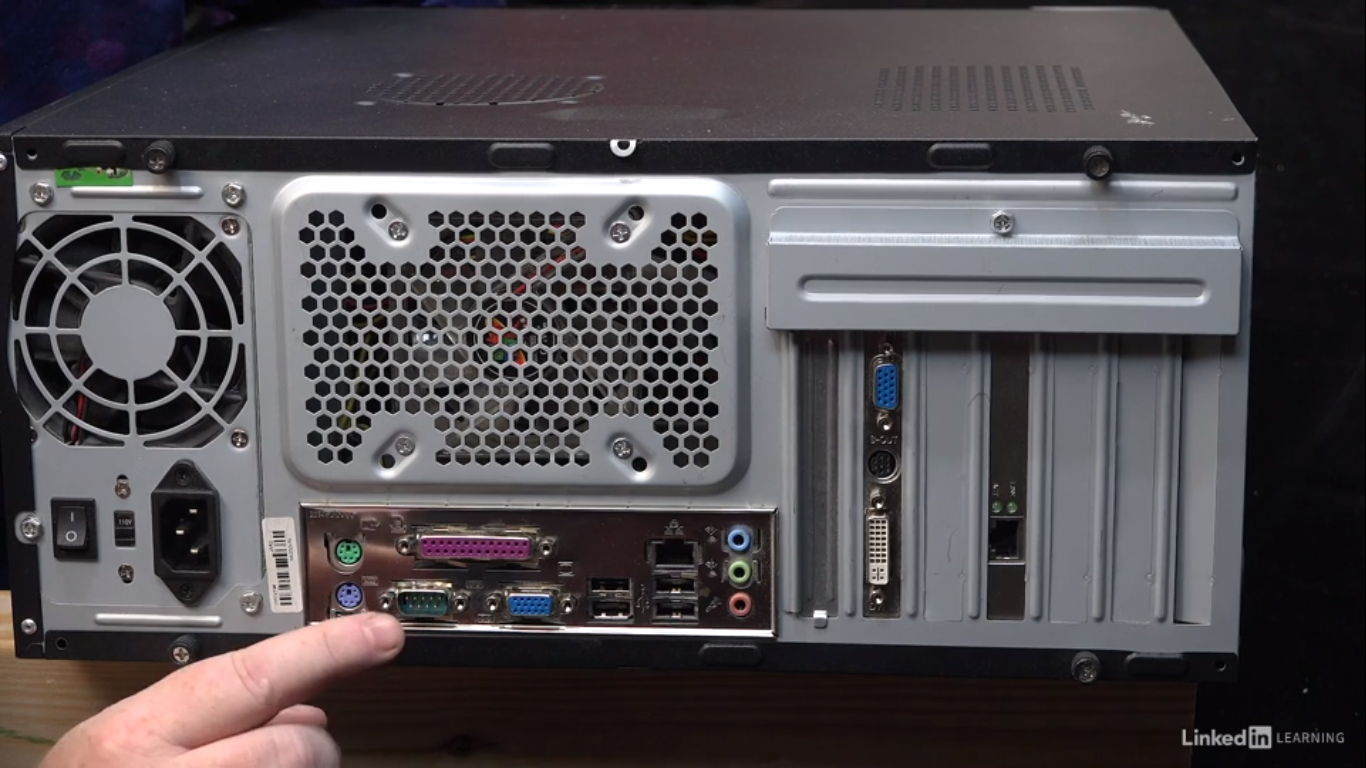
- Amini-DIN (PS/2)
- BParallel port (LPT Port)
- CSerial Connector
- DVideo Graphics Array VGA
- ERJ45
- Fdigitial visual interface DVI
- Ganalogue style connector
- HVideo Graphics Array VGA
15Label the connectors on laptops
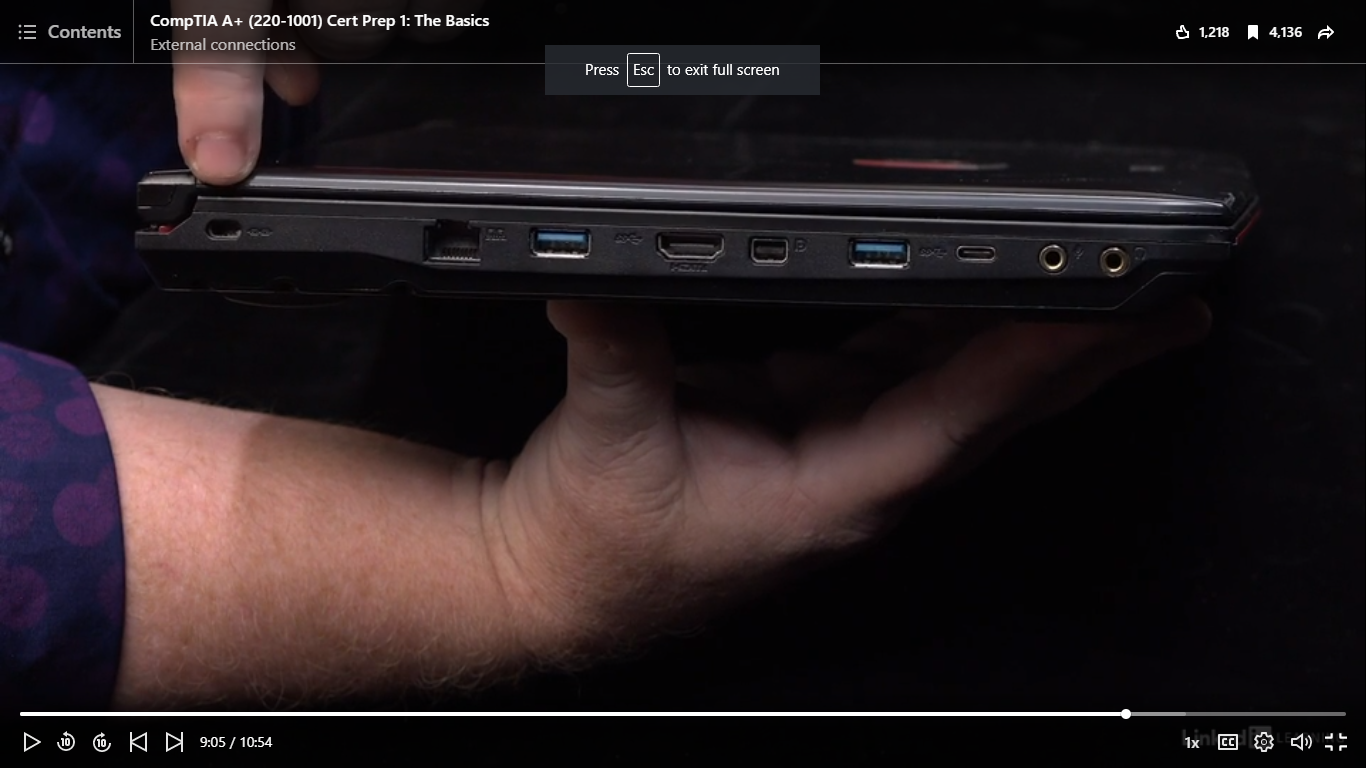
- AAnti-theft connector
- BRJ45
- CMini display port
- DUSB-C
16What is the second step in the troubleshooting theory?
- AIdentify the problem; Question the user, Enquire regarding environmental or infrastructure changes. Review system and application logs.
- BEstablish a theory of probable cause (question the obvious);
- CTest the theory to determine cause; If theory isn’t confirmed, re-establish new theory. Escalate the issue, if necessary.
- DEstablish a plan of action, to resolve the problem and implement the solution;
- EVerify full system functionality and, if applicable, implement preventative strategies; e.g. would you mind testing it to see if everythings okay? Preventative strategies can range from a casual reminder, to more serious strategies, like documentation, new company policies etc.
- FDocument findings, actions, and outcomes;
17What is the fourth step in the troubleshooting theory?
- AIdentify the problem; Question the user, Enquire regarding environmental or infrastructure changes. Review system and application logs.
- BEstablish a theory of probable cause (question the obvious);
- CTest the theory to determine cause; If theory isn’t confirmed, re-establish new theory. Escalate the issue, if necessary.
- DVerify full system functionality and, if applicable, implement preventative strategies; e.g. would you mind testing it to see if everythings okay? Preventative strategies can range from a casual reminder, to more serious strategies, like documentation, new company policies etc.
- EEstablish a plan of action, to resolve the problem and implement the solution;
- FDocument findings, actions, and outcomes;
18What is the third step in the troubleshooting theory?
- AEstablish a theory of probable cause (question the obvious)
- BIdentify the problem; Question the user, Enquire regarding environmental or infrastructure changes. Review system and application logs.
- CTest the theory to determine cause; If theory isn’t confirmed, re-establish new theory. Escalate the issue, if necessary.
- DVerify full system functionality and, if applicable, implement preventative strategies; e.g. would you mind testing it to see if everythings okay? Preventative strategies can range from a casual reminder, to more serious strategies, like documentation, new company policies etc.
- EEstablish a plan of action, to resolve the problem and implement the solution;
- FDocument findings, actions, and outcomes;
19What is the sixth step in the troubleshooting theory?
- AVerify full system functionality and, if applicable, implement preventative strategies; e.g. would you mind testing it to see if everythings okay? Preventative strategies can range from a casual reminder, to more serious strategies, like documentation, new company policies etc.
- BEstablish a plan of action, to resolve the problem and implement the solution;
- CDocument findings, actions, and outcomes;
- DTest the theory to determine cause; If theory isn’t confirmed, re-establish new theory. Escalate the issue, if necessary.
- EIdentify the problem; Question the user, Enquire regarding environmental or infrastructure changes. Review system and application logs.
- FEstablish a theory of probable cause (question the obvious);
20What is the fifth step in the troubleshooting theory?
- AEstablish a plan of action, to resolve the problem and implement the solution;
- BTest the theory to determine cause; If theory isn’t confirmed, re-establish new theory. Escalate the issue, if necessary.
- CVerify full system functionality and, if applicable, implement preventative strategies; e.g. would you mind testing it to see if everythings okay? Preventative strategies can range from a casual reminder, to more serious strategies, like documentation, new company policies etc.
- DDocument findings, actions, and outcomes;
- EEstablish a theory of probable cause (question the obvious);
- FIdentify the problem; Question the user, Enquire regarding environmental or infrastructure changes. Review system and application logs.
21The [blank_start]motherboard[blank_end], contains the principal components of a computer or other device, with connectors for other circuit boards to be slotted into
- Amotherboard
22[blank_start]RAM[blank_end] is the physical hardware inside a computer that temporarily stores data, serving as the computer's "working" memory
- ARAM
23The [blank_start]CPU[blank_end] is the primary component of a computer that processes instructions. It runs the [blank_start]operating system[blank_end] and applications, constantly receiving input from the user or active software programs. It processes the data and produces output, which may stored by an application or displayed on the screen.
- ACPU
- Boperating system
24An [blank_start]expansion slot[blank_end] is a socket on the motherboard that is used to insert an expansion card (or circuit board), which provides additional features to a computer such as video, sound, advanced graphics, Ethernet or memory
- Aexpansion slot
25[blank_start]M.2[blank_end] is a form factor for SSDs (solid-state drives) that’s shaped like a stick of gum. These SSDs are generally faster but more expensive than traditional, 2.5-inch SSDs.
- AM.2
26A computer will have a [blank_start]CPU[blank_end], RAM, Mass storage, and an operating system
- ACPU
- BM.2SSD
- CMOTHERBOARD
27The [blank_start]kernel[blank_end] is core part of the operating system, that handles the primary [blank_start]memory[blank_end] management. If somebody wants to start a program, its the [blank_start]kernel[blank_end] that decides where that’s going to sit in your [blank_start]RAM[blank_end].
- Akernel
- Bmemory
- Ckernel
- DRAM
28An [blank_start]operating system[blank_end] controls all the programs on a computer.
- Aoperating system
29Running programs are called [blank_start]processes[blank_end].
- Aprocesses
30Operating systems use device drivers to talk to [blank_start]hardware[blank_end]
- Ahardware
Informações
- Descrição
- Questions based on the CompTIA A+ Cert 1 prep course
- Autor
- Talitha Botha
- Idioma
- English
- Visualizações
- 12
- Etiquetas
- Avaliação
- Ainda sem avaliações Avalie este quiz