
Karteikarten
Data representation
Karten in diesem Stapel (51)
- 1Natural numberA whole number that is used in counting, which includes 0 and no negatives
- 2Whole numberAn integer which is whole numbers, includes 0 and negatives
- 3Rational numberNumbers that can be expressed as a ration or fraction which includes all integers, values that is recurring.
- 4Irrational numberNumbers that cannot be expressed as a fraction and has an endless series of non-repeating digits e.g.pi
- 5Real numberIf a number is either rational or irrational, it is considered as a real number
- 6Convert base 10 to base 2E.g. 128 64 32 16 8 4 2 1
0 0 1 0 0 1 0 1
= 37 - 7Base 16/ hexadecimal1-9 = same
10 = A
11 = B
12 = C
13 = D
14 = E
15 = F
16 = 10 - 8Convert decimals to hexadecimals8421 8421
1010 0001
= A1 - 9Reasons why hexadecimals is used1. Easier to represent a byte in two digits than a string of binary digits.
2. It will be easier for users and technicians to remember.
3. Less error will be made - 10Examples of the use of hexadecimalshtml colour code
Mac address
Assembly Code
Memory Dumps - 11On and off in binaryon = 1
off = 0 - 12what is a bit?bi from binary and t from digit
- 13how many bits are there in a bit8 bits = a byte
- 14Unit nomenclature for byteskilo = 10^3
Mega = 10^6
Giga = 10^9
Tera = 10^12
Peta = 10 ^15
Exa = 10^18
Zetta = 10^21
Yotta = 10^24 - 15New Unit prefixes in base 2kibi = 2^10 = 1024
mebi = 2 ^20 = 1,048,576
gibi = 2^30 = 1,073,741,824
tebi = 2^40 = 1,099,511,627,776
pebi = 2^50 = 1,125,899,906,842,624
exbi = 2^60 = 1,152,921,5004,606,846,976
zebi = 2^70 = 1,180,591,620,717,411,303,424
yobi = 2^80 = 1,208,925,819,614,629,174,706,176 - 16Ascii codeAmerican Standard Code for Information Interchange
It uses 7 bits
however the upgraded ascii uses 8 bits - 17UnicodeIt uses either 16 bits or 32 bits, the first 128 Unicode characters are the same as ascii
- 18Parity bitsIf it is in even parity, there will be even numbers of 0s
If it is in odd parity, there will be odd numbers of 1s - 19Disadvantages of parity bitsYou can check if there is two errors in one message
- 20Majority votingOne character(0 or 1) is sent three times and the majority one will be used as the corrected one.
- 21Disadvantages of Majority votingThe file size is going to be 3X larger than is was
- 22Checksum1. A total sum of all bytes is calculated in the transmission by using an algorithm.
2. Then the sum will be sent with the data
3. The receiving computer recalculates the checksum based on the data it received and compares it with the checksum received or a known, expected value - 23Check digitsAn additional digit at the end of a string of other numbers designed to check for mistakes in input or transmission.
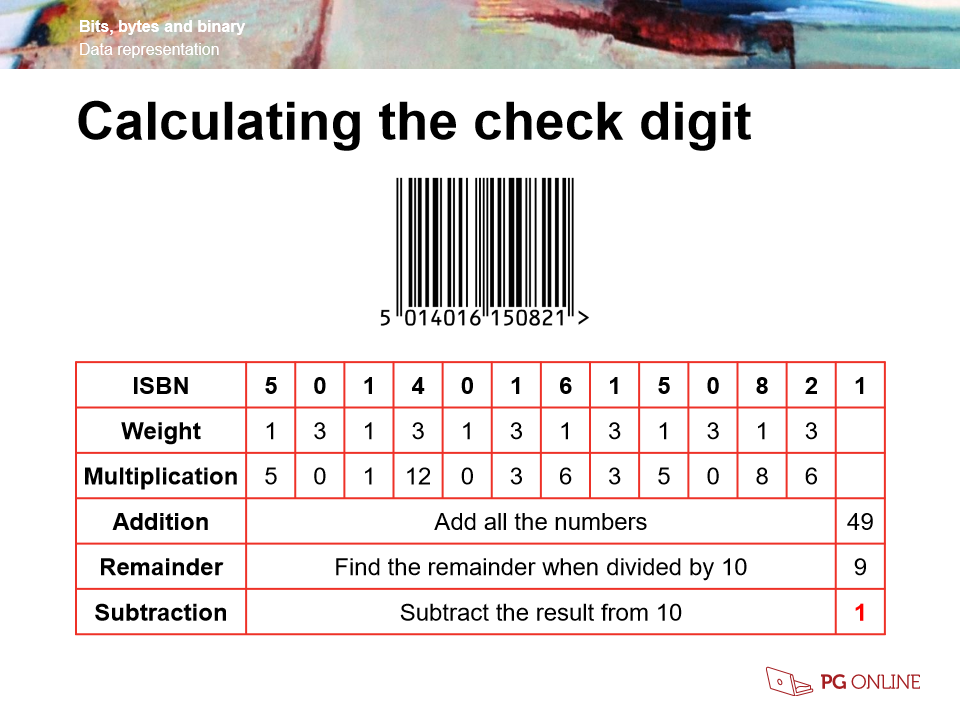
E.g. Bar codes - 24ISBN Example
- 25ISBN Explanation1. Weight are given 1 and 3 alternatively.
2. Each value is multiplied by its weight
3. multiplied values are added together and divided by 10 to get a remainder.
4. 10 will be minus by the remainder and the number will be the last digit. - 26Binary addition1=1
1+1=10
1+1+1=11 - 27Overflow errorThe result after calculation is too large and an extra bit is required to store the result
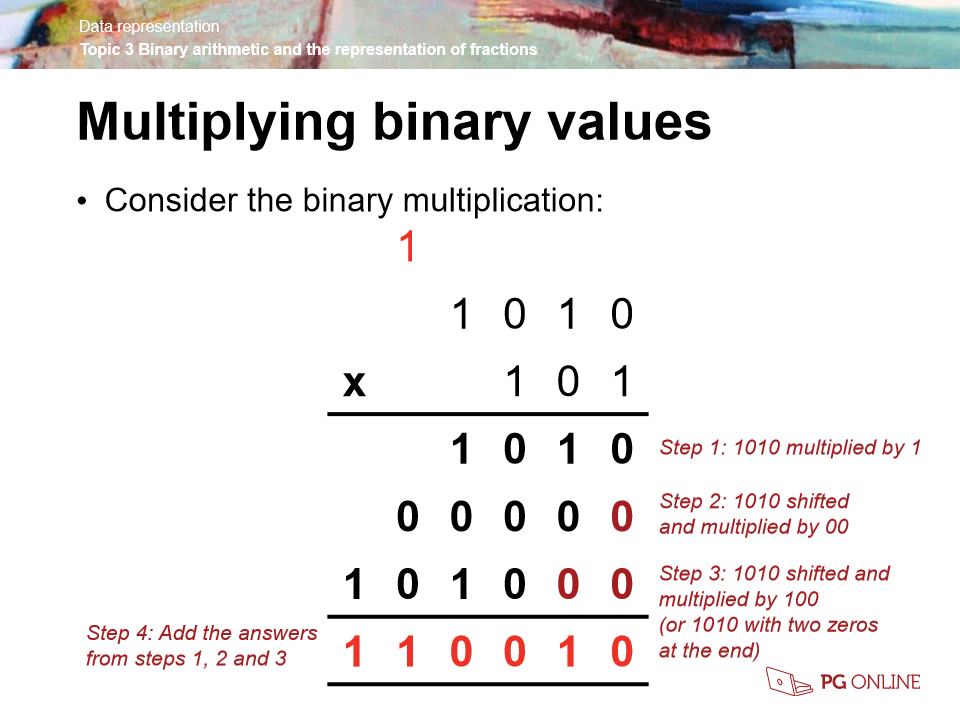
- 28Binary multiplication rule0x0=0
0x1=0
1x1=1 - 29Binary multiplication example
- 30Range and highest valueRange includes 0, so it will be 2^n where n = number of bits
Highest value will be 2^n-1 - 31Two's complementPositive values starts with 0s
Negative values starts with 1s - 32Two's complement examplesFind -77 in two's complement
01001101 = 77
10110010 = 76
Change the first 0 to 1
10110011 = -77 - 33Fixed point binary8 4 2 1 . (0.5) (0.25) (0.125) (0.0625)
- 34Types of bitmap filesBMP: Don't use very often because it is too large
JPG: Compressed BMP
GIF: Support transparent
PNG: Combined version of jpg and gif, support transparency
TIF: Very high resolution and high colour depth and it is a lossless - 35PixelWord "Pixel", which is invented from "picture element" is the basic unit of programmable colour on a computer display or in a computer image.
- 36ResolutionThe number of pixels in the picture,
vertical X horizontal - 37Colour or bit depthThe colour you can represent with that many of bits
- 38Colour codesRGB and is from 0 - 255
- 39Calculating File sizeNumber of pixels X bits of colour depth
- 40MetadataMetadata is data about data and is stored in the same file as the image data
- 41Example of metadataDate of creation
width and height in pixels of the image
colour depth - 42BitmapPictures that is created with pixels
- 43Vector graphicsPictures that is created with shape and all of them are passed through mathematical calculations, so even thought the size is enlarged, the quality stays the same
- 44Comparing bitmaps and vectorsBitmap graphics Vector graphics
Made up of: Pixels Shapes
File size : Typically larger Typically smaller
Resizing: Causes pixellation Casuse shapes
File formats: png, bmp, jpg sef, eps, svg - 45Nyquist's TheoremThe samples must be twice the highest frequency
- 46Run Length Encoding (RLE)Cut out 200 same colour pixels and rewrite number of pixels and colour value
Therefore, quality remains the same and data can be restored. - 47LosslessData can be restored, no quality loss
E.g. RLE - 48LossyData is lost forever, colour depth might be reduces, lower resolution etc
- 49Dictionary compressionwords and characters are stored in a dictionary, numbers are used to represent the text which refer to the dictionary
- 50EncryptionA way of ensure data can not be understood if data receiver don't have the key to decrypt it
- 51Caesar cipherIt is a basic type of encryption, it will shift alphabet by a consistent amount
Informationen
- Beschreibung
- GCSE Computing Karteikarten am Data representation , erstellt von Ho Ho am 19/01/2019.
- Erstellt von
- Ho Ho
- Aufrufe
- 0
- Bewertung