
Mindmap
Chapter 3
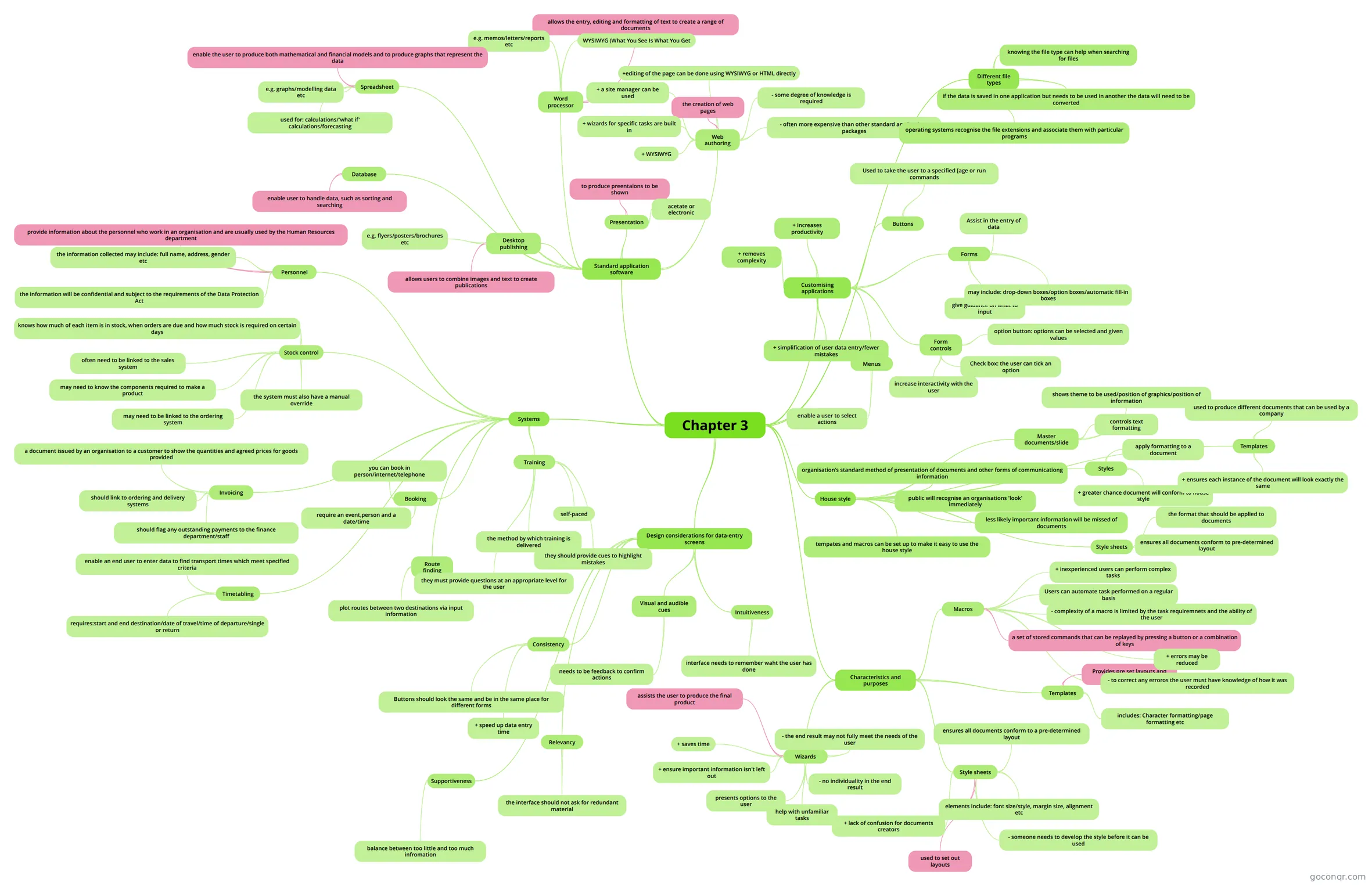
Mind map: Chapter 3 ICT applications
Inhalt der Mindmap
Chapter 3
Standard application software
- Word processor
- allows the entry, editing and formatting of text to create a range of documents
- e.g. memos/letters/reports etc
- WYSIWYG (What You See Is What You Get
- Desktop publishing
- allows users to combine images and text to create publications
- e.g. flyers/posters/brochures etc
- Spreadsheet
- enable the user to produce both mathematical and financial models and to produce graphs that represent the data
- used for: calculations/'what if' calculations/forecasting
- e.g. graphs/modelling data etc
- Database
- enable user to handle data, such as sorting and searching
- Web authoring
- the creation of web pages
- + wizards for specific tasks are built in
- + WYSIWYG
- + a site manager can be used
- +editing of the page can be done using WYSIWYG or HTML directly
- - some degree of knowledge is required
- - often more expensive than other standard applications packages
- Presentation
- to produce preentaions to be shown
- acetate or electronic
- Word processor
Systems
- Personnel
- provide information about the personnel who work in an organisation and are usually used by the Human Resources department
- the information collected may include: full name, address, gender etc
- the information will be confidential and subject to the requirements of the Data Protection Act
- Stock control
- knows how much of each item is in stock, when orders are due and how much stock is required on certain days
- often need to be linked to the sales system
- may need to know the components required to make a product
- may need to be linked to the ordering system
- the system must also have a manual override
- Invoicing
- a document issued by an organisation to a customer to show the quantities and agreed prices for goods provided
- should link to ordering and delivery systems
- should flag any outstanding payments to the finance department/staff
- Booking
- you can book in person/internet/telephone
- require an event,person and a date/time
- Timetabling
- enable an end user to enter data to find transport times which meet specified criteria
- requires:start and end destination/date of travel/time of departure/single or return
- Route finding
- plot routes between two destinations via input information
- Training
- the method by which training is delivered
- self-paced
- they must provide questions at an appropriate level for the user
- they should provide cues to highlight mistakes
- Personnel
Design considerations for data-entry screens
- Consistency
- Buttons should look the same and be in the same place for different forms
- + speed up data entry time
- Relevancy
- the interface should not ask for redundant material
- Supportiveness
- balance between too little and too much infromation
- Visual and audible cues
- needs to be feedback to confirm actions
- Intuitiveness
- interface needs to remember waht the user has done
- Consistency
Customising applications
- Buttons
- Used to take the user to a specified [age or run commands
- Forms
- Assist in the entry of data
- give guidance on what to input
- may include: drop-down boxes/option boxes/automatic fill-in boxes
- Menus
- enable a user to select actions
- Form controls
- increase interactivity with the user
- option button: options can be selected and given values
- Check box: the user can tick an option
- + simplification of user data entry/fewer mistakes
- + increases productivity
- + removes complexity
- Buttons
House style
- organisation's standard method of presentation of documents and other forms of communicationg information
- public will recognise an organisations 'look' immediately
- tempates and macros can be set up to make it easy to use the house style
- less likely important information will be missed of documents
- Master documents/slide
- shows theme to be used/position of graphics/position of information
- controls text formatting
- Styles
- apply formatting to a document
- + greater chance document will conform to house style
- Style sheets
- the format that should be applied to documents
- ensures all documents conform to pre-determined layout
- Templates
- used to produce different documents that can be used by a company
- + ensures each instance of the document will look exactly the same
Characteristics and purposes
- Wizards
- assists the user to produce the final product
- presents options to the user
- help with unfamiliar tasks
- + saves time
- + ensure important information isn't left out
- - no individuality in the end result
- - the end result may not fully meet the needs of the user
- Style sheets
- used to set out layouts
- elements include: font size/style, margin size, alignment etc
- ensures all documents conform to a pre-determined layout
- + lack of confusion for documents creators
- - someone needs to develop the style before it can be used
- Templates
- Provides pre set layouts and formats
- includes: Character formatting/page formatting etc
- Macros
- a set of stored commands that can be replayed by pressing a button or a combination of keys
- Users can automate task performed on a regular basis
- - complexity of a macro is limited by the task requiremnets and the ability of the user
- + errors may be reduced
- + inexperienced users can perform complex tasks
- - to correct any erroros the user must have knowledge of how it was recorded
- Wizards
Different file types
- operating systems recognise the file extensions and associate them with particular programs
- knowing the file type can help when searching for files
- if the data is saved in one application but needs to be used in another the data will need to be converted
Informationen
- Beschreibung
- ICT (Chapter 3) Mindmap am Chapter 3, erstellt von ebanks.amber am 14/04/2013.
- Erstellt von
- ebanks.amber
- Aufrufe
- 42
- Tags
- Bewertung