
Mindmap
Data Representation
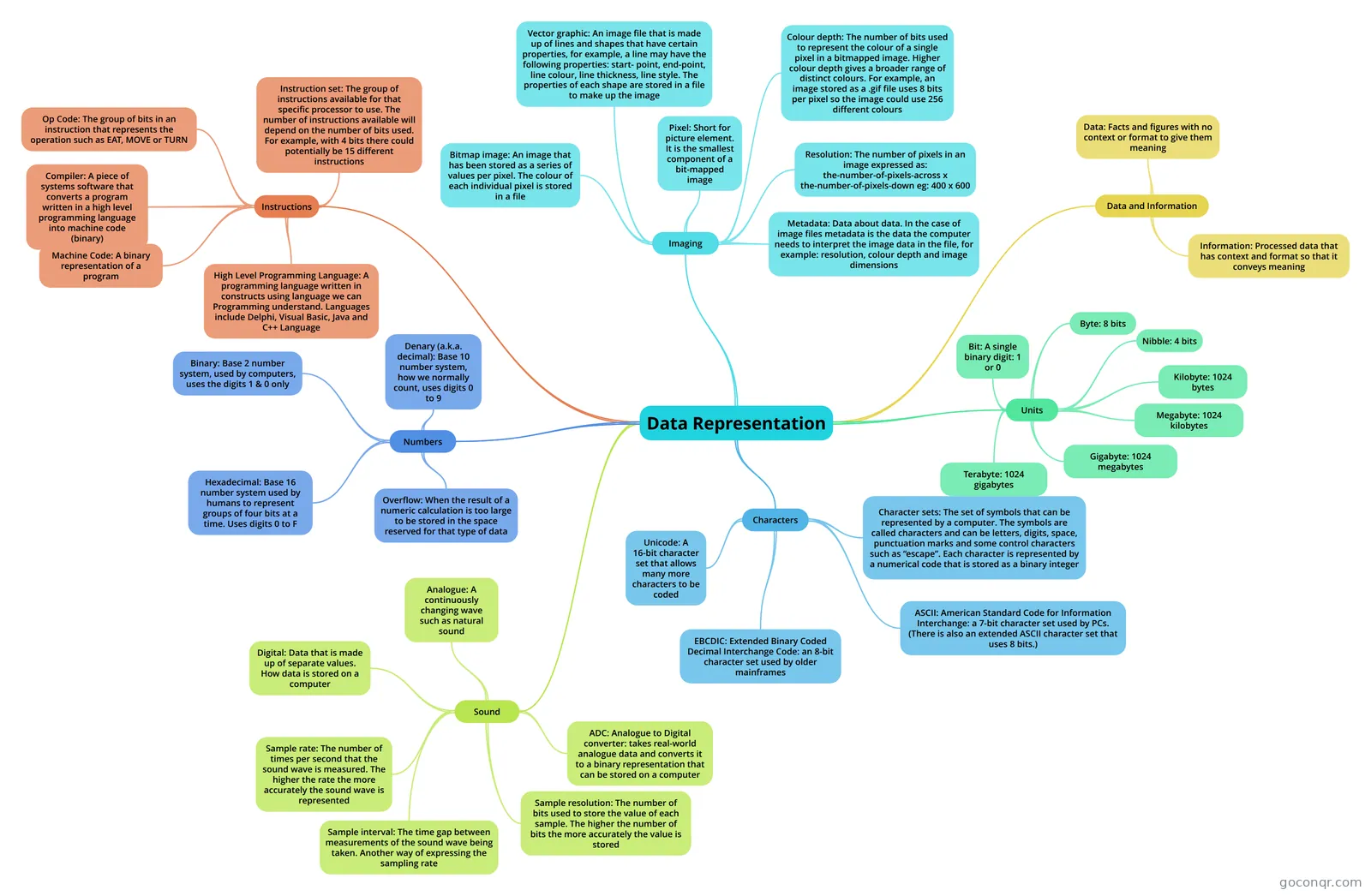
Mind map: Data representation
Inhalt der Mindmap
Data Representation
Units
- Bit: A single binary digit: 1 or 0
- Byte: 8 bits
- Nibble: 4 bits
- Kilobyte: 1024 bytes
- Megabyte: 1024 kilobytes
- Gigabyte: 1024 megabytes
- Terabyte: 1024 gigabytes
Numbers
- Binary: Base 2 number system, used by computers, uses the digits 1 & 0 only
- Denary (a.k.a. decimal): Base 10 number system, how we normally count, uses digits 0 to 9
- Hexadecimal: Base 16 number system used by humans to represent groups of four bits at a time. Uses digits 0 to F
- Overflow: When the result of a numeric calculation is too large to be stored in the space reserved for that type of data
Characters
- Character sets: The set of symbols that can be represented by a computer. The symbols are called characters and can be letters, digits, space, punctuation marks and some control characters such as “escape”. Each character is represented by a numerical code that is stored as a binary integer
- ASCII: American Standard Code for Information Interchange: a 7-bit character set used by PCs. (There is also an extended ASCII character set that uses 8 bits.)
- EBCDIC: Extended Binary Coded Decimal Interchange Code: an 8-bit character set used by older mainframes
- Unicode: A 16-bit character set that allows many more characters to be coded
Imaging
- Bitmap image: An image that has been stored as a series of values per pixel. The colour of each individual pixel is stored in a file
- Vector graphic: An image file that is made up of lines and shapes that have certain properties, for example, a line may have the following properties: start- point, end-point, line colour, line thickness, line style. The properties of each shape are stored in a file to make up the image
- Pixel: Short for picture element. It is the smallest component of a bit-mapped image
- Colour depth: The number of bits used to represent the colour of a single pixel in a bitmapped image. Higher colour depth gives a broader range of distinct colours. For example, an image stored as a .gif file uses 8 bits per pixel so the image could use 256 different colours
- Resolution: The number of pixels in an image expressed as: the-number-of-pixels-across x the-number-of-pixels-down eg: 400 x 600
- Metadata: Data about data. In the case of image files metadata is the data the computer needs to interpret the image data in the file, for example: resolution, colour depth and image dimensions
Sound
- Analogue: A continuously changing wave such as natural sound
- Digital: Data that is made up of separate values. How data is stored on a computer
- Sample rate: The number of times per second that the sound wave is measured. The higher the rate the more accurately the sound wave is represented
- Sample interval: The time gap between measurements of the sound wave being taken. Another way of expressing the sampling rate
- Sample resolution: The number of bits used to store the value of each sample. The higher the number of bits the more accurately the value is stored
- ADC: Analogue to Digital converter: takes real-world analogue data and converts it to a binary representation that can be stored on a computer
Data and Information
- Data: Facts and figures with no context or format to give them meaning
- Information: Processed data that has context and format so that it conveys meaning
Instructions
- Instruction set: The group of instructions available for that specific processor to use. The number of instructions available will depend on the number of bits used. For example, with 4 bits there could potentially be 15 different instructions
- Op Code: The group of bits in an instruction that represents the operation such as EAT, MOVE or TURN
- Compiler: A piece of systems software that converts a program written in a high level programming language into machine code (binary)
- Machine Code: A binary representation of a program
- High Level Programming Language: A programming language written in constructs using language we can Programming understand. Languages include Delphi, Visual Basic, Java and C++ Language
Informationen
- Beschreibung
- Mindmap am Data Representation, erstellt von kwithers09 am 07/06/2013.
- Erstellt von
- kwithers09
- Aufrufe
- 30
- Bewertung