
Mindmap
Software Testing
Inhalt der Mindmap
Software Testing
The SDLC Process
- Planning: Why? Who needs it?
- Analysis: What should the system do for us? Where and when will it be used?
- Design: How will it be built?
- Implementation: Build and Test
- Design: How will it be built?
- Analysis: What should the system do for us? Where and when will it be used?
- Planning: Why? Who needs it?
What? Why? When? How? Who? For whom?
- Why do software testing?
- Demonstrate a given software product matches its requirement specifications
- Uncover as many errors as possible in a given timeline
- Validate the quality of the software using minimum cost and efforts
- Create high-quality tests and issue correct and helpful problem reports
- Provide feedback to others
- Developers - Implementation errors
- Designers and architects: Design errors
- Business analysts - Requirements/specification inconsistencies
- Customers: Requirements validation
- Two types of feedback (V & V):
- Validation: The process of evaluating the software at the end of software development to ensure compliance with intendeded usage (The right system is built)
- Verification: The process of determining whether the products of a given phase of the software development process fulfill the requirements established during the previous phase
- When to do software testing?
- Late testing is more expensive
- 40-60% of total project effort on testing
- Cost of testing can be several times the cost of all other activities combined
- Not testing is even more expensive: Cost to fix errors increases exponentially, planning for testing after development is prohibitively expensive
- Error sources and detection
- Most errors cases occur in the early phases of the software development process
- 70% of errors are originated during requirement specification, but only 10% are found and corrected at that stage
- Only 30% of errors are originated during implementation
- Ideally start software testing ASAP, from analysis phase
- Late testing is more expensive
- How to do software testing?
- Basics
- Provide (test) input values to the system
- Collect actual results (outputs)
- Compare against expected results (outputs)
- Assign test verdict
- Pass: Actual and expected results match
- Fail: Actual and expected results do not match
- Assign test verdict
- Compare against expected results (outputs)
- Collect actual results (outputs)
- Prefix Values: Any inputs necessary to put the software into the appropriate state to receive the test input values
- Postfix Values: Any inputs that need to be sent to the software after the test input values
- Test case: A combination of test values, expected results, prefix values and postifix values
- Test set (test suite): A set of test cases
- Provide (test) input values to the system
- Automation
- Use of software to control the execution of tests
- Test Script: A test case that is prepared in a form to be executed automatically on the test software and produce a report - org.junit.Assert.assertEquals(f(2), 4)
- Automates
- Test execution
- Comparison of actual outputs to expected ones
- Setting up of test preconditions
- Other test control and test reporting functions
- Flavors
- Capture-replay tools: e.g. Selenium
- Test automation frameworks: e.g. xUnit
- Use of software to control the execution of tests
- Challenges
- What should I test?
- Functionality, security, performance, methods, classes, modules, components, entire system?
- What inputs to provide to reach those parts? What is the expected output for a given input? Which tools? How do I connect to the system?
- When to stop testing?
- Resources are over (time & budget)
- Found (some manually) seeded faults
- Some coverage is reached
- Coverage?
- Quantify the software in different ways, as items
- LOCs, Functions, Requirements, States, Etc...
- Measure how many (%) of the items have been "reached" during testing
- LOC -> code coverage: 70%, Requirements -> requirements coverage: 60%
- Coverage Criteria
- Used to decide which test inputs to use
- A goal or stopping rule for testing
- Provides a systematic and mechanized approach
- More likely that the tester will find problems, greater assurance that the software is of high quality and reliability, make regression testing easier, can be well supported with powerful tools
- Coverage criteria make testing more efficient and effective
- Quantify the software in different ways, as items
- Coverage?
- Controllability: How easy it is to provide inputs to a system, or to change its state
- Observability: How easy is it to observe the behaviour or outputs of a system
- Testability!
- Isolatebility: How easy is it to isolate and test different components of the system
- What should I test?
- Basics
- Why do software testing?
What is Software Testing?
- Testing is the process of establishing confidence that a program or system does what it is supposed to.
- Testing is executing a program to find errors.
- Evaluating an attribute or capability of a program to determine that it meets its requirements.
BUG?
- Defect, Fault, Probelm, Error, etc...
- Types:
- UI Error, Function Error, Defect Error, Requirements error, Design Error, Module interface error, Performance error, Logic error, State-based error, Structure error
- From Fault to Failure (RIP model)
- Fault -> Error -> Failure
- Three conditions necessary for a failure to be observed:
- Reachability: The location(s) in the program that contain the fault must be reached
- Infection: The state of the program must be incorrect (error)
- Propagation: The infected state must propagate to cause some output of the program to be incorrect (failure)
- Three conditions necessary for a failure to be observed:
- Fault -> Error -> Failure
- Types:
- Defect, Fault, Probelm, Error, etc...
IEEE
- Software Fault: A static defect in the code
- Software Error: An incorrect internal state that is the manifestation of some fault
- Software Failure: The observed behaviors from the expected one
Software Specification
- Functional requirement: Features the product will support
- Non-functional requirement: Constrains on the product
- Testing can only show the precense of errors,not their absence
Mutation testing
- Two variants of mutation coverage
- Weakly killing: satisfies reachability and infection, but NOT propagation
- Strongly killing: satisfies reachability and infection and propagation
- Types of Mutants: (Tester can keep adding tests until all mutants have been killed)
- Dead (killed) mutant: A test has killed it
- Stillborn mutant: Syntactically illegal (program will not compile)
- Trivial mutant: Almost every test can kill it
- Equivalent mutant: No test can kill it (equivalent to original program)
- Mutation score
- The ratio between killed mutants and non-equivalent mutants
- Mutation score = killed/non-equivalent mutants
- Between 0 and 1
- Gives an estimate on "how good our tests are"
- We can stop creating tests when a target mutation score is reached
- NOTES
- Number of mutants depends on two things: The syntax of the artifact being mutated, The mutation operators
- Mutation testing is very difficult and tedious to apply by hand
- But there are good effective tools to automate it
- Mutation testing is very effective - considered the "gold standard" of testing
- Mutation testing is often used to evaluate other test criteria or test suits
- Two variants of mutation coverage
Integration Testing
- Software designed using "components", aka design elements
- Modularity:
- Work division and reuse
- Advantage in testing individual components at unit- and module testing
- Puts complexity in testing design connection, faults in one component may result in failures in the other
- Testing connections among separate program units
- Often based on couplings - the explicit and implicit relationship among software components
- Couplings?
- Caller: A unit that invokes another unit
- Callee: The unit that is called
- Callsite: Statement or node where the call appears
- Actual parameter: Variable in the caller
- Formal parameter: Variable in the callee
- Interface: Mapping of actual parameters to formal parameters
- Couplings?
- Integration mutation focuses on mutating the connections between components
- Sometimes called "interface mutation"
- Both caller and callee methods are considered
- Four types of mutation operators
- Change a calling method
- by modifying values that are sent to a called method
- by modifying the call
- Change a called method
- by modifying values that enter and leave the method
- by modifying return statements from the method
- Change a calling method
- Five integration mutation operators
- 1. IPVR - Integration Parameter Variable Replacement
- Each parameter in a method call is replaced by each other variable in the scope of the method call that is of compatible type
- 2. IUOI - Integration Unary Operator Insertion
- Each expression in a method call is modified by inserting all possible unary operators in front and behind it
- 3. IPEX - Integration Parameter Exchange
- Each parameter in a method call is exchanged with each parameter of compatible types in that method call
- 4. IMCD - Integration Method Call Deletion
- Each method call is deleted
- If the method returns a value and it is used in an expression, the method call is replaced with an appropriate constant value
- Each method call is deleted
- 5. IREM - Integration Return Expression Modification
- Each expression in each return statement in a method is modified by applying the UOI and AOR operators
- UOR – Unary Operator Insertion (add: +, -, ! and ~)
- AOR – Arithmetic Operator Replacement (+, -, *, /,**, and %)
- Each expression in each return statement in a method is modified by applying the UOI and AOR operators
- 1. IPVR - Integration Parameter Variable Replacement
Object-Oriented Testing
- In Java, testing the way classes, packages and components are connected
- These test features that are unique to object-oriented programming languages
- inheritance, polymorphism and dynamic binding
White Box vs. Black Box Testing
- White-box testing: Deriving tests from the source code of the software, specifically including branches, individual conditions, and statements (aka. structural testing)
- Black-box testing: Deriving tests from external descriptions of the software, including specifications, requirements, and design. (aka. specification-based testing)
- Gray-box testing: A mix of white-box and black-box without pre-defined proportions.
Graph coverage for source code
- General idea
- Represent the software (code, specification, etc) as a graph
- Test requirements: elements of the graph (edges, nodes, etc)
- Coverage criteria: which elements of the graph are identified
- Coverage level: How many of the test requirements have been covered
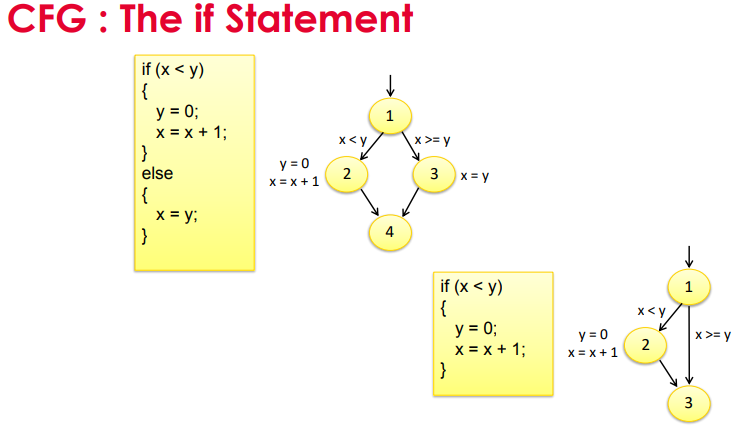
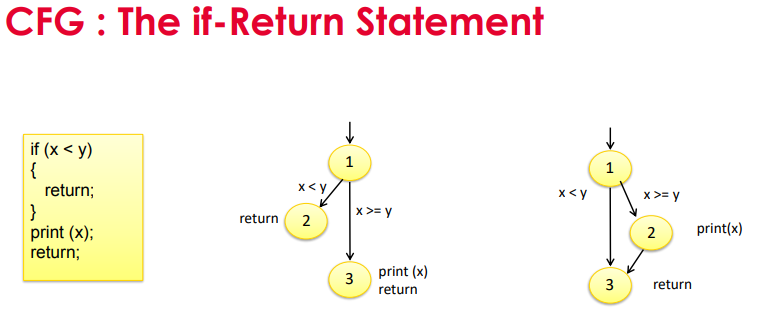
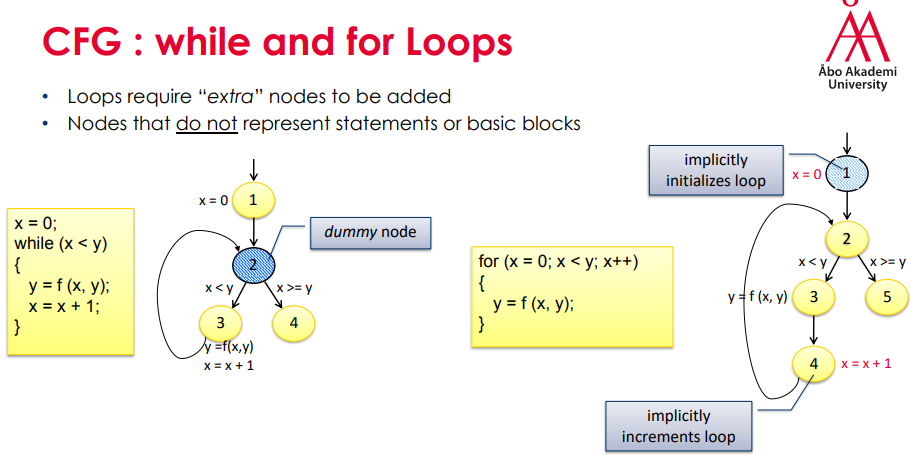
- Control Flow Graphs (CFG)
- Models all executions of a method by describing control structures
- Nodes: Statements or sequences of statements (basic blocks)
- Basic block: A sequence of statements such that if the first statement is executed, all statements will be (no branches)
- Edges: Transfers of control
- Nodes: Statements or sequences of statements (basic blocks)
- Definition of a Graph
- A set N of nodes, N is not empty
- A set N[0] of initial nodes, N[0] is not empty
- A set N[f] of final nodes, N[f] is not empty
- A set E of edges, each edge from one node to another
- Tests and Test paths
- Test - An input to a program (and its expected output)
- Test path:
- Sequence of nodes to visit when executing the program with a given test input
- Starts at an initial node and ends at a final node
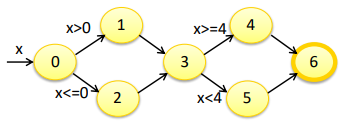
- Four test paths:
- TP1: [0, 1, 3, 4, 6]
- TP2: [0, 1, 3, 5, 6]
- TP3: [0, 2, 3, 4, 6]
- TP4: [0, 2, 3, 5, 6]
- Which test (inputs) to execute each test path?
- TP1: x=4; TP2 x=3; etc
- Some test paths can be executed by many tests
- TP1: x=4, x=5
- Some test paths cannot be executed by any tests -> infeasible test paths
- TP3: x<=0 AND X>=3 -> FALSE
- Visiting and Touring
- Visit: A test path p visits node n if n is in p
- A test path p visits edge e if e is in p
- Tour: A test path p tours subpath q if q is a subpath of p
- Path [0, 1, 3, 4, 6]
- Visits nodes: 0, 1, 3, 4, 6
- Visits edges: (0, 1), (1, 3), (3, 4), (4, 6)
- Tours subpaths: (0,1,3), (1,3,4), (3,4,6), (0,1,3,4), (1,3,4,6)
- Visit: A test path p visits node n if n is in p
- Simple Paths and Prime Paths
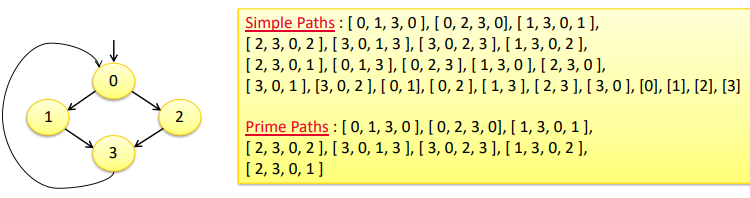
- Simple Path: A path from node ni to nj is simple, if no node appears more than once, except possibly the first and last nodes are the same
- No internal loops
- A loop is a simple path
- Prime Path: A simple path that does not appear as a subpath of any other simple path
- (OR a maximal length simple path)
- Prime Path Coverage
- A simple, elegant and finite criterion that requires loops to be executed as well as skipped
- Will tour all paths of length 0, 1, ....
- That is, it stronger than node, edge and edge-pair coverage
- Pros: keeps the number of test requirements down
- Cons: infeasible prime path may eliminate feasible simple paths
- Simple Path: A path from node ni to nj is simple, if no node appears more than once, except possibly the first and last nodes are the same
- Models all executions of a method by describing control structures
- Coverage Criteria
- Node coverage
- Coverage Criterion: each reachable node in G should be visited by at least a test path
- Test requirements = all nodes (8)
- A. [1] B. [2] C. [3] D. [4] E. [5] F. [6] G. [7] H. [8]
- Possible Test paths
- [1, 2, 3, 4, 3, 5, 6, 7, 6, 8]
- Visited (satisfied) TR
- A, B, C, D, E, F, G, H
- 1
- 2
- 3
- 4
- 5
- 6
- 7
- 8
- 6
- 3
- 2
- Edge Coverage
- Coverage criterion: each reachable edge in G should be covered by at least a test path
- Test requirements: all edges (9)
- Edge Pair Coverage
- Coverage criterion: each reachable sequence of two edges should be covered by at least a test path
- Test requirements: all sequences of two edges (12)
- NOTES!
- Edge, edge-pair... can be extended to sequences of edges of length n
- Complete path coverage: all sequences of edges of all possible length should be covered by at least a test path
- Node coverage
- General idea
Data Flow Coverage Criteria
- Focus on how values are computed and used during the execution of a program
- Test paths will try to reach from where variables are written to where they are read
- Defs and Uses
- Definition (def): A location where a value for a variable is stored into memory
- Use: A location where a variable's value is accessed
- def (n) or def (e): The set of variables that are defined by node n or edge e
- use (n) or use (e): The set of variables that are used by node n or edge e
- DU pair: A pair of locations (li, lj) such that a variable v is defined at li and used at lj
- Def-clear path: A path from li to lj is def-clear with respect to variable v, if v is not given another value on any of the nodes or edges in the path
- DU-path: A simple subpath that is def-clear with respect to v from a def of v to a use of v
- Simplest version: Make sure every def reaches a use on at least on path
- All-defs coverage (ADC): For each set of du-paths S = du (n, v), TR contains at least one path d in S
- == Make sure that every def reaches all possible uses on at least one path
- All-uses coverage (AUC): For each def-pair set S = du(ni, nj, v), TR contains at least one path d in S
- == Cover all paths between every def and every uses
- All-du-paths coverage (ADUPC): For each set S = du(ni, nj, v), TR contains every path d in S
Bilder und Dateien der Mindmap
Informationen
- Beschreibung
- Mindmap am Software Testing, erstellt von Tommy Snellman am 12/06/2019.
- Erstellt von
- Tommy Snellman
- Aufrufe
- 1
- Bewertung