
Mindmap
Unit 2: Technology Systems
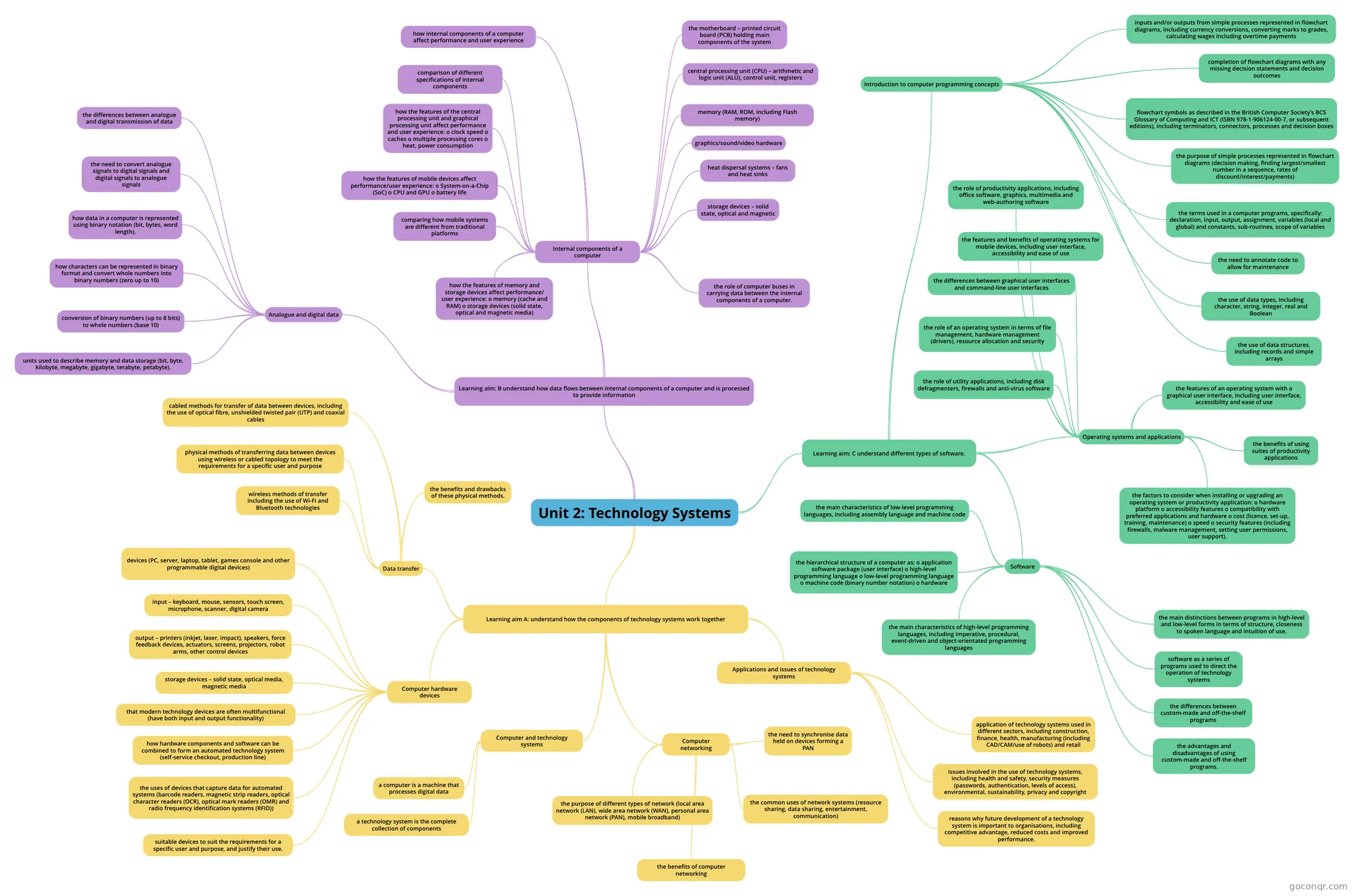
Mind map: Technology systems unit 2
Inhalt der Mindmap
Unit 2: Technology Systems
Learning aim A: understand how the components of technology systems work together
- Computer and technology systems
- a computer is a machine that processes digital data
- a technology system is the complete collection of components
- Applications and issues of technology systems
- application of technology systems used in different sectors, including construction, finance, health, manufacturing (including CAD/CAM/use of robots) and retail
- issues involved in the use of technology systems, including health and safety, security measures (passwords, authentication, levels of access), environmental, sustainability, privacy and copyright
- reasons why future development of a technology system is important to organisations, including competitive advantage, reduced costs and improved performance.
- Computer hardware devices
- devices (PC, server, laptop, tablet, games console and other programmable digital devices)
- input – keyboard, mouse, sensors, touch screen, microphone, scanner, digital camera
- output – printers (inkjet, laser, impact), speakers, force feedback devices, actuators, screens, projectors, robot arms, other control devices
- storage devices – solid state, optical media, magnetic media
- that modern technology devices are often multifunctional (have both input and output functionality)
- how hardware components and software can be combined to form an automated technology system (self-service checkout, production line)
- the uses of devices that capture data for automated systems (barcode readers, magnetic strip readers, optical character readers (OCR), optical mark readers (OMR) and radio frequency identification systems (RFID))
- suitable devices to suit the requirements for a specific user and purpose, and justify their use.
- Computer networking
- the purpose of different types of network (local area network (LAN), wide area network (WAN), personal area network (PAN), mobile broadband)
- the common uses of network systems (resource sharing, data sharing, entertainment, communication)
- the benefits of computer networking
- the need to synchronise data held on devices forming a PAN
- Data transfer
- physical methods of transferring data between devices using wireless or cabled topology to meet the requirements for a specific user and purpose
- wireless methods of transfer including the use of Wi-Fi and Bluetooth technologies
- cabled methods for transfer of data between devices, including the use of optical fibre, unshielded twisted pair (UTP) and coaxial cables
- the benefits and drawbacks of these physical methods.
- Computer and technology systems
Learning aim: B understand how data flows between internal components of a computer and is processed to provide information
- Internal components of a computer
- the motherboard – printed circuit board (PCB) holding main components of the system
- central processing unit (CPU) – arithmetic and logic unit (ALU), control unit, registers
- memory (RAM, ROM, including Flash memory)
- graphics/sound/video hardware
- heat dispersal systems – fans and heat sinks
- storage devices – solid state, optical and magnetic
- how internal components of a computer affect performance and user experience
- comparison of different specifications of internal components
- how the features of the central processing unit and graphical processing unit affect performance and user experience: o clock speed o caches o multiple processing cores o heat, power consumption
- how the features of mobile devices affect performance/user experience: o System-on-a-Chip (SoC) o CPU and GPU o battery life
- comparing how mobile systems are different from traditional platforms
- how the features of memory and storage devices affect performance/ user experience: o memory (cache and RAM) o storage devices (solid state, optical and magnetic media)
- the role of computer buses in carrying data between the internal components of a computer.
- Analogue and digital data
- the differences between analogue and digital transmission of data
- the need to convert analogue signals to digital signals and digital signals to analogue signals
- how data in a computer is represented using binary notation (bit, bytes, word length).
- how characters can be represented in binary format and convert whole numbers into binary numbers (zero up to 10)
- conversion of binary numbers (up to 8 bits) to whole numbers (base 10)
- units used to describe memory and data storage (bit, byte, kilobyte, megabyte, gigabyte, terabyte, petabyte).
- Internal components of a computer
Learning aim: C understand different types of software.
- Software
- software as a series of programs used to direct the operation of technology systems
- the differences between custom-made and off-the-shelf programs
- the advantages and disadvantages of using custom-made and off-the-shelf programs.
- the hierarchical structure of a computer as: o application software package (user interface) o high-level programming language o low-level programming language o machine code (binary number notation) o hardware
- the main characteristics of high-level programming languages, including imperative, procedural, event-driven and object-orientated programming languages
- the main characteristics of low-level programming languages, including assembly language and machine code
- the main distinctions between programs in high-level and low-level forms in terms of structure, closeness to spoken language and intuition of use.
- Introduction to computer programming concepts
- flowchart symbols as described in the British Computer Society’s BCS Glossary of Computing and ICT (ISBN 978-1-906124-00-7, or subsequent editions), including terminators, connectors, processes and decision boxes
- the purpose of simple processes represented in flowchart diagrams (decision making, finding largest/smallest number in a sequence, rates of discount/interest/payments)
- inputs and/or outputs from simple processes represented in flowchart diagrams, including currency conversions, converting marks to grades, calculating wages including overtime payments
- completion of flowchart diagrams with any missing decision statements and decision outcomes
- the terms used in a computer programs, specifically: declaration, input, output, assignment, variables (local and global) and constants, sub-routines, scope of variables
- the need to annotate code to allow for maintenance
- the use of data types, including character, string, integer, real and Boolean
- the use of data structures, including records and simple arrays
- Operating systems and applications
- the role of an operating system in terms of file management, hardware management (drivers), resource allocation and security
- the role of utility applications, including disk defragmenters, firewalls and anti-virus software
- the differences between graphical user interfaces and command-line user interfaces
- the features of an operating system with a graphical user interface, including user interface, accessibility and ease of use
- the features and benefits of operating systems for mobile devices, including user interface, accessibility and ease of use
- the role of productivity applications, including office software, graphics, multimedia and web-authoring software
- the benefits of using suites of productivity applications
- the factors to consider when installing or upgrading an operating system or productivity application: o hardware platform o accessibility features o compatibility with preferred applications and hardware o cost (licence, set-up, training, maintenance) o speed o security features (including firewalls, malware management, setting user permissions, user support).
- Software
Informationen
- Beschreibung
- Technology systems are involved in many of the objects we use every day, from a laptop computer and routers relaying internet traffic, to logging in to a social networking site. This unit provides a first look at how the main building blocks of technology systems work.
- Erstellt von
- oaboo
- Aufrufe
- 279
- Tags
- Bewertung