
Notizen
Data Representation
Inhalt der Notizen (4)
Seite 1
Binary Basics
Advantages of Binary:
less rules of arithmatic - less operations to be programmed
0s and 1s are easier to represent digitally
if the voltage changes, it won't affect the data - it's either on or off
Seite 2
Negative Numbers
Two's Complement:
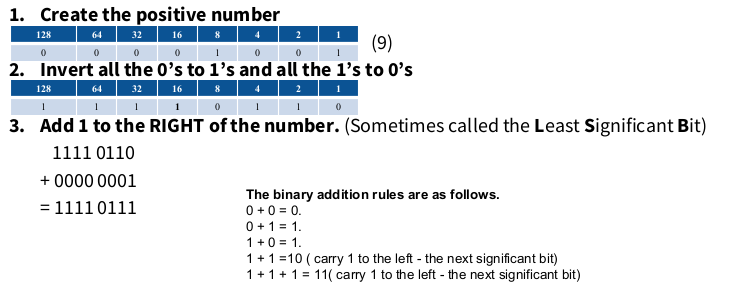
You need to convert the number into it's positive version
Then invert it, so all the 0s are 1a and all the 1s are 0s
Add one starting at the right
EXAMPLE:
The largest negative number that can be represented is -128
In Two's Compliment, the MSB (the one on the far left) is a sign bit. If it's a 1, then the number will be negative, if it's a 0, it'll be positive

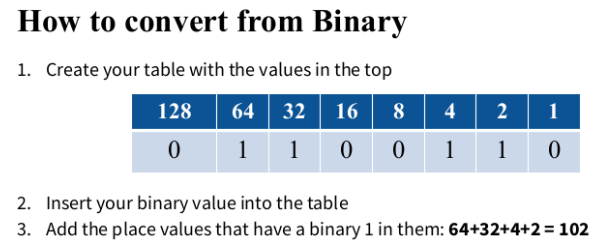
Another way to convert negatives is to:
first convert the positive version into binary
then invert everything after the first 1, going from right to left
Min & Max Limits:
Calculate the 2 to the power of the total number of bits
The negative value is half of that number
Then you take away 1 to get the positive value
EXAMPLE: The range of positive and negative numbers that can be stored with 16 bits
2^16 = 65536
65536 / 2 = 32768 (This is the negative value)
32768 - 1 = 32767 (This is the positive value)
The range of numbers that can be stored is -32768 to 32767
Seite 3
ASCII & Unicode
ASCII
in extended ASCII, you use 8 bits to store each character
a character set is the name given to the whole set of characters a keyboard can produce
control characters are the ones that aren't printed on screen (non-printable characters like ctrl and delete)
each character has a number that is converted and stored as binary
Extended ASCII can store more characters than standard ASCII, like the copyright symbol.
Unicode
AKA Universal Character Set
it can store far more languages and characters
it uses 16 bits, so it uses more memory
Seite 4
Bitmap & Vector Graphics
Bitmaps:
each pixel stores the colour of said pixel
the more bits used to store each pixel, the more colours can be represented
this uses up more memory to store
Vectors;
store picture by each objects attributes
doesn't store the picture, rather, how to draw it
Comparison:
Vectors don't lose quality when scaled but can't be edited at pixel level like bitmaps
Vectors use less storage, but can't show photo realistic scenes
Vectors are easily manipulated
you need special software to open vectors
Informationen
- Beschreibung
- Highers Computing Notiz am Data Representation, erstellt von Hazel Thomson am 08/12/2024.
- Erstellt von
- Hazel Thomson
- Aufrufe
- 1
- Bewertung