
Quiz
Logic Pro X Practice Exam
Erstelle ein kostenloses Konto, um dieses Quiz zu beenden
Speichere deinen Fortschritt und sieh dir dein Endergebnis an.
oder mit deiner E-Mail registrieren
Schon ein Konto? Anmelden
Fragen in diesem Quiz (31)
1Where is the inspector and what are it's uses?
- AIn the File menu go to Inspector. Its contextual parameters adapt based on what is selected and what has focus.
- BTo the right of the Tracks area. It provides a search field to get to loops and iTunes music.
- CTo the left of the Tracks area. Its contextual parameters adapt based on what is selected and what has focus.
- DAt the top of the window. It provides different tools to allow you to work in the Tracks area.
2Check all that apply concerning the Tracks area:
- AIt is in the center of the main window.
- BIt contains Track headers to the left.
- CIt contains an EQ fader.
- DIt contains a ruler at the top.
- EIt has a workspace where you edit regions.
- FIt contains a bank of instruments.
3The control bar is the row of buttons and displays at the top of your display. It contains transport buttons, information LCD displays, and mode buttons.
- ARichtig
- BFalsch
4The workspace is in the Tracks area below the ruler and contains track headers and the regions used in your project.
- ARichtig
- BFalsch
5When multiple panes are open, how do you make sure the desired pane reacts to key commands?
- AMake sure your key commands are set by adding them in the Key Commands Preferences.
- BBy clicking on the pane so there is a blue outline to bring focus.
- CClose all panes to make sure you are in the correct pane where you want to work.
- DCommand-F
6What are ways to adjust a numerical value in Logic X?
- ASlide the pointer vertically.
- BCommand-drag the value.
- CDouble-Click and type the value in the field.
7How do you copy a region? (Check all that apply)
- AFile>Duplicate Region.
- BOption-Drag the region.
- CSelect region, then Command C.
- DUse the Copy tool in the Tools menu.
8A region can be resized by placing the pointer over one of the two lower corners so it changes to a Resize tool, and then drag horizontally.
- ARichtig
- BFalsch
9How do you loop a region? (Check all that apply)
- AL
- BSelect the Loop checkbox in the Inspector.
- CMove the pointer to the upper right corner of the region and drag.
10Effect plug-ins are added by clicking on the effects button in the Track Header
- ARichtig
- BFalsch
11In the help tag, what are the units of the 4 numeric values used to determine the length and position of a region?
- ABars, divisions, ticks, and beats
- BMinutes, Seconds, milliseconds, ticks.
- CBars, beats, divisions, and ticks
- DBars, beats, divisions, and frames.
12How many ticks are in a 16th note?
- A100
- B240
- C220
- D280
13What ways are there to mix down your project to a stereo audio file?
- AFile > Bounce > Project or Section.
- BOption-Command-B
- CCommand-B
- DFile > Export > Project or Section.
14The keyboard shortcut for the Mixer is M.
- ARichtig
- BFalsch
15The keyboard shortcut for the Loops Browser is O.
- ARichtig
- BFalsch
16What two fundamental settings affect the quality of a digital audio recording?
- ASample Rate and EQ.
- BI/O Buffer Size and Recording Delay.
- CSample Rate and Bit Depth.
- DSurround Format and Enabling 24-bit Recording.
17The Audio Engineering Society sample rate recommendation for most applications is 44.1kHz.
- ARichtig
- BFalsch
18The more bits you use to encode a sample, the less accurate the encoding and the higher level of noise in the digital audio file.
- ARichtig
- BFalsch
19Where can you find the settings for Sample Rate and Bit Depth?
- ABoth are found in the File > Project Settings > Audio.
- BSample Rate is found under File > Project Settings > Audio, and the Bit Depth is found under Logic Pro X > Preferences > Audio, in the Devices tab.
- CSample Rate is found under Logic Pro X > Preferences > General, in the Editing tab, and Bit Depth is found under File > Project Settings > Audio.
- DBoth are found in Logic Pro X > Preferences > Advanced Tools.
20What precaution must you take before record-enabling multiple tracks simultaneously?
- AMake sure cycle mode is on to make take folders.
- BMake sure the tracks are assigned different inputs.
- CMake sure the tracks are not muted.
- DAll of the above.
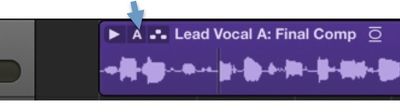
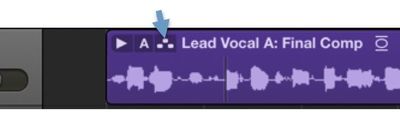
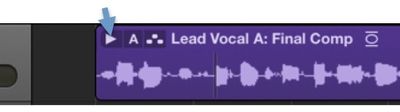
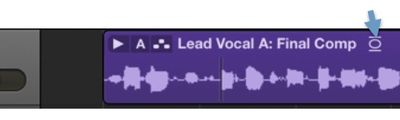
21Which picture represents a way to open a Take Folder.
- A
- B
- C
- D
- A
22You don't have to position the playhead in cycle mode; recording automatically starts at the beginning of the cycle.
- ARichtig
- BFalsch
23When you stop recording, if the recent take is shorter than a bar, Logic automatically discards it.
- ARichtig
- BFalsch
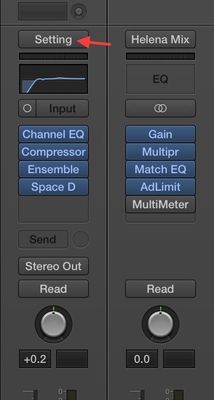
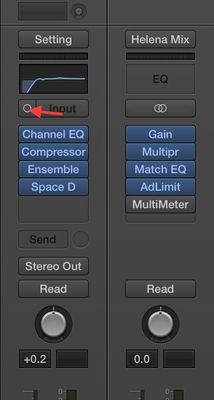
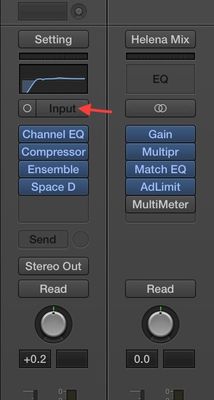
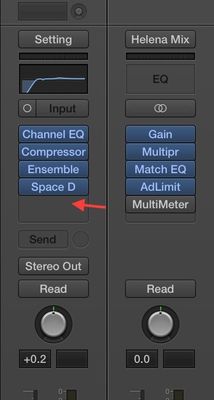
24Where do you reassign a track's input?
- A
- B
- C
- D
- A
25What are the recording file types?
- AAIFF
- BBWF or WAVE
- Cmp3
- Dm4a
- ECAF
26What is the shortcut for the Browser Pane?
- AB
- BW
- CF
- DCommand-B
27Cycle mode takes precedence over a marquee selection in playback.
- ARichtig
- BFalsch
28Nondestructive audio editing changes the original audio file.
- ARichtig
- BFalsch
29Where can you perform nondestructive audio editing?
- AWorkspace
- BAudio Track Editor
- CAudio File Editor
- DPiano Roll
30How do you comp takes?
- ACreate a new track stack and record each take into a component of the stack. Use the scissors tool and fade tool to comp between edits.
- BUsing the auto punch feature, set the auto punch region and re-record over an area.
- CUse the quick swipe comp tool to drag over desired sections. The take folder assembles a comp including all the highlighted sections.
- DRecord each track, and then use the track folder feature to comp them all together. Use the marquee and fade tool to smooth out edits.
31Which one indicates quick swipe comping is enabled?
- A
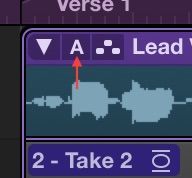
- B
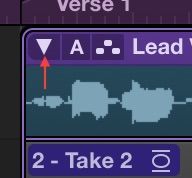
- C
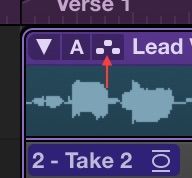
- D
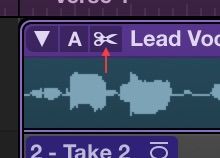
- A
Informationen
- Beschreibung
- Questions to familiarize yourself with the Logic Pro X basic exam (In progress).
- Autor
- markjo65
- Sprache
- English
- Aufrufe
- 188
- Verlauf
- Erstellt am 9 Apr 2015 · aktualisiert am 13 Sep 2016
- Schlagwörter
- Bewertung
- 5,0 von 5 · 2 Bewertungen Bewerte dieses Quiz