
Quiz
EVALUACIÓN DE SISTEMAS 11° 2P
This quiz has a time limit, so it opens in the usual player.
Questions in this quiz (10)
1La instrucción que se utiliza para iniciar pygame es: [blank_start]Pygame.init().[blank_end]
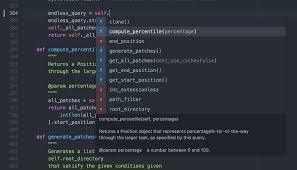
- APygame.init().
- BInput.
- CReturn 0.
- DIf – elif.
2la siguiente lineas de código nos ayudan a iniciar e importar pygame en python.
import pygame
from pygame.[blank_start]locals[blank_end] import *
- Alocals
3Las constantes para crear una ventana son:
WIDTH = 640
[blank_start]HEIGHT[blank_end] = 480
- AHEIGHT
4Las imágenes de pygame se miden por [blank_start]Pixeles[blank_end].

- APixeles
- BPulgadas
- CAlto y Ancho
- DDiametro
5
1. def load_image(filename, transparent=False):
2. try: image = pygame.image.load(filename)
3. except pygame.error, message:
4. raise SystemExit, message
5. image = image.convert()
6. if transparent:
7. color = image.get_at((0,0))
8. image.set_colorkey(color, RLEACCEL)
9. return image
La línea 5 convierte la imagen al tipo interno de [blank_start]Pygame[blank_end] que hace que sea mucho más eficiente.
- APygame
- BPython
- CPixeles
- DPulganas
61. def load_image(filename, transparent=False):
2. try: image = pygame.image.load(filename)
3. except pygame.error, message:
4. raise SystemExit, message
5. image = image.convert()
6. if transparent:
7. color = image.get_at((0,0))
8. image.set_colorkey(color, RLEACCEL)
9. return image
líneas 7 y 8, obtiene el [blank_start]color[blank_end] del pixel (0, 0) de la imagen (esquina superior izquierda)
- Acolor
71. def load_image(filename, transparent=False):
2. try: image = pygame.image.load(filename)
3. except pygame.error, message:
4. raise SystemExit, message
5. image = image.convert()
6. if transparent:
7. color = image.get_at((0,0))
8. image.set_colorkey(color, RLEACCEL)
9. return image
línea 9 [blank_start]retorna[blank_end] la imagen después de todo el proceso.
- Aretorna
- Bcomienza
- Csale
8La siguiente linea de código crea una ventana ¿Cual es la variable que falta?
screen = pygame.[blank_start]display.set[blank_end]_mode((WIDTH, HEIGHT))- Adisplay.set
9 líneas 3 y 4 manejan el [blank_start]error[blank_end] y salen del programa.
- Aerror
- Bcodigo
- Calto y ancho
- Dimport pygame
10La línea 2 asigna a la variable imagen a través de la función de [blank_start]pygame.image.load()[blank_end]

- Apygame.image.load()
Information
- Description
- Quiz on EVALUACIÓN DE SISTEMAS 11° 2P, created by Bryhan Rodriguez on 08/05/2018.
- Author
- Bryhan Rodriguez
- Language
- Español
- Views
- 450
- Tags
- Rating
- No ratings yet Rate this quiz