
Fichas
4. Data Representation and Data Types

Fichas del conjunto (36)
- 1Key Terms- Denary
- Binary
- Hexadecimal
- Bit
- Nibble
- Byte - 2Denary- Decimal ('normal')
- Base 10 - 3Binary- 0s and 1s
- Base 2 - 4Hexadecimal'Hex'
- 0 to F
- Base 16 - 5Denary --> BinaryRepresented as byte
Method:
24 - 16 = 8, 8 - 8 = 0
- 6Binary --> HexSplit into 2 nibbles
Method:
8 + 1 = 9, 8 + 2 + 1 = B (11)
- 7Memory MeasurementKB = 1024 bytes ∵ memory measured in ^ 2
(2 ^ 10 = 1024)
Memory is exponential - 8More Key Terms- Character set
- ASCII
- UNICODE
- Integer
- String
- Float
- Boolean - 9Character Set- Each char = binary code
- Comps. agree on code to communicate (Handshaking) - 10ASCIIAmerican Standard Code for Information Exchange:
- 1 Byte per Char
- 7-bit (128 possible chars) - 11ASCII ConsSpaces < chars. in other languages
'Too small' - 12UNICODE- Up to 4 bytes per char
- 16-bit (up to 110,000 chars) - 13CharacterType: Single letter, number or symbol
Example: A, c, 4, @
Storage: 1 byte (ASCII) or 4 bytes (UNICODE) - 14StringType: Group of characters
Example: "Hello world!"
Storage: # of chars * 1 byte (ASCII) or 4 bytes (UNICODE) - 15IntegerType: Whole number
Example: 4, -5
Storage = 2 bytes (up to 65,535) - 16Float (Real)Type: Fraction or decimal
Example: 4.56, 4/5
Storage = *TO BE ADDED* - 17BooleanType: True and False
Example: 0 = False, 1 = True
Storage = 1 bit (0 or 1) - 18Signed MagnitudeStoring Negatives:
- Left-most bit stores state info (0 = Positive, 1 = Negative)
- Other 7 bits store value
(Binary) - 19Signed Magnitude (Example)

- 20Two's Complement- Find positive # in binary
- Search left to right to find first 1 in #
- Invert every value after first 1 - 21Two's Complement (Example)
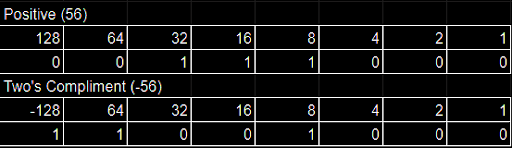
- 22Binary Addition Rules0 + 0 = 0
1 + 0 = 1
1 + 1 = 10
1 + 1 + 1 = 11 - 23Binary Subtraction- Conver subtracted num (12 in 24-12) to negative with Two's Complement
- Add nums together
- 24Mantissa and Exponent- Store real denary as floating-point binary
- 25Mantissa and Exponent - Positive numbers- Real denary converted to binary (stored in mantissa)
- Floating-point (normalised) assumed at immediate right of most significant bit
- Total of exponent says # of spaces floating point must be moved (neg = left, pos = right) - 26Mantissa and Exponent - Positive numbers (Example)

- 27Mantissa and Exponent - Negative numbers- # converted like pos
- Changed to neg using Two's Compliment
- Exponent works the same as pos - 28Mantissa and Exponent - Negative number (Example)

- 29Integer ProsStores numbers 100% accurately
- 30Integer ConsLimited range of #s represented with given bits
- 31Floating Point Pros> range of #s can be stored with same amount of bits
- 32Floating Point Cons- Hard to store numbers accurately
- No representation of 0
- More complex processing - 33TruncationUsed when not enough bits
Bits that can't be displayed are left out
(E.g. 2.25457 --> 2.2, or 0.0101101 --> 0.010) - 34RoundingUsed when not enough bits
Rounds bits that can't be displayed
(E.g. 2.25457 --> 2.3, or 0.0101101 --> 0.011) - 35Absolute ErrorOriginal number - Rounded number
E.g.
2.25457 - 2.2 = 0.05457
0.0101101 - 0.0100000 = 0.0001111 - 36Relative ErrorAbsolute error / Original number
E.g.
0.05457 / 2.25457 = 2.4%
0.0001111 / 0.0101101 = 33%
Información
- Descripción
- A Level ((AS) Unit 1: Fundamentals of Computer Science ) Computer Science Fichas sobre 4. Data Representation and Data Types, creado por Scott Jones el 31/07/2019.
- Creado por
- Scott Jones
- Visitas
- 1
- Valoración