
Fichas
Computer Organization
Fichas del conjunto (101)
- 1switchesmicroscopic transistors etched into silicon
- 2master switchescontrol dozens of switches: flipping one triggers a whole series of switches
- 30off
- 41on
- 5microprocessorultimate brain of computer
- 6two main units of the microprocessorALU and CU (connected by the bus)
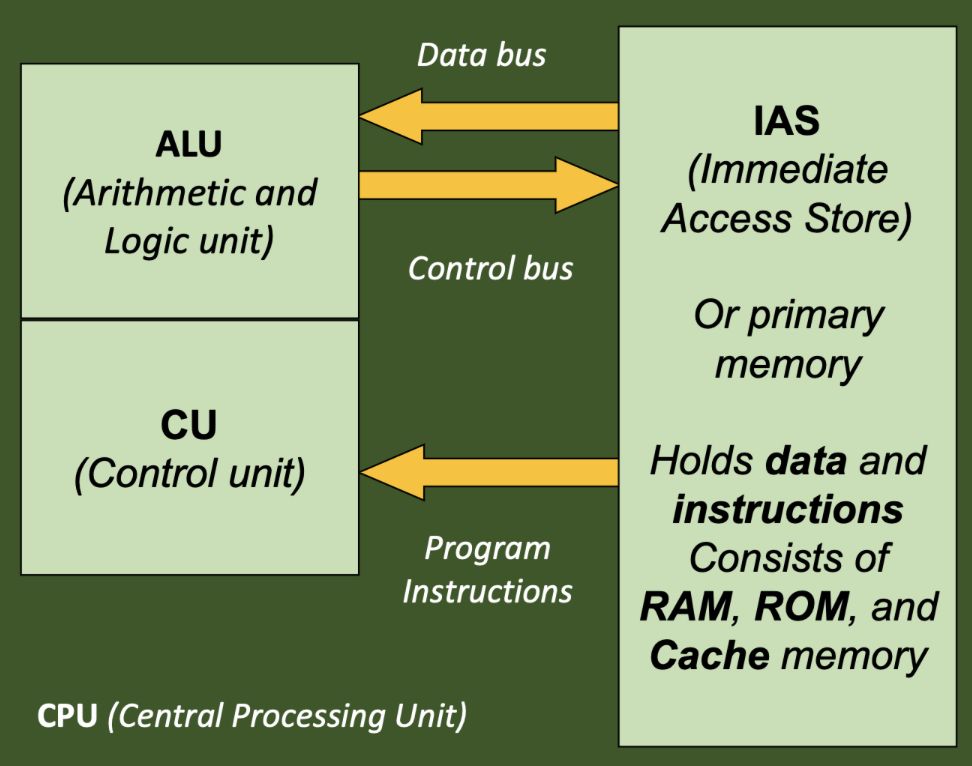
- 7ALUArithmetic Logic Unit
- 8CUControl Unit
- 9data busmoves data in both directions
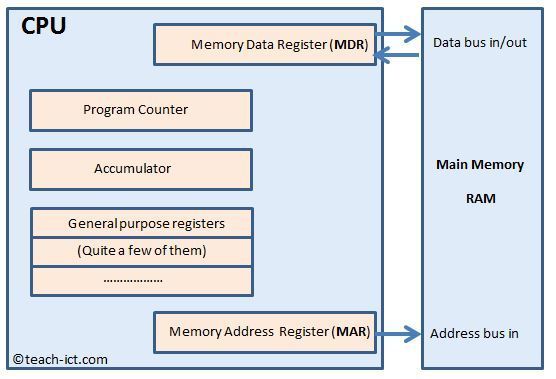
- 10address bussends address data from the microprocessor to the primary memory
- 11control bustells data bus which way it is movie data
- 12CU overall functiontells the rest of the computer how to carry out a program's instructions
- 13CU specific functions• directs electronic signals between ALU and main memory
• directs electronic signals between main memory and input/output devices
• sends commands to the other units - 14ALU functionperforms arithmetic and logical comparisons (and the speed of these operations)
- 15CISCComplex Instruction Set Computer - allows processor to handle large amount of instructions with reduced speed
- 16RISCReduced Instruction Set Computer - operates faster with fewer instructions
- 17CPU structurecontains the primary memory of the computer and the microprocessor (ALU and CU)
- 18IASImmediate Access Store - cache and primary memory (stores 1's and 0's)
- 19CIRCurrent Instruction Register - holds the current instruction being executed
- 20PRProgram Counter ( or Instruction Pointer) - holds the address of the next instruction
- 21Accumulatorimportant register inside the ALU
- 22Interrupt Registerstores information about processes waiting to catch the attention of the CPU
- 23Busesa collection of wires that convey data from one part of the CPU to another
- 24Register• a small amount of computer memory that can hold 1 word of data (32 or 64 bits)
• link the microprocessor to primary memory and cache - 25MHz operationtells you how many million instructions can be carried out by the microprocessor in a second
ex. "500 MHz" = 500 million instructions/sec - 26Machine Instruction Cycle nicknameFetch-Decode-Execute cycle
- 27Machine Instruction Cyclethe main steps to be taken in the execution of machine language instructions
- 28Machine Instruction Cycle steps• start
• fetch the next instruction from the IAS (RAM) into the CIR (found via address, brought back via data bus)
• decode the instruction in the CIR, fetch any data needed from the IAS
• Execute the instruction and tell other components what to do
• store results of operation back into IAS
• repeat if there are more instructions
• stop - 29MARMemory Address Register - holds the address of a block of memory for reading from or writing to
- 30MDRMemory Data Register - holds data fetched from memory or data waiting to be stored in memory
- 31CPU diagram
- 32Primary Memory (IAS)the main memory that stores program instructions and data in binary machine code
- 33Primary Memory typesRAM - Random Access Memory
ROM - Read-Only Memory - 34RAM• volatile, loses contents when the computer is switched off
• can be written to, instructions and data can be loaded into it
- holds data that will be needed shortly by the processor - 35ROM• non-volatile, is used to store programs permanently
• the computer cannot store anything new in this type of memory - 36importance of RAM• computers come with different amounts of RAM
• RAM can be upgraded
• more RAM means faster software operation - 37Cache Memorypart of the system of primary memory but it lives on the CPU (making it easy and fast to access)
- 38Secondary Memory• persistent
• when programs and data files are not in RAM, they are stored on backing store (hard drives, portable devices, disc drives) - 39Tiered approachcache > RAM > secondary storage
balances cost and speed - 40VRAMmemory built into the video card used for graphics
- 41Operating Systema collection of programs that manage all of the activities of a computer system
software closest to the hardware: performs basic functions - 42Core Functions and Utilities of Operating Systemsformatting floppy discs, creating backup file sets, transferring data from one file format to another
- 43Mainframe and Micro-computersMainframe are multi-user machines and run multi-programming operating systems
Micro-computers (PC) are single-user and may or may not run multi-tasking operating systems - 44Batch Processingreserved for low-priority jobs which can run overnight without user intervention
- 45Real-time Operating Systemsused where any one output can be processed in time to affect the next input
- 46OS Functionsaccess control, accounting, error handling, i/o handling, interrupt handling, JCL interpretation, job sequencing, protection, security, resource allocation, software execution control, memory management
- 47persistent storage useneeded to store data in a non-volatile device during and after the running of a program
- 48Access ControlAC systems perform identification, authentication, and authorization of users and entities by evaluating required login credentials
- 49Accountingkeeps track of resources used and who they were used by
- 50Error Handlingthe process comprised of anticipation, detection, and resolution of application, programming, or communication errors
- 51Input/Output Handlingmanaging the transfer of data, controls input and output of the computer system
- 52Interrupt Handlingsystem that will service the device and stop the device from interrupting when a interrupt signal is sent
- 53JCL Interpretationhandles JCL (Job Control Language) and tells the operating system about the work you want it to perform
- 54Job Sequencingallow for establishment of job priorities and helps determine which jobs should be performed first
- 55Protection and Securitytechniques that protect operating systems, like antivirus software, regular updates, firewalls, and enforcement of secure access through privileges and user controls
- 56Resource allocationthe process by which a computing system aims to meet the hardware requirements of an application run by it - optimizing resources by taking into account hardware, performance, and environmental restrictions
- 57Operator/User Interfacesprovides an environment for the user or operator to interact with the machine, either graphical or text-based
- 58Software Execution Controlallows the computer to read and act on instructions of a program
- 59Memory Managementmanages operations between main memory and disk during process execution and keeps track of all memory locations
- 60Basic File Maintenance Operationscopy, delete, rename, create folders
- 61Utilities commonly provided as part of the system softwarebackups, media formatting, disc maintenance, archiving, disk compression, defragmentation, virus checkers
- 62System Backupsa routinely scheduled operation in every business whose activities depend upon their computer systems data
- 63Media Formattingall types of media need to be prepared in some way for use on a computer system, and many operating systems will use different formats
- 64Archivingdata will be archived when there are very large amounts of data that are rarely accessed but still need to be kept
- 65Data Compressioncan be used with text and other files to save space on backing store and time when transmitting data
also used with media files, though quality is sacrificed (not with text though) - 66Virus checkerslook for virus programs and remove them
- 67Linkerjoins several modules together to form a single module
- 68AnalogA continuous wavy line of events that moves at predictable rates (our perception of the world)
- 69ADC, DACanalog to digital, digital to analog converters
- 70sampling rateconverting analog signals to digital values - how often the voltage is being measured
- 71Resolution (bits)how accurate each measurement is
- 72DAC functionroutes digital current through a matrix of resistors, the resistors are weighted to present different degrees of resistance, resulting in an analog stream
- 73conversion precisionaffected by how often the analog signal is sampled; more sampling means more accurate conversion
- 74Bita series of ones and zeroes
- 75ByteEight bits (binary digits)
- 76Kilobyte (K)1,024 bytes, equivalent to approx. 1 page of text
2^10 - 77Megabyte (MB)1,048,576 bytes, equivalent to approx. 1 book
2^20 - 78Gigabyte (GB)1,073,741,824 bytes, equivalent to approx. 1 shelf of books in a library
2^30 - 79Terabyte (TB)1024 gigabytes
- 80unit ordersbit > byte > kilobyte > megabyte > gigabyte
- 81computer storage unit measurementscomputer storage is measured in units of 2^10 (1024)
- 82patterns of binary digitseverything in a computer, data and instructions, is expressed through these
these bit patterns need to stand for things other than integers or floating-point numbers - 83ASCIIAmerican Standard Code for Information Interchange
• 8-bit register
• 128 different characters, only the first seven bits used to encode the character
• English centric - 84UNICODEprovides 110,000 characters across 100 scripts/languages
• UTF-8 uses one byte for ASCII, 4 for other codes
• UTF-16 uses two or four bytes to represent all codes - 85computer software graphicsBitmap, Vector
- 86Bitmap Graphics• graphics stored as a bitmap image
• raster graphics
• grid of pixels
• at least one bit needed to record each pixel, maybe needs more (pixel depth/bit depth)
• more colors mean greater pixel depth - 87Vector Graphics• graphics made up of individual objects stored as mathematical calculations for the outline and colors of each
• computer only needs to store the description in mathematical terms
• easily resizable, new numbers just fed in
• some graphics (like a photo) can be too complex to be a vector graphic - 88compression softwareshrinks graphics size using special compression algorithms in the software
jpg, gif, etc. - 89Bitmapped Graphics process1. when a program reads a bitmapped file, it looks at information contained in the file's header
2. the header begins with a signature that identifies the file as a bitmap
3. the header contains information on width, height, and palette (in pixels)
4. program reads in bytes that contain the bit patterns
5. color bitmaps require more than 1 bit per pixel - 90Virtual Pixelseparate dots that are so close together that the eyes see them as a single point of blended color
- 9124-bit Graphics3 bytes of memory used, 17 million colors
three byte values determine how much of each color goes into each pixel - 92after interpretation of bitmap filegraphics software puts the values for the pixels into a section of the video memory called the frame buffer
electric signals are adjusted to set the intensity of dots for each pixel
DAC converts digital signal to analog electrical current and sends to monitor
three different currents are sent (one for each color) - 93ANDA • B
- 94ORA + B
- 95NOTA'
- 96NAND(A • B)'
- 97NOR(A + B)'
- 98XORoutput is true if only one input is true
0 0 and 1 1 result in a 0
0 1 or 1 0 result in a 1 - 99binarybase 2, relating to involving only two things
- 100denary, decimalbase 10, relating or involving ten things
- 101hexadecimal16 rather than 10 as a base