
Fichas
Computer science
Fichas del conjunto (6)
- 1—Antivirus or anti-virus software (often abbreviated as AV), sometimes known as anti-malware software, is computer software used to prevent, detect and remove malicious software.
Antivirus software was originally developed to detect and remove computer viruses, hence the name. However, with the proliferation of other kinds of malware, antivirus software started to provide protection from other computer threats. In particular, modern antivirus software can protect from: malicious Browser Helper Objects (BHOs), browser hijackers, ransomware, keyloggers, backdoors, rootkits, trojan horses, worms, malicious LSPs, dialers, fraudtools, adware and spyware.[1] Some products also include protection from other computer threats, such as infected and malicious URLs, spam, scam and phishing attacks, online identity (privacy), online banking attacks, social engineering techniques, Advanced Persistent Threat (APT), botnets DDoS attacks.[2] - 2—pyware is software that aims to gather information about a person or organization without their knowledge and that may send such information to another entity without the consumer's consent, or that asserts control over a computer without the consumer's knowledge.[1]
"Spyware" is mostly classified into four types: system monitors, trojans, adware, and tracking cookies.[2] Spyware is mostly used for the purposes of tracking and storing Internet users' movements on the Web and serving up pop-up ads to Internet users.
Whenever spyware is used for malicious purposes, its presence is typically hidden from the user and can be difficult to detect. Some spyware, such as keyloggers, may be installed by the owner of a shared, corporate, or public computer intentionally in order to monitor users.
While the term spyware suggests software that monitors a user's computing, the functions of spyware can extend beyond simple monitoring. Spyware can collect almost any type of data, including personal information like internet surfing habits, user logins, and bank or credit account information. Spyw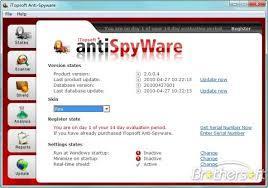
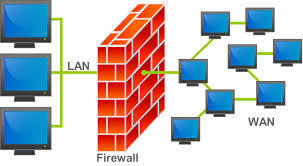
- 3—In computing, a firewall is a network security system that monitors and controls the incoming and outgoing network traffic based on predetermined security rules.[1] A firewall typically establishes a barrier between a trusted, secure internal network and another outside network, such as the Internet, that is assumed to not be secure or trusted.[2] Firewalls are often categorized as either network firewalls or host-based firewalls. Network firewalls are a software appliance running on general purpose hardware or hardware-based firewall computer appliances that filter traffic between two or more networks. Host-based firewalls provide a layer of software on one host that controls network traffic in and out of that single machine. [3] Routers that pass data between networks contain firewall components and can often perform basic routing functions as well,[4][5] Firewall appliances may also offer other functionality to the internal network they protect such as acting as a DHCP or VPN server for that network.[6]
- 4—Disk formatting is the process of preparing a data storage device such as a hard disk drive, solid-state drive, floppy disk or USB flash drive for initial use. In some cases, the formatting operation may also create one or more new file systems. The first part of the formatting process that performs basic medium preparation is often referred to as "low-level formatting".[1] Partitioning is the common term for the second part of the process, making the data storage device visible to an operating system.[1] The third part of the process, usually termed "high-level formatting" most often refers to the process of generating a new file system.[1] In some operating systems all or parts of these three processes can be combined or repeated at different levels[NB 1] and the term "format" is understood to mean an operation in which a new disk medium is fully prepared to store files.
As a general rule,[NB 2] formatting a disk leaves most if not all existing data on the disk medium; some or most of which might be recoverable with special tools.[4] Special tools can remove user data by a single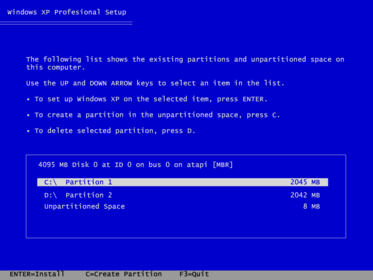
- 5—File transfer is a generic term for the act of transmitting files over a computer network like the Internet. There are numerous ways and protocols to transfer files over a network. Computers which provide a file transfer service are often called file servers. Depending on the client's perspective the data transfer is called uploading or downloading. File transfer for the enterprise now increasingly is done with Managed file transfer.
There are 2 types of file transfers:
Pull-based file transfers where the receiver initiates a file transmission request
Push-based file transfers where the sender initiates a file transmission request.
File transfer can take place over a variety of levels:
Transparent file transfers over network file systems
Explicit file transfers from dedicated file transfer services like FTP or HTTP
Distributed file transfers over peer-to-peer networks like Bittorent or Gnutella
In IBM Systems Network Architecture, LU 6.2 peer-to-peer file transfer programs such as IBM's Connect:Direct and CA Technologies' XCOM Data Transport
File transfers over instant messaging o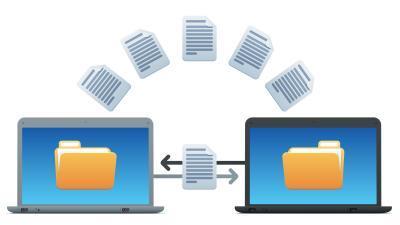
- 6—In the maintenance of file systems, defragmentation is a process that reduces the amount of fragmentation. It does this by physically organizing the contents of the mass storage device used to store files into the smallest number of contiguous regions (fragments).In the maintenance of file systems, defragmentation is a process that reduces the amount of fragmentation. It does this by physically organizing the contents of the mass storage device used to store files into the smallest number of contiguous regions (fragments). It also attempts to create larger regions of free space using compaction to impede the return of fragmentation. Some defragmentation utilities try to keep smaller files within a single directory together, as they are often accessed in sequence.
Defragmentation is advantageous and relevant to file systems on electromechanical disk drives. The movement of the hard drive's read/write heads over different areas of the disk when accessing fragmented files is slower, compared to accessing the entire contents of a non-fragmented file sequentially without moving the read/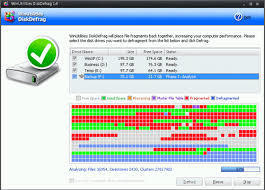
Información
- Descripción
- Fichas sobre Computer science , creado por 13elliott.riley el 04/12/2015.
- Creado por
- 13elliott.riley
- Visitas
- 0
- Valoración