
Fichas
Python
Fichas del conjunto (84)
- 1what is a variable for?storing piece of data, and gives it a specific name
- 2what is a booleanit can only have 2 values
yes/no
true/false - 3#for Comments
-make program easier to understand
-easily figure out what your code does. - 4how do you write multi-line commentsinclude the whole block in a set of triple quotation marks
- 5**exponential
(to the power of) - 6*multiplication
- 7/division
- 8+addition
- 9-subtraction
- 10%modulo
-returns the remainder from a division
e.g for 3 % 2, it will return 1, because 2 goes into 3 evenly once, with 1 left over - 11what is whitespaceseparates statements
- 12what is a stringcontains letters, numbers, and symbols
-Strings need to be within quotes - 13what is the issue with apostrophes and how do you fix this?-code thinks it ends the string
-so put a backslash
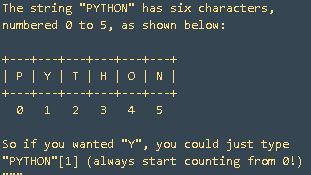
'There\'s a snake in my boot!' - 14what is the indexEach character in a string is assigned a number
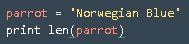
- 15len()gets the length (the number of characters) of a string
- 16lower()get rid of all the capitalization in your strings
:
NATASHA.lower()
will result in natasha - 17upper()capitalize all the characters in the string
:
natasha.upper()
will result in NATASHA - 18str()turns non-strings into strings:
str(2)
would turn 2 into "2" - 19formatting strings

- 20Control flowgives us this ability to choose among outcomes based off what else is happening in the program.
- 21comparatorscheck if a value is (or is not) equal to, greater than (or equal to), or less than (or equal to) another value
- 22==Equal to
- 23!=Not equal to
- 24<Less than
- 25<=less than or equal to
- 26>Greater than
- 27>=Greater than or equal to
- 28ifconditional statement that executes some specified code after checking if its expression is True
- 29elsecomplements the if statement
-if/else pair says: "If this expression is true, run this indented code block; otherwise, run this code after the else statement." - 30elifelse if
otherwise, if the following expression is true, do this - 31.isalpha()Check if character is alphabetic
return False if contains non-letter characters
else returns TRUE - 32how do you concatenate strings in python?using +
e.g
"hello " + "mum" - 33parametera value that is passed into a function or procedure
- 34functionA section of code that when programming can be called by another part of the program with the purpose of returning one single value.
- 35procedureA section of computer code that performs a specific task
- 36defdefine a function
- 37modulea file that contains definitions—including variables and functions—that you can use once it is imported
- 38math (the module)includes a number of useful variables and functions, and sqrt() is one of those functions. In order to access math, all you need is the import keyword
- 39generic importwhen you access a module using am import keyword
- 40generic import exampleimport math
print math.sqrt(81) - 41function importPulling in just a single function from a module and it's done with the 'from' keyword
- 42max()takes any number of arguments and returns the largest one
e.g. max(1,2,3) will return 3 - 43min()returns the smallest of a given series of arguments
- 44abs()returns the absolute value of the number it takes as an argument—that is, that number's distance from 0 on an imagined number line
e.g. 3 and -3 both have the same absolute value: 3.
The abs() function always returns a positive value, and unlike max() and min(), it only takes a single number - 45type()returns the type of the data it receives as an argument
- 46listsdatatype you can use to store a collection of different pieces of information as a sequence under a single variable name
empty_list = [ ] - 47indexlike an address that identifies the item's place in the list. The index appears directly after the list name, in between brackets, like this: list_name[index]
- 48how to make list longer and add thingsvariable.APPEND("type thing here")
- 49how to access portions of a listletters = ['a', 'b', 'c', 'd', 'e']
slice = letters[1:3]
print slice
print letters - 50how to insert items into a listanimals.insert(1, "dog")
print animals
We insert "dog" at index 1, which moves everything down by 1. - 51for loopIf you want to do something with every item in the list
e.g
my_list = [1,9,3,8,5,7]
for number in my_list:
print 2*number - 52.sort()sorts out a jumbled list
e.g - 53keycan be any string or number. Dictionaries are enclosed in curly braces, like so:
d = {'key1' : 1, 'key2' : 2, 'key3' : 3} - 54Like Lists, Dictionaries are mutableThis means they can be changed after they are created. One advantage of this is that we can add new key/value pairs to the dictionary after it is created like so:
dict_name[new_key] = new_value - 55len() of a dictionarythe number of key-value pairs it has. Each pair counts only once, even if the value is a list.
- 56delItems can be removed from a dictionary with the del command:
del dict_name[key_name]
will remove the key key_name and its associated value from the dictionary - 57how to remove an item from a list.remove(item)
- 58Lists + FunctionsFunctions can also take lists as inputs and perform various operations on those lists
- 59Removing elements from listn.pop(index) will remove the item at index from the list and return it to you:
n = [1, 3, 5]
n.pop(1)
# Returns 3 (the item at index 1)
print n
# prints [1, 5]
n.remove(item) will remove the actual item if it finds it:
n.remove(1)
# Removes 1 from the list,
# NOT the item at index 1
print n
# prints [3, 5]
del(n[1]) is like .pop in that it will remove the item at the given index, but it won't return it:
del(n[1])
# Doesn't return anything
print n
# prints [1, 5] - 60range() functiona shortcut for generating a list:
range(6) # => [0, 1, 2, 3, 4, 5]
range(1, 6) # => [1, 2, 3, 4, 5]
range(1, 6, 3) # => [1, 4]
The range function has three different versions:
range(stop)
range(start, stop)
range(start, stop, step) - 61raw_inputasks the user for input and returns it as a string
- 62breakuse the break command to get out of a for loop:
Add a break under the win condition to end the loop after a win - 63while loopsimilar to an if statement: it executes the code inside of it if some condition is true. The difference is that the while loop will continue to execute as long as the condition is true. In other words, instead of executing if something is true, it executes while that thing is true.
- 64infinite loopa loop that never exits. This can happen for a few reasons:
The loop condition cannot possibly be false (e.g. while 1 != 2)
The logic of the loop prevents the loop condition from becoming false. - 65while/elseis similar to if/else, but there is a difference: the else block will execute anytime the loop condition is evaluated to False. This means that it will execute if the loop is never entered or if the loop exits normally. If the loop exits as the result of a break, the else will not be executed
- 66zipwill create pairs of elements when passed two lists, and will stop at the end of the shorter list
- 67sorted()sorts lists
- 68.items()returns an array of tuples with each tuple consisting of a key/value pair from the dictionary
- 69.keys()returns a list of the dictionary's keys
- 70.values()returns a list of the dictionary's values
- 71List Slicing SyntaxList slicing allows us to access elements of a list in a concise manner. The syntax looks like this:
[start:end:stride]
Where start describes where the slice starts (inclusive), end is where it ends (exclusive), and stride describes the space between items in the sliced list. For example, a stride of 2 would select every other item from the original list to place in the sliced list. - 72functional programmingyou're allowed to pass functions around just as if they were variables or values
- 73lambdacreates an anonymous function
- 74filterfilter uses the lambda to determine what to filter
- 75Bitwise operationsoperations that directly manipulate bits
- 76bin()takes an integer as input and returns the binary representation of that integer in a string
- 77bit maska variable that aids you with bitwise operations. A bit mask can help you turn specific bits on, turn others off, or just collect data from an integer about which bits are on or off.
- 78__init__()This function is required for classes, and it's used to initialize the objects it creates. __init__() always takes at least one argument, self, that refers to the object being created. You can think of __init__() as the function that "boots up" each object the class creates.
- 79scopeThe scope of a variable is the context in which it's visible to the program
- 80global variablesvariables that are available everywhere
- 81member variablesvariables that are only available to members of a certain class
- 82instance variablesvariables that are only available to particular instances of a class
- 83Inheritancethe process by which one class takes on the attributes and methods of another, and it's used to express an is-a relationship. For example, a Panda is a bear, so a Panda class could inherit from a Bear class. However, a Toyota is not a Tractor, so it shouldn't inherit from the Tractor class (even if they have a lot of attributes and methods in common). Instead, both Toyota and Tractor could ultimately inherit from the same Vehicle class.
- 84—
Información
- Descripción
- GCSE (Computer Science) French, Geog, Computing Fichas sobre Python, creado por n g el 21/08/2017.
- Creado por
- n g
- Visitas
- 4
- Valoración