
Fichas
Network+ Chapter 1
Fichas del conjunto (100)
- 1---- topologies are the easiest to troubleshoot and can easily scale to large sizesStar topologies
- 2IP is considered what protocol?Network layer protocol.
- 3Internet Explorer is an example of what protocol?Application layer protocol
- 4Ethernet is an example of a -- layer protocolData Link
- 5T1 can be considered a -- layer protocolPhysical
- 6Layer 2 of the OSI model is the --Data Link layer
- 7Cable modems use --- cablesRG-6 coax
- 8To get the high data-transfer speed, like 1 Gbps, you need to use a wire standard that is highly rated, such as --Category 5e or Category 6
- 9To connect -- switches together or a hub to a switch, you need a -- cabletwo, crossover
- 10For the most part, switches are not cheap; however, one of the biggest benefits of using switches instead of hubs in your internetwork is that each switch port is actually its own --.collision domain
- 11A hub creates one large --collision domain
- 12Switches still can’t break up -- domainsbroadcast
- 13A switch creates separate collision domains for each port but does not break up -- by default.broadcast domains
- 14DNS uses -- for zone exchanges between servers and -- when a client is trying to resolve a hostname to an IP address. (Protocols)TCP, UDP
- 15HTTP, FTP, and Telnet use -- at the Transport layer. However, they are all -- layer protocolsTCP, Application
- 1610.0.0.0 through 10.255.255.255 and 172.16.0.0 through 172.31.255.255 as well as 192.168.0.0 through 192.168.255.255 are all considered -- , based on RFC 1918private
- 17To test the local stack on your host, -- the loopback interface of --.ping, 127.0.0.1
- 18Packets specifically have to be carried to a router in order to be routed through a network. On your local computer, the IP address of this router is displayed as the -- --gateway address
- 19RIP and RIPv2 are -- -- routing protocolsdistance vector
- 20OSPF and IS-IS are -- --link state
- 21-- is called a hybrid routing protocol because it uses the characteristics of both distance vector and link state routing protocolsEIGRP
- 22-- can only be run on Cisco routers and is not vendor neutralEIGRP
- 23The new CompTIA objectives mention BGP as a -- -- protocol.hybrid routing
- 24Virtual LANs break up -- -- in Layer 2 switched internetworksbroadcast domains
- 25-- -- -- was designed to stop Layer 2 loops. All enterprise model switches have -- by default.The Spanning Tree Protocol (STP)
- 26Part of the 802.11n wireless standard, MIMO sends multiple frames by several antennas over several paths; they are then recombined by another set of antennas to optimize throughput and multipath resistance. This is called -- --spatial multiplexing
- 27At a minimum, you need to change the default -- value on each AP and configure new usernames and passwords on the AP.SSID
- 28-- works at the Network layer of the OSI model (Layer 3) and secures all applications that operate above it (Layer 4 and above)IPSec
- 29combines user authentication and authorization into one profileRADIUS
- 30refers to the act of attempting to illegally obtain sensitive information by pretending to be a credible source.Social engineering, or phishing
- 31A -- attack prevents users from accessing the system.denial-of-service (DoS)
- 32Changing network configurations, terminating sessions, and deceiving the attacker are all actions that can be taken by an -- device.intrusion prevention system (IPS)
- 33-- help provide perimeter network security by allowing or denying connections and types of traffic in or out of the network.Firewalls
- 34Routing Information Protocol (RIP) is not a WAN protocol but a -- protocol used in local area connections.routing protocol
- 35The committed information rate (CIR) is the rate, in -- per second, at which the -- switch agrees to transfer data.bits, Frame Relay
- 36The arp utility’s –a and –g switches perform the -- functionsame
- 37To purge and reload the remote NetBIOS name cache, you must use --. Remember that the -- must be uppercase, and it will not work correctly without the -- before it.nbtstat –R, hyphen
- 38is used to attach ends onto different types of network cablesA wire crimper or crimper
- 39Because most of today’s networks still consist of large amounts of -- cable, they can continue to suffer from the physical issues (the options are not a complete list) that have plagued all networks since the very beginning of networking.copper
- 40Traffic shaping, also known as packet shaping, is another form of -- --.bandwidth optimization
- 41refers to a technique used to spread work out to multiple computers, network links, or other devices.Load balancing
- 42You can load-balance work on servers by -- servers so that multiple machines all provide the same serviceclustering
- 43two hosts “talk” to each other using a computer language called -- --, which consists of lots of 1s and 0s in a specific order that describes exactly what they want to “say.”binary code
- 44connecting remote LANs together is something known as a -- -- network.wide area network
- 45a -- network is usually restricted to spanning a particular geographic location such as an office building, a single departmentlocal area network (LAN)
- 46it’s still best to split a big LAN into smaller logical zones known as -- to make administration easier.workgroups
- 47A -- machine is any device on the network that can ask for access to resources like a printer or other hosts from a server or powerful workstation.client
- 48The terms workstation, client, and host can sometimes be used interchangeably. The term -- is used to describe pretty much anything that takes an IP address.host
- 49-- are also powerful computers. They get their name because they truly are “at the service” of the network and run specialized software known as the network operating system to maintain and control the network.Servers
- 50In a good design that optimizes the network’s performance, servers are highly specialized and are there to handle one important labor-intensive job . This is not to say that a single server can’t do many jobs, but more often than not, you’ll get better performance if you dedicate a server to a -- --single task
- 51-- Server The “memo maker” that sends and receives paperless faxes over the networkFax
- 52-- Server Manages network applicationsApplication
- 53-- Server Handles the call center and call routing and can be thought of as a sophisticated network answering machineTelephony
- 54host means any network device with an --IP address
- 55-- usually need a router port or ports. -- span larger geographic areas and/ or can link disparate locations. -- are usually slower. (Network)WANs
- 56-- can utilize either private or public data transport media such as phone lines (Network)WANs
- 57We get the word Internet from the term --. An -- is a type of LAN and/ or WAN that connects a bunch of networks, or intranets.internetwork
- 58Each connection into a router is a different -- --logical network
- 59-- has become one of the most innovative and flexible networking technologies on the marketMPLS
- 60Physical layout flexibility Prioritizing of data Redundancy in case of link failure One-to-many connection MPLS is a switching mechanism that imposes -- to data and then uses those -- to forward data when it arrives at the MPLS network.labels (numbers)
- 61The -- are assigned on the edge of the MPLS network, and forwarding inside the MPLS network (cloud) is done solely based on -- through virtual links instead of physical links.labels
- 62Computers connected together in -- networks do not have any central, or special, authority— they’re all -- , meaning that when it comes to authority, they’re all equals.peer-to-peer, peer
- 63computers coexisting in a -- network can be client machines that access resources and server machines and provide those resources to other computers. This actually works pretty well as long as there isn’t a huge number of users on the network, if each user backs things up locally, and if your network doesn’t require much security.peer- to-peer
- 64-- networks are pretty much the polar opposite of peer-to-peer networks because in them, a single server uses a network operating system for managing the whole network.Client-server
- 65the -- -- of a network is also a type of mapphysical topology
- 66a network’s physical topology gives you the lay of the land and the -- shows how a digital signal or data navigates through that layoutlogical topology
- 67topologies you’re most likely to run into these days:Bus
Star
Ring
Mesh
Point-to-point - 68the -- topology consists of two distinct and terminated ends, with each of its computers connecting to one unbroken cable running its entire length.bus
- 69If -- -- measures have been implemented correctly on a network, it’s highly unlikely that any of that network’s users will know that a problem ever existed at all.fault-tolerance
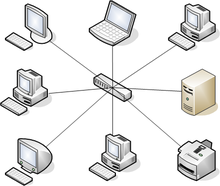
- 70A -- -- computers are connected to a central point with their own individual cables or wireless connections (topology)star topology’s
- 71-- offers a lot of advantages over bus topology, making it more widely used even though it obviously requires more physical media. One of its best features is that because each computer or network segment is connected to the central device individually, if the cable fails, it only brings down the machine or network segment related to the point of failure.Star topology
- 72Another great thing about a -- is that it’s a lot more — all you have to do if you want to add to it is run a new cable and connect to the machine at the core of the --. (topology)star topology, scalable, star
- 73—Typical star topology with a hub
- 74at the center of a star topology network that can give you the most grief if something goes wrong with it. If that -- happens to fail, down comes the whole networkcentral hub
- 75a -- topology has its pros and cons. But the good news far outweighs the bad, which is why people often opt for -- topology.star topology
And here’s a list of benefits you gain by going with it: New stations can be added or moved easily and quickly. A single cable failure won’t bring down the entire network. It’s relatively easy to troubleshoot. - 76There are two more sophisticated implementations of a star topology. The first is called a -- where you have not only the device in the center of the spoke acting as a hub but also the device on the other end.point-to-point link
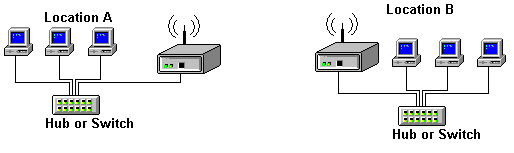
- 77-- are pretty much just wireless hubs or switches that behave like their wired counterparts. Basically, they create a point-by-point connection to endpoints and other wireless access points.access points
- 78the -- has a lot in common with the bus topology because if you want to add to the network, you have no choice but to break the cable ring, which is likely to bring down the entire network!ring topology
- 79In this type of topology, you’ll find that there’s a path from every machine to every other one in the networkMesh Topology
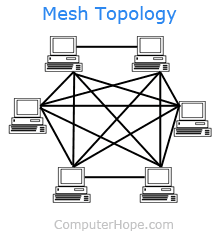
- 80-- -- topology networks will have quite a few connections between certain places to create redundancy (backup)hybrid mesh
(Just remember that it isn’t a full-on mesh topology if there isn’t a connection between all devices in the network.) - 81-- usually isn’t used in corporate LANs anymore because they were so complicated to manage.mesh
- 82A -- -- physical topology is least likely to have a collision, which happens when the data from two hosts trying to communicate simultaneously “collides” and gets lost.full mesh
- 83In fact, the mesh topology is actually pretty rare now, but it’s still used because of the robust -- -- it offers. Because you have a multitude of connections, if one goes on the blink, computers and other network devices can simply switch to one of the many redundant connections that are up and running.fault tolerance
- 84-- Topology As its name implies, you have a direct connection between two routers or switches, giving you one communication path.Point-to-Point
- 85The routers in a point-to-point topology can be linked by a serial cable, making it a -- network, or if they’re located far apart and connected only via a circuit within a Frame Relay or MPLS network, it’s a -- network instead.physical network, logical network
- 86remember that a big drawback to peer-to-peer network sharing is that it’s not very -- . With this in mind, you probably won’t be all that surprised that even if both machines have a wireless point-to-point connection, this network still won’t be very --.scalable
- 87You’ll usually find point-to-point networks within many of today’s WANs, a link from a computer to a -- or -- is also a valid point-to-point connectionhub or switch
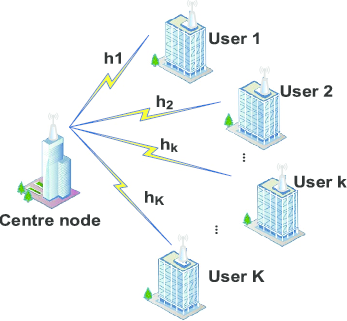
- 88-- topology consists of a succession of connections between an interface on one router and multiple destination routers— one point of connection to multiple points of connection. Each of the routers and every one of their interfaces involved in the -- connection are part of the same network.point-to-multipoint
- 89-- -- means just that— a combination of two or more types of physical or logical network topologies working together within the same network.hybrid topology
- 90a -- -- topology really shines when it comes to making additions to the network, moving things around, and making any kind of changes happen quickly, efficiently, and cost effectively.star topology
- 91Here’s a list of things to keep in mind when you’re faced with coming up with the right topology for the right network:Cost
Ease of installation
Ease of maintenance
Fault-tolerance requirements
Security requirements - 92Today’s networks can get pretty complicated, so we need to have a standard way of communicating with each other intelligibly about exactly which part of the network we’re referencing. This is the reason we divide networks into different parts called -- and -- .backbones and segments
- 93You can see that the network -- is actually kind of like our own. It’s what all the network segments and servers connect to and what gives the network its structure.backbone
- 94being such an important nerve center, the backbone must use some kind of seriously fast, robust technology— often -- Ethernet.Gigabit
- 95to optimize network performance— its speed and efficiency— it follows that you would want to connect all of the network’s servers and segments directly to the network’s --.backbone
- 96When we refer to a --, we can mean any small section of the network that may be connected to, but isn’t actually a piece of, the backbone. The network’s workstations and servers organized into -- connect to the network backbone , which is the common connecting point for all --segment
- 97A -- refers to a network that encompasses several buildings.campus area network (CAN)
- 98Classic -- are comprised of high-capacity storage devices that are connected by a high-speed private network (separate from the LAN) using a storage-specific switch. This storage information architecture addresses the collection of data, management of data, and use of data . These networks are typically fiber networks.Storage area networks (SANs)
- 99Know your network topologies. Know the names and descriptions of the topologies. Be aware of the difference between -- (what humans see) and -- (what the equipment “sees”)physical networks , logical networks
- 100Understand the terms LAN and WAN. You need to understand when you would use a LAN and when you would use a WAN. A -- is used to connect a group of hosts together, and a -- is used to connect various LANs together.LAN, WAN
Información
- Descripción
- Chapter1 flash cards for Net+
- Creado por
- Tiffany Andrews
- Visitas
- 28
- Etiquetas
- Valoración