
Fichas
Chapter 4 - Networks
Fichas del conjunto (61)
- 1Stand-alone-computerA computer that is not connected to a network.
- 2NetworkA collection of computers that are connected together.
- 3Advantages of networking computers togetherUsers can share files and resources with others
Users can access their files and resources from another computer on the same network.
Servers can be created to centrally control a number of operations and services on a network, such as security and file backup.
Communications can be sent to any computer on the network.
Peripherals can be shared. - 4Disadvantages of networking computers togetherNetworks can be subject to security issues, allowing unauthorised access to users' files and resources.
Malware and viruses can be spread for computer to computer and it may be difficult to control and eradicate the issue.
Depending on the structure of the network, of an element of it fails, this could cause failure or issues for the rest of the network.
A high amount of network traffic can cause a network to run slowly. - 5PeripheralA device that is attached to a computer system.
- 6Network trafficThe amount of data that is travelling across a network at any one time.
- 7Local Area Network (LAN)Short for Local Area Network.
A network that covers a small geographical area. - 8Characteristics of LANSecurity - can be kept fairly high as security can be controlled and updated centrally and regularly.
Connection Method - Copper cables, coaxial cables. twisted cables, fire-optic cables or radio waves.
Ownership - The structure is normally owned by the individual or the organisation.
Transfer rate - High - often as much as 1 Gb per second (gigabits, not gigabytes!)
Transmission errors - Fewer errors as packets of data are being sent over a small distance. - 9WANShort for Wide Area Network.
A network that covers a large geographical area. - 10Characteristics of WANSecurity - Can be difficult to manage due to the high number of devices connected.
Connection method - Coaxial cables, twisted cables, fire optic cables or radio waves.
Ownership - parts of the structure will be owned by other people, quite a number.
Transfer rate - Normally restricted to less than 200Mb per second.
Transmission errors - Greater chance of an error occurring as packets of data are being sent over long distances. - 11Network characteristicsSecurity
Connection method
Ownership
Transfer rate
Transfer method - 12Client-server networkContains two main types of computer; a client and a server.
- 13Advantages of a client-server network-----
- 14Disadvantages of a client-server network-----
- 15ClientA computer that requests data and services from a server.
- 16ServerA computer that provides services and data for other computers on a network.
- 17Peer-to-peer network(P2P)Each computer in this network is known as a peer.
A peer-to-peer network does not have a central server to manage the network - 18Advantages of a peer-to-peer network-----
- 19Disadvantages of a peer-to-peer network------
- 20PeerA computer that is part of a network that is controlled by a server.
- 21Network topologyThe physical structure of a network.
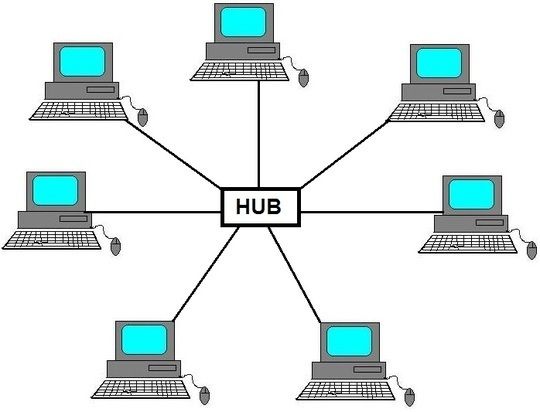
There are two main network topologies; star and the mesh topologies. - 22Star topologycdsaqIn a star network topology there is a central computer or server that all other computers are directly connected to.
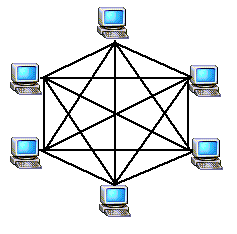
- 23Mesh topologyA mesh topology can be either a full mesh or a partial mesh.
Full mesh - each computer in the network is directly connected to every other computer in the network.
Partial mesh - computers that need to interact the most with each other. - 24Data collisionThe result of two devices on the same network attempting to transmit data at the time down the same connection
- 25InterferenceAdditional energy that appears in a network, that causes a signal to be disrupted.
- 26BottleneckData that is delayed in transmission through an overloaded section of a network.
- 27BandwidthThis is the rate at which data can be transmitted around a network.
- 28LatencyThe measure of any delay that it takes to transmit a data packet from one destination to another in a network.
- 29Error rateRefers to the number of errors that occur in the transmission of data packets around a network.
- 30Transmission mediaThe type of cables used in a network can affect the network performance.
- 31Virtual networkA network created using software.
- 32What is Wi-Fi?Wi-Fi uses radio waves to provide a connection to the internet. The radio waves are transmitted by a WAP that normally has a wired connection to the internet.
- 33FrequencyThe rate per second at which vibration occurs, creating a wave.
- 34EncryptionScrambling data to make it unreadable, to add to security in transmitting the data.
- 35InternetThe largest WAN network.
- 36World Wide WebThe collection of web pages and protocols we access using the Internet.
- 37Domain name server (DNS)A directory of all the domain names of websites and their corresponding IP address.
- 38HostingA host is a web server that hosts one or more websites.
- 39The cloudA cloud is the name given to the remote storage of data and software that we access using a device.
- 40Advantages of the cloud----
- 41Disadvantages of the cloud-----
- 42PacketA unit of data that is transmitted across a network.
- 43Packet switchingThe process of sending data packets across a network.
- 44ProtocolA set of rules that govern network operations.
Makes it possible for all devices to effectively be speaking the same language when communicating with each other on a network. - 45Transmission Control Protocol / Internet Protocol (TCP/IP)Sets rules for how devices on a network are connected.
- 46Hypertext Transfer Protocol (HTTP)Used by web browsers to access websites.
Allows the browser to communicate with a web server. - 47Hypertext Transfer Protocol Secure (HTTPS)Used in conjunction with the TCP/IP protocol to transmit files across a network.
- 48File Transfer Protocol (FTP)Used in conjunction with the TCP/IP protocol to transmit files across a network.
- 49Post Office Protocol (POP)Used to retrieve emails from a server.
- 50Internet Message Access Protocol (IMAP)Works in a similar way to POP. However the email is not deleted from the server when the email is downloaded, until the user chooses to delete it.
- 51Simple Mail Transfer Protocol (SMTP)Governs the sending of emails using a network.
- 52LayerAn individual section of a protocol that is responsible for one part of the operation.
- 53The Application LayerMakes sure data is in a suitable format for transmission.
- 54The Transport LayerPreforms any error detection and correction functions, and establishes the speed at which the data can be sent and received.
- 55The internet Layer/network LayerAllows the exchange of data between lots of different networks.
- 56The Data Link LayerEnsures the network hardware can be used to transmit the data and that any transmission media can be used.
- 57What is meant by 'network topology'. [1]A 'network topology' is the structure of a network.
- 58Draw and label a diagram showing a star topology. [2]
- 59Draw and label a diagram showing a mesh topology. [2]
- 60What is a data collision and how could it impact on a network? [3]Data collision is the result of two devices on the same network attempting to transmit data at the same time down the same connection.
- 61Explain two benefits of networking computers together. [2]
Información
- Descripción
- Computer Science Fichas sobre Chapter 4 - Networks, creado por Caitlin Mulhall el 07/08/2019.
- Creado por
- Caitlin Mulhall
- Visitas
- 1
- Valoración