
Mapa mental
Input devices
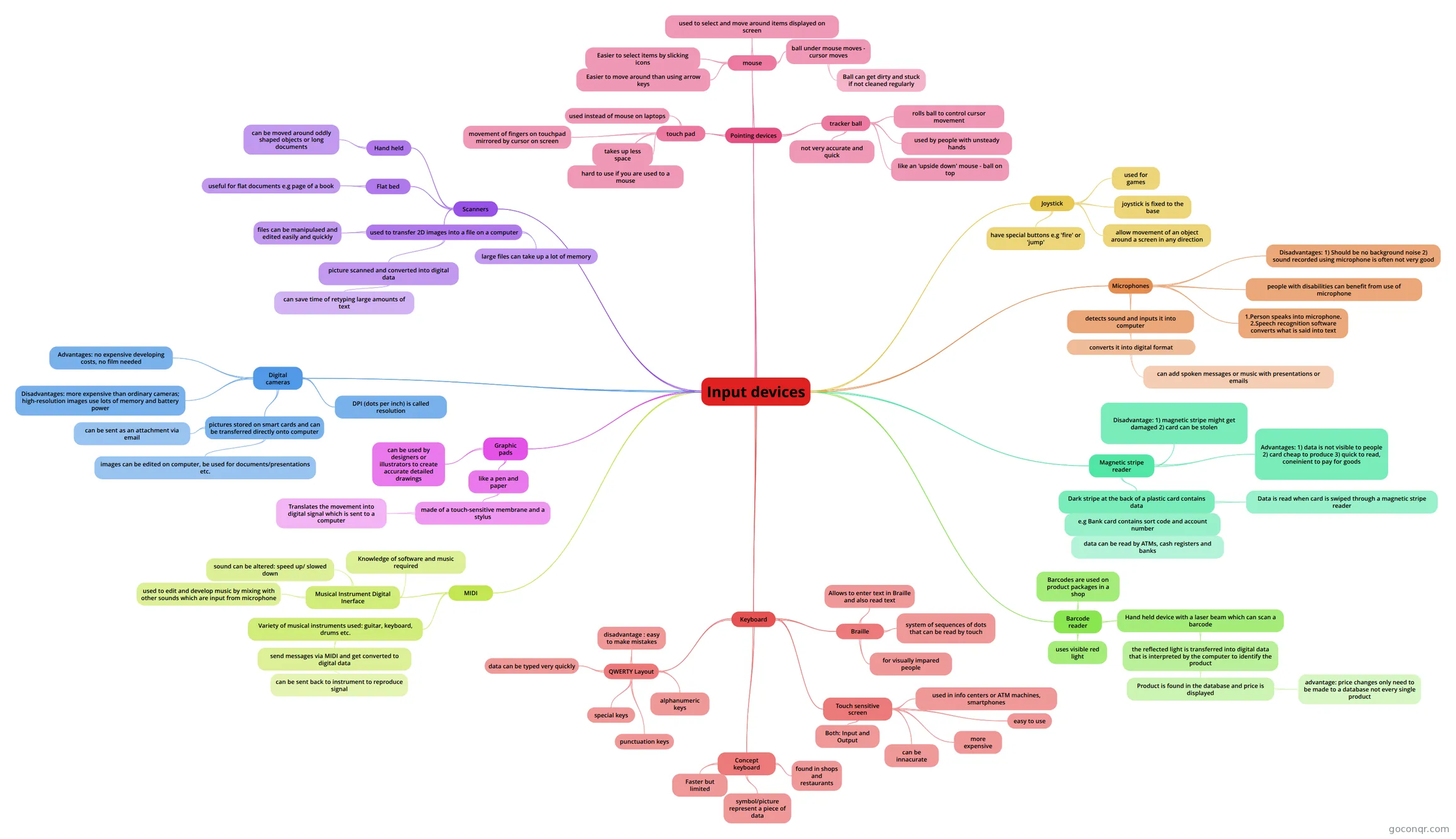
Mind map: Input devices
Contenido del mapa
Input devices
Keyboard
- QWERTY Layout
- alphanumeric keys
- letters and numbers
- punctuation keys
- comma, period, semicolon etc.
- special keys
- function keys, control keys, arrow keys, Caps Lock key etc.
- data can be typed very quickly
- disadvantage : easy to make mistakes
- alphanumeric keys
- Concept keyboard
- Faster but limited
- found in shops and restaurants
- symbol/picture represent a piece of data
- Braille
- system of sequences of dots that can be read by touch
- for visually impared people
- Allows to enter text in Braille and also read text
- Touch sensitive screen
- used in info centers or ATM machines, smartphones
- easy to use
- more expensive
- can be innacurate
- Both: Input and Output
- QWERTY Layout
Pointing devices
- mouse
- ball under mouse moves - cursor moves
- Sensors measure the movement of the ball in 2 directions and computer works out the direcion and distance the mouse has travelled
- Ball can get dirty and stuck if not cleaned regularly
- used to select and move around items displayed on screen
- Easier to select items by slicking icons
- Easier to move around than using arrow keys
- ball under mouse moves - cursor moves
- tracker ball
- not very accurate and quick
- used by people with unsteady hands
- rolls ball to control cursor movement
- like an 'upside down' mouse - ball on top
- touch pad
- used instead of mouse on laptops
- movement of fingers on touchpad mirrored by cursor on screen
- hard to use if you are used to a mouse
- takes up less space
- mouse
Joystick
- used for games
- joystick is fixed to the base
- allow movement of an object around a screen in any direction
- have special buttons e.g 'fire' or 'jump'
Scanners
- used to transfer 2D images into a file on a computer
- picture scanned and converted into digital data
- Scanner shines light onto paper document and measures amount of light reflected back.
- can save time of retyping large amounts of text
- files can be manipulaed and edited easily and quickly
- large files can take up a lot of memory
- picture scanned and converted into digital data
- Flat bed
- useful for flat documents e.g page of a book
- Hand held
- can be moved around oddly shaped objects or long documents
- used to transfer 2D images into a file on a computer
Digital cameras
- DPI (dots per inch) is called resolution
- pictures stored on smart cards and can be transferred directly onto computer
- images can be edited on computer, be used for documents/presentations etc.
- can be sent as an attachment via email
- Advantages: no expensive developing costs, no film needed
- Disadvantages: more expensive than ordinary cameras; high-resolution images use lots of memory and battery power
Microphones
- detects sound and inputs it into computer
- converts it into digital format
- can add spoken messages or music with presentations or emails
- converts it into digital format
- 1.Person speaks into microphone. 2.Speech recognition software converts what is said into text
- people with disabilities can benefit from use of microphone
- Disadvantages: 1) Should be no background noise 2) sound recorded using microphone is often not very good
- detects sound and inputs it into computer
Magnetic stripe reader
- Dark stripe at the back of a plastic card contains data
- e.g Bank card contains sort code and account number
- data can be read by ATMs, cash registers and banks
- Data is read when card is swiped through a magnetic stripe reader
- Sends information to computer bank. Checks if there is sufficient amount available for transaction. If no - card payment is declined. If yes - payment goes through. Money is transferred from customer's bank account onto shop's account.
- e.g Bank card contains sort code and account number
- Advantages: 1) data is not visible to people 2) card cheap to produce 3) quick to read, coneinient to pay for goods
- Disadvantage: 1) magnetic stripe might get damaged 2) card can be stolen
- Dark stripe at the back of a plastic card contains data
Graphic pads
- like a pen and paper
- made of a touch-sensitive membrane and a stylus
- Translates the movement into digital signal which is sent to a computer
- made of a touch-sensitive membrane and a stylus
- can be used by designers or illustrators to create accurate detailed drawings
- like a pen and paper
MIDI
- Musical Instrument Digital Inerface
- used to edit and develop music by mixing with other sounds which are input from microphone
- sound can be altered: speed up/ slowed down
- Knowledge of software and music required
- Variety of musical instruments used: guitar, keyboard, drums etc.
- send messages via MIDI and get converted to digital data
- can be sent back to instrument to reproduce signal
- send messages via MIDI and get converted to digital data
- Musical Instrument Digital Inerface
Barcode reader
- Hand held device with a laser beam which can scan a barcode
- the reflected light is transferred into digital data that is interpreted by the computer to identify the product
- Product is found in the database and price is displayed
- advantage: price changes only need to be made to a database not every single product
- Product is found in the database and price is displayed
- the reflected light is transferred into digital data that is interpreted by the computer to identify the product
- uses visible red light
- Barcodes are used on product packages in a shop
- Hand held device with a laser beam which can scan a barcode
Información
- Descripción
- (Output and Input Devices) ICT Mapa Mental sobre Input devices, creado por mezhievaseda el 21/05/2013.
- Creado por
- mezhievaseda
- Visitas
- 177
- Etiquetas
- Valoración