Mapa mental
Spreadsheets
Contenido del mapa
Spreadsheets
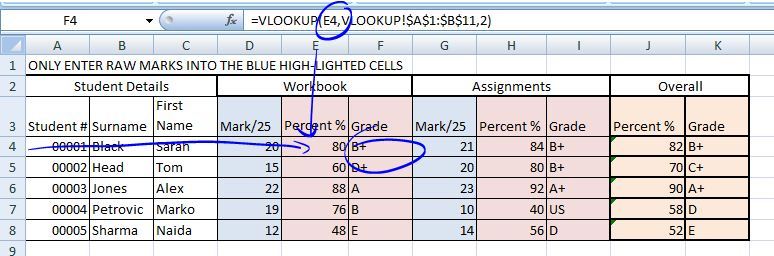
VLOOKUP
- VLOOKUP TUTORIAL
- https://www.timeatlas.com/vlookup-tutorial/
- VLOOKUP TUTORIAL
Functions
- Function Definitions
- A function is a standard routine used to perform common tasks. It represents a complex formula that uses reserved words e.g. VLOOKUP, IF. A function performs a specific set of operations on its input values to produce a single output value.
- Function Definitions
Dropdown Lists
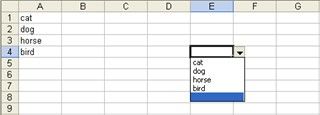
- 1.Create the list in cells A1:A4. Similarly, you can enter the items in a single row, such as A1:D1. 2.Select cell E3. (You can position the drop-down list in most any cell or even multiple cells.) 3.Choose Validation from the Data menu. 4.Choose List from the Allow option's drop-down list. (See, they're everywhere.) 5.Click the Source control and drag to highlight the cells A1:A4. Alternately, simply enter the reference (=$A$1:$A$4). 6.Make sure the In-Cell Dropdown option is checked. If you uncheck this option, Excel still forces users to enter only list values (A1:A4), but it won't present a drop-down list.Click OK.
Formulas