
Mapa mental
Binary systems and hexadecimal
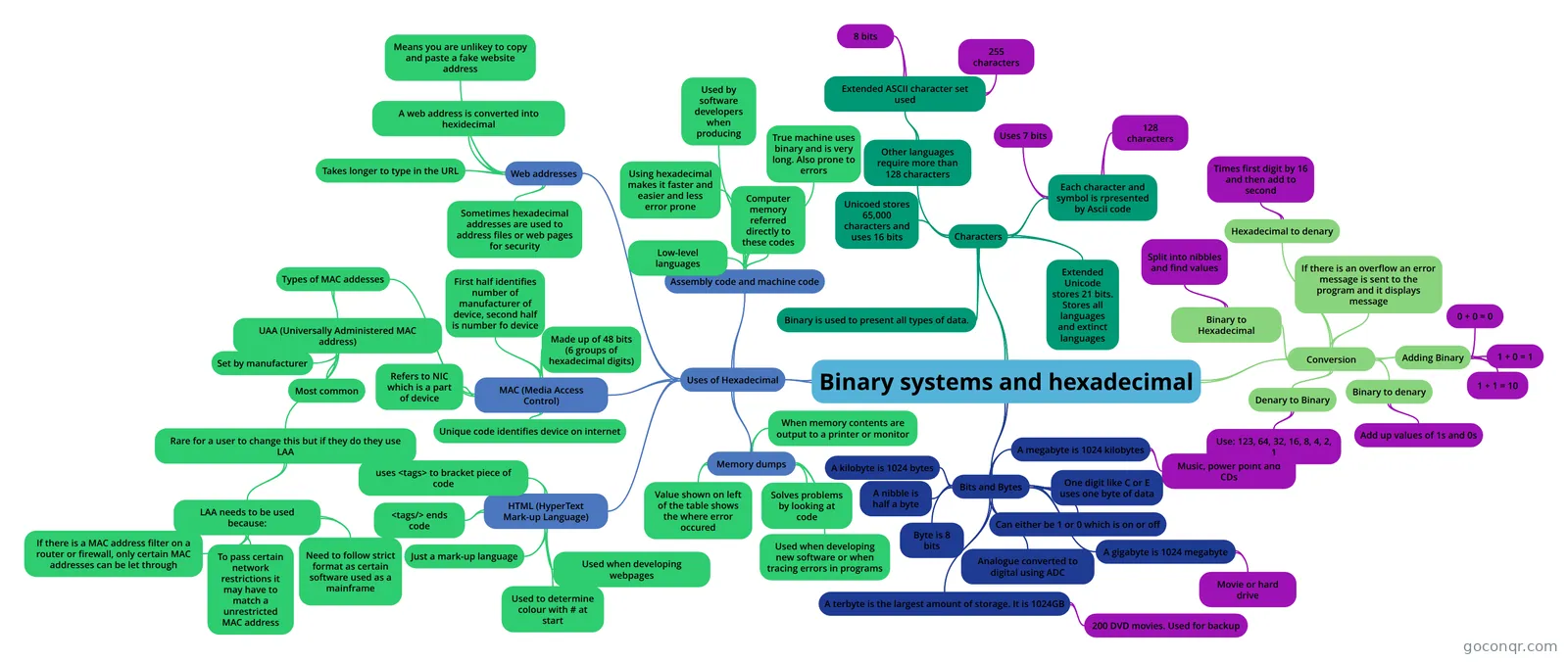
Mind map: Binary systems and hexadecimal
Contenido del mapa
Binary systems and hexadecimal
Bits and Bytes
- Analogue converted to digital using ADC
- Can either be 1 or 0 which is on or off
- Byte is 8 bits
- One digit like C or E uses one byte of data
- A nibble is half a byte
- A megabyte is 1024 kilobytes
- Music, power point and CDs
- A kilobyte is 1024 bytes
- A gigabyte is 1024 megabyte
- Movie or hard drive
- A terbyte is the largest amount of storage. It is 1024GB
- 200 DVD movies. Used for backup
Conversion
- Denary to Binary
- Use: 123, 64, 32, 16, 8, 4, 2, 1
- Binary to denary
- Add up values of 1s and 0s
- Adding Binary
- 1 + 1 = 10
- 1 + 0 = 1
- 0 + 0 = 0
- If there is an overflow an error message is sent to the program and it displays message
- Binary to Hexadecimal
- Split into nibbles and find values
- Hexadecimal to denary
- Times first digit by 16 and then add to second
- Denary to Binary
Characters
- Binary is used to present all types of data.
- Each character and symbol is rpresented by Ascii code
- Uses 7 bits
- 128 characters
- Other languages require more than 128 characters
- Extended ASCII character set used
- 8 bits
- 255 characters
- Extended ASCII character set used
- Unicoed stores 65,000 characters and uses 16 bits
- Extended Unicode stores 21 bits. Stores all languages and extinct languages
Uses of Hexadecimal
- Memory dumps
- Used when developing new software or when tracing errors in programs
- Solves problems by looking at code
- When memory contents are output to a printer or monitor
- Value shown on left of the table shows the where error occured
- HTML (HyperText Mark-up Language)
- Used when developing webpages
- Just a mark-up language
- uses <tags> to bracket piece of code
- <tags/> ends code
- Used to determine colour with # at start
- MAC (Media Access Control)
- Unique code identifies device on internet
- Refers to NIC which is a part of device
- Made up of 48 bits (6 groups of hexadecimal digits)
- First half identifies number of manufacturer of device, second half is number fo device
- Types of MAC addesses
- UAA (Universally Administered MAC address)
- Most common
- Set by manufacturer
- Rare for a user to change this but if they do they use LAA
- LAA needs to be used because:
- Need to follow strict format as certain software used as a mainframe
- If there is a MAC address filter on a router or firewall, only certain MAC addresses can be let through
- To pass certain network restrictions it may have to match a unrestricted MAC address
- LAA needs to be used because:
- UAA (Universally Administered MAC address)
- Web addresses
- A web address is converted into hexidecimal
- Sometimes hexadecimal addresses are used to address files or web pages for security
- Takes longer to type in the URL
- Means you are unlikey to copy and paste a fake website address
- Assembly code and machine code
- Computer memory referred directly to these codes
- Using hexadecimal makes it faster and easier and less error prone
- True machine uses binary and is very long. Also prone to errors
- Low-level languages
- Used by software developers when producing
- Memory dumps
Información
- Descripción
- Mapa Mental sobre Binary systems and hexadecimal, creado por megandmog11 el 19/12/2015.
- Creado por
- megandmog11
- Visitas
- 1
- Valoración
Más sobre Binary, Decimal and Hexadecimal