
Mapa mental
Operating Systems Part 1
Contenido del mapa
Operating Systems Part 1
Purpose Of an OS
- To provide a user friendly interface between the user and the hardware.
- To manage memory, and processors to ensure they are used efficiently.
- To manage peripheral devices, such as printers and keyboards.
- To protect the hardware and software from incompetence and inexperience.
- To provide a similar environment on different machines making programs more transportable.
- To avoid duplication by incorporating commonly used routines.
Types of operating System
- Batch = Either: data is collected together before processing which is then carried out without human interaction or os is given a series of jobs which are carried out without human interaction. Series of jobs = JCL (Job control language).
- Single User = A mode of the operation where the operating system deals with just a single user.
- Multi User = A mode of operation where the computer can deal with a number of users at the same time. E.g. Sales system in a supermarket.
- Multiprogramming = The ability of the operating system to have several programs loaded and the operating system can rapidly switch between them giving the impression they are all running at the same time.
Dealing with Peripheral Devices
- Interrupts - Allow device to send message to processor to stop what it is doing and deal with the peripheral.
- The current state of the processor is stored (on a stack).
- A jump is made to a subroutine that deals with interrupts.
- The interrupt is processed.
- The previous state of the processor is retrieved (from the stack).
- High, Medium and low.
- High level interrupt for data loss.
- Medium level interrupt when the user is waiting for a response.
- Low level interrupt for all other cases
- Polling = Checking the OS of a number of devices in turn to see if they need attention.
- Devices share the same interrupt so OS may need to ask peripherals in turn to see which one made the interrupt.
- Buffers
- An amount of RAM allocated as a temporary storage while data is being transferred to and from a peripheral device.
- Organised a a Queue.
- Times used.
- There is a speed difference between a computer and the peripheral device.
- Where data needs to be sent in batches rather than one bit/byte at a time.
- Example: Word processor sends data at high speed to printer, print buffer stores data and sends to the mechanical printer slowly.
- Example: Key is pressed on keyboard. Interrupt is generated and character is placed in buffer. Applications take characters from the keyboard buffer when they require input.
- Example: Data is always written to a disk in one block, buffer is used to gather block of information for it to be written to a drive.
- Data must be written to disk in one block.
- Enough data must be written to fill up a block
- Data is read from a disk, the complete block is transferred to the buffer.
- Each open file has a buffer.
- Terminating a program which is written to a file without closing may result in data loss.
- If data is already in the buffer the file disc need not be accessed.
- The checksum is calculated on data in a full buffer (to detect errors).
- Data must be written to disk in one block.
- Double Buffering - A single buffer can suffer from buffer underflow which results in pauses
- Problem with memory being written to when whilst being read.
- Application writes to and fills buffer one before doing the same on buffer two. Whilst buffer two is being written to, buffer one is being read and visa versa.
- Double buffer means continual flow.
- Also used in video cards. Screen shows image from one buffer while processor builds up information in the other.
- Device Drivers
- Device drivers form an interface between the OS and specific piece of hardware.
- Logical Device - such as a printer or a disk. A piece of hardware that has an address (may be a memory location) that is difficult for the user to remember.
- A single physical disk may be partitioned to appear as several logical drives
- A single printer may appear as two logical printers, one that prints in black and white and the other in colour.
- Interrupts - Allow device to send message to processor to stop what it is doing and deal with the peripheral.
Accounting and Security
- Function of OS is to monitor the use and to protect the data on the computer from unauthorised access. Particularly important on a multi user system.
- User Identification: On a multi user system the OS needs to know who is using the system and be able to authenticate them.
- Each user must have an account set up.
- Each user must log on before they can use the computer, a process designed to identify and authenticate the user.
- Weaknesses
- Quite easy to work out username
- Passwords can be guessed.
- Users forget passwords.
- Users may be careless with passwords.
- Smart card or a physical key.
- Finger print scanner/ biometrics.
- Administrator - At least one user who can create and manage accounts, set backups, manage groups etc.
- File protection - OS makes sure each user can only access their own files which is achieved through access rights.
- File Encryption - To stop data from being accessed externally, OS can encrypt the data.
- Problems with OS Security
- Back up is taken and placed on external device, access rights information is lost.
- Stolen hard disk placed in another system can be accessed.
- Administrators can access any file.
- Problems with OS Security
- Access Log - System keeps records of who accessed what to monitor unauthorised access.
Record Locking - Possible for multiple users to try to modify a record at the same time causing a problem.
- Solved by system record locking which means that the record is not allowed to be accessed more then once at one time.
Scheduler
- High Level Scheduler
- Batch processing system - HLS responsible for deciding the order in which jobs are to be started.
- Order jobs are started depends on...
- Priority given by user.
- Processing requirements processor availability.
- Resources needed.
- Low Level Scheduler
- Maintains a queue of all of the currently active jobs and decides access to processor.
- Order depends on priority, required resources, and available resources as well as closeness to completion.
- Time Slice - Multiprogramming system, amount of processor time given to a task before processing moves on to another task.
- Scheduler Strategies
- Round robin - Each job is given an equal time slice of the processor, provided it can be executed.
- Run time Method - A task is executed until completion or processing comes to a halt.
- Job priorities - Some OS allow jobs to be given different priorities. High priority may be given more time by: allocating longer time slices, give time slice more frequently.
- High Level Scheduler
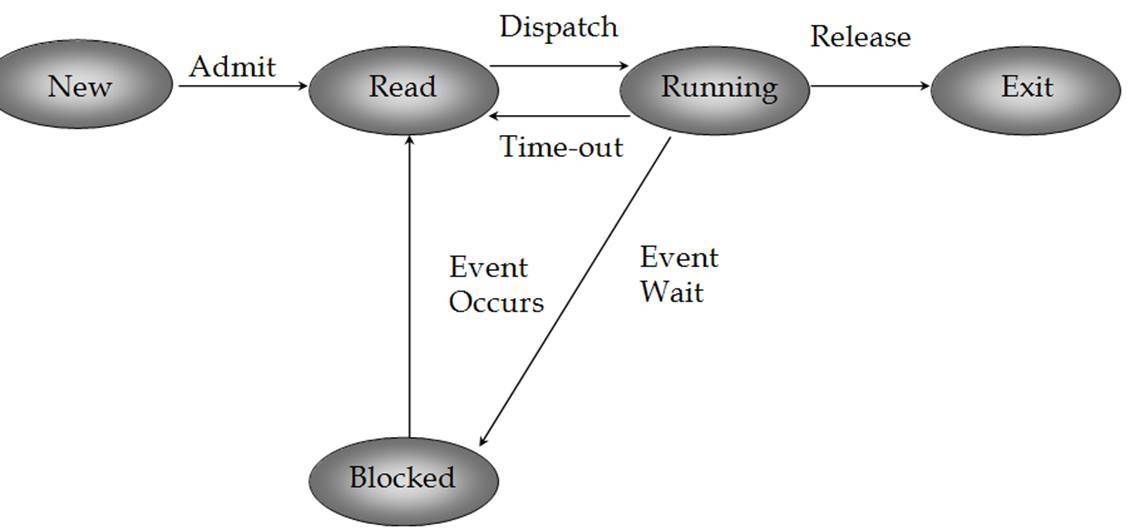
Five State Processing model
- New - A process has been created but not yet admitted to the pool for executable processes.
- Ready - Processes that are prepared to run if given an opportunity.
- Running - Process that is currently being executed.
- Blocked - A process that cannot execute until a specified event has been completed. Such as reading a record from a file or user input.
- Exit - A process that has been released by OS either after normal termination or after abnormal termination.
Memory Management
- Memory Structure
- Main Store = RAM + ROM
- RAM - Used for holding most running programs and data that is being processed.
- ROM - Holding at least the instructions to start a computer.
- Handheld computer (without HDD) - whole of OS and applications will be on ROM.
- Main Store = RAM + ROM
- Main Store - On a multitasking computer partitioning refers to dividing up the main store so that each of the current programs can have a part. The OS makes sure that programs do not corrupt each other.
- Variable Partitioning - Each task is allocated a variable sized section of memory depending on how much memory the task needs. Task has exclusive use of the partition.
- Problems
- Memory becomes fragmented as task are removed.
- Tasks cannot claim more memory after they have been started.
- Consequences of partitioning failure.
- If partitioning fails then one program will use the memory allocated to another program resulting in error.
- Problems
- Modern Memory management -
- OS must allocate memory to each of the programs currently running. Early systems suffered from memory fragmentation and applications needed to be able to run from any location.
- Paging - Main store is divided into pages. May not be next to each other however the OS MMS makes them appear to be consecutive. whne memory is required the memory manager intercepts the request and reroutes the task.
- Swapping - To allow more programs to be in main memory than the capacity of main store, a swapping disc will be used to swap currently suspended tasks (between time slices).
- Virtual Memory - Each task allocated small amount of main store. Longer programs executed in segments with required segments coming form the disc. Automatic process and appears to user as working on system with almost unlimited memory.
- Cache - Small amount of RAM that is built into a device such as a processor or hard disc for very fast temporary storage.
- Memory Structure
Data Transmission Part 1
- Computers always use digital data. This is because...
- Precise signal level of digital is not vital.
- Encryption is often used in transmission of information. To keep data secret or breaking information down.
- Enables multi directional transmission simultaneously.
- Serial Transmission
- Simplex - Data that can flow in one direction. Broadcast digital radio and digital television are examples of simplex transmission.
- Half duplex - Provides for communication in both directions but only one direction at a time. For example: a walkie talkie.
- Full duplex - Data can flow in both directions at the same time. For example mobile phones.
- Parallel transmission - Inside a computer from the processing unit to the RAM. A number of bits are transferred simultaneously.
- Digital Transmission - If data is transported down a copper or fibre optics cable patterns of bits can be represented by two different voltages (0v or 5v) or light being on or off.
- Modulated Signals - A more complex arrangement where the binary data is used to vary some other signals.
- Allows binary data to be sent that was not designed to carry binary data.
- Allows several bits to be sent at the same time by each bit being sent using a different carrier wave.
- Device that performs modulation is known as a modem. Converts digital data into analgoue sound tones for transmission over telephone lines.
- ADSL
- Converts the digital data into a number of modulated carrier waves for transmission over a communication system.
- Modulated Signals - A more complex arrangement where the binary data is used to vary some other signals.
- Computers always use digital data. This is because...
Imágenes y archivos del mapa
Información
- Descripción
- A-Level Computing Mapa Mental sobre Operating Systems Part 1, creado por elliot9678 el 08/04/2016.
- Creado por
- elliot9678
- Visitas
- 0
- Valoración