
Mapa mental
Human-computer interface
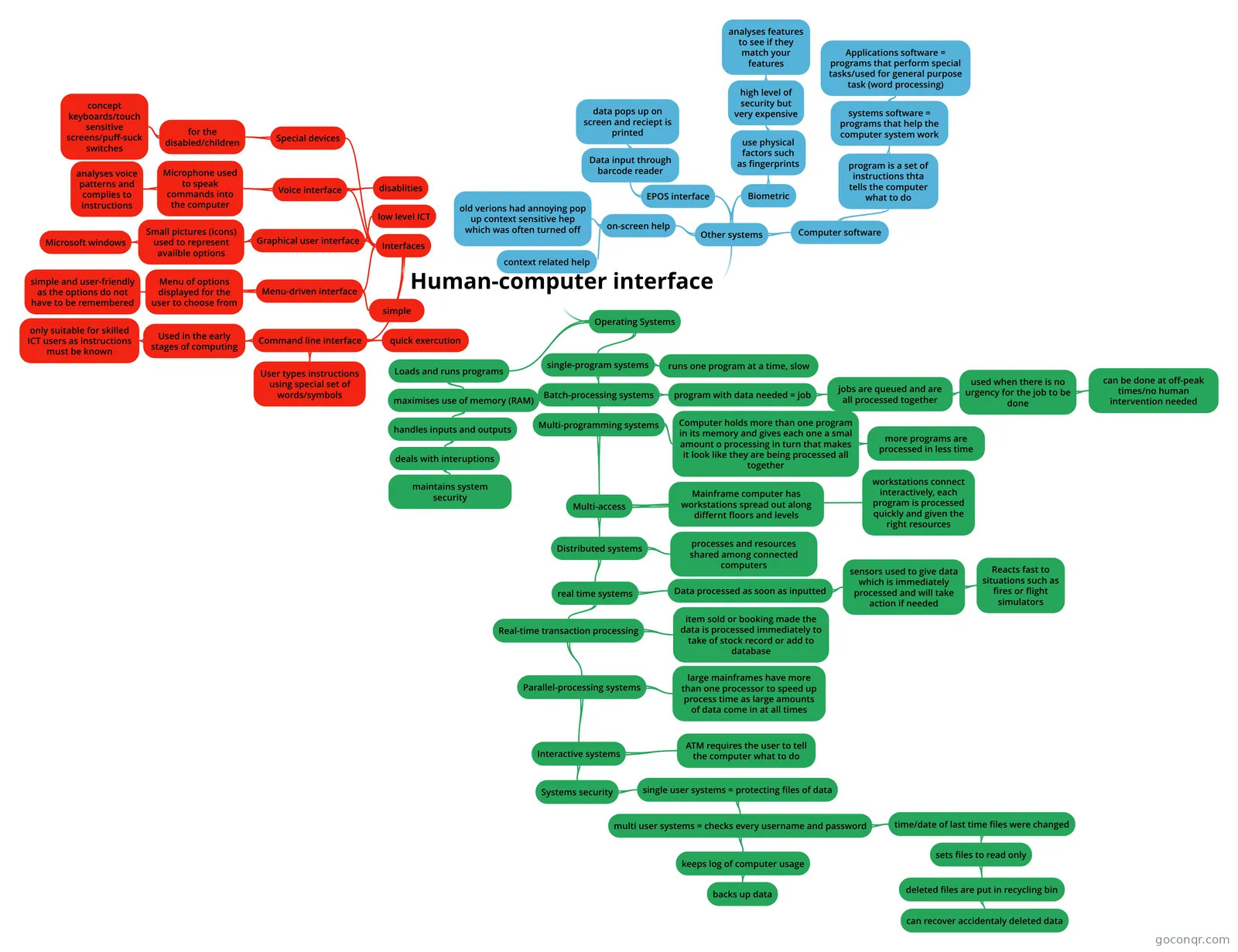
Mind map: Human-computer interface
Contenido del mapa
Human-computer interface
Interfaces
- Command line interface
- User types instructions using special set of words/symbols
- Used in the early stages of computing
- only suitable for skilled ICT users as instructions must be known
- quick exercution
- Menu-driven interface
- Menu of options displayed for the user to choose from
- simple and user-friendly as the options do not have to be remembered
- simple
- Graphical user interface
- Small pictures (icons) used to represent availble options
- Microsoft windows
- low level ICT
- Small pictures (icons) used to represent availble options
- Voice interface
- Microphone used to speak commands into the computer
- analyses voice patterns and complies to instructions
- disablities
- Microphone used to speak commands into the computer
- Special devices
- for the disabled/children
- concept keyboards/touch sensitive screens/puff-suck switches
- for the disabled/children
- Command line interface
Other systems
- on-screen help
- context related help
- old verions had annoying pop up context sensitive hep which was often turned off
- EPOS interface
- Data input through barcode reader
- data pops up on screen and reciept is printed
- Data input through barcode reader
- Biometric
- use physical factors such as fingerprints
- high level of security but very expensive
- analyses features to see if they match your features
- high level of security but very expensive
- use physical factors such as fingerprints
- Computer software
- program is a set of instructions thta tells the computer what to do
- systems software = programs that help the computer system work
- Applications software = programs that perform special tasks/used for general purpose task (word processing)
- systems software = programs that help the computer system work
- program is a set of instructions thta tells the computer what to do
- on-screen help
Operating Systems
- Loads and runs programs
- maximises use of memory (RAM)
- handles inputs and outputs
- deals with interuptions
- maintains system security
- deals with interuptions
- handles inputs and outputs
- maximises use of memory (RAM)
- single-program systems
- runs one program at a time, slow
- Batch-processing systems
- program with data needed = job
- jobs are queued and are all processed together
- used when there is no urgency for the job to be done
- can be done at off-peak times/no human intervention needed
- used when there is no urgency for the job to be done
- jobs are queued and are all processed together
- Multi-programming systems
- Computer holds more than one program in its memory and gives each one a smal amount o processing in turn that makes it look like they are being processed all together
- more programs are processed in less time
- Multi-access
- Mainframe computer has workstations spread out along differnt floors and levels
- workstations connect interactively, each program is processed quickly and given the right resources
- Distributed systems
- processes and resources shared among connected computers
- real time systems
- Data processed as soon as inputted
- sensors used to give data which is immediately processed and will take action if needed
- Reacts fast to situations such as fires or flight simulators
- sensors used to give data which is immediately processed and will take action if needed
- Real-time transaction processing
- item sold or booking made the data is processed immediately to take of stock record or add to database
- Parallel-processing systems
- large mainframes have more than one processor to speed up process time as large amounts of data come in at all times
- Interactive systems
- ATM requires the user to tell the computer what to do
- Systems security
- single user systems = protecting files of data
- multi user systems = checks every username and password
- keeps log of computer usage
- backs up data
- time/date of last time files were changed
- sets files to read only
- deleted files are put in recycling bin
- can recover accidentaly deleted data
- deleted files are put in recycling bin
- sets files to read only
- keeps log of computer usage
- multi user systems = checks every username and password
- single user systems = protecting files of data
- Data processed as soon as inputted
- Computer holds more than one program in its memory and gives each one a smal amount o processing in turn that makes it look like they are being processed all together
- program with data needed = job
- Loads and runs programs
Información
- Descripción
- KS4 ICT Mapa Mental sobre Human-computer interface, creado por Matthew Stentiford el 27/04/2017.
- Creado por
- Matthew Stentiford
- Visitas
- 21
- Valoración