
Using GoConqr to teach science
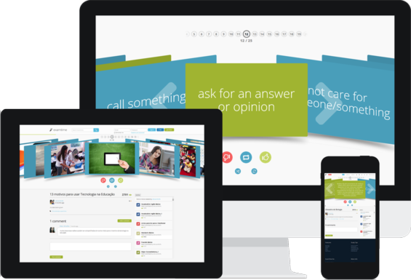
Diapositivas del conjunto (8)
-
Using GoConqr to teach Science
-
GoConqr tools for science teaching
- Flash cards
- Quizzes
- Mind Maps
- Notes
- Slides
- GoConqr tools provide an easy way to access and create resources to facilitate teaching science.
- Let's look at how these tools could be used in a secondary school science classroom.
-
- Flashcards are a great way to learn key concepts or formulas.
- Students can discover already created flashcard decks which they can use to revise on the go, using the GoConqr mobile app.
- As a teacher, you could assign students a different topic each for them to create a revision flashcard deck. These can then be shared in a class group created on GoConqr.
- The flashcard deck on the top right is an example using junior cert physics formulas. Another deck (bottom right) teaches students to identify lab equipment.
- You could also display a deck on screen during class time for a quick revision pop quiz!
- Laboratory Tools
- Proven Ways Flashcards Improve Learning
- Junior Cert Physics formulas
-
- GoConqr quizzes are a useful and fun way for you to test your students' learning.
- You can create quizzes with a variety of question types, including multiple choice and fill-in-the-blanks.
- Students can take the test multiple times and track their improvement. When they review their answers, they can see not only their result, but why their answer was correct or incorrect.
- Quizzes can be timed.
- Creating their own quizzes is a wonderful way for students to deepen and demonstrate their mastery of subject material.
- Test your Knowledge with Quizzes
- Acids and Bases
- Atomic numbers and mass numbers quiz
-
- Mind maps are used to arrange information visually to facilitate understanding and recall.
- You could create resources to share with your students such as
- the mind map guide to Blood (top right)
- Each node represents a concept or idea, and further information or explanation can be included in attached notation.
- Students can check off nodes as they learn concepts or complete tasks.
- The Digestive System
- Blood
- Connect your Content with Mind Maps
-
- Students can take notes in class, or make notes at home.
- These can be shared in groups and used for revision, on a desktop computer, or on the GoConqr mobile app.
- Students can copy, edit, and combine notes, collaborating to make a revision guide for exams.
- Notes can include images, video and links to other resources created in GoConqr.
- Food
- Transform your Material with Online Notes
-
- Slides can be used for traditional presentations in class, but GoConqr slides can be used for so much more:
- Other resources, including quizzes, mind maps and flashcards, can be embedded in slides, organising your material for easy access and presentation.
- Videos can also be embedded in slides, so you can show video excerpts straight from your GoConqr slides.
- The use of video and audio clips can contribute significantly to learning.
- Introduction to the Atom
-
- A further feature of GoConqr is the ability to create groups.
- You can create a group for each class, making it easy for students to share resources, and for you to administer quizzes.
- Groups can be used for discussion outside the classroom which facilitates peer learning.
- You could have students share their notes about their experiments and even include photos of their outcomes.
Información
- Descripción
- A guide to using GoConqr tools in the classroom for science teachers
- Creado por
- Sarah Egan
- Visitas
- 1.213
- Etiquetas
- Historial
-
- Creado por Sarah Egan · 21 oct 2015
- Copiado por Sarah Egan · 21 oct 2015
- Valoración