
Fichas
Computing
Fichas del conjunto (84)
- 1Define a computer systemis a collection of parts that work together to process data.
- 2How can you enter dataData has to be INPUT manually (e.g. keyboard) or automatically (e.g. pressure sensor).
- 3What happens at the CPU?Then the CPU does something to it – this is a PROCESS – so that what is OUTPUT (e.g. on the screen) looks different to what you input.
- 4What does the store do?The STORE keeps the data temporarily (in RAM) or permanently (e.g. on a hard drive) until it is needed.
- 5What is software?The SOFTWARE is the set of instructions to make everything happen.
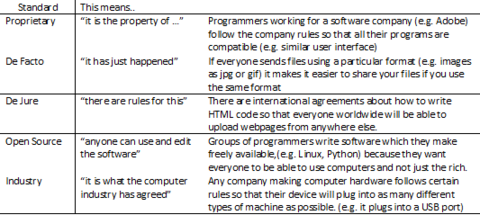
- 6Explain the need for adherence to suitable professional standards in the development, use and maintenance of computer systems
- 7State the purpose of the CPUprocesses the data stored in its memory.
- 8Where is data stored?PRIMARY STORAGE/ CACHE MEMORY (RAM).
- 9What moves data to the correct place?The CONTROL UNIT
moves the data to the correct place (register) - 10What does the ALU do?Does any calculations or comparisons.
- 11What happens in the fetch execute cycle?FETCH
CPU looks up the address of the next instruction, finds it in RAM and copies it into the CPU.
@ CPU IT'S DECODED.
the CPU works out what it has to do. EXECUTE
does what it has been instructed to do - 12How does the clock speed affect performance?Tells you how many instructions the CPU can carry out in one second. If you increase the clock speed you increase the number of instructions carried out per second.
- 13How does the cache memory affect the performance of the computer?CACHE MEMORY uses the fastest RAM chips and is closest to the processor.
If you increase the amount of Cache memory you cut down the waiting time while the processor fetches the next instruction. - 14How does the number of cores affect the performance of a computer?The NUMBER of CORES tells you how many CPUs you have in your computer. (Dual Core means 2 CPUs).
With a multi-core processor the program will run faster because the instructions are shared out with each processors carrying out a different instruction at the same time. - 15Why is data represented in binary form in computer systemsComputers use 2 state devices
computers used switches and light bulbs
RAM chip circuits are either on or off. Magnetic spots on a hard drive are either North or South polarity.
Marks on a CD reflect or absorb light. - 16Input devices for people with limited movementLimited movement: Tracker balls, Joysticks, Concept keyboard with overlays, Pointing Stick, Foot Pedals, Suck and Puff switch, Eye Tracking
- 17Input devices for people with limited visionLimited vision: Speakers with “talking” software, Magnifiers, Braille printers and keyboards, Concept keyboard with overlays
- 18What is ROM?ROM is programmed during manufacture and can’t be changed.
It is non-volatile – the data remains when the power is turned off. - 19What is RAM?RAM is blank so you can fill it with whatever you want.
It is volatile – all the data is lost when the power is turned off - so you have to save your work on a secondary storage device if you want to keep it. - 20Explain the need for ROM in a computer systemIt stores the programs that the computer will always need called the BIOS (basic input/output system). This does not need a lot of space, so computers only have a few Megabytes of ROM.
- 21Describe the purpose of RAM in a computer systemIt stores the programmes that are running / being processed by the processor.
- 22Explain how the amount of RAM in a personal computer affects the performance of the computerIf you have enough space in RAM to load all the PAGES of the program it will run at full speed. If you can only load some of the PAGES the program will have to slow down every time pages are swapped.
- 23Explain the need for virtual memoryTo store the extra PAGES of a large program when it won’t all fit in RAM.
- 24Describe cache memoryPart of the RAM storage is called CACHE MEMORY.
This is the RAM closest to the CPU and is used to store data that is needed immediately by the processor.
They use high speed S-RAM chips for cache memory. - 25Describe flash memoryFLASH MEMORY is a solid state device found in a flash drive.
It uses a special type of ROM chip called an EPROM (Erasable Programmable Read Only Memory).
You can add your own programs to it like a RAM chip, and they stay there when the power goes off like a ROM chip. - 26Why is flash memory called flash memory?It is called FLASH memory because you can erase data from it by passing a large current (a flash) through it when you want to.
- 27Discuss how changes in memory technologies are leading to innovative computer designsSMALLER:
fit into smaller, thinner computers
CHEAPER:
made for so little money
MORE CAPACITY:
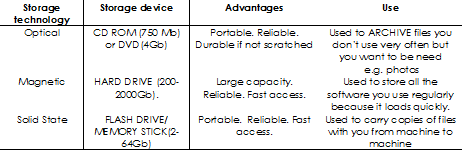
can hold more - 28Explain the need for secondary storageTo keep permanent copies of programmes and data files.
- 29Describe common storage technologies
- 30What are different types of User interfaceGraphical User Interface with windows, icons, tool bars and a pointer (e.g. Windows)
Command Line Interface - type in all the commands (e.g. MS DOS)
Menu Driven Interface - have to find your way through a series of menus (e.g. railway ticket machines). - 31Describe the purpose and use of common utility programs:COMPUTER SECURITY: (antivirus, spyware protection and firewalls)
DISK ORGANISATION: (formatting disks, loading/saving/ files, defragmentation)
SYSTEM MAINTENANCE: (system information and diagnosis, system clean up tools, automatic updates) - 32Advantage and disadvantage of Custom written softwareThis should give you a perfect program which does exactly what you want in a fast and efficient way.
However, it may cost a fortune, it may take a long time to write and it may never work. - 33Advantage and disadvantage of off the shelf softwareThis software can be bought today, lots of other people use it, there are lots of sites to help you if you get stuck and it is relatively cheap. However, it may not do exactly what you want.
- 34Advantage and disadvantage of Open Source SoftwareDeveloped by a community of programmers and offered freely to anyone else who wants to use it.
It may do most of what you want
May not work as well as the software you buy. - 35Advantage and disadvantage of proprietary softewareSoftware owned by a software company. It is often well designed and free from most bugs because a large team of expert programmers have written and tested it. However you have to pay to use it and it may not be possible to customise it very much.
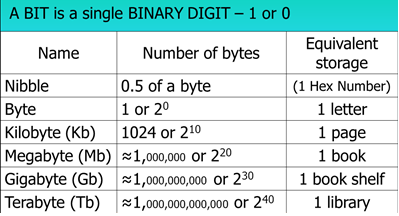
- 36How many bytes in a Kb, Mb, Gb and Tb
- 37Why do people use hexidecimal numbers?It's a short hand way of writing long binary numbers.
It is quicker to write, easier to remember and less likely to be typed incorrectly – and the computer can easily turn it back into binary. - 38What is the relationship between the number of bits per character in a character set and the number of characters which can be representedASCII has 8 bits (binary numbers with 8 columns) giving 256 numbers to store 256 different characters.
UNICODE has 16 bits giving over 65,000 numbers
UNICODE takes up twice as much memory as ASCII - 39Explain the representation of an image as a series of pixels represented in binaryEach pixel must be given a binary code to tell the computer what colour it has to be.
If you have just 1 BIT for each pixel you can only have black or white.
If you have 8 bits for each pixel you can have 256 COLOURS.
If you have 16 bits for each pixel you can have over 65,000 colours – giving very high resolution images. - 40Explain the need for metadata to be included in the file such as height, width and colour depthMETADATA tells the computer things such as the size of the image and how many bits have been used for each pixel of an image.
- 41What is resolution and what are the Advantage and disadvantage of high resolution pictureResolution:
The number of pixels needed to make the image.
If we wanted to make our image closer to the original view we could split one pixel into four and give each one a slightly different colour to make the picture look better but would also make the file 4 times as big. - 42how can sound be sampled and stored in digital formSound is a continuous analogue wave which can be plotted on a graph. A SAMPLE is when you read off the value of that sound at a certain point in time. Each SAMPLE VALUE is then recorded as a binary number.
- 43What affects the quality of a sound file?SAMPLING INTERVALS
ACCURACY OF SAMPLE VALUES
SIZE OF SOUND FILE - 44Explain the difference between high level code and machine code Explain the need for translators to convert high level code to machine codeHigh level code is written in a language close to English that is easier for us to understand.
Machine code is binary numbers. Translators need to convert high level code into machine code so that the computer can understand the program we have written. - 45Describe the characteristics of an assembler, a compiler and an interpreterAn ASSEMBLER: Translates LOW LEVEL code into Machine code.
A COMPILER: Translates HIGH LEVEL code into Machine code.
AN INTERPRETER: Translates HIGH LEVEL code into Machine code. being translated live every time it is run but that makes it easier to edit. - 46What are common tools and facilities available in an integrated development environment (IDE)This is what you use when you write Python Programs.
EDITOR - the screen you use to write the programs.
ERROR DIAGNOSTICS- changing the colour of the text & gives messages when you try to run a bugged program.
RUN-TIME ENVIRONMENT - the screen that allows you to try out your program before you finally publish it. - 47Define the terms variable and constant as used in an imperative languageVARIABLE: CHANGE while the program is running.
CONSTANT: Will NOT CHANGE while the program is running. - 48What is an integer?This is a whole number such as a counter in a program.
- 49What is real data?A number with a decimal point such as the answer to a division sum
- 50What is boolean data?When a data item is TRUE or FALSE / YES or NO
- 51What is a character?A SINGLE letter used for example with GENDER – M or F
- 52What is a string?You can store anything in this data type such as names, postcodes or telephone numbers
- 53What is a database?A persistent organised store of data.
This means that the data you put there, stays there, until it is deleted (persistent) and it can be found again easily (organised). - 54What does data handling software allow you to do?CREATE a database by setting up TABLES which have FIELDS (the headings) and RECORDS (the rows of data).
MAINTAIN a database by entering, updating and deleting data.
INTERROGATE a database by setting up QUERIES. - 55Describe how a DBMS allows the separation of data from applications and why this is desirableA DATABASE MANAGEMENT SYSTEM (DBMS) provides an interface between the data and applications so they can be stored separately. BA can store the data, each travel agent can set up their own set of applications (e.g. set up their own security system) and the DBMS is able to link the two together.
- 56Describe the relationship between entities and tablesENTITIES with ATTRIBUTES in the database plan become TABLES with FIELDS in the actual database
- 57What are the components of a relational database?Tables, Forms, Queries, Reports and Modules
- 58What are forms for?FORMS: These provide a way to enter and validate new data including drop down lists and help buttons.
- 59What are queries for?QUERIES: These provide a way to search or interrogate a database. WHAT from WHERE WHEN.
- 60What are reports for?REPORTS: These provide a way to format the output. Reports can merge the data with letters, tickets e-mails and any other documents the user requires. They can also produce graphs and charts.
- 61What are modules for?MODULES: These are programs written to do extra jobs in the database. They could be pre-written like a sort routine / a way of producing pie charts or they could be written when a user has a specific need.
- 62Explain the advantages of networking stand-alone computers into a local area network1. They can share resources like a printer, a modem, application software and files.
2. A user can get access to these resources from any machine.
3. Updates can be made on one machine and then copied to the others. - 63What is a NETWORK CARD for?They allow the signal from the network to be transmitted to the machine.
- 64What is a hub?HUB: A hardware device that connects multiple computers together, allowing them to share data packets.
- 65What is a switch?SWITCH: Similar to a hub but allowing multiple connections simultaneously.
- 66What does a router do?Forwards data packets across multiple networks to their final destination by the most efficient route.
- 67What does a bridge do?BRIDGE: Joins two networks together.
- 68What does a Wireless Access Point do?WIRELESS ACCESS POINTS: Creates a wireless network.
- 69What does a repeater do?Boosts the signal back to its correct level.
- 70What does a modem do?MODEM: It converts the digital data into a continuous analogue wave-form for the telephone system.
- 71Why is a Client server network used?Used in larger LAN networks such as a school. The server stores all the users’ data and some of the application software.
- 72What is the difference between a thin-client system and a thick-client system?THIN-CLIENT SYSTEM has most software on the server (cheap, slower to load, easier to manage),
THICK-CLIENT SYSTEM has most software on the client (can work independently of the network). - 73What is a peer to peer network?When computers are linked up but without a server.
For small LANs such as a small office or at home.
Software and data are stored on all machines but can be accessed from any other. - 74What are the properties of a ring network?Computers are linked in a ring with more than one server.
Data travels in ONE direction only.
Should avoid most collisions. - 75What are the properties of a bus network?Computers are linked in a row with one server.
Data travels in BOTH directions leading to lots of collisions. - 76What are the properties of a star network?Server linked directly to each computer.
Should avoid all collisions even though data travels in BOTH directions.
Needs a router to organise data packets. - 77What's the difference between LAN and WAN?LAN: Covers a small geographical area. Share application software, data files AND hardware.
WAN: Covers a large geographical area. Only shares data files (e.g. web pages, downloads etc.) - 78What is an IP address?An IP ADDRESS (Internet Protocol address) is a 4 byte number between 0.0.0.0 and 255.255.255.255 It is a number given to any device on a network
- 79What is a MAC addressA MAC ADDRESS (Media Access Code Address) is a 6 byte number usually represented as 12 Hex Codes from 00-00-00-00-00-00 to FF-FF-FF-FF-FF-FF
- 80What are protocols?International agreements about how to do things such as what an IP Address will look like.
Any website with a URL (Uniform Resource Locator) starting with HTTP:// is using a format called Hypertext Transfer Protocol – which means it is written in HTML (Hypertext Mark-up Language). - 81What are security measures in networks?User access levels,
Suitable passwords and
Encryption techniques - 82Describe the nature of the Internet?The Internet is a WAN (wide area network) of other networks. At the heart of it are DNSs (Domain Name Servers), Web Servers and ISPs (Internet Service Providers).
- 83Describe common file standards associated with the internet such as JPG, GIF, PDF, MP3, MPEGJPG – Used to store graphic images in lossy format. This reduces the file size and speeds up downloading.
GIF – Used to store graphic images in lossless format. This stores better quality images.
PDF – This preserves the content and the format of the original document.
MP3 – This stores sound files in lossy format. This reduces the file size and speeds up downloading.
MPEG – This is used to store video - 84Describe the differences between lossy and lossless compression.LOSSY COMPRESSION: Removes a percentage of the original data so it is less accurate but still usable.
LOSSLESS COMPRESSION: All the original detail is kept but it is concatenated. In a text file common words like “the” could be replaced by one character like “&”.