
Mind map
AWS
Map content
AWS
Innovate with AWS Services
- Serverless Application
- don’t require you to provision, maintain, or administer servers
- Artificial intelligence
- AWS Transcribe: Convert speech to text
- AWS Comprehend: • Discover patterns in text
- AWS Fraud: fraudulent online activities
- AWS Lex: Build voice and text chatbots
- Machine Learning
- AWS SageMaker: build, train, and deploy machine learning models at scale
- AWS Augmented AI (A2I): provides built-in human review workflows for common machine learning use cases
- AWS Textract: extracts text and data from scanned documents
- DeepRacer: Race car to test maching learning
- Internet of Things
- enabling connected devices to communicate all around the world.
- Ground Station
- only pay for the satellite time you actually need
- Serverless Application
Snow Family: Dispositivos de almacenamiento externo
- hardware and software is cryptographically signed, and all data stored is automatically encrypted using 256-bit encryption keys
- Snowcone
- 2 CPUs, 4 GB of memory, and 8 TB of usable storage
- Snowball
- Storage Optimized: 80 TB
- Compute Optimized : 42 TB
- Snowmobile
- exabyte-scale data transfer: 100 PB
Well-Architected Framework: Desing and operate the cloud with best practices
- Operational excellence
- run workloads effectively, gain insight into their operation, and continuously improve supporting processes and procedures to delivery business value.
- Security
- Protect, risk assestments and mitigation
- • Automate security best practices when possible
- • Apply security at all layers
- • Protect data in transit and at rest
- Protect, risk assestments and mitigation
- Reliability
- the ability of a system to do its fuctions
- Mitigate disruptions, recover failure, acquire computing
- the ability of a system to do its fuctions
- Performance efficiency
- use computing resources efficiently
- Ej: using serverless architectures or go global
- use computing resources efficiently
- Cost optimization
- deliver business value at the lowest price
- Operational excellence
6 strategies for migration
- Rehosting
- Lift and Shift
- Replatforming
- lift-tinker-and-shift
- make a few cloud optimizations but no core changes. Ej: BD --> RDS
- lift-tinker-and-shift
- Repurchasing
- Moving to a different product
- AWS Marketplace: CRM --> Salesforce.com
- Moving to a different product
- Refactoring / Re-architecting
- Volver a desarrollar
- Retire
- Get rid of (librarse de algo
- Retain
- not migrate to the cloud
- Rehosting
AWS Cloud Adoption Framework (AWS CAF) - Para el area de IT
- Business Perspective
- from a model that separates business and IT strategies into a business model that integrates IT strategy. Estrategia de IT alineada --> necesidades de negocio
- People Perspective
- helps prioritize training, staffing, and organizational changes for cloud adoption
- Governance Perspective
- helps you to identify and implement best practices for IT governance (Gerencia IT)
- Operations Perspective
- operating and recovering IT workloads to meet the requirements of your business stakeholders.
- Security Perspective
- security controls that meet the organization’s needs.
- Platform Perspective
- implementing new solutions on the cloud, and migrating on-premises workloads to the cloud.
- Business Perspective
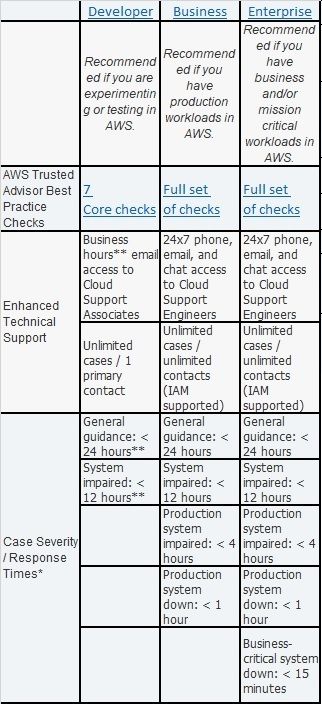
Support Plans
- TAM is your primary point of contact at AWS
- provide guidance, architectural reviews, and ongoing communication with your company as you plan, deploy, and optimize your applications.
- TAM is your primary point of contact at AWS
Princing
- Free Tier
- AWS Free Tier
- These offers do not expire and are available to all AWS customers.
- 12 Months Free
- Trials
- Short-term free
- AWS Free Tier
- AWS pricing concepts
- Pay for what you use
- Pay less when you reserve
- Pay less with volume-based discounts when you use more
- Pricing models for Amazon EC2
- On-Demand Instances
- Pay for what you use
- No long-term commitments or upfront payments are required
- Savings Plans
- low prices on Amazon EC2, AWS Lambda, and AWS Fargate usage
- commitment to a consistent amount of usage (measured in $/hour)
- 1 or 3 year term, up to 72% discount
- Reserved Instances
- Are a billing discount applied to the use of On-Demand Instances in your account, 1 or 3 year term, up to 75%
- Standard Reserved Instances
- Purchase Convertible Reserved Instances
- Reserved Instances Payment Options
- All Upfront option
- Partial Upfront option
- No Upfront option
- Are a billing discount applied to the use of On-Demand Instances in your account, 1 or 3 year term, up to 75%
- Spot Instances
- allow you to request spare Amazon EC2 computing capacity
- Upt to 90%
- Users with fault-tolerant and/or stateless and/or interrupted workloads
- On-Demand Instances
- AWS Billing & Cost Management dashboard
- pay your AWS bill, monitor your usage, and analyze and control your costs.
- Consolidated billing
- The consolidated billing feature of AWS Organizations enables you to receive a single bill for all AWS accounts in your organization
- the ability to share volume discount across the accounts in your organization
- AWS Budgets
- you can create budgets to plan your service usage, service costs, and instance reservations
- you can also set custom alerts when your usage exceeds (or is forecasted to exceed) the budgeted amount
- AWS Cost Explorer (Tablero BI)
- tool that enables you to visualize, understand, and manage your AWS costs and usage over time.
- You can apply custom filters and groups to analyze your data
- Free Tier
Security
- AWS Identity and Access Management (IAM)
- • IAM users, groups, and roles • IAM policies • Multi-factor authentication
- account root user
- It has complete access to all the AWS services and resources in the account.
- Do not use the root user for everyday tasks. Instead, use the root user to create your first IAM user and assign it permissions to create other users.
- AWS Account
- IAM users
- It consists of a name and credentials
- By default, no permissions
- IAM policies
- document that allows or denies permissions to AWS services and resources
- IAM groups
- collection of IAM users. When you assign an IAM policy to a group, all users in the group are granted permissions specified by the policy.
- IAM roles
- gain temporary access to permissions to switch the role
- they abandon all previous permissions and assume the permissions of the new role.
- Multi-factor authentication (pin aleatorio)
- You can enable MFA for the root user and IAM users
- IAM users
- AWS Organizations
- consolidate and manage multiple AWS accounts within a central location.
- service control policies (SCPs)
- control permissions for the accounts in your organization
- Organizational units
- all the accounts in the OU automatically inherit the permissions specified in the policy.
- service control policies (SCPs) --> Apply to all, including the AWS account root user. IAM policies --> IAM users, groups, or roles. You cannot apply an IAM policy to the AWS account root user.
- AWS Artifact
- AWS Artifact Agreements
- Sign an agreement with AWS regarding your use of certain types of information
- AWS Artifact Reports
- provide compliance reports from third-party auditors
- AWS Artifact Agreements
- Customer Compliance Center
- resources to help you learn more about AWS compliance.
- you can read customer compliance stories
- resources to help you learn more about AWS compliance.
- AWS Shield
- protects applications against DDoS attacks
- Shield Standard: No Cost
- Shield Advanced: Paid, detect and mitigate sophisticated
- protects applications against DDoS attacks
- AWS Key Management Service (AWS KMS)
- enables you to perform encryption operations through the use of cryptographic keys.
- AWS WAF
- web application firewall that block or allow traffic into your web applications.
- Works by using a web access control list (ACL) to protect your AWS resources.
- web application firewall that block or allow traffic into your web applications.
- Amazon Inspector
- It checks applications for security vulnerabilities and deviations from security best practices
- Amazon GuardDuty
- provides intelligent threat detection for your AWS infrastructure and resources
- GuardDuty begins monitoring your network and account activity
- provides intelligent threat detection for your AWS infrastructure and resources
- Amazon CloudWatch
- uses metrics to create graphs to monitor your applications, optimize resource utilization
- configure alarm actions
- CloudWatch alarms
- CloudWatch dashboard
- monitor the CPU utilization of an Amazon EC2 instance, the total number of requests made to an Amazon S3 bucket, and more
- uses metrics to create graphs to monitor your applications, optimize resource utilization
- AWS CloudTrail
- enables you to review details for user activities and API calls that have occurred within your AWS environment
- AWS Identity and Access Management (IAM)
AWS Trusted Advisor
- inspects your AWS environment and provides real-time recommendations in accordance with AWS best practices
- Cost optimization: save money on unused and idle resources
- Performance: Improve the performance of your service by checking your service limits and monitoring for overutilized instances.
- Security: Improve the security of your application by closing gaps
- Fault tolerance: Increase the availability and redundancy
- Service limits: Checks for service usage that is more than 80% of the service limit
- inspects your AWS environment and provides real-time recommendations in accordance with AWS best practices
Database
- RDS
- run relational databases in the AWS Cloud.
- encryption at rest (protecting data while it is stored) and encryption in transit (protecting data while it is being sent and received).
- • Amazon Aurora • PostgreSQL • MySQL • MariaDB • Oracle Database • Microsoft SQL Server
- Benefits: • automated patching • backups • redundancy • failover • disaster recovery
- run relational databases in the AWS Cloud.
- Nonrelational databases
- “NoSQL databases”, key-value pairs, because they use structures other than rows and columns to organize data
- Amazon DynamoDB
- key-value database service. It delivers single-digit millisecond performance at any scale.
- SERVERLESS
- • AUTOMATIC SCALING
- key-value database service. It delivers single-digit millisecond performance at any scale.
- Amazon Neptune
- graph database, engineered for social networking and recommendation engines, also great for fraud detection needs.
- Amazon QLDB, or Quantum Ledger Database
- fully managed ledger database that provides a transparent, immutable (it cannot be altered or deleted), and cryptographically verifiable transaction log
- record a history of economic and financial activity or supply chain
- fully managed ledger database that provides a transparent, immutable (it cannot be altered or deleted), and cryptographically verifiable transaction log
- Amazon ElastiCache
- Accelerate BD: adding caching layers on top of your databases that can help improve read times of common requests from milliseconds to microseconds
- Amazon Redshift
- This is data warehousing as a service for business intelligence workloads
- you can directly run a single SQL query against exabytes of unstructured data running in data lakes.
- This is data warehousing as a service for business intelligence workloads
- AWS Database Migration Service (AWS DMS)
- homogenous migration
- databases that are of the same type, from MySQL to Amazon RDS for MySQL, Microsoft SQL Server to Amazon RDS for SQL Server
- heterogeneous migrations
- databases are of different types, it's a two-step process
- Development and test database migrations
- Enabling developers to test applications against production data without affecting production users
- Database consolidation
- You can use AWS Database Migration Service to consolidate multiple source databases into a single target database. for homogeneous and heterogeneous migrations, and all supported database engines.
- Continuous replication
- perform continuous data replication, Disaster Recovery instance synchronization, geographic database distribution and Dev/Test environment synchronization
- homogenous migration
- RDS
Infraestructure
- Benefits of cloud computing
- Trade upfront expense for variable expense (pay for what you use)
- Stop spending money to run and maintain data centers
- Stop guessing capacity
- Benefit from massive economies of scale
- Increase speed and agility
- Go global in minutes
- Amazon EC2 instance types
- General purpose instances
- balance of compute, memory, and networking resources
- Compute optimized instances
- high-performance processors: high-performance web servers, compute-intensive applications servers, and dedicated gaming servers
- Memory optimized instances
- high-performance database or a workload that involves performing real-time processing of a large amount of unstructured data
- Accelerated computing instances
- hardware accelerator is a component that can expedite data processing, include floating-point number calculations, graphics processing, and data pattern matching.
- Storage optimized instances
- workloads that require high, sequential read and write access to large datasets on local storage
- General purpose instances
- Amazon EC2 Auto Scaling
- automatically add or remove Amazon EC2 instances in response to changing application demand
- Dynamic scaling responds to changing demand.
- Predictive scaling automatically schedules the right number of Amazon EC2 instances based on predicted demand.
- automatically add or remove Amazon EC2 instances in response to changing application demand
- Application integration
- Amazon Simple Notification Service (SNS)
- a publisher publishes messages to subscribers
- Amazon Simple Queue Service (SQS)
- message queuing service- decoupling application)
- Amazon Simple Notification Service (SNS)
- AWS Lambda
- run code without needing to provision or manage servers.
- 1. You upload your code to Lambda. 2. You set your code to trigger from an event source 3. Lambda runs your code only when triggered. 4. You pay only for the compute time that you use.
- run code without needing to provision or manage servers.
- Conteiners
- AWS Fargate
- serverless compute engine for containers. It works with both Amazon ECS and Amazon EKS.
- Amazon Elastic Container Service (ECS) (Docker)
- Amazon Elastic Kubernetes Service (EKS) (Kubernetes)
- AWS Fargate
- selecting a Region
- Compliance with data governance and legal requirements
- Proximity to your customers
- Available services within a Region
- Pricing
- AWS Elastic Beanstalk
- deploying and scaling web applications on servers such as Apache, Nginx, Passenger, and Internet Information Services (IIS)
- AWS CloudFormation
- infrastructure as a code – templates to define AWS resources
- Benefits of cloud computing
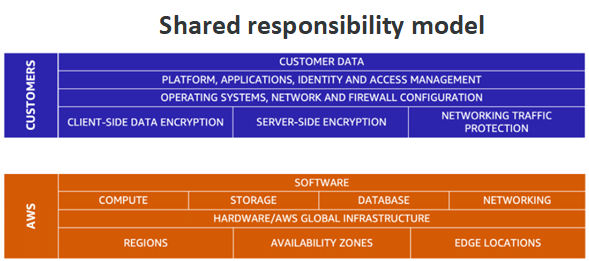
Shared responsibility model
- customer responsibilities (commonly referred to as “security in the cloud”)
- AWS responsibilities (commonly referred to as “security of the cloud”).
Images and files in the map
Information
- Description
- Mind Map on AWS, created by Carlos A Candela C on 30/07/2021.
- Created by
- Carlos A Candela C
- Views
- 0
- Rating