
Mind map
COMPUTER APPLICATION : By Muhammad Hafiz Rasli, GA 02220
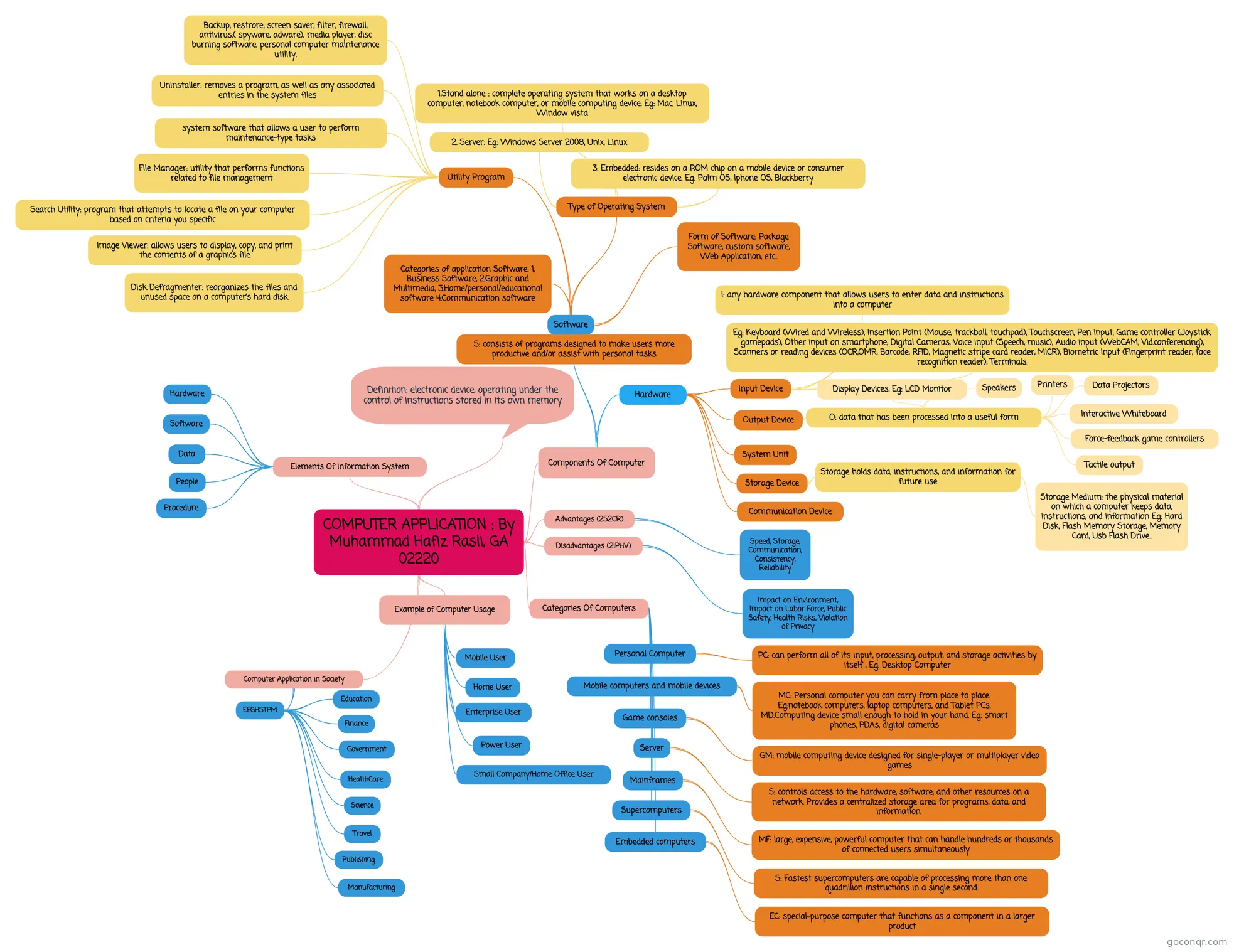
Mind map: computer application
Map content
COMPUTER APPLICATION : By Muhammad Hafiz Rasli, GA 02220
Definition: electronic device, operating under the control of instructions stored in its own memory
Components Of Computer
- Hardware
- Input Device
- I: any hardware component that allows users to enter data and instructions into a computer
- Eg: Keyboard (Wired and Wireless), Insertion Point (Mouse, trackball, touchpad), Touchscreen, Pen input, Game controller (Joystick, gamepads), Other input on smartphone, Digital Cameras, Voice input (Speech, music), Audio input (WebCAM, Vid.conferencing), Scanners or reading devices (OCR,OMR, Barcode, RFID, Magnetic stripe card reader, MICR), Biometric Input (Fingerprint reader, face recognition reader), Terminals.
- Output Device
- O: data that has been processed into a useful form
- Display Devices, Eg: LCD Monitor
- Printers
- Speakers
- Data Projectors
- Interactive Whiteboard
- Force-feedback game controllers
- Tactile output
- O: data that has been processed into a useful form
- System Unit
- Storage Device
- Storage holds data, instructions, and information for future use
- Storage Medium: the physical material on which a computer keeps data, instructions, and information Eg: Hard Disk, Flash Memory Storage, Memory Card, Usb Flash Drive..
- Storage holds data, instructions, and information for future use
- Communication Device
- Input Device
- Software
- S: consists of programs designed to make users more productive and/or assist with personal tasks
- Form of Software: Package Software, custom software, Web Application, etc..
- Categories of application Software: 1, Business Software, 2.Graphic and Multimedia, 3.Home/personal/educational software 4.Communication software
- Type of Operating System
- 1.Stand alone : complete operating system that works on a desktop computer, notebook computer, or mobile computing device. Eg: Mac, Linux, Window vista
- 2. Server: Eg: Windows Server 2008, Unix, Linux
- 3. Embedded: resides on a ROM chip on a mobile device or consumer electronic device. Eg: Palm OS, Iphone OS, Blackberry
- Utility Program
- system software that allows a user to perform maintenance-type tasks
- File Manager: utility that performs functions related to file management
- Search Utility: program that attempts to locate a file on your computer based on criteria you specific
- Image Viewer: allows users to display, copy, and print the contents of a graphics file
- Uninstaller: removes a program, as well as any associated entries in the system files
- Disk Defragmenter: reorganizes the files and unused space on a computer’s hard disk
- Backup, restrore, screen saver, filter, firewall, antivirus:( spyware, adware), media player, disc burning software, personal computer maintenance utility.
- Hardware
Advantages (2S2CR)
- Speed, Storage, Communication, Consistency, Reliability
Disadvantages (2IPHV)
- Impact on Environment, Impact on Labor Force, Public Safety, Health Risks, Violation of Privacy
Categories Of Computers
- Personal Computer
- PC: can perform all of its input, processing, output, and storage activities by itself , Eg: Desktop Computer
- Mobile computers and mobile devices
- MC: Personal computer you can carry from place to place. Eg:notebook computers, laptop computers, and Tablet PCs. MD:Computing device small enough to hold in your hand. Eg: smart phones, PDAs, digital cameras
- Game consoles
- GM: mobile computing device designed for single-player or multiplayer video games
- Server
- S: controls access to the hardware, software, and other resources on a network. Provides a centralized storage area for programs, data, and information.
- Mainframes
- MF: large, expensive, powerful computer that can handle hundreds or thousands of connected users simultaneously
- Supercomputers
- S: Fastest supercomputers are capable of processing more than one quadrillion instructions in a single second
- Embedded computers
- EC: special-purpose computer that functions as a component in a larger product
- Personal Computer
Elements Of Information System
- Hardware
- Software
- Data
- People
- Procedure
Example of Computer Usage
- Home User
- Small Company/Home Office User
- Mobile User
- Power User
- Enterprise User
Computer Application in Society
- EFGHSTPM
- Education
- Finance
- Government
- HealthCare
- Science
- Travel
- Publishing
- Manufacturing
- EFGHSTPM
Information
- Description
- Mind Map on COMPUTER APPLICATION : By Muhammad Hafiz Rasli, GA 02220, created by norliyana_ghazali90 on 18/10/2014.
- Created by
- norliyana_ghazali90
- Views
- 10
- Rating