
Mind map
Wireless Auditing and Risk Assessment
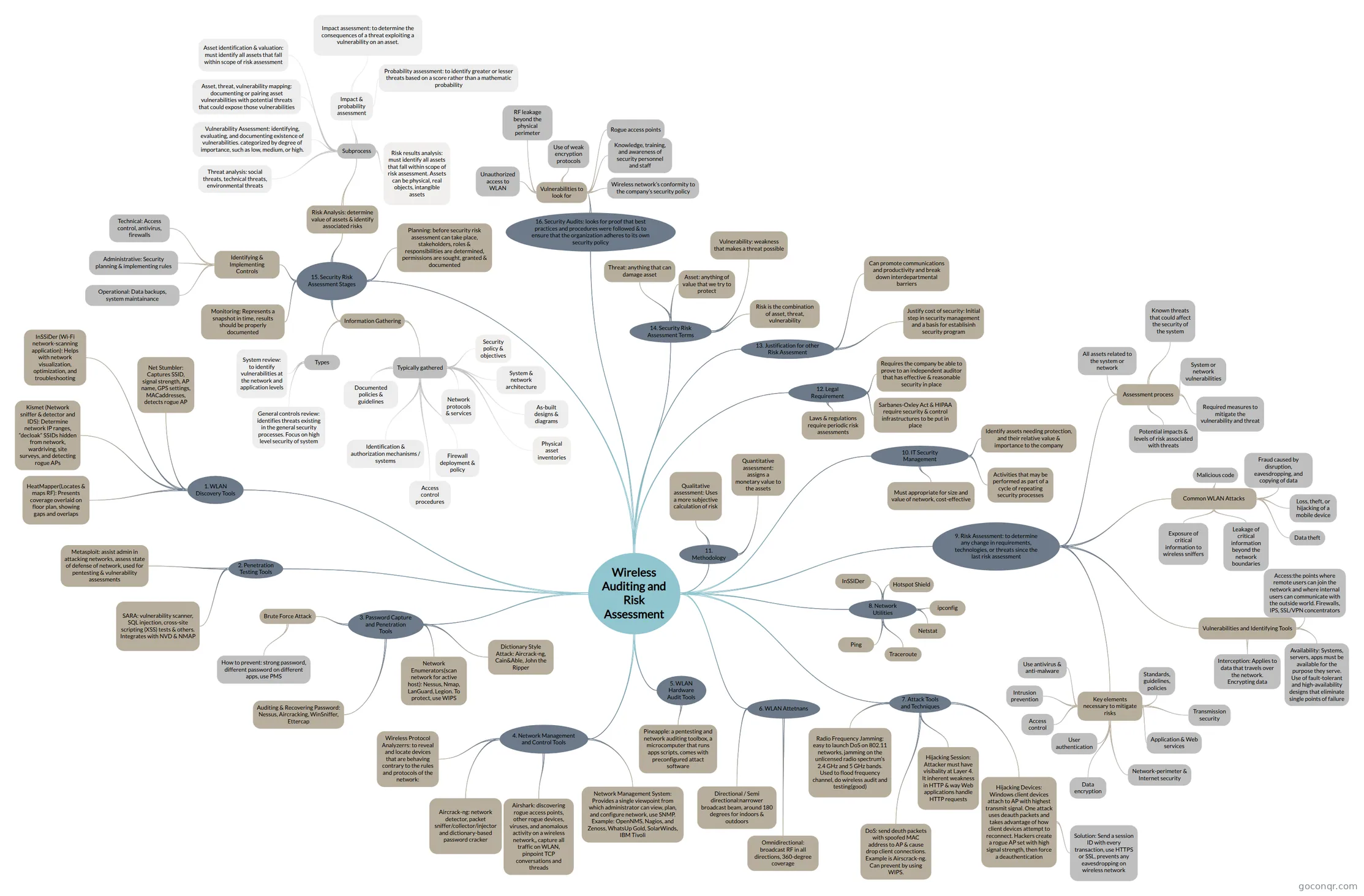
Mind map: Wireless auditing and risk assessment
Map content
Wireless Auditing and Risk Assessment
1. WLAN Discovery Tools
- Net Stumbler: Captures SSID, signal strength, AP name, GPS settings, MACaddresses, detects rogue AP
- InSSiDer (Wi-Fi network-scanning application): Helps with network visualization, optimization, and troubleshooting
- Kismet (Network sniffer & detector and IDS): Determine network IP ranges, “decloak” SSIDs hidden from network, wardriving, site surveys, and detecting rogue APs
- HeatMapper(Locates & maps RF): Presents coverage overlaid on floor plan, showing gaps and overlaps
2. Penetration Testing Tools
- Metasploit: assist admin in attacking networks, assess state of defense of network, used for pentesting & vulnerability assessments
- SARA: vulnerability scanner, SQL injection, cross-site scripting (XSS) tests & others. Integrates with NVD & NMAP
3. Password Capture and Penetration Tools
- Auditing & Recovering Password: Nessus, Aircracking, WinSniffer, Ettercap
- Dictionary Style Attack: Aircrack-ng, Cain&Able, John the Ripper
- Brute Force Attack
- How to prevent: strong password, different password on different apps, use PMS
- Network Enumerators(scan network for active host): Nessus, Nmap, LanGuard, Legion. To protect, use WIPS
4. Network Management and Control Tools
- Wireless Protocol Analyzerrs: to reveal and locate devices that are behaving contrary to the rules and protocols of the network:
- Aircrack-ng: network detector, packet sniffer/collector/injector and dictionary-based password cracker
- Airshark: discovering rogue access points, other rogue devices, viruses, and anomalous activity on a wireless network,, capture all traffic on WLAN, pinpoint TCP conversations and threads
- Network Management System: Provides a single viewpoint from which administrator can view, plan, and configure network, use SNMP. Example: OpenNMS, Nagios, and Zenoss, WhatsUp Gold, SolarWinds, IBM Tivoli
5. WLAN Hardware Audit Tools
- Pineapple: a pentesting and network auditing toolbox, a microcomputer that runs apps scripts, comes with preconfigured attact software
6. WLAN Attetnans
- Omnidirectional: broadcast RF in all directions, 360-degree coverage
- Directional / Semi directional:narrower broadcast beam, around 180 degrees for indoors & outdoors
7. Attack Tools and Techniques
- Radio Frequency Jamming: easy to launch DoS on 802.11 networks, jamming on the unlicensed radio spectrum’s 2.4 GHz and 5 GHz bands. Used to flood frequency channel, do wireless audit and testing(good)
- DoS: send deuth packets with spoofed MAC address to AP & cause drop client connections. Example is Airscrack-ng. Can prevent by using WIPS.
- Hijacking Devices: Windows client devices attach to AP with highest transmit signal. One attack uses deauth packets and takes advantage of how client devices attempt to reconnect. Hackers create a rogue AP set with high signal strength, then force a deauthentication
- Solution: Send a session ID with every transaction, use HTTPS or SSL, prevents any eavesdropping on wireless network
- Hijacking Session: Attacker must have visibality at Layer 4. It inherent weakness in HTTP & way Web applications handle HTTP requests
8. Network Utilities
- Ping
- Traceroute
- Netstat
- ipconfig
- InSSIDer
- Hotspot Shield
9. Risk Assessment: to determine any change in requirements, technologies, or threats since the last risk assessment
- Vulnerabilities and Identifying Tools
- Interception: Applies to data that travels over the network. Encrypting data
- Availability: Systems, servers, apps must be available for the purpose they serve. Use of fault-tolerant and high-availability designs that eliminate single points of failure
- Access:the points where remote users can join the network and where internal users can communicate with the outside world. Firewalls, IPS, SSL/VPN concentrators
- Common WLAN Attacks
- Exposure of critical information to wireless sniffers
- Leakage of critical information beyond the network boundaries
- Data theft
- Loss, theft, or hijacking of a mobile device
- Fraud caused by disruption, eavesdropping, and copying of data
- Malicious code
- Assessment process
- All assets related to the system or network
- Known threats that could affect the security of the system
- System or network vulnerabilities
- Potential impacts & levels of risk associated with threats
- Required measures to mitigate the vulnerability and threat
- Key elements necessary to mitigate risks
- Access control
- User authentication
- Data encryption
- Intrusion prevention
- Use antivirus & anti-malware
- Standards, guidelines, policies
- Network-perimeter & Internet security
- Transmission security
- Application & Web services
- Vulnerabilities and Identifying Tools
10. IT Security Management
- Must appropriate for size and value of network, cost-effective
- Activities that may be performed as part of a cycle of repeating security processes
- Identify assets needing protection, and their relative value & importance to the company
11. Methodology
- Quantitative assessment: assigns a monetary value to the assets
- Qualitative assessment: Uses a more subjective calculation of risk
12. Legal Requirement
- Laws & regulations require periodic risk assessments
- Sarbanes-Oxley Act & HIPAA require security & control infrastructures to be put in place
- Requires the company be able to prove to an independent auditor that has effective & reasonable security in place
13. Justification for other Risk Assesment
- Justify cost of security: Initial step in security management and a basis for establisinh security program
- Can promote communications and productivity and break down interdepartmental barriers
14. Security Risk Assessment Terms
- Asset: anything of value that we try to protect
- Threat: anything that can damage asset
- Vulnerability: weakness that makes a threat possible
- Risk is the combination of asset, threat, vulnerability
15. Security Risk Assessment Stages
- Planning: before security risk assessment can take place, stakeholders, roles & responsibilities are determined, permissions are sought, granted & documented
- Information Gathering
- Typically gathered
- Security policy & objectives
- System & network architecture
- As-built designs & diagrams
- Physical asset inventories
- Network protocols & services
- Access control procedures
- Firewall deployment & policy
- Identification & authorization mechanisms / systems
- Documented policies & guidelines
- Types
- General controls review: identifies threats existing in the general security processes. Focus on high level security of system
- System review: to identify vulnerabilities at the network and application levels
- Typically gathered
- Risk Analysis: determine value of assets & identify associated risks
- Subprocess
- Asset identification & valuation: must identify all assets that fall within scope of risk assessment
- Threat analysis: social threats, technical threats, environmental threats
- Asset, threat, vulnerability mapping: documenting or pairing asset vulnerabilities with potential threats that could expose those vulnerabilities
- Impact & probability assessment
- Impact assessment: to determine the consequences of a threat exploiting a vulnerability on an asset.
- Probability assessment: to identify greater or lesser threats based on a score rather than a mathematic probability
- Risk results analysis: must identify all assets that fall within scope of risk assessment. Assets can be physical, real objects, intangible assets
- Vulnerability Assessment: identifying, evaluating, and documenting existence of vulnerabilities. categorized by degree of importance, such as low, medium, or high.
- Subprocess
- Identifying & Implementing Controls
- Technical: Access control, antivirus, firewalls
- Administrative: Security planning & implementing rules
- Operational: Data backups, system maintainance
- Monitoring: Represents a snapshot in time, results should be properly documented
16. Security Audits: looks for proof that best practices and procedures were followed & to ensure that the organization adheres to its own security policy
- Vulnerabilities to look for
- Unauthorized access to WLAN
- RF leakage beyond the physical perimeter
- Use of weak encryption protocols
- Rogue access points
- Knowledge, training, and awareness of security personnel and staff
- Wireless network’s conformity to the company’s security policy
- Vulnerabilities to look for
Information
- Description
- Mind Map on Wireless Auditing and Risk Assessment, created by Aina Syazwani on 01/11/2018.
- Created by
- Aina Syazwani
- Views
- 0
- Rating