
Mind map
ICT Revision
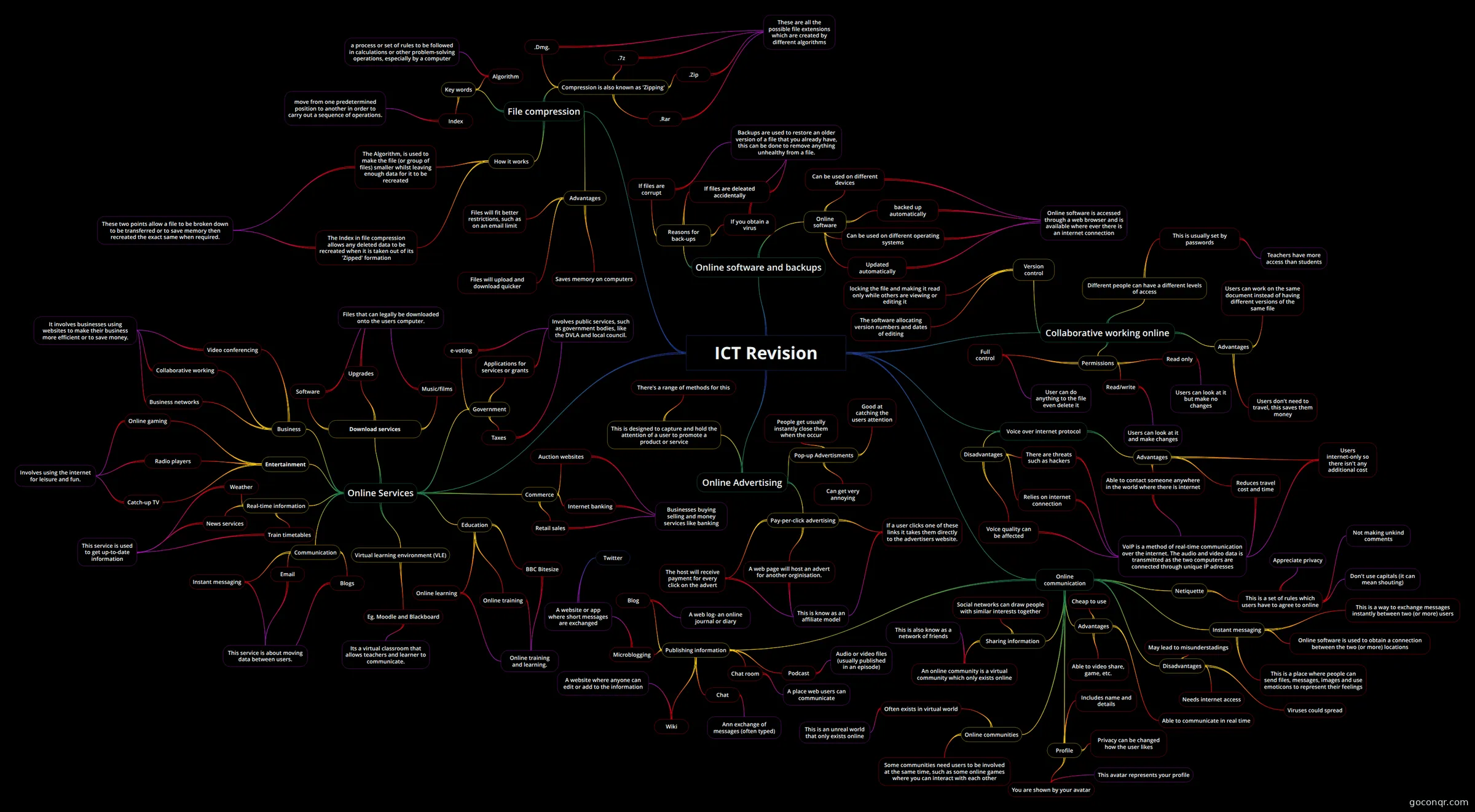
Mind map: ICT revision
Map content
ICT Revision
Online Services
- Communication
- Blogs
- Email
- This service is about moving data between users.
- Instant messaging
- Blogs
- Commerce
- Retail sales
- Businesses buying selling and money services like banking
- Internet banking
- Auction websites
- Retail sales
- Government
- Taxes
- e-voting
- Involves public services, such as government bodies, like the DVLA and local council.
- Applications for services or grants
- Taxes
- Real-time information
- Weather
- This service is used to get up-to-date information
- Train timetables
- News services
- Weather
- Entertainment
- Online gaming
- Involves using the internet for leisure and fun.
- Radio players
- Catch-up TV
- Online gaming
- Education
- BBC Bitesize
- Online learning
- Online training and learning.
- Online training
- BBC Bitesize
- Business
- Collaborative working
- Business networks
- It involves businesses using websites to make their business more efficient or to save money.
- Video conferencing
- Collaborative working
- Virtual learning environment (VLE)
- Eg. Moodle and Blackboard
- Its a virtual classroom that allows teachers and learner to communicate.
- Eg. Moodle and Blackboard
- Download services
- Music/films
- Files that can legally be downloaded onto the users computer.
- Software
- Upgrades
- Music/films
- Communication
Online Advertising
- Pay-per-click advertising
- A web page will host an advert for another orginisation.
- This is know as an affiliate model
- If a user clicks one of these links it takes them directly to the advertisers website.
- The host will receive payment for every click on the advert
- A web page will host an advert for another orginisation.
- Pop-up Advertisments
- Can get very annoying
- Good at catching the users attention
- People get usually instantly close them when the occur
- This is designed to capture and hold the attention of a user to promote a product or service
- There's a range of methods for this
- Pay-per-click advertising
File compression
- Advantages
- Saves memory on computers
- Files will upload and download quicker
- Files will fit better restrictions, such as on an email limit
- Compression is also known as 'Zipping'
- .Zip
- These are all the possible file extensions which are created by different algorithms
- .Rar
- .7z
- .Dmg.
- .Zip
- How it works
- The Index in file compression allows any deleted data to be recreated when it is taken out of its 'Zipped' formation
- These two points allow a file to be broken down to be transferred or to save memory then recreated the exact same when required.
- The Algorithm, is used to make the file (or group of files) smaller whilst leaving enough data for it to be recreated
- The Index in file compression allows any deleted data to be recreated when it is taken out of its 'Zipped' formation
- Key words
- Index
- move from one predetermined position to another in order to carry out a sequence of operations.
- Algorithm
- a process or set of rules to be followed in calculations or other problem-solving operations, especially by a computer
- Index
- Advantages
Online software and backups
- Reasons for back-ups
- If you obtain a virus
- If files are corrupt
- Backups are used to restore an older version of a file that you already have, this can be done to remove anything unhealthy from a file.
- If files are deleated accidentally
- If you obtain a virus
- Online software
- Updated automatically
- Online software is accessed through a web browser and is available where ever there is an internet connection
- backed up automatically
- Can be used on different devices
- Can be used on different operating systems
- Updated automatically
- Reasons for back-ups
Collaborative working online
- Advantages
- Users can work on the same document instead of having different versions of the same file
- Users don't need to travel, this saves them money
- Version control
- locking the file and making it read only while others are viewing or editing it
- The software allocating version numbers and dates of editing
- Different people can have a different levels of access
- This is usually set by passwords
- Teachers have more access than students
- This is usually set by passwords
- Permissions
- Read only
- Users can look at it but make no changes
- Read/write
- Users can look at it and make changes
- Full control
- User can do anything to the file even delete it
- Read only
- Advantages
Voice over internet protocol
- Advantages
- Reduces travel cost and time
- VoIP is a method of real-time communication over the internet. The audio and video data is transmitted as the two computers are connected through unique IP adresses
- Users internet-only so there isn't any additional cost
- Able to contact someone anywhere in the world where there is internet
- Reduces travel cost and time
- Disadvantages
- Relies on internet connection
- There are threats such as hackers
- Voice quality can be affected
- Relies on internet connection
- Advantages
Online communication
- Publishing information
- Blog
- A web log- an online journal or diary
- Microblogging
- A website or app where short messages are exchanged
- A website or app where short messages are exchanged
- Wiki
- A website where anyone can edit or add to the information
- Podcast
- Audio or video files (usually published in an episode)
- Chat room
- A place web users can communicate
- Chat
- Ann exchange of messages (often typed)
- Blog
- Sharing information
- Social networks can draw people with similar interests together
- An online community is a virtual community which only exists online
- This is also know as a network of friends
- Online communities
- Often exists in virtual world
- This is an unreal world that only exists online
- Some communities need users to be involved at the same time, such as some online games where you can interact with each other
- Often exists in virtual world
- Netiquette
- This is a set of rules which users have to agree to online
- Don't use capitals (it can mean shouting)
- Appreciate privacy
- Not making unkind comments
- This is a set of rules which users have to agree to online
- Profile
- Includes name and details
- Privacy can be changed how the user likes
- You are shown by your avatar
- This avatar represents your profile
- Instant messaging
- This is a way to exchange messages instantly between two (or more) users
- Online software is used to obtain a connection between the two (or more) locations
- This is a place where people can send files, messages, images and use emoticons to represent their feelings
- Advantages
- Able to communicate in real time
- Cheap to use
- Able to video share, game, etc.
- Disadvantages
- Viruses could spread
- Needs internet access
- May lead to misunderstadings
- Publishing information
Information
- Description
- Mind map one- this mind map goes up to page nine in my ICT revision booklet (there are seven topics within it)
- Created by
- Thomas Grainger
- Views
- 56
- Tags
- Rating