
Software Development Methodologies
Slides do conjunto (11)
-
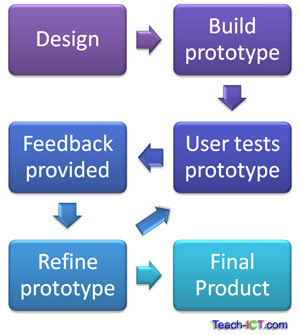
- A prototype represents one aspect of the full system - for example a mock up of the GUI. The mock up may have buttons with dummy commands, this is so they act as if they are connected to the real system.
- The user can try out this one aspect of the system and give the developer feedback before they move onto another part of the system.
- Prototyping allows for the system to be developed in an iterative process. It also makes the development cheaper, as it allows for problems to be ironed out before developing the full system, rather than resolving problems as the end, once the system has been built.
-
- Legenda: Evolutionary Prototyping
- Evolutionary prototyping involves the user giving feedback and criticism on the system each time a prototype is made. The developer improves the system based on this feedback and presents the user with another prototype. The process repeats until the user is happy.
- This prototyping is appropriately named evolutionary, as with each iteration the system is changed for the better.
- Advantages of Evolutionary Prototyping:
- Speed of system delivery is increased
- User feel more involved with the design of the system
- System is more likely to meet user requirements.
-
- A small part of the system is developed and sent to the user. Once feedback has been given the prototype is thrown away.
- The purpose of throw away prototyping is to clearly understand and validate the system requirements.
- Advantages of throw away prototyping:
- Quicker to develop the prototype, only focuses one aspect of the system, so keep feedback precise.
- Disadvantages of throw away prototyping:
- May be pressurised to deliver the prototype as the final system.
- Lots of hours are lost on develop multiple throw away prototypes

-
- Better quality system delivered
- Helps a developer to understand what the client wants. Enables misunderstandings and problems to be discussed early on in the development process.
- Identify problems early on
- The client can identify possible improvements before the full system is completed
- End user involvement
- The client feels more engaged in the development and will help them 'buy into' the final product.
- Fulfil user requirements
- The system will have better design quality and will be closer to what the client needs.
- Cost savings
- Making changes in early stages of development is easier and cheaper than making changes towards completion.
- Training
- The prototype will allow staff to train whilst the full system is being developed.
-
- Excessive development time
- Feedback from the client may be delayed or excessive. Tweaking unnecessary aspects of the system will lead to delays.
- User confusion
- If the final system differs greatly from the prototype it can disappoint the client, especially if features present in the prototype are removed.
- Increased development time
- The client may ask for features that were never in the requirements specification. This can lead to increased development time and costs.
- Too much focus on one part of the system
- Spending an extended amount of time on one aspect may lead to other areas of the system being neglected.
- Expense of prototyping
- Costs money in development time and hardware. The real system is on hold whilst prototypes are being developed.
-
Rapid Application Development (RAD)
- Projects often take so long to complete that the user requirements drastically change before the end.
- If large changes happen at late stages of the system development, it will most likely result in a late delivery and being over budget. There is a chance the project may be cancelled as a result.
- RAD provides a solution to develop a system in a faster time frame. Usually less than six months from start to finish,
- RAD is made possible by the following approaches:
- Use workshops and focus groups to gather requirements rather than a formal Requirement Document.
- Use prototyping to refine the system with heavy involvement of the user.
- Allocate strict time limits to develop each part of the system. The intent is to develop a system that is 'good enough' rather than including unnecessary features.
- Re-use software components already to hand.
-
- User groups actively involve users in developing requirements, rather than analysts collating information to produce the requirements specification.
- Advantages:
- User feels ownership of the project from the beginning
- Greater user satisfaction
- Better quality user requirements
- Fewer late changes
- This is achieved through collaborative workshops and discussion groups, this is sometimes referred to as Joint Application Development (JAD).
- It is hoped that the requirements do not change too much during the project. Fewer changes result in lower cost, quicker delivery and better quality.

-
- Requirements are divided into tasks in which users and developers are involved. Each task is set a strict time limit. When time is up it is expected that a fully accepted set of requirements has been defined and agreed.
- Splitting up a project in this way allows the project manager and client to have a clear view of progress. It stops users form excessively tweaking the system.
- If one task is late:
- Requirements are added to another time box and developed further
- The requirements are considered too difficult to achieve in the time available and either simplified or dropped altogether
-
- Lots of time and energy will have been spent in developing software in the past, it speeds up development if these systems are re-used.
- Encouraging software re-use:
- Use software libraries that have well-developed, stable functions
- Use object oriented programming methods to develop software classes, all parts of the system can then use these classes
- Use a software application framework
- Frameworks are complete software development environments with powerful built-in features. For instance creating a complex graphical user interface may simply involve dragging and dropping controls onto a workspace, the code is automatically generated for you.

-
- Benefits
- User involvement
- The use of collaborative workshops means the user is heavily involved with the design and development of the system.
- Evolutionary requirements
- Users are not expected to understand everything they require at the beginning of the project. Requirements evolve.
- Speed up projects
- Good time management, efficient software development encouraged by RAD reduce the chances of late changes.
- Problems
- Not everyone is happy
- The workshops may not include all types of user. Some users may have been left out and so the system may not meet their expectations.
- System is not optimal
- Time boxes may limit the time needed on a certain aspect of the system, if the system is rushed is will be under developed or do less than required.
Informações
- Descrição
- A level IT (331 - The systems cycle) Slides sobre Software Development Methodologies, criado por James Tungate em 23-03-2018.
- Criado por
- James Tungate
- Visualizações
- 4
- Avaliação