
Flashcards
ICT Unit 1 flashcards
Flashcards do conjunto (50)
- 14 data typesText,Still and Moving Images,Numbers,
Sound - 2List manual input devicesKeyboard
Mouse
Concept Keyboards
Touch Screen
Graphics Tablet
Speech recognition - 3List automatic input devicesCard readers
RFID
Scanners
OMR
OCR
Barcode readers
MICR
Webcam
Camera
Sound and Video input - 4How can input devices be adapted for people with disabilites?The pointer speed of the mouse can be adjusted
Speed of mouse clicks can be adjusted
Buttons on mouse can be set for right or left handed people
A large trackball can be used for a mouse
A foot mouse can be used - 5What five things should you think about when deciding on an input device?Type of data
Volume of data
User preferences
Cost considerations
Where device will be used - 6List output devicesScreens and monitors (CRT,LCD,Projector,Plasma screens,Smart Board)
Printers (Laser,Inkjet,Dot Matrix)
Plotters
Speakers - 7How can output devices be changed to help people with disabilities?Increasing font size
Adjusting screen resolution
Magnifying the display
Adjusting colour contrasts
Using sound output rather than visual
Keywords to describe graphics - 8Choosing type of monitor or screen,what should be considered?Kind of image to be viewed
Where to be viewed
Who to view
Internet access - 9Choosing type of printer,what should be considered?What is to be printed
How many documents
What kind of media
Who is to use it - 10Reasons to store dataBasic setup information and OS are required for computer to function
Application software needs to be available to carry out tasks
Files need to be stored so they can be used again
Data may need to be transferred
Backup copies need to be taken - 11What is file compression?It allows file sizes to be made smaller. It can reduce transmission time or allows more data to be fitted on to any storage medium.
- 12What are the types of storage?Magnetic storage
Hard Disks
Floppy Disks
Optical storage
Flash memory
Online storage (cloud) - 13What is important to think about when using removable storage?Volume of data to be stored
Reason why data is being stored
Whether data will need to be rewritten
Speed of recovery
Physical size of device - 14What is the role of the OS?Manages memory when computer is carrying out more than one task
Allocates processor time
Controls where data is stored
Communicates with input and output devices
Handles errors
System security,user and file permissions - 15What are the different types of application software?Text
Number
Picture
Video
Sound
Multimedia - 16What is included in a H&S risk assessment?Identify the hazards the user is exposed to
Identify the risks the hazard can produce
Put safety precautions in place
Train workers to deal with any risks left
Check situation regularly to make sure it hasn't become worse
Encourage staff to report any h&s problems - 17What are the four risks in the display screen equipment regulations?Back pain
RSI
Eye strain
Stress - 18How can risks associated with back pain be reduced?Adjustable chairs
Adjustable monitors
Adjustable keyboard
Enough work space for documents
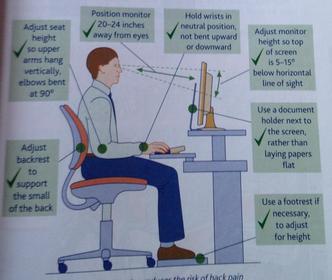
Regular breaks - 19What is a perfect workstation?
- 20How can risks associated with RSI be reduced?Ensure workstation and chair are correct height
Use wrist rests
Keep elbows close to sides
Regular breaks - 21How can risks associated with eye strain be reduced?Monitors that dont flicker
Blinds at windows
Suitable lighting
Screen filter
Regularly look away from screen and focus on something else
Regular breaks
Regular eye tests - 22How can risks associated with stress be reduced?Regular communication between staff and managers
Training schemes
Checking of staffs workload
Have relaxed time at home
Tell boss if feeling under pressure
Ask for help - 23How can software design improve health and safety?Background and font colours/sizes shouldn't cause eye strain
Logical menu layouts to reduce RSI
Interaction controls and screen icons
Keyboard shortcuts
Macros to reduce key presses
Accept input from a variety of devices
Help options - 24What is involved with the analysis stage of SDLC?Identifying problems
Identifying client requirements
Identifying input,processing,output - 25How could you identify client requirements?Interview
Questionnaire
Existing paperwork
Observations - 26What would you find out from the current system?How users interact with current system
How other systems interact with current system
What is good about current system
What causes problems in current system
Which parts of system are critical to business - 27What do you say about the proposed new system?What the new system is expected to do
How the new system is expected to do this
What people want from the new system
Which parts of the old system should be incorporated into the new system - 28What 3 type of diagrams would be used to show results from analysis stage?System diagrams
Data flow diagrams
Process diagrams - 29What is involved in the design stage of the SDLC?Project planning
System requirements specification
Data dictionary
Testing documentation
Prototyping - 30What is project planning?Project planning is about handling people;how many,where and when they are needed. in addition these people will need resources to carry out their jobs.
- 31What is included in the system requirements specification?Data capture methods for the system
Data inputs to system
Data outputs from system
Data processing
File structure for data storage - 32What is the data dictionary?It defines:
tables,fields,records and relationships
constants,variables and data structures
validation that is required
query structures - 33What is included in the testing documentation?A test plan is written at this stage to test the key parts of the system once it has been developed.
- 34What is prototyping?A prototype is something that represents what you will finally create without having to worry about all the details.
- 35What is developed in the implementation stage?Table and data structure
Validation routines
Data capture forms
Data input forms
Automated processing routines
Queries
User interface
Printing outputs - 36What is a beta tester?A tester who tests the system against the client requirements and makes sure it follows everything in the system spec.
- 37What is an alpha tester?An alpha tester makes sure the system is user friendly,they have had no involvement in the development of the system.
- 38What is the role of the test plan?The beta testers use this to test all parts of the system. They use this exactly ,entering all data specified on the plan.
- 39What three types of data should be tested?Normal data
Extreme data
Erroneous data - 40What are the 4 different types of installation?Direct
Parallel
Phased
Pilot - 41What is the direct method of installation?This is where the company switches off the old system and switches on the new one.
- 42What is the parallel method of installation?This runs both systems at the same time. Once the organisation is sure that the new system is working properly they will make the decision to fully change over.
- 43What is the phased method of installation?This is where the old system is in place but parts of the new system are brought online. Once any problems have been corrected with these parts of the new system more parts will be added.
- 44What is the pilot method of installation?This is where the complete new system is tested out in certain departments or branches.
- 45What is another essential part of the installation stage?Staff training
- 46What 4 questions should be asked at the evaluation stage?Does the solution do what it is supposed to?
Does it do it in the way it was supposed to?
Is the solution an effective one?
If not,what would make the solution an effection one? - 47What are the 3 types of maintenance?Corrective
Adaptive
Perfective - 48What is corrective maintenance?This is where problems are identified with system after installation. This is then corrected by the team and retested to make sure the problem is solved.
- 49What is adaptive maintenance?This happens due to external changes or strategic changes in the company. e.g. VAT rate
- 50What is perfective maintenance?Over time,the user will find small tweaks or changes that will help improve the systems running. The system stays running while these changes are being made.
Informações
- Descrição
- A-Level ICT (Unit 1) FlashCards sobre ICT Unit 1 flashcards, criado por sophiegreer3 em 22-04-2015.
- Criado por
- sophiegreer3
- Visualizações
- 43
- Tags
- Avaliação