
Flashcards
Email Protocols
Flashcards do conjunto (21)
- 1Store and forward (system)The sender and recipient(s) of an email message do not have to be online at the same time. When one person sends a message, it is stored on an email server. It waits in store until the recipient signs in, at which point the server forwards the message to them.
- 2Address book/contact groupWithin the email program, you can create a list of people’s contact details (e.g. name, email address, company name, phone numbers).
- 3CC - Carbon copyAnyone included in the CC section will see all of the other people in the CC section.
- 4BCC - Blind carbon copyIf this is used the same message will go to multiple recipients but they will not be able to see who else it goes to.
- 5Email - BenefitsMessages are sent immediately on a global scale.
There is no cost, unlike the conventional mail system.
It's possible to deliver to multiple recipients.
Attachments (e.g. documents and audio and video files).
Having a record of the correspondence between users.
Webmail providers (including Hotmail and Gmail) tend to store emails on a remote server, meaning that you can access them
anywhere via a web browser. - 6Email - DrawbacksPrivate emails can possibly be hacked into and read material which should not be available. (security)
To send an email, you must have internet access which some people might not have or want.
Sometimes an instant response is required, not everyone checks their email regularly.
Spam emails.
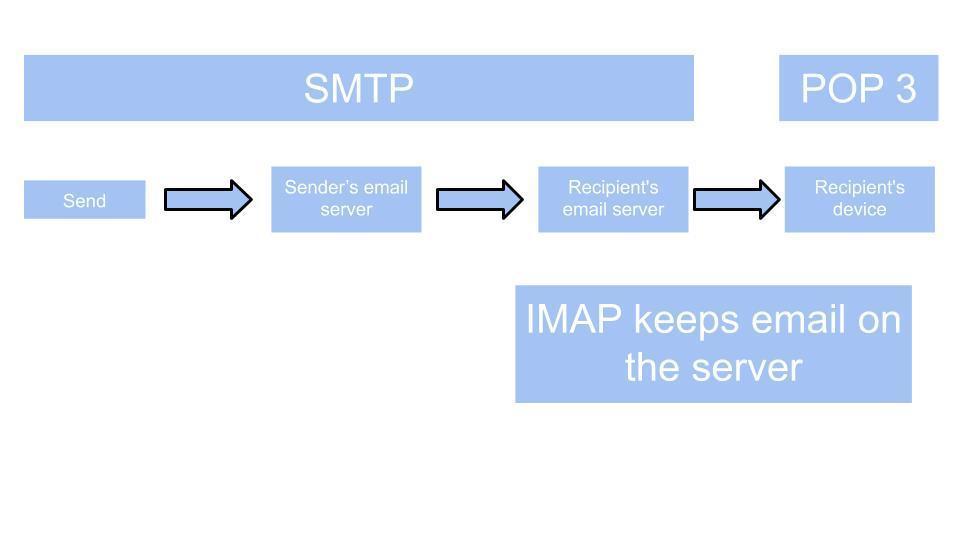
One mistake in the address and it won’t be sent/will be sent to the wrong recipient. - 7SMTP + POP 3
- 8SMTP - Simple Mail Transfer ProtocolPush - From server to client.
- 9POP 3 - Post Office Protocol 3Pull - Pulls mail from server to client when requested.
- 10IMAP - Internet Message Access ProtocolUsed for webmail such as gmail or hotmail.
- 11WebmailAn email system in which a user can access their emails via a browser on any computer or device that is connected to the internet.
- 12Email clientA computer program used to access and manage a user's email.
- 13Data Exchange Data Packet diagram
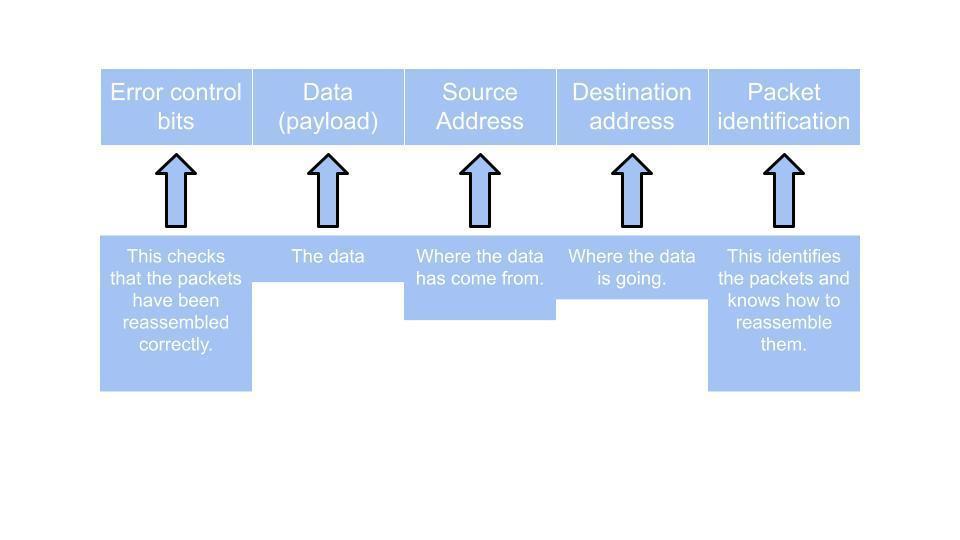
- 14Packet switching - DefinitionCodec is used to digitise an analogue voice signal, then compress it and split it into internet packets for transmission. It then performs the reverse at the receiving end.
- 15Packet switching - AdvantagesSends data efficiently across networks.
Small packets take different routes across a network.
Good security levels as packets only contain part of a whole file. - 16Packet switching - DisadvantagesIf one or more packets are lost during transmission the file will not be received correctly.
Requires Large amount RAM (Random Access Memory) to handle large amounts of data communication in packets. - 17CodecsCodecs are softwares required to run a VOIP system that consists mainly of an encoding and decoding program.
- 18SimplexOne-way transmission only (e.g. computer to a printer or remote control).
- 19DuplexTwo-way transmission (e.g. telephone).
- 20Half-duplexTwo-way transmission but one way at a time
(e.g. ‘walkie-talkie’ radios). - 21Serial and parallel transmissionWhen data is sent using parallel data transmission, multiple data bits are transmitted over multiple channels at the same time. This means that data can be sent much faster than using serial transmission methods.
In serial transmission, bits are transmitted one at a time over a single wire/channel. This reduces the cost of the cable, but gives a slower rate of data transfer.
Keyboard and mouse cables are serial, the co-axe cable is serial, cables to connect a video camera to a PC are serial. Serial transmission is widely used as the cable is cheaper than cable for parallel transmission.
Informações
- Descrição
- FlashCards sobre Email Protocols, criado por Chloe Stone em 05-01-2021.
- Criado por
- Chloe Stone
- Visualizações
- 1
- Avaliação