
Flashcards
Hardware
Flashcards do conjunto (54)
- 1What is the CPU?Central Processing Unit- the brain of the computer
- 2What would the computer not do without the CPU?It wouldn't work
- 3What are the two main parts of the CPU?The two main parts are:
The Control Unit
The Arithmetic and Logic unit - 4What does the Control Unit do?The control unit looks at data- HD, RAM
- 5What does the Arithmetic and Logic Unit do?It does maths and calculations
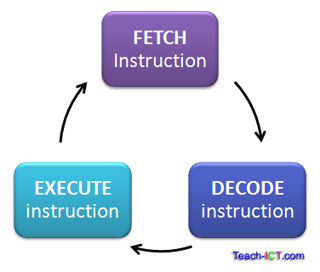
- 6What does the CPU work on?It works on the Fetch- execute cycle
- 7What does the Fetch do?Fetches data
- 8What does the decode do?Works out what data means
- 9What does the execute do?it performs the task
- 10What happens when the computer is turned on?Switches on
ROM
Boot up
CPU
OS (operating system) - 11What is the clock speed?It measures the speed of the fetch-excecute system
- 12What is the clock speed measured in?Hertz- Hz
- 13How many complete cycles is 4GHz?4 billion complete cycles every second
- 14How many levels is there in the cache memory?3 levels
- 15What is level 1 cache memory?It is on the CPU chip
It is low capacity
Same speed as CPU - 16What is level 2 cache memory?It is a little further away from the CPU, Larger than CPU
Slower than CPU - 17What is level 3 cache memory?Largest
Furthest away
Slowest - 18What are busses?They are the connection between different parts of the motherboard, sends data around the system.
- 19What effects the speed of the CPU?Processor speed
Bus speed
Amount of cache available
Number of core available - 20What is dual-core?Two processors that allow simultaneous processing of the fetch-excecute cycle
- 21What is the motherboard?The circuit which holds the parts of the computer system
- 22What can the main internal memory in the computer be split into?Two types-
ROM
RAM - 23What is ROM?Read only memory that can be changed by a program or user
It stores the instructions to the computer start up
Saved even if the computer is turned off (non volatile) - 24What is RAM?RAM is faster than ROM
Temporary memory
Programs, applications and data are stored when being used
When computer loses power, all data RAM is lost (volatile) - 25When your computer is running slow what do you need to do?install more RAM
- 26What is virtual memory?When the RAM is full the computer slows down so in this case the main part of the memory can be allocated to become a temporary storage area to help the RAM run smoothly this is called virtual memory.
- 27What are the main two types of RAM?Dynamic RAM
Static RAM - 28What is dynamic RAM?The memory must be constantly refreshed or it will lose its contents. It uses a transistor which can hold a small charge for a millisecond which represents one bit.
- 29What is Static RAM?This faster and less volatile the Dynamic RAM, but it requires more power and is more expensive. These use chips which contain more than one transistor wired together.
- 30What is the disadvantages of static RAM?As static RAM uses 4 or 5 transistors for each but then it takes up a lot of space and cost a lot more to manufacture.
- 31What is Flash memory?ROM uses a similar group of transistors wired together to make a circuit that are programmed with the instructions to boot up the machine at the point of manufacture. These circuits trap electrons in the transistors using a large 'flash' of electrical charge.
- 32What are flash memory sticks used for?Flash memory sticks are used to write and re-write files time and time again an this writing and re-writing can cause the circuits to deteriorate over time so flash memory sticks should not be used in critical systems
- 33Advantage of flash memory?Relatively low cost
Portable - 34What are some Flash memory devices?Memory cards in cameras
Mini and micro SD cards in smartphones
Memory card in MP3 music players
USB memory sticks
Solid state drives
BIOs - 35Disadvantages of Flash memory?Flash memory is not as fast a RAM but it is faster than accessing the magnetic hard disk and is often used to back up a system
- 36How do computers work?Computers work by looking at the inputs and then processing the data according to certain rules and producing and output
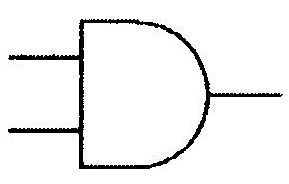
- 37ANDBoth have to be on to work
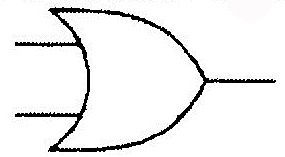
- 38OReither or both on= positive
- 39XORIf either one is positive = positive
Both positive= negative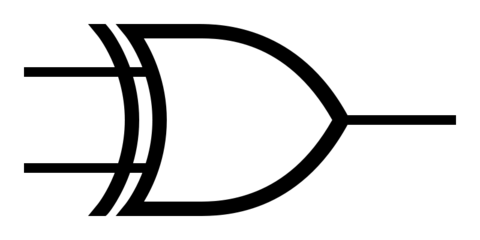
- 40NOTopposite
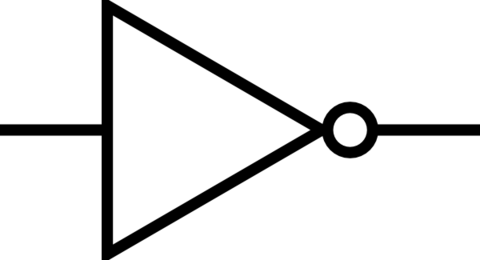
- 41What is a OMR?Optical Mark Recognition
Used in lottery tickets
Fast and accurate way of inputting - 42What is OCR?Optimal Character Recognition
The machine reads and understands handwriting
Post offices use to sort letter and parcels - 43What is MICR?Magnetic Ink Character Recognition
At bottom of standard cheque
Special reader reads numbers + checks magnetic numbers against account holders details to prevent fraud - 44What is a laser jet printer?Relatively cheap
Toners are expensive
Laser burning ink onto paper - 45What is an Ink Jet printer?Splodge ink onto paper
Cheap to buy but expensive ink - 46What is a Dot-Matrix printer?Impact printers
Tiny pins to form shape - 47What is a plotter?Arm that moves are across paper
Uses motors
Used by architects to create large plans - 48What is a touch screen?Input and output device
Used in smart phones and tablets - 49What is a magnetic hard disk?Stack of magnetic disks that spin around to read data
Reliable, high capacity, low cost - 50What is an optical disk?CD's, DVDs + Blu-ray
Portable
External devices
CD-ROMs
CD-RWs - 51What is a Magnetic portable memory?Sequential
Easily corrupted+ slow
Casette + videos - 52What is cloud computing?An alternative to the time and cost wasting hosting that companies had to do to expand their server. It means you can access the cloud data immediately when you need more computing power. Cloud computings saves money and time and you can access it through a personal compter. This is the infrastructure level and there is also two other levels, platform and application. It saves money because companies dont need to buy and maintain network servers, so don't have to employ technicians
- 53What are the benefits of cloud computing?Fixes faults and bugs
Can access immediately with internet access
inexpensive- no need for technicians - 54What are the disadvantages of cloud computing?Who has access
Losing data
Hacking
Informações
- Descrição
- GCSE Computer Science FlashCards sobre Hardware, criado por Amber Turner em 03-11-2015.
- Criado por
- Amber Turner
- Visualizações
- 2
- Avaliação