
Mapa mental
A2 IT Animation
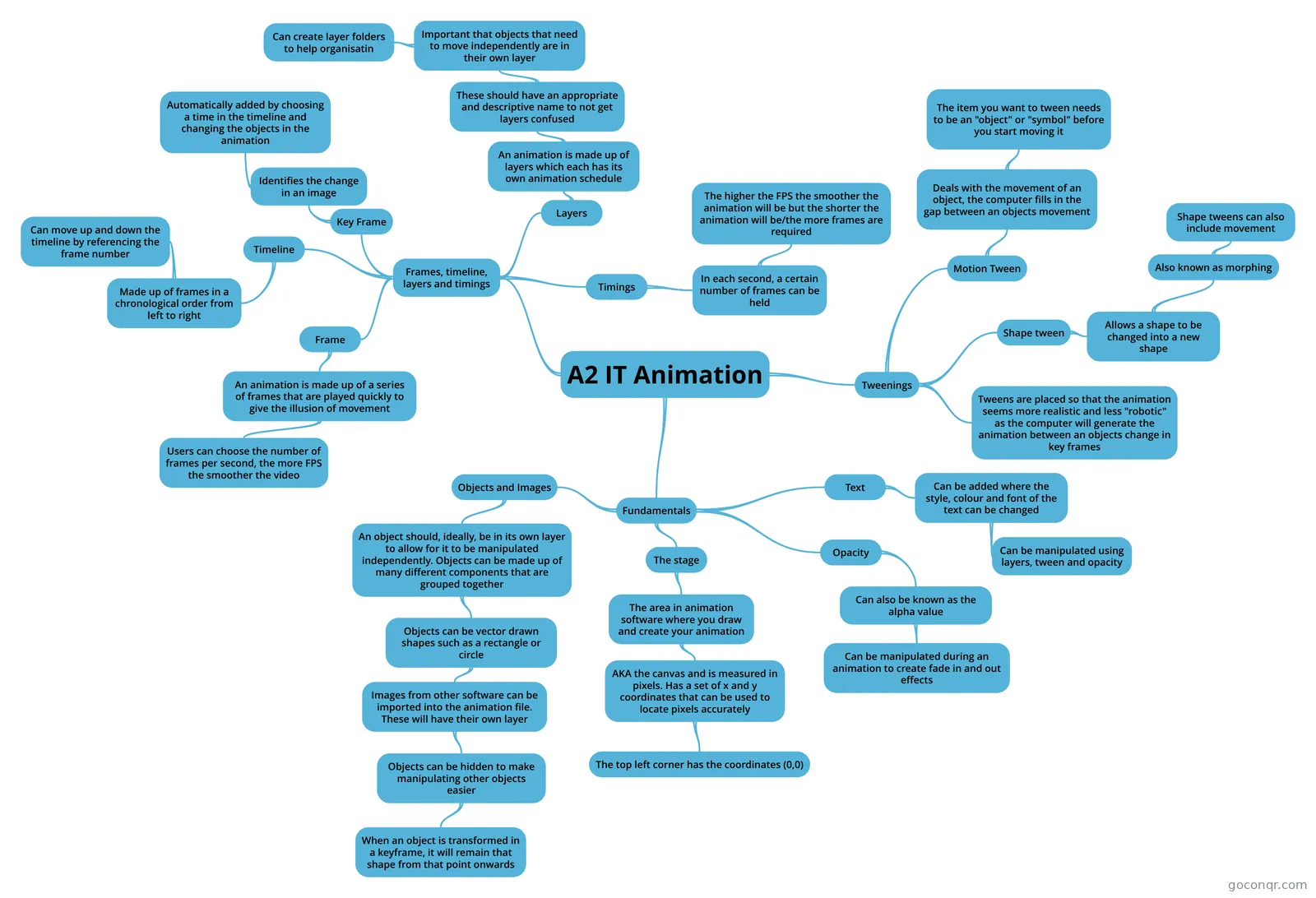
Mind map: A2 IT animation
Conteúdo do mapa
A2 IT Animation
Fundamentals
- Objects and Images
- An object should, ideally, be in its own layer to allow for it to be manipulated independently. Objects can be made up of many different components that are grouped together
- Objects can be vector drawn shapes such as a rectangle or circle
- Images from other software can be imported into the animation file. These will have their own layer
- Objects can be hidden to make manipulating other objects easier
- When an object is transformed in a keyframe, it will remain that shape from that point onwards
- Objects can be hidden to make manipulating other objects easier
- Images from other software can be imported into the animation file. These will have their own layer
- Objects can be vector drawn shapes such as a rectangle or circle
- An object should, ideally, be in its own layer to allow for it to be manipulated independently. Objects can be made up of many different components that are grouped together
- The stage
- The area in animation software where you draw and create your animation
- AKA the canvas and is measured in pixels. Has a set of x and y coordinates that can be used to locate pixels accurately
- The top left corner has the coordinates (0,0)
- AKA the canvas and is measured in pixels. Has a set of x and y coordinates that can be used to locate pixels accurately
- The area in animation software where you draw and create your animation
- Opacity
- Can also be known as the alpha value
- Can be manipulated during an animation to create fade in and out effects
- Can also be known as the alpha value
- Text
- Can be added where the style, colour and font of the text can be changed
- Can be manipulated using layers, tween and opacity
- Can be added where the style, colour and font of the text can be changed
- Objects and Images
Frames, timeline, layers and timings
- Frame
- An animation is made up of a series of frames that are played quickly to give the illusion of movement
- Users can choose the number of frames per second, the more FPS the smoother the video
- An animation is made up of a series of frames that are played quickly to give the illusion of movement
- Timeline
- Made up of frames in a chronological order from left to right
- Can move up and down the timeline by referencing the frame number
- Made up of frames in a chronological order from left to right
- Key Frame
- Identifies the change in an image
- Automatically added by choosing a time in the timeline and changing the objects in the animation
- Identifies the change in an image
- Layers
- An animation is made up of layers which each has its own animation schedule
- These should have an appropriate and descriptive name to not get layers confused
- Important that objects that need to move independently are in their own layer
- Can create layer folders to help organisatin
- Important that objects that need to move independently are in their own layer
- These should have an appropriate and descriptive name to not get layers confused
- An animation is made up of layers which each has its own animation schedule
- Timings
- In each second, a certain number of frames can be held
- The higher the FPS the smoother the animation will be but the shorter the animation will be/the more frames are required
- In each second, a certain number of frames can be held
- Frame
Tweenings
- Tweens are placed so that the animation seems more realistic and less "robotic" as the computer will generate the animation between an objects change in key frames
- Motion Tween
- Deals with the movement of an object, the computer fills in the gap between an objects movement
- The item you want to tween needs to be an "object" or "symbol" before you start moving it
- Deals with the movement of an object, the computer fills in the gap between an objects movement
- Shape tween
- Allows a shape to be changed into a new shape
- Also known as morphing
- Shape tweens can also include movement
- Also known as morphing
- Allows a shape to be changed into a new shape
Informações
- Descrição
- AS level IT Mapa Mental sobre A2 IT Animation, criado por Sean Byrne em 14-01-2018.
- Criado por
- Sean Byrne
- Visualizações
- 6
- Avaliação