
Mapa mental
Spreadsheets
Conteúdo do mapa
Spreadsheets
Formulas
- Must start with an =
- Formulas perform calculations on cell contents
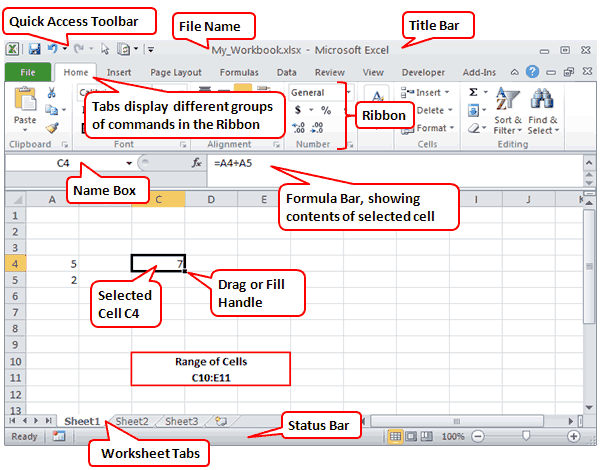
- Formulas appear in the formula bar
- The result of a formula is automatically recalculated every time the data on a spreadsheet changes
- The 4 main mathematical operations are...
- + Add
- -Subtract
- *Multiply
- / Divide
Cells
- A cell reference always starts with a letter and ends with a number e.g A5
- Data entered into cells can be different data types e.g. text, number, currency, date
- A range of cells is a set of cells in a row or column
Functions
- Must also start with a =
- Function name describes what a function can do SUM, COUNT, AVERAGE, MAX, MIN, IF
- They are specialised calculations built in to the spreadsheet software
Replicating cells
- When you position the mouse pointer in the bottom right hand corner of the cell and drag down or across the spreadsheet tries to respond intelligently
- If there is a formula in the cell, the spreadsheet tries to adjust it as it goes down the page to fit in with the new position and the cells being referred to
- This can save time
Graphs/Charts
- Using graphs/charts allow us to notice patterns and trends more easily
- Specific data can be selected on a spreadsheet and a chart/graph of this data can be selected
- Bar charts - To compare values
- Pie charts - To show how a total is divided among a number of different categories
- Line graph - Display trends
Cell referencing
- When a formula is copied by 'Filling down' the cell references in cells are adjusted as you drag the pointer down the page
- If a formula is copied by filling down, the cell references are adjusted as you drag the replication pointer down the page. This is because it uses the relative address of the cells based on their position in the worksheet
- Relative cell references is when a cell is used in a formula and the formula is copied to a new cell reference(address), the cell references changes to take account of the formulas new position
The $ can be used in front of the letter and number that are required to stay the same. Think of the $ as glue. It glues the absolute cell into every formula it is needed in
Advanced functions
- IF – change the value of a cell if something is true, eg if a customer’s total bill is over £100, deduct 10% from their bill.
- COUNTIF – adds up cells that meet a certain rule, eg count the number of students that achieved level 6.
- VLOOKUP – matches contents of a cell with an answer, eg how much is a pepperoni pizza?
Benefits of using a spreadsheet
- Automatic recalculation - Everytime the content of a cell is changed, calculations are performed and other cells are updated if necessary
- Accurate calculations - Providing the formulas have been set up correctly, the formulas will always produce a correct calculation
- Graphs/Charts - Can be drawn using data in selected cells
- Replication - Once the first formula is correctly entered, it is possible to drag across to adjacent cells in a row or column so the computer copies the pattern of the calculation
Imagens e arquivos do mapa
Informações
- Descrição
- Mapa Mental sobre Spreadsheets, criado por Molly Gearing em 07-03-2015.
- Criado por
- Molly Gearing
- Visualizações
- 0
- Avaliação