
Mapa mental
A2 IT Networks - Security Methods
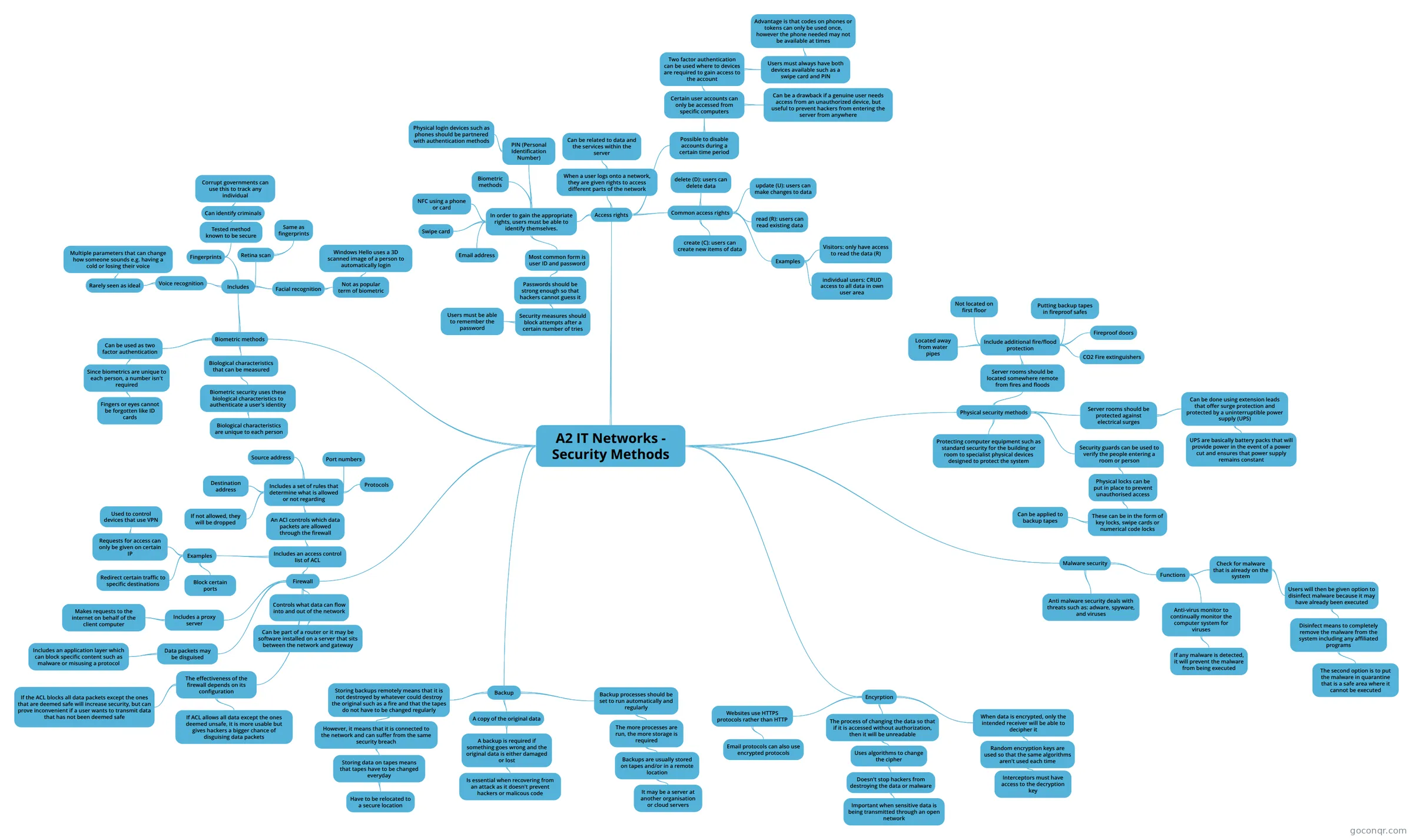
Mind map: IT networks security methods
Conteúdo do mapa
A2 IT Networks - Security Methods
Access rights
- When a user logs onto a network, they are given rights to access different parts of the network
- Can be related to data and the services within the server
- Common access rights
- create (C): users can create new items of data
- read (R): users can read existing data
- update (U): users can make changes to data
- delete (D): users can delete data
- Examples
- Visitors: only have access to read the data (R)
- individual users: CRUD access to all data in own user area
- In order to gain the appropriate rights, users must be able to identify themselves.
- Most common form is user ID and password
- Passwords should be strong enough so that hackers cannot guess it
- Security measures should block attempts after a certain number of tries
- Users must be able to remember the password
- Security measures should block attempts after a certain number of tries
- Passwords should be strong enough so that hackers cannot guess it
- Email address
- Swipe card
- NFC using a phone or card
- Biometric methods
- PIN (Personal Identification Number)
- Physical login devices such as phones should be partnered with authentication methods
- Most common form is user ID and password
- Possible to disable accounts during a certain time period
- Certain user accounts can only be accessed from specific computers
- Two factor authentication can be used where to devices are required to gain access to the account
- Users must always have both devices available such as a swipe card and PIN
- Advantage is that codes on phones or tokens can only be used once, however the phone needed may not be available at times
- Users must always have both devices available such as a swipe card and PIN
- Can be a drawback if a genuine user needs access from an unauthorized device, but useful to prevent hackers from entering the server from anywhere
- Two factor authentication can be used where to devices are required to gain access to the account
- Certain user accounts can only be accessed from specific computers
- When a user logs onto a network, they are given rights to access different parts of the network
Biometric methods
- Biological characteristics that can be measured
- Biometric security uses these biological characteristics to authenticate a user's identity
- Biological characteristics are unique to each person
- Biometric security uses these biological characteristics to authenticate a user's identity
- Includes
- Retina scan
- Same as fingerprints
- Facial recognition
- Not as popular term of biometric
- Windows Hello uses a 3D scanned image of a person to automatically login
- Not as popular term of biometric
- Fingerprints
- Tested method known to be secure
- Can identify criminals
- Corrupt governments can use this to track any individual
- Can identify criminals
- Tested method known to be secure
- Voice recognition
- Rarely seen as ideal
- Multiple parameters that can change how someone sounds e.g. having a cold or losing their voice
- Rarely seen as ideal
- Retina scan
- Can be used as two factor authentication
- Since biometrics are unique to each person, a number isn't required
- Fingers or eyes cannot be forgotten like ID cards
- Since biometrics are unique to each person, a number isn't required
- Biological characteristics that can be measured
Firewall
- Controls what data can flow into and out of the network
- Can be part of a router or it may be software installed on a server that sits between the network and gateway
- Includes an access control list of ACL
- An ACl controls which data packets are allowed through the firewall
- Includes a set of rules that determine what is allowed or not regarding
- Protocols
- Port numbers
- Source address
- Destination address
- If not allowed, they will be dropped
- Includes a set of rules that determine what is allowed or not regarding
- Examples
- Block certain ports
- Redirect certain traffic to specific destinations
- Requests for access can only be given on certain IP
- Used to control devices that use VPN
- An ACl controls which data packets are allowed through the firewall
- Includes a proxy server
- Makes requests to the internet on behalf of the client computer
- Data packets may be disguised
- Includes an application layer which can block specific content such as malware or misusing a protocol
- The effectiveness of the firewall depends on its configuration
- If the ACL blocks all data packets except the ones that are deemed safe will increase security, but can prove inconvenient if a user wants to transmit data that has not been deemed safe
- If ACL allows all data except the ones deemed unsafe, it is more usable but gives hackers a bigger chance of disguising data packets
- Controls what data can flow into and out of the network
Backup
- A copy of the original data
- A backup is required if something goes wrong and the original data is either damaged or lost
- Is essential when recovering from an attack as it doesn't prevent hackers or malicous code
- A backup is required if something goes wrong and the original data is either damaged or lost
- Backup processes should be set to run automatically and regularly
- The more processes are run, the more storage is required
- Backups are usually stored on tapes and/or in a remote location
- It may be a server at another organisation or cloud servers
- Backups are usually stored on tapes and/or in a remote location
- The more processes are run, the more storage is required
- Storing backups remotely means that it is not destroyed by whatever could destroy the original such as a fire and that the tapes do not have to be changed regularly
- However, it means that it is connected to the network and can suffer from the same security breach
- Storing data on tapes means that tapes have to be changed everyday
- Have to be relocated to a secure location
- Storing data on tapes means that tapes have to be changed everyday
- However, it means that it is connected to the network and can suffer from the same security breach
- A copy of the original data
Encyrption
- The process of changing the data so that if it is accessed without authorization, then it will be unreadable
- Uses algorithms to change the cipher
- Doesn't stop hackers from destroying the data or malware
- Important when sensitive data is being transmitted through an open network
- Doesn't stop hackers from destroying the data or malware
- Uses algorithms to change the cipher
- When data is encrypted, only the intended receiver will be able to decipher it
- Random encryption keys are used so that the same algorithms aren't used each time
- Interceptors must have access to the decryption key
- Random encryption keys are used so that the same algorithms aren't used each time
- Websites use HTTPS protocols rather than HTTP
- Email protocols can also use encrypted protocols
- The process of changing the data so that if it is accessed without authorization, then it will be unreadable
Malware security
- Anti malware security deals with threats such as: adware, spyware, and viruses
- Functions
- Anti-virus monitor to continually monitor the computer system for viruses
- If any malware is detected, it will prevent the malware from being executed
- Check for malware that is already on the system
- Users will then be given option to disinfect malware because it may have already been executed
- Disinfect means to completely remove the malware from the system including any affiliated programs
- The second option is to put the malware in quarantine that is a safe area where it cannot be executed
- Disinfect means to completely remove the malware from the system including any affiliated programs
- Users will then be given option to disinfect malware because it may have already been executed
- Anti-virus monitor to continually monitor the computer system for viruses
Physical security methods
- Protecting computer equipment such as standard security for the building or room to specialist physical devices designed to protect the system
- Security guards can be used to verify the people entering a room or person
- Physical locks can be put in place to prevent unauthorised access
- These can be in the form of key locks, swipe cards or numerical code locks
- Can be applied to backup tapes
- These can be in the form of key locks, swipe cards or numerical code locks
- Physical locks can be put in place to prevent unauthorised access
- Server rooms should be protected against electrical surges
- Can be done using extension leads that offer surge protection and protected by a uninterruptible power supply (UPS)
- UPS are basically battery packs that will provide power in the event of a power cut and ensures that power supply remains constant
- Can be done using extension leads that offer surge protection and protected by a uninterruptible power supply (UPS)
- Server rooms should be located somewhere remote from fires and floods
- Include additional fire/flood protection
- CO2 Fire extinguishers
- Fireproof doors
- Putting backup tapes in fireproof safes
- Not located on first floor
- Located away from water pipes
- Include additional fire/flood protection
Informações
- Descrição
- AS level IT Mapa Mental sobre A2 IT Networks - Security Methods, criado por Sean Byrne em 30-10-2017.
- Criado por
- Sean Byrne
- Visualizações
- 5
- Avaliação