
Mapa mental
Computer Hardware - CPU and Memory
Conteúdo do mapa
Computer Hardware - CPU and Memory
Processing
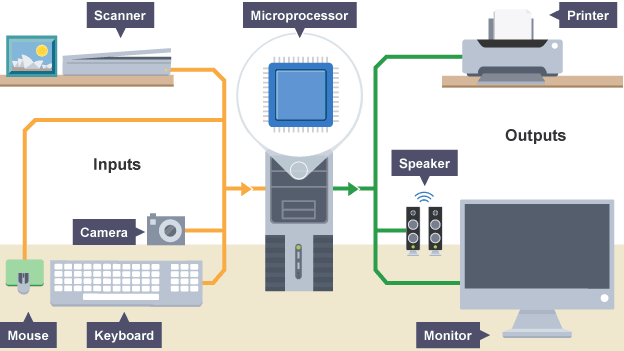
- Computers require an input hardware, processing hardware and output hardware.
- CPU
- Executes programs using the fetch-decode-execute cycle
- Memory
- Stores program operations and data while the program is being executed. Types: Registers, cache, RAM, ROM and Virtual Memory
- Storage
- Stores programs and files long term, even when not in use. Types include: USB, SD Cards, Hard-Drives and SSDs
- Performance
- CPU speed (cycles per second) measured in Hertz
CPU and Memory
- Factors that affect performance
- Clock Speed
- The clock speed - also known as clock rate - indicates how fast the CPU can run. This is measured in gigahertz (gHz) and corresponds with how many instruction cycles the CPU can deal with in a second.
- Cache Size
- Cache is a small amount of memory which is a part of the CPU - closer to the CPU than RAM. It is used to temporarily hold instructions and data that the CPU is likely to reuse.
- The CPU control unit checks the cache for instructions before the RAM.
- Larger the Cache = the more data can be stored closer to the CPU
- Processor Cores
- CPU can contain one or more processing units (cores). A core contains a ALU, Control Unit and Registers.
- Clock Speed
- Factors that affect performance
MEMORY
- Memory is the area where the computer stores or remembers data. Memory provides the CPU with its instructions. AKA Primary Storage
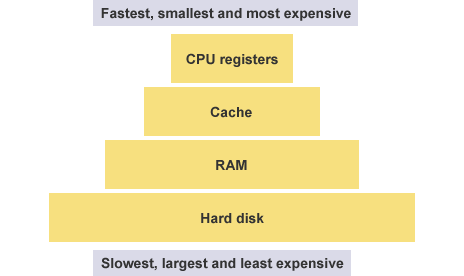
- Closer to CPU = quicker the CPU can access instructions
- VOLATILE
- RAM
- Only stores information to run programs while the PC is on. Memory is deleted when the PC is turned off.
- RAM
- NON-VOLITILE
- ROM
- Retains data even when the computer is off. This is where the bootup program and the OS would be stored.
- ROM
- Memory is the area where the computer stores or remembers data. Memory provides the CPU with its instructions. AKA Primary Storage
TYPES OF HARDWARE DEVICES
- Laser Printer (Output)
- Scanner (Input)
- Microphone (Input)
- Mouse (Input)
- Keyboard (Input)
- Touchscreen (Input & Output)
- Monitor (Output)
- Speakers (Ouput)
- Inkjet Speaker (Output)
- 3D Printer (output)
- You will need to be able to describe the features, give advantages and disadvantages of each device. Advantages can also be listed as features. When describing advantages or disadvantages you should compare with other similar devices.
Imagens e arquivos do mapa

Informações
- Descrição
- OCR Computing - Hardware
- Criado por
- a St George
- Visualizações
- 1
- Tags
- Histórico
-
- Criado por ollietablet123 · 12 mar 2015
- Copiado por a St George · 31 out 2022
- Avaliação