
Mapa mental
Unit 3 ICT
Conteúdo do mapa
Unit 3 ICT
Audio
- MP3 format needs to be decoded when used, which means they do not load as quickly as some other formats.
- Sound signals need to be converted before they can be processed by a computer because sound signals are analogue, computers are only able to process digital signals.
- A Interface that allows a musical instrument and a computer to communicate with each other is called Musical Instrument Digital Interface (MIDI)
Input/Output Devices
- An input is data that a computer receives.
- An output is data that a computer sends.
- Computers only work with digital information. Any input that a computer receives must be digitised.
Analogue & Digital
- Often data has to be converted back to an analogue format when it's output, for example the sound from a computer's speakers.
- Computers only work with digital information. Any input that a computer receives must be digitised.
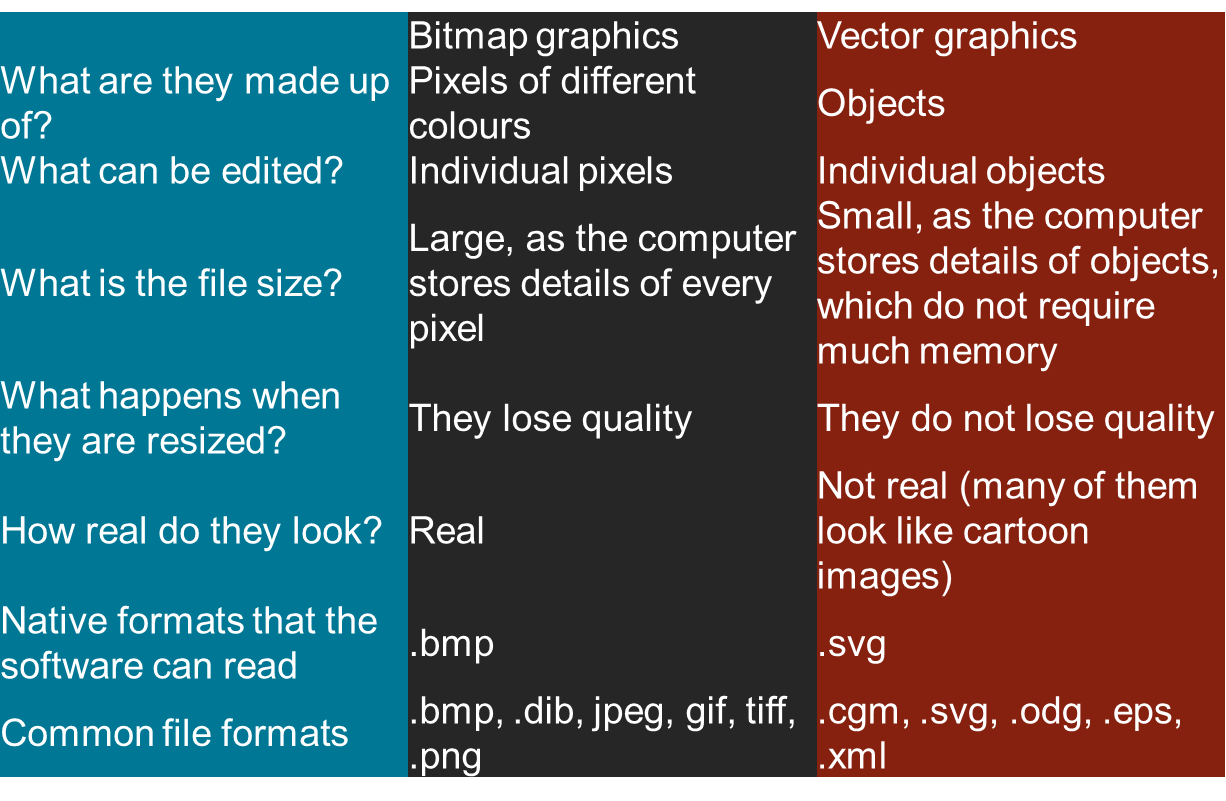
Bitmap/Vectors
Networks
- Wide Area Network (WAN)
- Local Area Network (LAN)
- A computer network is a number of computers linked together to allow them to share resources. Networked computers can share hardware, software and data.
- Bridge: Connects two similar networks e.g. two LANs
- Gateway: Connects two dissimilar networks e.g. connects a LAN to a Wan
- Switch: Analyses each packet of data and sends it to the computer it was intended for
Animation
- Tweening: Process used by animation software to automatically create the in-between frames between the two key-frames of the animation sequence
- Key Frames: Key frames are the starting and ending images of an animation sequence.
- Onion Skinning: Onion-skinning, is an option that you can turn on that shows a range of frames from your current frame
- FPS: A frame (state) is a single image within the complete animation sequence.
- Persistence of Vision: The process by which the eye is fooled into thinking that still related pictures, which are shown rapidly after each other, is actually a motion picture
- ADV: Brings a topic to life It gains the attention of the viewer Keep a young audience’s attention for longer Extend the boundaries of the physical world
- DIS: Takes a lot of effort to create even a basic animation Need skill to use animation software If overused, can be distracting from key message Unrealistic
Verification
- Visual Check – User carefully reads what has been typed in and compares with original data source
- Parity Check – Ensures data sent is the same as the data received when data is transmitted from one computer to another
- Double Keying – Checks the same data enter twice matches
Validation
- Validation checks that data is sensible/reasonable/within stated ranges.
- Batch Totals check meaningful data. Adds up data which is meaningful E.g. The sum of the total prices of objects in a database
- Hash Total checks meaningless data/ adds up a total that does not make sense. E.g. The sum of peoples phone numbers
Security
- Non-Physical Ways Access levels/Encryption/Backups/Passwords /Usernames/Monitoring the network/Anti-virus
- Physical Ways Alarms/security locks/bars on windows/Fireproof doors/Fireproof boxes
Legal Issues
- Computer Misuse Illegal to: Gain Unauthorised access to files stored on a computer system. Gain unauthorised access to files and use them for criminal activities Change or delete files unless authorised to do so.
- Electronic Communications Act (2000)
- Data Protection Act This act deals with personal data. If holding personal data you must: Store & Process data only for lawful stated purpose. Collect and process data fairly and lawfully. Keep adequate and relevant data. Meet the rights of the data subjects. Keep accurate & Up to date. Keep no longer than necessary. Keep data secure. Do not send outside of the EU
Human – Computer Interface (HCI)
- Biometrics:
- ADV: Each individual has a unique biometric characteristic e.g. Finger print It is difficult to forge biometric properties They cannot be shared Reduce password administration costs Replace hard to remember passwords
- DIS: Very expensive If biometric finger print is stolen it cannot be changes For people affected with diabetes, the eyes get affected resulting in differences.
- Command Line:
- ADV: Quicker to type a command Little memory needed Little processing power needed No need for expensive hardware Much less RAM needed A low resolution, cheaper monitor.
- DIS: It can be confusing if someone is new There are a large number of commands that need to be learned You can’t just guess the instruction Not suitable for a novice
- Menu Driven:
- ADV: No need to learn lots of commands Ideal for beginners Little processing power needed Extremely easy to use Step-by-step options Menu interfaces done’ have to be visual, they can be spoken.
- DIS: Poorly designed, maybe slow Can be too many menu screens to work through Cause frustration if menus are not organised Can be tedious for experts
- GUI (Graphical User Interface)
- ADV: Easy to navigate Uses windows/icons/menus/pointers Easy for novices Help guides and shortcuts for experts You do not use complicated commands Exchange data between different software applications
- DIS: Lots of memory Lots of processing power Slow for experts that just want to get things done More RAM needed
- Biometrics:
Control Systems
- Good for doing certain jobs quicker and don't need as many breaks as humans. e.g robots
- However cost a lot to repair and assembly line jobs can be lost
Imagens e arquivos do mapa
Informações
- Descrição
- GCSE ICT Mapa Mental sobre Unit 3 ICT, criado por Josh Shaw em 04-11-2015.
- Criado por
- Josh Shaw
- Visualizações
- 24
- Avaliação