
Mapa mental
Wired And Wireless Networks
Conteúdo do mapa
Wired And Wireless Networks
The Internet
- Circuit Switching Network
- When youn make a telephone call, a dedicated connection is set up between you and the person you are calling for the duration of the call
- For internet there aren't enough lines for the billions of users to use Circuit Switching Networks.
- So instead we use Packet Switching
- Files are broken down into "packets" which are small bits of data that are sent across the internet.
- They are then reassembled at the recepents comuputer
- Each "packet" is given a header containing.....
- The IP address it is going to
- The IP address it has come from
- The sequence number of the packet ie 5th
- The number of total packets
- Error checking data
- Packets travel by the fastest possible route not the shortest distance
- When the recpient gets there packets they are reasembled and checks the packets for errors
- corrupt packets are requested to be resent
- any packets not acknowledged after a set time interval will be automatically resent
- corrupt packets are requested to be resent
- When the recpient gets there packets they are reasembled and checks the packets for errors
- Files are broken down into "packets" which are small bits of data that are sent across the internet.
- So instead we use Packet Switching
- The internet is a collection of inter-connected networks.
- The internet is a Wide Area Network | WAN
- Any network in which the computers communicate using resources supplied by a “third party carrier”, such as British Telecom, is a WAN
- A WAN uses cables, telephone lines, satellites and radio waves to connect, usually spread over a wide geographical area
- In 1969, there were 4 internet connected networks. In 2012 2.1 billion people were internet users
- IP Adsressing
- IPv4 Adressing
- every network in the world has a separate, unique address.
- There are almost no more IPv4 addresses left so IPv6 adresses are replacing them
- Every computer and other device connected to the Internet has an IP address
- IPv4 Adressing
- Hard Ware
- The Router
- The router is used to send each packet through the internet using the quickest route
- Network Interface Cards
- built into every networked device
- MAC addressing
- a Media Access Control is assigned to each Network Interface Card by the manufacturer
- your computer may have more than 1 MAC address e.g 1 for ethernet and 1 for wireless
- a MAC address looks like this: 3B:14:E6:39:0A:2C
- Ther are 281,474,976,710,656 possible different MAC addresses possible
- enough for 40,000 NIC per person
- The ROLE of the MAC address
- The actual geographical location (e.g your house) of a networked device is determined by it IP adress
- so if you take your laptop to another part of town or a different country is IP address will change.
- The MAC address is used to identify the device
- When you request a web page, each router along the way uses the MAC address of the next router to send the data packet on the next leg of its journey
- The actual geographical location (e.g your house) of a networked device is determined by it IP adress
- Domain Name System Technology
- The role of DNS technology
- it takes names such as www.google.co.uk
- then translates it into an IP address
- e.g. www.google.co.uk = 74.125.131.94
- then translates it into an IP address
- it takes names such as www.google.co.uk
- DNS Servers
- There are 13 DNS "root" servers worldwide which keep a complete database of all names and IP addresses
- smaller DNS servers hold smaller parts of the database
- When a DNS server receives a request not in its database, it will pass the request on to another server until it reaches one with the matching name and IP address
- Lower level DNS servers are owned by ISPs
- When a DNS server receives a request not in its database, it will pass the request on to another server until it reaches one with the matching name and IP address
- smaller DNS servers hold smaller parts of the database
- There are 13 DNS "root" servers worldwide which keep a complete database of all names and IP addresses
- The role of DNS technology
- The Router
- Circuit Switching Network
LANs
- What is a LAN
- LAN stands for Local Area Network
- A LAN operates on a single site such as a school or small business using their own cabling systems
- Advantages and Disadvantages of Networking
- Advantages
- Sharing resources such as printers saves money
- You can access your files from any computer in the network
- Data is easy to back up as it is stored centrally on the server
- Disadvantages
- purchasing the network hardware is expensive
- Managing a large network is complicated
- Viruses may be able to infiltrate the network and infect every computer
- Advantages
- Network Topolgies
- Networks can be set up in different ways
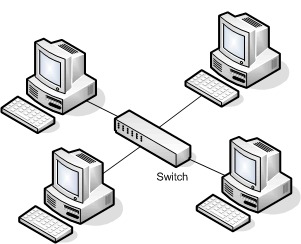
- Star Topology
- Advantages
- Fast data transfer as there are fewer data collisions
- If one cable fails the other workstations are not affected
- Disadvantages
- Requires additional hardware such as the central switch
- If the central device fails the whole network goes down
- Advantages
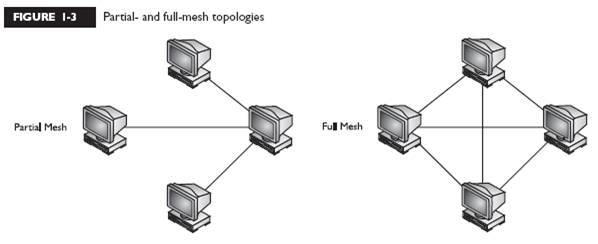
- Mesh Topolgy
- Nodes act as routers for data in order to relay and propagate data in the network
- Partial mesh network model usually used, often in conjunction with star topologies to create larger networks
- Wireless mesh networks
- Wireless mesh networks have enormous potential to provide Wi-Fi solutions for entire organisations, cities or even countries
- Only one node needs a wired Internet connection – no other cabling or infrastructure is required
- The more nodes that use the network, the more the signal can travel
- A node within broadcast distance of three other nodes, will have triple the standard bandwidth
- As the distance between one node and another is halved, signal strength becomes four times stronger
- Wireless mesh networks have enormous potential to provide Wi-Fi solutions for entire organisations, cities or even countries
- Advantages and disadvantages
- Advantages
- No single point of failure – It is a self-healing network
- Expansion and modification can be done without disrupting the network
- Data can be transmitted from different devices simultaneously
- Disadvantages
- Can involve redundant connections
- Expensive to install cabling if using wired connections
- Network maintenance and administration is difficult
- Advantages
- Network Hardware
- A Network Interface Card (NIC) in your computer or device
- A router or switch, which provides access to a local area network
- A modem may also be combined with the router in a single device
- Routers, Hubs and Switches
- Router: Sends data packets on their way in the best direction
- Hub: Central, multi-plug adaptor for computers and printers in a network. When a packet of data is received, it broadcasts the packet to all devices on the network
- Switch: Smart multi-plug adaptor only sends packets to the intended recipient, using its MAC address. Reduces network traffic and increases speed
- What is a LAN
Ethernet
- Ethernet Cable
- The Ethernet networking standard uses twisted pair cabling or fibre optics
- Ethernet Protocols
- ‘Ethernet’ refers to a family of standard local networking ‘protocols’ or rules
- It describes how devices should format data ready for transmission between computers on the same network
- nodes will wait until the connection is quiet before attempting to ‘speak’ or transmit
- Two nodes attempting to transmit simultaneously will stop and each wait a random period before reattempting
- nodes will wait until the connection is quiet before attempting to ‘speak’ or transmit
- It describes how devices should format data ready for transmission between computers on the same network
- ‘Ethernet’ refers to a family of standard local networking ‘protocols’ or rules
- Ethernet transmission
- Ethernet systems divide data into frames, similar to Internet packets
- Each frame contains source and destination addresses and error checking data
- Frames are broadcast to all nodes – only the intended recipient will open the frame. Others will be discarded
- Frames which are detected to contain transmission errors are dropped or resent
- Ethernet Cable
Virtual Netowrks
- Logical segments of a larger physical network (e.g. the Internet) are configured to behave as though they are part of a separate, and much smaller network
- Transmission is encrypted since data is travelling across a space used by others
Imagens e arquivos do mapa
Informações
- Descrição
- Year 10 Computing Mapa Mental sobre Wired And Wireless Networks, criado por James Buttle em 17-11-2016.
- Criado por
- James Buttle
- Visualizações
- 3
- Avaliação