
Mindmap
os test 1
Inhalt der Mindmap
os test 1
os: - software that manages computer's hardware. basis for apps. middle man between user and hardware
- goals: executes programs, uses hardware efficiently, makes computer system easier to use for user.
- goals - user view - ease of use, high performance to maximize work or play
- resources may have to be shared via workstations, servers, mainframes
- phones - resource-poor, ^ battery life and useability
- computer view - resource allocator, control program
- resources: cpu time, memory, storage, i/o devices. OS manages them all
- prioritize conflicting requests for resources
- allocates them fairly.
- manages execution of user programs to prevent errors and improper use of the computer.
- resources: cpu time, memory, storage, i/o devices. OS manages them all
- Program view: OS is a kernel
- the program that runs @ all times.
- other programs associated with OS - system programs, but not necesarily kernel.
- Moore's law is the observation that the number of transistors in a dense integrated circuit doubles about every two years.
- in mobile phones - also have middleware - software for application developers such as databases and graphics. in addition to kernel
- application programs - programs not associated with operation of the system
- bootstrap program - first program after computer power-on. loads the operating system.
- typically stored in ROM or EPROM, known as firmware
computer 4 components
- hardware - basic computer resources.
- CPU - programmable device for computation. made of integrated ciruits on a silicon package called microprocessor.
- software (OS) is needed for this brain to think on its own.
- can't store memory - storage media needs to be installed
- most systems use a single, general purpose processor.
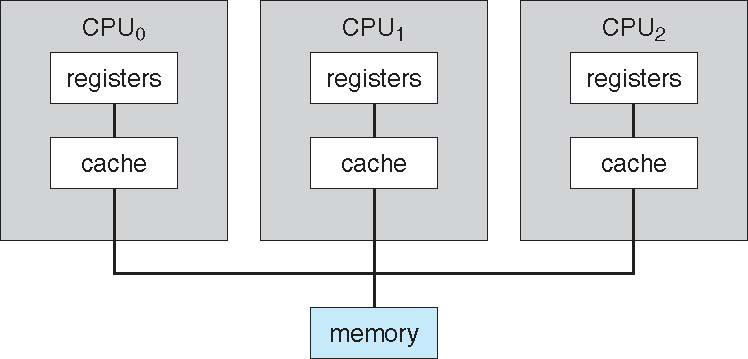
- multiprocessors/parallel system/tightly-coupled systems - growing in use and importance
- advantages: increased throughput, economy of scale, increased reliability
- types:
- asymmetric - each processor is assigned a specific task.
- symmetric - each processor performs all tasks. ***most common
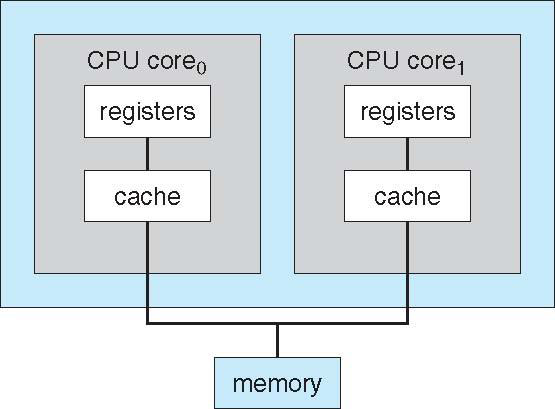
- a computer can have more than 1 chip with a single core but multiple CPUS (multiprocessing) , or one chip with multiple cores with a l1 cache for each core, and a l2 cache that is shared (multicore)
- that same processor can also have multiple execution core, all in one CPU. **different from multiprocessor
- these execution cores (microprocessors) are autonomous and do not communicate with the cpu, just run by the os
- there can also be multiple systems (computers, nodes) working together. **clustering.
- storage is shared via storage-area network (SAN)
- advantage: high- availability service that survives failures
- used for high-performance computing, solving big problems
- parallelization - one computer takes one part of the problem, and another one takes another. then answers are combined in the end
- used for high-performance computing, solving big problems
- types:
- asymmetric clustering - one machine, hot-standby mode
- symmetric clustering - multiple nodes that run apps that monitor each other
- apps must be written in a format such that parallelization is able.
- DISTRIBUTED LOCK MANAGERR - in order to avoid conflicting operations
- Each machine has full access to all data in the database. To provide this shared access, the system must also supply access control and locking to ensure that no conflicting operations occur. This function, commonly known as a distributed lock manager (DLM), is included in some cluster technology.
- blade servers - multiprocessors that have their own operating system.
- NUMA - non-uniform memory access - each cpu would have its own local memory, with its own local fast bus.
- problem occurs when 1 cpu has to access memory that is from another cpu.
- multiprocessors/parallel system/tightly-coupled systems - growing in use and importance
- CPU - programmable device for computation. made of integrated ciruits on a silicon package called microprocessor.
- operating system - controls and coordinates hardware with users and apps
- OS is software. conscience to CPU's brain
- apps - define ways that system resources/hardware are used to solve computing problems
- users
- hardware - basic computer resources.
Computer system organization - how a computer works
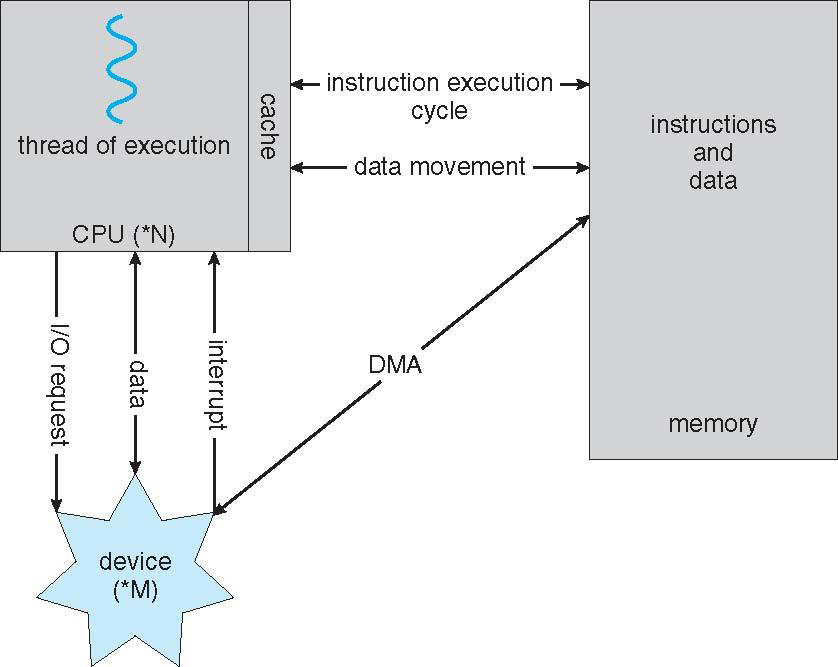
- one or more cpus + device controllers (disk, usb, graphics) which can run concurrently connect through common bus and compete for memory
- each device controller has a local buffer, which cpu moves data from main memory
- I/o transaction is from the device to the local buffer of the device controller.
- operation finished - device tells cpu by causing interupt.
- interupt handling - hardware triggers interupt by sending signal to the cpu via the system bus. the cpu has an interupt request line (hardware) that detects it
- interupt vector contains addresses of all the service routines
- an interupt is transferred to the INTERUPT VECTOR
- the address of the interupted instruction is saved for when it needs to be started up again.
- what the os does: i) the OS (software) preserves the state of the CPU (hardware) by storing REGISTERS in the PROGRAM COUNTER
- ii) determines which type of interupt has occured
- iii) separate segments of code to determine what action should be taken for what type of interupt
- iv) performs a state restore, and executes a return from interrupt instruction to return the CPU to the execution state prior to the interrupt.
- layman terms - We say that the device controller raises an interrupt by asserting a signal on the interrupt request line, the CPU catches the interrupt and dispatches it to the interrupt handler, and the handler clears the interrupt by servicing the device.
- iv) performs a state restore, and executes a return from interrupt instruction to return the CPU to the execution state prior to the interrupt.
- iii) separate segments of code to determine what action should be taken for what type of interupt
- ii) determines which type of interupt has occured
- what the os does: i) the OS (software) preserves the state of the CPU (hardware) by storing REGISTERS in the PROGRAM COUNTER
- wiki: *An "interrupt vector table" (IVT) is a data structure that associates a list of interrupt handlers with a list of interrupt requests in a table of interrupt vectors. Each entry of the interrupt vector table, called an interrupt vector, is the address of an interrupt handler. While the concept is common across processor architectures, IVTs may be implemented in architecture-specific fashions.
- most cpus have 2 types of interupts.
- NONMASKABLE INTERUPT- unrecoverable memory errors.
- MASKABLE: it can be turned off by the CPU before the execution of critical instruction sequences that must not be interrupted.
- The maskable interrupt is used by device controllers to request service.
- INTERUPT CHAINING, in which each element in the interrupt vector points to the head of a list of interrupt handlers. When an interrupt is raised, the handlers on the corresponding list are called one by one, until one is found that can service the request. This structure is a compromise between the overhead of a huge interrupt table and the inefficiency of dispatching to a single interrupt handler.
- interupt priority level -putting high priority ones above low priority without masking them all.
- the address of the interupted instruction is saved for when it needs to be started up again.
- TRAP/EXCEPTION - software generated interupt caused by an ERROR or USER REQUEST
- there are also normal interupts that are written in the software
- an interupt is transferred to the INTERUPT VECTOR
- The interrupt must transfer control to the appropriate specific interrupt service routine, usually stored in the interupt vector, or a table of service routines
- routine invokes interupt specific INTERUPT HANDLER
- interupt vector contains addresses of all the service routines
- multiprogramming (batch system) -
- organizes jobs (codes and data) such that cpu WILL ALwAYS HAVE ONE JOB TO eXECUTE
- all jobs need to be done are stored in memory
- job to be run selected via the job scheduling
- when the cpu has to wait for an i/o device, the os automatically switches to another job
- ** user input - seven characters per second is fast for people but incredibly slow for computers. Rather than let the CPU sit idle as this interactive input takes place, the operating system will rapidly switch the CPU to another process.
- when the cpu has to wait for an i/o device, the os automatically switches to another job
- TIMESHARING- verb - cpu switches jobs so frequently that the user can interact with each job while it is running, creating INTERACTIVE computing
- VIRTUAL MEMORY lessens response time - The main advantage of this scheme is that it enables users to run programs that are larger than actual physical memory. Further, it abstracts main memory into a large, uniform array of storage, separating logical memory as viewed by the user from physical memory.
- organizes jobs (codes and data) such that cpu WILL ALwAYS HAVE ONE JOB TO eXECUTE
- system bus- the main information transformation route b/w different parts of the computer
- SYSTEM CALL: user tells OS
- software: SERVICE ROUTINE in OS
- hardware: TRAP/INTERUPT to specific location in interupt vector
- mode bit from user to kernel
- kernel confirms that the request is legal
- mode bit from user to kernel
- hardware: TRAP/INTERUPT to specific location in interupt vector
- software: SERVICE ROUTINE in OS
- interupt handling - hardware triggers interupt by sending signal to the cpu via the system bus. the cpu has an interupt request line (hardware) that detects it
- user gives input
- operation finished - device tells cpu by causing interupt.
- there exists device driver (software) for each device controller (hardware) to manage i/o. - interface b/w controller and kernel.
- direct memory access: high speed i/o devices can transmit info to main memory w/o cpu intervention **fast
- how its done: one interupt per block, as opposed to one interupt per byte.
- for high-performing i/o devices such as disk controllers and network adapters.
- when computer starts up: kernel mode 0, user mode 1
- that is wen the OS is in charge of computer = kernel mode
- to prevent errors made by users, the hardware has some programs have PRIVILEGED INStRUCTIONS that can only be executed in kernel mode.
- if in user mode and executed - trap!
- PROTECTION RINGS - 0 - kernel mode, 3 is user mode, 1 and 2 are for protection
- kernel - most privileged, vmm - less than kernel, more than user, user, least.
- if in user mode and executed - trap!
- to prevent errors made by users, the hardware has some programs have PRIVILEGED INStRUCTIONS that can only be executed in kernel mode.
- that is wen the OS is in charge of computer = kernel mode
- direct memory access: high speed i/o devices can transmit info to main memory w/o cpu intervention **fast
- I/o transaction is from the device to the local buffer of the device controller.
- each device controller has a local buffer, which cpu moves data from main memory
- real - time
- system call - user asks OS to do something
- trap to a specific location in the interrupt vector. This trap can be executed by a generic trap instruction, although some systems have a specific syscall instruction to invoke a system call.
- When a system call is executed, it is typically treated by the hardware as a software interrupt. Control passes through the interrupt vector to a service routine in the operating system, and the mode bit is set to kernel mode.
- The kernel examines the interrupting instruction to determine what system call has occurred; a parameter indicates what type of service the user program is requesting. Additional information needed for the request may be passed in registers, on the stack, or in memory (with pointers to the memory locations passed in registers). The kernel verifies that the parameters are correct and legal, executes the request, and returns control to the instruction following the system call
- if error occurs, the hardware handles like its a trap, then terminates the program abnormally.
- timer. A timer can be set to interrupt the computer after a specified period. to prevent infinite loops
- once timer is up, the control is trsfered back to the os - error
- When a system call is executed, it is typically treated by the hardware as a software interrupt. Control passes through the interrupt vector to a service routine in the operating system, and the mode bit is set to kernel mode.
- in terms of processes, and active entity in which a program is running - the os does the following:
- Creating and deleting both user and system processes • Scheduling processes and threads on the CPUs • Suspending and resuming processes • Providing mechanisms for process synchronization • Providing mechanisms for process communication
- trap to a specific location in the interrupt vector. This trap can be executed by a generic trap instruction, although some systems have a specific syscall instruction to invoke a system call.
- protection - from self, and user
- security - from external attacks
- user ID for one person - can escalate privileges to gain mroe access to shit
- group identifier - for more than 1 person
- security - from external attacks
- system call - user asks OS to do something
- one or more cpus + device controllers (disk, usb, graphics) which can run concurrently connect through common bus and compete for memory
memory - The CPU can load instructions only from memory, so any programs must first be loaded into memory to run.
- **semi-conductor, electrical circuits based. main memory (RaM) - only large storage media that CPU can directly access. re-writable, volatile
- secondary storage - extension of mm, large and nonvolatile storage. Secondary storage commonly refers to nonvolatile storage devices, such as hard disk drives (HDDs) and solid-state drives (SSDs)
- hard disks - divided into tracks, then subdivided into sectors, controlled by disk controller to interact with device and computer.
- solid state disks - faster than hards, nonvolatile as well.
- programs and data can be loaded onto main memory when to be used.
- firmware - storage that is infrequently written to and is nonvolatile. **stil primary memory though
- eeprom - erasable programable read only memory - can be changed but cannot be changed frequently. In addition, it is low speed, and so it contains mostly static programs and data that aren’t frequently used. bootstrap program that loads the OS or apple phones - manufature information
- system daemons - upon starting, some other services are loaded along with the kernel - run the entire time kernel is running
- eeprom - erasable programable read only memory - can be changed but cannot be changed frequently. In addition, it is low speed, and so it contains mostly static programs and data that aren’t frequently used. bootstrap program that loads the OS or apple phones - manufature information
- secondary storage - extension of mm, large and nonvolatile storage. Secondary storage commonly refers to nonvolatile storage devices, such as hard disk drives (HDDs) and solid-state drives (SSDs)
- caching, verb - the action of copying info into a faster storage storage system. stores data for future requests so that it can be served faster. . cache is automatically managed by the hardware, and invisible to the software
- how it works: Faster storage (cache) checked first to determine if information is there
- if yes, the info is used directly from cache.
- design problem: cache smaller than info being cached
- if no, data copied to cache and used there
- for frequently used data from the main memory.
- if yes, the info is used directly from cache.
- CACHE COHERENCY - A copy of piece of info may exist simultaneously in several caches. Since the various CPUs can all execute in parallel, we must make sure that an update to the value in one cache is immediately reflected in all other caches where A resides. hardware issue, below OS handling
- how it works: Faster storage (cache) checked first to determine if information is there
- The load instruction moves a byte or word from main memory to an internal register within the CPU, whereas the store instruction moves the content of a register to main memory
- von neuman - von Neumann architecture, first fetches an instruction from memory and stores that instruction in the instruction register. The instruction is then decoded and may cause operands to be fetched from memory and stored in some internal register. After the instruction on the operands has been executed, the result may be stored back in memory.
- tertiary storage - shit that you can take in and out of the computer such as blue ray or cd. slower access time, more storage.
- OS does the following: • Keeping track of which parts of memory are currently being used and which process is using them • Allocating and deallocating memory space as needed • Deciding which processes (or parts of processes) and data to move into and out of memory
- file system, OS does the following: • Creating and deleting files • Creating and deleting directories to organize files • Supporting primitives for manipulating files and directories • Mapping files onto mass storage • Backing up files on stable (nonvolatile) storage media
- **semi-conductor, electrical circuits based. main memory (RaM) - only large storage media that CPU can directly access. re-writable, volatile
virtualization - abstracts hardware of computer. into several different execution environments, thereby creating the illusion that each separate environment is running on its own private computer.
- 2 operating systems can run at the same time and interact with each other.
- virtual machine can switch among the various operating systems in the same way a user can switch among the various processes running concurrently in a single operating system.
- With virtualization, in contrast, an operating system that is natively compiled for a particular CPU architecture runs within another operating system also native to that CPU.
- can install different operating systems on the same comp.
- With virtualization, in contrast, an operating system that is natively compiled for a particular CPU architecture runs within another operating system also native to that CPU.
- example: emulation - Hardware emulation is the use of one hardware device to mimic the function of another hardware device.
- allow an entire operating system written for one platform to run on another.
- but: machine code from one must be translated to another. therefore, emulated code runs slower than native code.
- virtual machine can switch among the various operating systems in the same way a user can switch among the various processes running concurrently in a single operating system.
- 2 operating systems can run at the same time and interact with each other.
network - Anetwork, in the simplest terms, is a communication path between two or more systems. Distributed systems depend on networking for their functionality.
- Networks vary by the protocols used, the distances between nodes, and the transport media. TCP/IP is the most common network protocol, and it provides the fundamental architecture of the Internet
- For an operating system, it is necessary only that a network protocol have an interface device—a network adapter, for example —with a device driver to manage it, as well as software to handle data.
- LAN - local area network, WAN - wide area network, etc etc
- NETWORK os - network operating system is an operating system that provides features such as file sharing across the network, along with a communication scheme that allows different processes on different computers to exchange messages.
- P2p, cloud computing, real-time operating systems , real-time embedded systems , client-server systems are examples of how diverse OSs can be
- financially - difference between free, open-source and closed-source OS
- GNU/Linux - hundreds of unique distributions, has a live CD and live DVD
- BSD UNIX - version control system - users to pull an entire source code tree to his comp, then push any changes back to the repository.
- financially - difference between free, open-source and closed-source OS
- Networks vary by the protocols used, the distances between nodes, and the transport media. TCP/IP is the most common network protocol, and it provides the fundamental architecture of the Internet
data structures
- lists
- singly, doubly, circularly
- worst case O(n), which is slow. used for constructing stacks and queues. sometimes used in kernels
- stacks
- LIFO, last in first out
- Parameters, local variables, and the return address are pushed onto the stack when a function is called; returning from the function call pops those items off the stack
- LIFO, last in first out
- queues
- FIFO
- printer jobs, processes waiting in the CPU
- FIFO
- bitmap
- string of n binary digits that can be used to represent the status of n items. For example, suppose we have several resources, and the availability of each resource is indicated by the value of a binary digit: 0 means that the resource is available, while 1 indicates that it is unavailable
- trees
- binary tree - left and right child
- worst case scenario is O(n), slow again.
- balanced binary tree - algorithm helps with this - remedies the situation
- worst case scenario is O(n), slow again.
- binary tree - left and right child
- hash function
- input is put through a function, pretty quick , can be as quick as O(1)
- problem when different input - same output
- prevent HASH COLLISION by having a linked list at the table location that contains all of the items with the same hash value.
- application - hash map - username password pairs
- problem when different input - same output
- input is put through a function, pretty quick , can be as quick as O(1)
- lists
Bilder und Dateien der Mindmap
Informationen
- Beschreibung
- cs Mindmap am os test 1, erstellt von Katlyn Ai am 17/09/2018.
- Erstellt von
- Katlyn Ai
- Aufrufe
- 1
- Bewertung