
A2 ICT
Folien in diesem Satz (43)
-
- 1. A network for a company
- 2. Types of networks available and the use of associated hardware
- 3. Software components
-
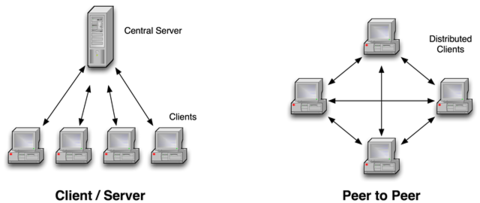
- There are two main types of networks. A peer-to-peer network and a client-server network.
-
- A peer-to-peer network is a network in which all computers are the same status and are able to communicate with each other on equal footing. All computers on this type of network can access all the resources of any computer on the network. This type of network is mainly used for the home as you can only connect around 15 computers to this network maximum. A peer-to-peer network is used to share things like files and printers with computers within the network.
- This type of network has become a popular way to share files in as there is no central management to go through.
- https://www.youtube.com/watch?v=aFU3ug9_BJQ (Einbetten)
-
- Client-Server networks are the better choice for large organisations as all the computers are not the same status. This is needed in most work places as the manager should be able to access more than other staff within an organisation. This type of network requires a powerful computer at the centre of all the other computers to store all files and programs. This is called the server while the computers connected are the clients. As the server is such an important part of this network, a person called the network manager is usually appointed to be in charge of it.
- https://www.youtube.com/watch?v=aFU3ug9_BJQ (Einbetten)
-
- Advantages:
- 1. Saves money as it doesn't need a server
- 2. No network manager is needed
- 3. Easy to set up
- 4. No reliance on a server
- 5. Lower set-up and maintenance costs
- 6. Users decide what resources other users can see on their computer
- Disadvantages:
- 1. Backups cannot be made centrally so users need to back up their own data
- 2. Users need more IT knowledge as they are responsible for their own files
- 3. Poorer security so users have to decide what resources other users in the network can see
- 4. Computers can run slowly
- 5. Users may have trouble finding files if they're not organised and held centrally
- 6. Only suitable for very small networks with typically 15 or fewer computers
-
- Advantages:
- 1. Security is better as one person is responsible for the central system
- 2. Centralised data meaning that all users can access that same set of data
- 3. Backups are taken centrally which means that data is unlikely to be lost completely
- 4. Faster access to programs and files
- Centralised administration so users do not need to worry about it
- Disadvantages:
- 1. More expensive than peer-to-peer network
- 2. Need a person with specialist knowledge to be in charge of the server
- 3. Software is sophisticated and expensive
- 4. If the user breaks down, then the network is unusable until its repaired
-
- Network topologies are the way in which a network is set out. A network topology shows how the computers are connected when wires are used. There are 3 types of topologies. The bus topology, the ring topology and the star topology. These topologies use cables. In a wireless network, network topology is used to show how the devices in a network communicate with each other.
- https://www.youtube.com/watch?v=RdN06rhKtqA (Einbetten)
-
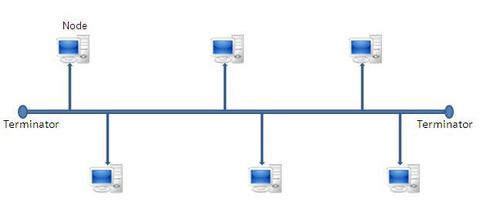
- In a bus topology, all devices are connected to the network with a shared cable called the backbone. Signals can be passed either way along this backbone. Terminators are put at the end of the backbone when there are no more devices to connect. They can be removed to add another device at any time.
-
- Advantages:
- 1. Cost effective because of the small amount of cable needed
- 2. Simple cable runs makes it easy to install
- 3. Easy to add extra devices to the network
- Disadvantages:
- 1. If more than about 12 devices are connected, then the performance of the network can be downgraded
- 2. If there is a break in the backbone cable, then the network cannot be used
-
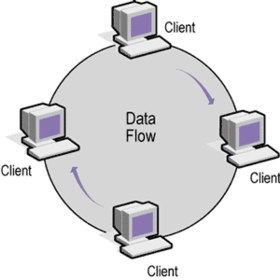
- A ring network is also a peer-to-peer network as there is no server. In a ring topology, all computers are arranged in a circle where data sent by one computer passes around the ring until it reaches the correct computer.
-
- Advantages:
- 1. The network is not dependent on a central system
- 2. Each computer has the same access as the others so no one computer can 'hog' the network
- Disadvantages:
- 1. If there is a break in the connection, then the whole network fails whether its wireless or not wireless
- 2. Faults are difficult to locate
- 3. It is possible to keep the network running whilst equipment is added or removed because there is only one path for the data to follow
-
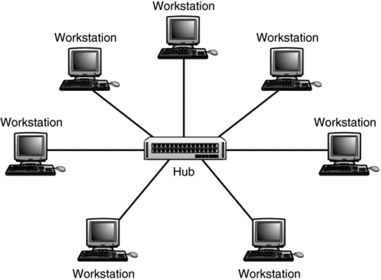
- A star topology uses a central connection point to connect all the devices on the network together. The central connection point can be a hub, a switch or a router.
-
- Advantages:
- 1. If one cable fails, then the other computers can still be used
- 2. Extra computers can be added without much loss in performance because all computers have their own path to the hub
- 3. Its easy to add extra devices as this doesn't disturb other computers connected to the network
- Disadvantages:
- 1. A large amount of cabling is needed which makes its a more expensive topology
- 2. There is dependence on the central system as if that centre device fails, then so does the whole network
-
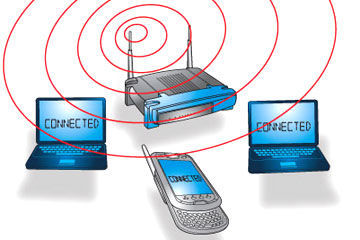
- Computers are now able to communicate with each other and access the internet in a local area network (LAN) wirelessly. With wireless communication, the data transfer medium is the air through which radio waves travel. Wireless networks can work anywhere where they can get a radio signal. Many people-especially people that travel a lot- need to access the internet regularly so there are many public places where the internet can be accessed wirelessly using a persons device. These places where you can connect to the Wi-Fi are called hotspots.
- To set up a small Wi-Fi network you would need:
- 1. A broadband connection to the internet
- 2. A router
- 3. Wi-Fi enabled computers or devices
- Most computers have a wireless adapter already built into them but for old computers without this, you can buy an adapter.
-
- Advantages:
- 1. Allows expensive LAN's to be set up without cables
- 2. Allows people the freedom to work anywhere a signal can be recieved
- 3. Ideal for networks in old listed buildings where cables wouldn't be allowed to be installed
- 4. You can use Wi-Fi all over the world
- Disadvantages:
- 1. Power consumption is high which means that laptops soon exhaust their rechargeable batteries
- 2. There may be health problems with Wi-Fi due to waves
- 3. There may be security problems even when encryption is used because people can break past these encryptions with certain devices
- 4. Home networks have a very limited range
- 5. There can be interference if wireless network signals start to overlap
-
- Networks need software to tell the connected devices how to communicate with each other.
-
- Small networks (Peer-to-Peer) can be run using existing windows software but larger networks (Client-Server) need specialist operating systems software.
- Network operating systems are more complex as they need to co-ordinate the activities of all computers and other devices connected to the network.
- Network operating system software include:
- -UNIX
- -LINUX
- -Novell Netware
- Novel Netware is a very popular client-server network operating system.
-
- A network manager who is in charge of several hundred computers would need help in looking after all of them to keep the network running. There is a software called network management software that helps a network manager do this.
- Tasks that the network management software would help with are:
- - Making sure that all computers have up-to-date software with latest security measures.
- - Checking there are licences on each computer for all the software being used.
- - Providing remote control facilities so that help-desk staff can sort a users computer problem out by seeing exactly what's on the screen.
- - To check that bandwidth is being used correctly.
- - To find out if a user has installed non-licensed software without permission from a networked computer.
- - Checking the speed of the processor as well as the memory used.
-
- Everyone who uses a network is given user accounts. The user account is set up by the network manager.
- At the time the account is created, the network manager will allocate user rights.
- All network users will be able to:
- - Change their password
- - Change their desktop settings
- - Manage their own files in their storage area
- The network manager will decide:
- - Which software the user can access
- - Which shared files a user has access to
- - If a user is allowed to copy files
- - If a user is allowed to install software
-
- When a user logs in, they give their username and password. The system then allocates network resources to the user. When a user no longer requires access to the network, they can log out.
- As well as making sure only authorised users are allowed access to the network, the log-in procedure can provide an audit trail as to who has used resources on the system. This is done by providing a user log, which is a record of the successful and failed log-ins and also the resources used by the users who have access to that network.
-
- Organisations have security risks when owning a network. Strategies regarding the use of networks need to be put in place to minimise these threats.
- Ways software can help with security:
- - Providing users with usernames and passwords so that access is restricted to authorised users.
- - Virus checking software can be put in place to scan the computer and its files.
- - Firewalls can be put in place to prevent the network from hackers.
- - Encryption can be used to keep data secret when being sent over networks. This is used mainly for when financial details are being shared over the internet.
-
- Once a network has been created, it is necessary to configure it to maximise performance. Network configuration management is the process of organising and maintaining all information about a network.
- When a network needs a modification, repair, expansion or upgrading, the network manager will refer to the network configuration database to determine the best course of action.
- The network configuration database will contains the locations and network addresses of all hardware devices used in the network and also information about the programs.
- Advantages in using configuration management software:
- - Easier to repair, expand or upgrade the network.
- - The network will be optimised and so will run faster.
- - Less network downtime owing to better management of the network.
- - Network security is optimised.
- - It keeps records of all the changes made to a network so you do not need to write down the new settings.
-
- There are many tasks that a person in charge of a network can do on their terminal. Network managers administrators can use remote management to:
- - See which users are using the network.
- - Check on emails being sent in company time.
- - Check on sites visited by employees.
- - Check on the hardware.
- - Check to make sure that the number of allowed users for the software are not being exceeded.
- - Guide users through problems they may be having.
- -Log off a computer if it has been left for a while.
- - See if components on the networks are failing.
- - Rebuild stations by adding software.
-
- Auditing keeps a record of who has done what on the network. Auditing keeps record of:
- - Usernames
- -The times a user has logged on or off
- - Details of programs they used
- - Details of files accessed
- - Details of changes made
- It is used to identify abuses of the systems by authorised staff and also to investigate instances of unauthorised access (Hackers)
-
- Companies will have to cope with the loss of hardware, software, data or communication services or a combination of these. This loss can be caused by:
- - Hardware failure
- - Software bugs
- - Natural dis taters (Fires, floods ect)
- - Deliberate damage
- - Accidental damage
- Disaster planning is needed to:
- - Minimise the disruption caused
- - Get the systems working again in the shortest possible time
- -Ensure that all staff know what to do to recover data
-
- Back-up:
- Programs and hardware are not too much of a problem because they can be replaces. However, without back-up they cannot be easily replaced. Loss of data could cause companies to go out of business. Backing up data on a network is extremely important. Back-ups should be:
- - Done on a regular basis
- - Kept off-site or in a fireproof safe
- - Used with a RAID (Random array of inexpensive disks) system.
- Restoration:
-
- Analysing large amounts of data requires a lot of computer power which may not be available due to high costs. To solve this problem, there is something called distributed computing. Instead of having a very expensive supercomputer, a few less powerful computers could be connected together using the internet but each working on the same problem. Home users can contribute some of their resources to certain projects when they are not using their computer system.
- Examples of distributed computing:
- SETI@home Beta - This project searches for extraterrestrial intelligence.
- Asteroids@home - This project is designed to enlarge our knowledge of the physical properties of asteroids.
-
- 1. The impact of the internet on business
- 2. Connecting to the internet
- 3. Moral, social and ethical issues associated with the internet
-
TOPIC 3:HUMAN-COMPUTER INTERFACE
- Consistency of sign posting
- On-screen help
- Layout
- User expertise
- Use by disabled
- Navigational structure
- Environment of use
-
- A good user interface will have consistent sign posting. This means that all aids to navigation (such as the 'next' and 'previous' buttons) all look the same and appear in the same position from screen to screen. This consistency will make navigation easier for novice users.
-
- On-line help shows the user what to do when they are not sure how to do something. This is especially handy for novice users as the help screens often explain things simply and gives the user advice on how to do things. Every software package should have on-screen help so that users don't have to look through manuals or user guides. Some help screens can use unfamiliar words however, when they should use simplistic terms for novice users.
- On-line help is not just for novice users. Some users may not be confident in using the more complicated software. Microsoft office uses wizards that help you through some of the more complex tasks. This form of assistance allows the users to accomplish their tasks in as short a period as possible.
-
- The layout for a piece of software would be different for each task depending on what is appropriate. For example, you would not have the same layout for a piece of software to be used by young children learning how to spell as you would with a piece of CAD software used by an architect to design complex buildings. As these people are performing completely different tasks, they would need a layout appropriate for that specific task.
- The interface to teach children spelling should:
- -Have a minimum amount of text on-screen
- -Use bright colours to attract young children to the package
- -Have an uncluttered appearance
- -Involve minimum use of the keyboard
- -Use speech synthesis so they can hear words
- The interface for CAD should:
- -Be customisable
- -Use a large screen for complex interfaces
- -Design pull-down menus so that the selections used most frequently are situated at the top of the menu
- -Keep working area as large as possible by including pull-down menus
-
- Users can be divided into:
- Novices: People who have never experienced the software before
- Experienced: People who have used the software before but only know and use some of its features
- Experts: People who have many years experience of the software and know and use all its facilities
- Each of these users will have different needs for the user interface. The novice users priority will be ease of learning and easy access to help and the expert user will want to get the job done in the least possible time.
- Short cuts can be provided for experts so that they can work as a high speed. They would have to memorise commands using a combination of keys and this would save them the hassle of using pull down screens and icons. A novice user can use a mouse, so many packages provide an alternative interface.
-
- Users with sensory impairment: The user may not be able to read the letters on the screen properly. A clear and large enough font should be used to make writing easy to read. If a user is blind, then ICT can help them by the use of a talking computer where the words are spoken when typed in by the user, or output on the computer. Blind users can also use special braille keyboards to enter data and they can use braille printers to produce output in braille with raised dots.
- Users with a physical disability - this usually affects the users mobility. For example, they may not be able to use their arms or hands or may be unable to walk. In some cases the disability is so severe that the person is almost paralysed. People who are unable to write can use voice-activated systems to put data into the computer.
-
- Navigational structure should be clear to the users so that they know how to accomplish certain tasks. For a complex task, the user can be guided through using a series of small steps. For example, the mail merge wizard in the word processing package Word takes the user one step at a time through the process of creating a mail merge using their own data.
- Many websites use hotspots without telling the user to click on them. The user should never be left wondering what to do next. Forward and back buttons should be positioned at the same place on the screen and so should next buttons. If a user wants to flick quickly through a series of pages, it is annoying to position the mouse before clicking. It is much easier to keep the next button in the same place so all the user has to do is click to take them to the next page.
-
- When designing a good user interface, the environment of use needs to be considered. For example, if a HCI is used in a noisy environment, then sound will not be used and instead, large font and clear colours would be needed. The HCI will need to be suitable for the environment in which it is used in.
-
- 1. Telecommuting/Teleworking
- 2. Codes of conduct
-
1. Telecommuting for the Employee
- Advantages
- -No expenses for travelling to work
- -You can sometimes work your own hours
- -You can fit work around family commitments
- -You can live where you want
- -Ideal for disabled people
- -Less stress e.g: you don't get stuck in traffic
- Disadvantages
- -May feel isolated
- -No social work life
- -Loss of status for some staff
- -May not be a quiet place in the house to work
- -Boundary between work and home is lost
- -Home costs increase
-
Telecommunting for the Employer
- Advantages
- -Smaller offices are needed
- -Less office furniture needed
- -Staff less likely to spend time off sick
- -Reduced office overheads
- -Staff may be more amenable to working flexible hours
- -Fewer cleaners or caretaker needed
- Disadvantages
- -More difficult to hold meetings
- -Change to organisational structure may be needed
- -Hard to determine how hard staff are working
- -Employers usually have to pay for employee's ICT equipment
- -Harder for managers to manage the work
- -Increased number of sites for ICT equipment may cause more security risks
-
- Advantages
- -Less air pollution
- -Reduced traffic congestion as fewer people travel to work
- -Fewer greenhouse gas emissions helps global warming
- -Can help sustain rural communities as people can telework
- -Prosperity is spread around the UK rather than being mainly located in the cities
- -Family relationships improve as there is more time in the home
-
- Employee-
- Less stress as you do not have to experience delays of travel ect.
- Less time spent away from home meaning an improved family life
- Long hours of travel are not needed
- Organisation-
- Cheaper as they do not have to pay for employees travel or accomodation
- Improved productivity of employees as they do not need to travel
- Meetings can be called at short notice
- Short meetings can be conducted without the need to travel for such a short meeting
- Society-
- Fewer people have to fly to meetings, reducing the amount of carbon dioxide and therefore reducing global warming
- Roads will not be clogged up with traffic meaning less stress and less pollution
-
Limitations of Videoconferencing
- Cost of specialist video conferencing equipment is expensive
- Image and sound quality may be poor if specialist equipment is not being used
- People could feel self-concious when video conferencing and therefore, fail to come across well
- Products cannot be passed around so only digital documents can be passed on
- Lack of face-to-face contact may mean a discussion may not be as effective
Informationen
- Beschreibung
- Folienset am A2 ICT, erstellt von 09rice1b am 11/01/2016.
- Erstellt von
- 09rice1b
- Aufrufe
- 0
- Bewertung