
Module 4 of 22 · Media
The REPL Interface
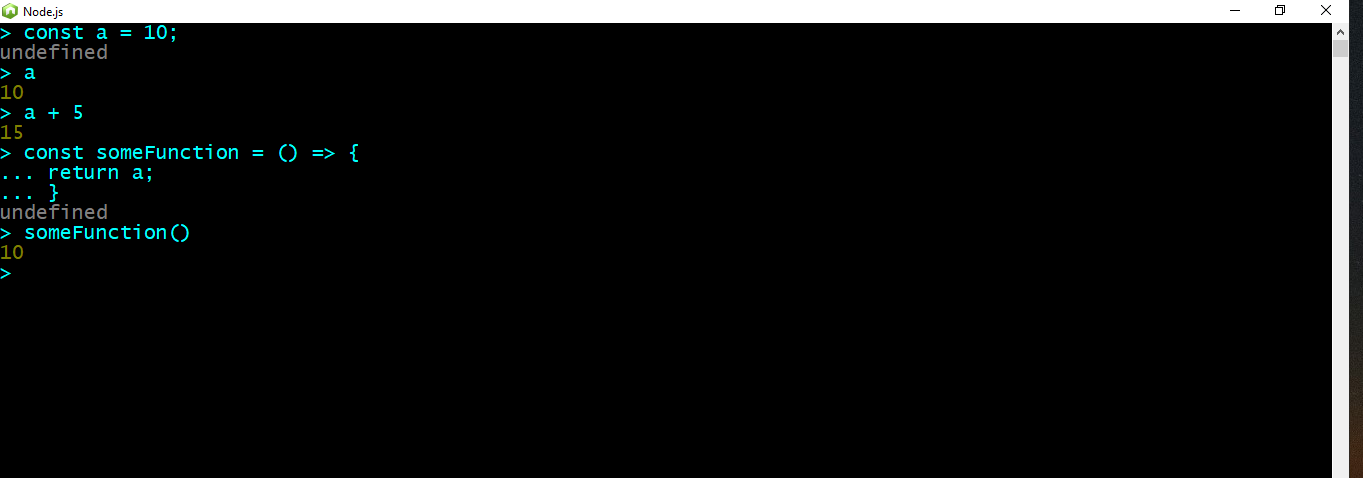
The REPL interface
Let's run some JavaScript code after all this setup, shall we? Before we open files normally with our favorite text editor, let's get familiar with the REPL interface. You can search for node.js in the all programs. Node.js comes with this command line like interface built in. There we can execute JavaScript statements exactly as we would like with a JS file.
This is the Read-Evaluate-Print-Loop (or REPL for abbreviation) environment.
We are not going to spend much time here, since mostly we are going to implement our code within JavaScript files, but it's good to spend a minute or two to understand that node is just an execution context.
For getting familiar, at the first line try to create a new variable (the syntax is JavaScript as always) and store a valid value to it. Then hit enter. A line after just type the name of the variable and hit enter. What do you observe? Node stored the value into the variable and printed it when you asked for it.
After that, feel free to play around, by creating a function that returns the previous variable. Don't be scared to go multi line as long as you open the block of code and then hitting enter as shown above.
You can use normally the REPL interface for evaluating fast and quickly JavaScript expressions (such as regular expressions, complex comparisons and more)but not for real development purposes.