
Quiz
Midterm Study
This quiz has question types that open in the usual player.
Questions in this quiz (154)
1Which computer components are considered "black boxes"?
- AGPU & MOBO
- BMonitor & PSU
- CCPU & GPU
- DPSU
2How large is a motherboard with ATX form factor?
- AUp to 9.6" x 9.6"
- BUp to 6.7" x 6.7"
- CUp to 21" x 9.6" (full size)
- DUp to 19" x 10"
3A chipset is a set of chips on a motherboard that works closely with the CPU to collectively control the memory, buses, and some peripherals.
- ATrue
- BFalse
4The Intel Coffee Lake (8th gen) chipset uses the revised [blank_start]LGA1151[blank_end] socket.
- ALGA1150
- BLGA2011
- CLGA1151
5The Intel Kaby Lake (7th gen) and Skylake (6th gen) chipsets use the [blank_start]LGA1151[blank_end] socket.
- ALGA1151
- BLGA1150
- CLGA1152
6The Intel Coffee Lake (8th gen) chipset is backwards compatible.
- ATrue
- BFalse
7The Intel Coffee Lake (8th gen) chipset can only use DDR4 DIMM.
- ATrue
- BFalse
8The Intel Skylake (6th gen) uses DDR4 but [blank_start]can be[blank_end] used with low voltage DDR3 DIMMs.
- Acan be
- Bcan not be
9Intel uses LGA (land grid array) for all of it's current sockets.
- ATrue
- BFalse
10The AMD TR4 (Threadripper 4) chipset uses [blank_start]LGA[blank_end] socket with 4094 pins and is part of the AMD Ryzen series.
- ALGA
11The AMD AM4 chipset uses [blank_start]PGA[blank_end] socket with [blank_start]1331[blank_end] pins and is used with AMD Ryzen and Athlon CPUs.
- APGA
- BLGA
- C1330
- D1331
- E2000
12The AMD AM3+ & AM3 chipset uses [blank_start]PGA[blank_end] socket and is used with AMD Piledriver and Bulldozer CPU.
- ALGA
- BPGA
13Installing a CPU on a motherboard that fits the socket but has the wrong chipset can damage both the motherboard and the CPU.
- ATrue
- BFalse
14After 2012 which motherboard firmware started to be used?
- ABIOS
- BUEFI
- CBIOS/UEFI
- DTOTO
15Which BIOS/UEFI boot option is older, allows for four partitions, and is limited to only 2TB devices.
- AMaster Boot Record (MBR)
- BSecure Boot
- CGUID Partition Table (GPT)
- DBIOS Boot
16Which BIOS/UEFI boot option was invented to prevent malware from launching before the OS and anti-malware software?
- AMaster Boot Record (MBR)
- BGUID Partitions Table (GPT)
- CBIOS Boot
- DSecure Boot
17UEFI can provide BIOS boot through the CSM (compatibility support module) feature which is backward compatible.
- ATrue
- BFalse
18UEFI uses only the keyboard but BIOS I can use both the keyboard and mouse.
- ATrue
- BFalse
19Why might someone change the boot priority order?
(Select all that apply)- AThey are switching from Windows 10 to Windows 8.
- BIt is the first install of the OS on the HDD and they have to boot on DVD.
- CTheir already installed Windows isn't working so they have to boot from DVD.
- DThey are booting Linux from a USB flash drive.
20Secure Boot only works when the boot mode is UEFI and the OS supports it.
- ATrue
- BFalse
21Secure Boot holds __________ in the database stored in flash memory on the motherboard and/or HDD.
(Select all that apply)- ADigital Signatures
- BEncryption Keys
- CDrivers
- DOS Information
22What are you able to do in the configuration screen of BIOS/UEFI?
(Select all that apply)- ADisable and enable ports.
- BConfigure the front panel audio.
- CNone of the above.
23What are you able to do in the security screen of BIOS/UEFI?
(Select all that apply)- ASet power-on passwords.
- BSet Windows user passwords.
- CSet drive password protection.
- DSet HDD encryption.
24The different levels of access for power on passwords are __________.
(Select all that apply)- AFull Access
- BMinimal Access
- CNo Access
- DLimited
- EView Only
25A technology that is embedded in the firmware of many laptops to locate stolen laptops.
- ACMS
- BStoLap
- CLoJack
- DNone of the above.
26Drive password protection only encrypts a few sectors of the HDD but TPM Chip + HDD encryption works with BitLocker to encrypt all contents on the HDD.
- ATrue
- BFalse
27To check if TPM is enabled in your computer, log into admin and search for [blank_start]tpm.msc[blank_end].
- Atsm.msc
- Btpm.msc
- Ctpm.exe
- Dtm.exe
28To check for the edition and type of Windows that is running on your computer search for [blank_start]msinfo32.exe[blank_end] (system info utility).
- Amswin32.exe
- Bwin64.exe
- Cmsinfo32.exe
- Dwined.exe
29The reasons why someone might flash BIOS/UEFI (update firmware) is because their system hangs at odd times or during boot, their motherboard functions stopped working, or there was an error when installing a new OS or hardware device.
- ATrue
- BFalse
30It is recommended that you run a downloaded express BIOS/UEFI updated with Windows by going to the motherboard's manufacturer website.
- ATrue
- BFalse
31What can you do to recover when an error occurs during the BIOS/UEFI update?
(Select all that apply)- ABack flash by downloading the recovery file from the motherboard manufacturer website and copy it to a USB drive.
- BUnplug the computer and hold the power button for 5 seconds.
- CSet the jumper on the motherboard. Reboot the computer, reset the jumper, boot again.
- DYou can't recover from a failed BIOS/UEFI update because it corrupts the motherboard.
32What can you do when you forgot your power-on password?
- ANothing, your computer is now permanently locked.
- BReinstall Windows.
- CHold the power button for 10 seconds to reset the computer.
- DUse jumpers to clear BIOS/UEFI settings.
33When a jumper is open, it means there is [blank_start]no cover[blank_end]. When a jumper is closed, it means there is [blank_start]a cover on 2 pins[blank_end]. When a jumper is parked, it means there is [blank_start]a cover on a single pin[blank_end] for safekeeping.
- Ano cover
- Ba cover on one pin
- Ca cover on two pins
- Da cover on 1 pin
- Ea cover on 2 pins
- Fno cover
- Gno cover
- Ha cover on 2 pins
- Ia cover on a single pin
34When jumpers 1+2 are closed -> [blank_start]normal booting[blank_end].
When jumpers 2+3 are closed -> [blank_start]the password to BIOS/UEFI cleared[blank_end].
When no jumpers are closed -> [blank_start]BIOS/UEFI recover from a failed update[blank_end].- ABIOS/UEFI recover from a failed update
- Bnormal booting
- Cthe password to BIOS/UEFI cleared
- DBIOS/UEFI recover from a failed update
- Enormal booting
- Fthe password to BIOS/UEFI cleared
- Gthe password to BIOS/UEFI cleared
- Hnormal booting
- IBIOS/UEFI recover from a failed update
35CMOS RAM retains data even after the computer is turned off.
- ATrue
- BFalse
36What does thermal compound do?
(Select all that apply)- AEliminates air pockets.
- BDraws heat off the CPU.
- CSticks the heatsink to the CPU.
- DNone of the above.
37DDR4 and DDR3 both support quad, triple, dual channels or can also function as single DIMMs. DDR2 only supports dual or single DIMMs.
- ATrue
- BFalse
38Which DDR technology(s) has/have one notch near the center of the edge connector.
(Select all that apply)- ADDR2 and DDR3
- BDDR3
- CDDR2
- DDDR4
- EDDR3 and DDR4
39DDR3 and DDR2 are compatible because they both have 240-pins.
- ATrue
- BFalse
40Single, dual, triple, and quad channels indicate how many DIMMs can be accessed at a time by the memory controller.
- ATrue
- BFalse
41If the 4th slot is used in a triple channel, the triple channel will be disabled. If you put two matching pairs then the triple channel will revert to dual channeling.
- ATrue
- BFalse
42How many memory slots will a motherboard with quad channeling have?
- A8
- B4
- C6
43DIMM speeds are measured in ___.
- AGHz
- BMbps
- CMHz
- DdB
44To calculate the PC rating for DDR4 DIMM, multiple the speed by [blank_start]8[blank_end] bytes.
- A8
45What is parity checking?
- AA type of error checking that is used by older SIMMs and DIMMS.
- BIt checks the speed capabilities of DIMMs.
- CIt checks if DIMMs are compatible with a motherboard.
- DIt checks if a pear is tasty or not.
46What is a good temperature range for a CPU to be in?
- A200-205F
- B50-60C
- C32-43C
- D30-55C
47What is the best material(s) for a heatsink to be made of?
- ASilver and copper
- BMostly copper
- CMetal
- DMostly silver
48The PSU should be rated [blank_start]30[blank_end]% higher than the expected needs.
- A30
49You should pay attention to the capacity for +[blank_start]12[blank_end] V rail on the PSU because it is the most used.
- A6
- B12
- C3.3
- D5
50The voltages for SATA are _________.
(Select all that apply)- A+3.3 V
- B+5 V
- C+12 V
- D-3.3 V
- E-5 V
- F-12 V
51What are some extra features for PSUs?
(Select all that apply)- AWarranty and quality
- BTwo GPU support (SLI Nvidia and Crossfire AMD)
- COvervoltage protection
- DActive PFC (more efficient)
- EAll of the above.
52The general approach to problem solving:
Step 1 - [blank_start]Interview user and backup data[blank_end]
Step 2 - [blank_start]Establish a theory[blank_end]
Step 3 - [blank_start]Test your theory[blank_end]
Step 4 - [blank_start]Plan the fix and resolve[blank_end]
Step 5 - [blank_start]Verify and prevent[blank_end]
Step 6 - [blank_start]Document[blank_end]- AInterview user and backup data
- BEstablish a theory
- CTest your theory
- DPlan the fix and resolve
- EVerify and prevent
- FDocument
53How can you back up a customer's data?
- AMove the hard drive to another system.
- BUse a USB to SATA adapter on the hard drive and connect it to another system.
- CHire a professional file recovery service.
- DUse file explorer to copy the data to another system.
- EAll of the above.
54Improper motherboard contact with the chassis can cause a short.
- ATrue
- BFalse
55A BSOD during boot is a symptom of an overheating computer.
- ATrue
- BFalse
56When you use a multimeter to test a laptop AC adapter, the voltage should be +-[blank_start]5[blank_end]% of the accepted voltage.
- A5
- B10
- C12
- D8
57Which components are FRU (field replaceable unit)?
- ACPU
- BCPU cooler
- CRAM
- DCMOS battery
- EPSU
- FMotherboard
- GHDD and SSD
- HAll of the above.
58To test the memory module, search [blank_start]mdsched.exe[blank_end] in Windows to run the memory diagnostics tool.
- Amdsched.exe
- Bmdt.exe
- Cmemd.ms
- Dmdt.ms
59You can check the event viewer logs for records about hardware or app problems.
- ATrue
- BFalse
60What is covered with a magnetic medium that can hold data as magnetized spots in a magnetic HDD?
- AThe disk surface.
- BThe spindle.
- CThe head.
- DNone of these.
61At which speeds can the spindle in a magnetic HDD rotate?
- A5400 RPM
- B7200 RPM
- C10,000 RPM
- D15,000 RPM
- E2500 RPM
- F25,000 RPM
62Label the parts of a magnetic hard drive.
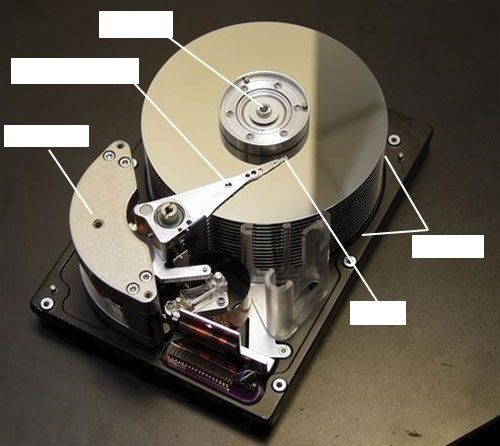
- ASpindle
- BActuator Arm
- CPlatters/Disks
- DHead
- EActuator
63Tracks of a magnetic hard drive are divided into sectors. The old sectors had [blank_start]512[blank_end] bytes. The new sectors have [blank_start]4096[blank_end] bytes.
- A512
- B250
- C1000
- D4096
- E1000
- F512
- G4050
64How many transistors are at each section of a SSD chip?
- A2
- B3
- C4
- D6
65The memory in SSD is called [blank_start]NAND[blank_end] flash memory.
- ANAND
- BAND
- CNAN
- DFAND
66An SSD with 70 TBW means there can be [blank_start]70[blank_end] TB write operations during the lifetime of the drive.
- A70
67An SSD with 70 DWPD means there can be 70 [blank_start]GB[blank_end] write operations per day for the next five years.
- AGB
68What is an M.2 SSD card?
- AA small M.2 card that uses the motherboard M.2 slot.
- BAn SSD card that uses the USB port.
- CA mega 2.0 card for gaming computers.
69A PCIe SSD expansion card is faster than the 2.5" SSD and M.2 SSD cards.
- ATrue
- BFalse
70In a hybrid hard drive (H-HDD), the magnetic drive holes the permanent data while the flash component serves as a buffer to improve the performance of the drive.
- ATrue
- BFalse
71High-level formatting is when sector markings are written to HDDs or SSDs.
- ATrue
- BFalse
72What is logical block addressing (LBA)?
- AA simple sequential numbering system to address all sectors on a drive.
- BLogically sorting blocks in a drive to improve performance.
- CWhen sector markings are written to format magnetic drives or SSDs.
- DNone of the above.
73What is S.M.A.R.T.?
- AA monitoring system to predict when a drive is likely to fail. It monitors the drive performance, temperature, and other factors.
- BA smart monitoring system that predicts when a motherboard will fail.
- CA temperature monitoring system that warns you when you computer is getting too hot.
- DA chicken nugget.
74S.M.A.R.T. monitors the [blank_start]disk spin-up time[blank_end] and [blank_start]distance between the head & disk[blank_end] of HDDs and monitors the [blank_start]number of write operations[blank_end] for SSDs.
- Adisk spin-up time
- Bdistance between the head & disk
- Cnumber of write operations
75SATAe (SATA express) is also known as the 3.2 revision.
- ATrue
- BFalse
76You need a [blank_start]universal bay kit[blank_end] when installing a small drive in a wide bay.
- Auniversal bay kit
- BSSD chassis
- Cdrive bay shelf
77What is RAID?
- AA technology that configures 2 or more drives to work together as an array of drives.
- BA software that allows users to see the temperatures of their system components.
- CA motherboard brand.
- DRebellious animals in daycare (R.A.I.D.)
78What are the pros of RAID?
- AIt improves performance by writing to two or more drives.
- BIt improves fault tolerance, which is the computers ability to respond to a fault or catastrophe (e.g. failure, power outage) so data isn't lost.
- CIt is smaller and more portable.
- DIt is more affordable.
79RAID 0 uses [blank_start]2[blank_end]+ disks to increase disk space available for a single volume. It writes to disks evenly across both disks. It is also called [blank_start]striped[blank_end] volume. RAID 1 duplicates data on one drive to another drive and is used for fault tolerance. If one drive fails, the other continues to operate and data isn't lost. It is also called [blank_start]mirror[blank_end] volume. RAID 5 stripes data and [blank_start]parity[blank_end] information across [blank_start]3[blank_end]+ drives. It uses parity checking so if one drive fails, the other drives can recreate the data. Data is not duplicated in this type of RAID. RAID 10 (1+0) is a combination of RAID 1 and RAID 0. It has the best redundancy and performance out of all the RAID types.
- A2
- Bstriped
- Cmirror
- D3
- Eparity
80Which RAID type is the best in terms of redundancy and performance?
- ARAID 10
- BRAID 0
- CRAID 1
- DRAID 5
81Which RAID types allow hot-swapping?
- ARAID 10
- BRAID 0
- CRAID 1
- DRAID 5
82Spanning is when 2 hard drives hold a single Windows volume (e.g. drive E:). Data is written to the first drive and then continues to the second one when it gets full. It increases disk space available for a single volume.
- ATrue
- BFalse
83When you want storage to be available to an entire network, what type of storage do you use?
- ANAS
- BRAID
- CSDIC
- DCDFS
84NAS can be connected by [blank_start]ethernet port[blank_end] when it serves an entire network or [blank_start]USB or eSATA[blank_end] port when it servers one computer.
- Aethernet port
- BUSB
- CeSATA
- DUSB or eSATA
- Eethernet
- FPS/2
- GHDMI
85A file system is the overall structure the OS uses to name, store, and organize files on a drive.
- ATrue
- BFalse
86[blank_start]NTFS[blank_end] is primarily used by HDDs, [blank_start]exFAT[blank_end] is used by large capcity removeable storage devices (e.g. some USB flash drives, memory cards, external HDDs). [blank_start]FAT32 and FAT[blank_end] are used by smaller capcity devices. [blank_start]CDFS or UDF[blank_end] is used by CDs.
- ANTFS
- BexFAT
- CFAT32 and FAT
- DCDFS or UDF
87What is a smart card reader?
- AA memory card slot.
- BA device used for transactions with credit and debit cards.
- CA device that can read a smart card to authenticate a person onto a network
- DA device that calculates how smart you are by scanning your driver's license card.
88Which of these storage are considered solid-state storage?
- ASSD
- BUSB flash drives
- CMemory card
- DHDD
- ENAS
89The most popular memory card is [blank_start]SD[blank_end].
- ASD
- BUSB
- CmicroSD
- DMemory stick
- ExD-Picture card
90Regular SD and SD high capacity cards use [blank_start]FAT[blank_end] and SD eXtended capacity cards use [blank_start]exFAT[blank_end].
- AFAT
- BexFAT
91For the best performance, don't allow an SSD to exceed [blank_start]70[blank_end]% capacity and an HDD to exceed [blank_start]80[blank_end]% capacity.
- A70
- B50
- C60
- D80
- E70
- F60
- G50
- H80
92Windows [blank_start]defrags[blank_end] an HDD and [blank_start]trims[blank_end] an SSD weekly.
- Adefrags
- Btrims
- Ccuts
- Drefrag
93Which command can you search in Windows that will open the Windows Defrag and Optimization tool?
- Adfrgui.exe
- Bdefrag.exe
- Cdfrag.exe
- Ddefr.ms
94[blank_start]chkdsk[blank_end] is a system tool and command in DOS that verifies the file system integrity of a volume and fixes logical file system errors. Use this to troubleshoot problems with the hard drive.
- Achkdsk
- Bchkb
- Cbootrec
- Dchk.ms
95Most networks use dynamic IP addresses. By default, Windows requests dynamic IP configuration from the DHCP server.
- ATrue
- BFalse
96A device is no faster than the port or slots its designed to use.
- ATrue
- BFalse
97To open device manager in Windows, which command do you use?
- Adevmgmt.msc
- Bdevmgmt.exe
- Cdmgmt.msc
- Ddmgmt.ms
98What is Automatic private IP address (APIPA)?
- AIn TCP/IP version 4, an IP address in the address range 169.254.x.y is automatically assigned and used by a computer when it cannot successfully lease an IP address from a DHCP server.
- BA type of IPv6 IP address.
- CA 48-bit (6-byte) hardware address unique to each NIC or onboard network controller; the address is assigned by the manufacturer at the factory and embedded on the device.
- DCommunication that happens in two directions at the same time.
99[blank_start]Full-duplex[blank_end] sends and receives transmissions at the same time while [blank_start]half duplex[blank_end] works only one diretion at a time.
- AFull-duplex
- Bhalf duplex
100What is NIC?
- AAn expansion card network adapter that plugs into a motherboard.
- BA Windows command that allows you to configure your networks.
- CAn automatic IP address assigner.
- DA boot type in UEFI.
101Most network adapters sold today use 10-gigabit ethernet.
- ATrue
- BFalse
102What is a MAC address?
- AA 48-bit ID number that every NIC has that is hardcoded by its manufacturer. It is a unique ID that is used to identify the network adapter on the local network.
- BAn IPv6 or IPv4 IP address.
- CThe local McDonalds address.
- DA unique Windows user identifying number.
103Which of these is a MAC address?
- A00-0C-6E-4E-AB-AS
- B2001:0db8:85a3:0000:0000:8a2e:0370:7334
- C75.123.253.255
- D1010001010101010111010101
104When you are having a problem with connecting to a network, check the status indicator lights for the wired network adapter to verify that you have connectivity. If it indicates that there is no connectivity then that means it is a problem with the hardware.
- ATrue
- BFalse
105What is a Wake-on-LAN?
- ANIC - Configuring a computer so that it will respond (wake up) to network activity when the computer is in a sleep state.
- BA configuration that will make the computer usable only when there is an internet connection.
- CAn LAN feature that laptops have.
- DWAKE UP LAN!
106What is QOS (Quality of Service)?
- AThe ability to control which applications traffic have priority on the network. You can choose which applications get priority.
- BA Windows service that tells you the quality of your network.
- CA label on your network adapter that tell you the adapters quality.
- DBanana.
107It is recommended that you enable Wake-on-LAN for a wireless network adapter.
- ATrue
- BFalse
108QOS feature must be enabled and configured on the router, enabled on the network adapters, and configured in Windows for every computer on the network that uses the high-priority applications.
- ATrue
- BFalse
109To configure Wake-on-LAN for onboard NIC, you have to enable it in [blank_start]BIOS/UEFI[blank_end] setup also.
- ABIOS/UEFI
110A router is a device that manages traffic between two or more networks (ISP and local) and can help find the best path for traffic to get from one network to another.
- ATrue
- BFalse
111Fill in the blanks.
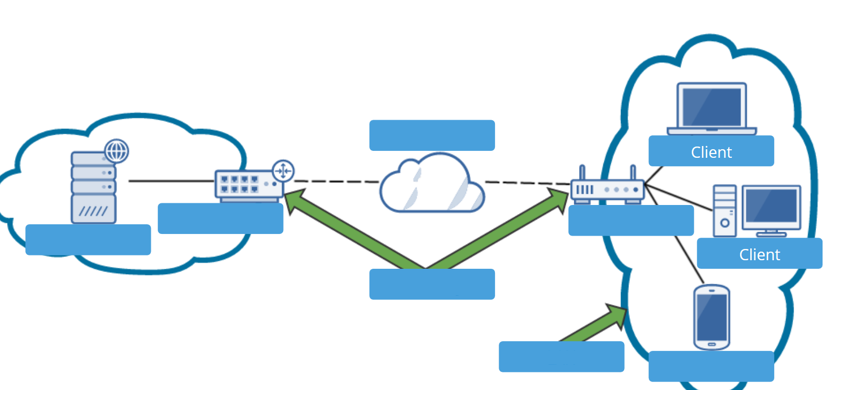
- Aweb server
- Brouter
- Cgateway
- Dinternet
- ELAN
- FSOHO router
- Gclient
112SOHO as a [blank_start]switch[blank_end], manages several network ports that can be connected to wired computers on the local network or to a dedicated [blank_start]switch[blank_end] that provides even more ports for locally networked computers.
- Aswitch
- Bswitch
113SOHO as a [blank_start]DHCP[blank_end] server can provide IP addresses to computers and other devices on the local network.
- ADHCP
114SOHO as a [blank_start]firewall[blank_end] blocks unwanted traffic from the Internet and can restrict Internet access for local devices behind the firewall. It can also limit network and Internet access to specified computers, based on their MAC addresses
- Afirewall
115SOHO router can be used as an FTP server.
- ATrue
- BFalse
116For best security in a small business, place the router behind a locked door accessible only to authorized personnel in a location with access to network cabling.
- ATrue
- BFalse
117The indoor range for a Wi-Fi hotspot is up to [blank_start]70[blank_end] meters
- A70
- B50
- C40
- D100
118You can reserve and IP address for network devices such as a printer so it has a consistent address.
- ATrue
- BFalse
119An [blank_start]address reservation[blank_end] is when a DHCP server assigns a static IP address to a DHCP client. For example, a network printer might require a static IP address so that computers on the network can find the printer.
- Aaddress reservation
- Bstatic address
- Cautomatic address
- DDHCP reserve
120MAC address filtering allows you to restrict access to your network to certain computers or devices.
- ATrue
- BFalse
121[blank_start]Universal Plug and Play (UPnP)[blank_end] is a feature of a SOHO router that enables computers on the local network to have unfiltered communication so they can automatically discover services provided by other computers on the network. UPnP is considered a security risk because hackers might exploit the vulnerability created when computers advertise their services on the network.
- AUniversal Plug and Play (UPnP)
- BQuality of Service (QOS)
- CNVMe
- DDHCP server
122Most applications used on the Internet or a local network are client/server applications. Client applications, such as Internet Explorer, Google Chrome, or Outlook, communicate with server applications such as a web server or email server.
- ATrue
- BFalse
123[blank_start]Port forwarding[blank_end] is a technique that allows a computer on the Internet to reach a computer on a private network using a certain port when the private network is protected by NAT and a firewall that controls the use of ports.
- APort forwarding
- BDMZ
- COpen port
- DPort filtering
124For port forwarding to work, the computer on your network does not have to have a static IP address so that the router knows where to send the communication.
- ATrue
- BFalse
125[blank_start]DMZ (demilitarized zone)[blank_end] is a computer or network that has limited or no firewall protection within a larger organization of protected computers and networks.
- ADMZ (demilitarized zone)
- BPort forwarding
- CMAC address filtering
- DQOS
126Criteria for filtering can draw from [blank_start]blacklists[blank_end] (lists of what cannot be accessed) or [blank_start]whitelists[blank_end] (lists of what can be accessed).
- Ablacklists
- Bwhitelists
127Most new adapters, wireless computers, and mobile devices support 802.11ac and are backward compatible with older standards.
- ATrue
- BFalse
128A type of LAN that does not use wires or cables to create connections, but instead transmits data over radio or infrared waves.
- AWLAN
- BLAN
- CWMP
- DWAN
- EMAN
129By default, a network that uses a security key encrypts data traversing the network.
- ATrue
- BFalse
130[blank_start]WPA2 (Wi-Fi Protected Access 2)[blank_end], also called the 802.11i standard, is the current wireless security standard. This standard typically uses AES (Advanced Encryption Standard) for encryption, which provides faster and more secure encryption than TKIP. All wireless devices sold today support this standard.
- AWPA2 (Wi-Fi Protected Access 2)
- BWPA3 (Wi-Fi Protected Access 3)
- CWEP (Wired Equivalent Privacy)
- DWPA (Wi-Fi Protected Access)
131[blank_start]WEP[blank_end] (Wired Equivalent Privacy) is no longer considered secure because the key used for encryption is static (it doesn’t change).
- AWEP
132[blank_start]WPA (Wi-Fi Protected Access)[blank_end] is stronger than WEP and was designed to replace it. It typically uses TKIP (Temporal Key Integrity Protocol, pronounced tee-kip) for encryption. TKIP generates a different key for every transmission; however, the encryption algorithm used for its calculations is no longer considered secure.
- AWPA
- BWEP
- CWPA2
- DWPA3
133What is a Service Set Identifier (SSID)?
- AThe name of a wireless access point and wireless network.
- BIt is the identifying number for your wireless connection.
- CIt is a type of IP address.
- DIt is similar to a MAC address.
134If your computer supports 802.11ac, you would want to select the SSID for the 5-GHz band in order to get the faster speeds of the 802.11ac standard. If you selected the SSID for the 2.4-GHz band, the connection would revert to the slower 802.11n standard.
- ATrue
- BFalse
135For most networks, you can allow auto channel selection so the device scans for the least busy channel. However, if you are trying to solve a problem with interference from a nearby wireless network, you can manually set each network to a different channel and make the channels far apart to reduce interference.
- ATrue
- BFalse
136A [blank_start]channel[blank_end] is a specific radio frequency within a broader frequency.
- Achannel
- Bport
- Ctunnel
- Ddisk
137To reduce interference, save on electricity, or limit the range of the network to your own property, increase the power level.
- ATrue
- BFalse
138When [blank_start]WMM[blank_end] is enabled, the wireless access point will prioritize wireless traffic for audio, video, and voice over other types of wireless network traffic.
- AWMM
- BWEP
- CWAN
- DMMA
139Wi-Fi Protected Setup ([blank_start]WPS[blank_end]), which is designed to make it easier for users to connect their computers to a wireless network when a hard-to-remember SSID and security key are used. It generates the SSID and security key using a random string of hard-to-guess letters and numbers.
- AWPS
- BWAP
- CLAN
- DWAN
140ping [blank_start]–a[blank_end] 69.32.208.75 The parameter tests for name resolution. Use it to display the host name and verify that DNS is working.
ping [blank_start]–t[blank_end] 69.32.208.75 The parameter causes pinging to continue until interrupted. To display statistics, press Ctrl+Break. To stop pinging, press Ctrl+C.- A–a
- B–t
141Most of the net commands don't require an elevated command prompt window.
- ATrue
- BFalse
142This command is used to clear the command prompt.
- Acls
- Bclear
- Cclrp
- Ddel
143netstat –[blank_start]b[blank_end] is a command and parameters that will show the protocol stats and TCP/IP network connections, along w/ the executable that created the connection. It is useful for finding malware that might be using the network.
- Ab
144netstat –[blank_start]b[blank_end] -[blank_start]o[blank_end] includes the process ID of each program listed. When you know the process ID, you can use the taskkill command to kill the process.
- Ab
- Bo
145netstat –[blank_start]a[blank_end] lists statistics about all active connections and the ports the computer is listening on.
- Aa
146BNC, RG-6, and RG-59 are types of [blank_start]coaxial cables[blank_end]. They are used as transmission lines for radio frequency, video and data signals. They have traditionally been used as feed lines to connect radio transmitters and receivers with antennas, internet connections, digital audio and cable television signals.
- Acoaxial cables
- Bdial up cables
- Cethernet cables
- Dnetwork cables
147When installing an adapter card to replace an onboard port, go to BIOS/UEFI setup and disable that port.
- ATrue
- BFalse
148Laptops and desktops mostly use OLED monitors.
- ATrue
- BFalse
149[blank_start]LCD[blank_end] monitors have liquid crystal material with grids of electrodes. This type of monitor has less glare.
- ALCD
150[blank_start]OLED[blank_end] monitors have no backlighting and provides better contrast and use less power. This type of monitor has a thin LED layer of film between 2 grids of electrodes.
- AOLED
151[blank_start]Refresh rate[blank_end] is the number of times a monitor screen is refreshed in 1 sec measured in Hz (cycles per sec).
- ARefresh rate
- BPixel pitch
- CContrast ratio
152The lower the contrast ratio, the better.
- ATrue
- BFalse
153[blank_start]Pixel pitch[blank_end] is the distance between adjacent pixels on the screen.
- APixel pitch
154The lower the pixel pitch, the better.
- ATrue
- BFalse
Information
- Description
- Information Technology Quiz on Midterm Study, created by Ari Gu on 21/02/2020.
- Author
- Ari Gu
- Language
- English
- Views
- 12
- Tags
- Rating
- No ratings yet Rate this quiz