
Mind map
GRUB2
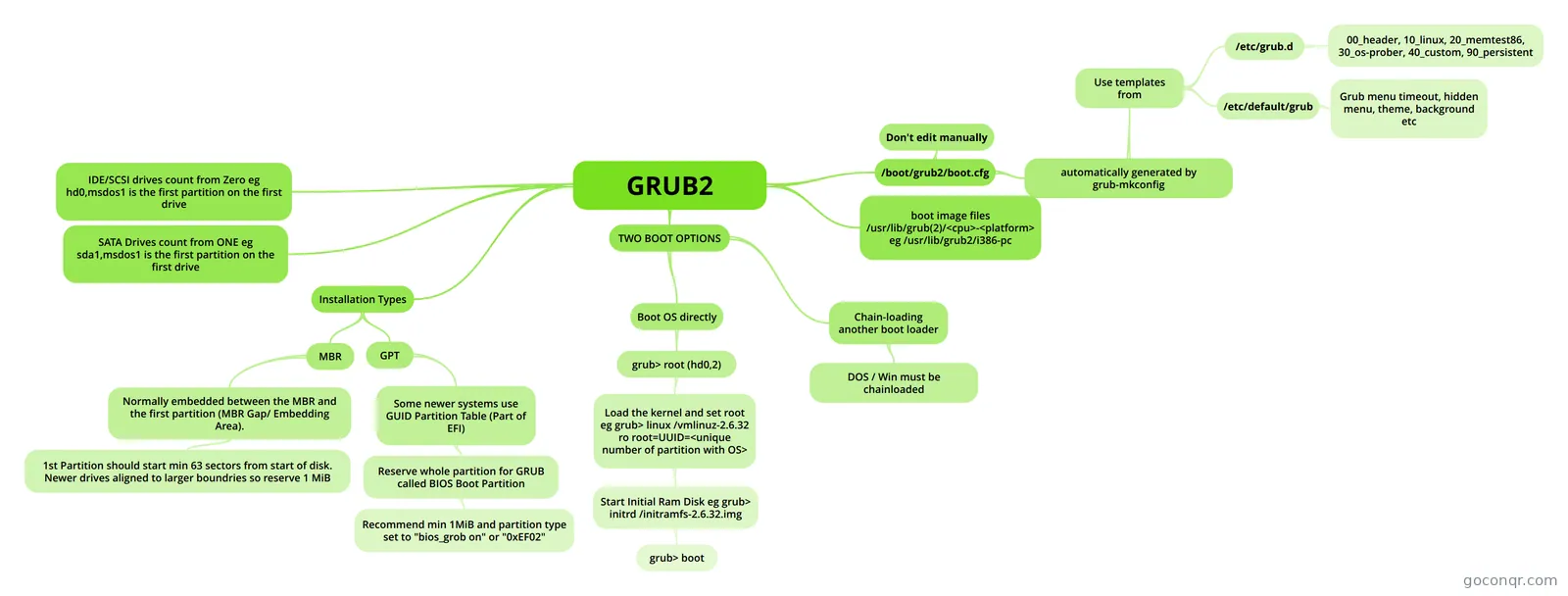
Mind map: GRUB2
Map content
GRUB2
/boot/grub2/boot.cfg
- automatically generated by grub-mkconfig
- Use templates from
- /etc/grub.d
- 00_header, 10_linux, 20_memtest86, 30_os-prober, 40_custom, 90_persistent
- /etc/default/grub
- Grub menu timeout, hidden menu, theme, background etc
- /etc/grub.d
- Use templates from
- Don't edit manually
- automatically generated by grub-mkconfig
IDE/SCSI drives count from Zero eg hd0,msdos1 is the first partition on the first drive
SATA Drives count from ONE eg sda1,msdos1 is the first partition on the first drive
boot image files /usr/lib/grub(2)/<cpu>-<platform> eg /usr/lib/grub2/i386-pc
Installation Types
- MBR
- Normally embedded between the MBR and the first partition (MBR Gap/ Embedding Area).
- 1st Partition should start min 63 sectors from start of disk. Newer drives aligned to larger boundries so reserve 1 MiB
- Normally embedded between the MBR and the first partition (MBR Gap/ Embedding Area).
- GPT
- Some newer systems use GUID Partition Table (Part of EFI)
- Reserve whole partition for GRUB called BIOS Boot Partition
- Recommend min 1MiB and partition type set to "bios_grob on" or "0xEF02"
- Reserve whole partition for GRUB called BIOS Boot Partition
- Some newer systems use GUID Partition Table (Part of EFI)
- MBR
TWO BOOT OPTIONS
- Boot OS directly
- grub> root (hd0,2)
- Load the kernel and set root eg grub> linux /vmlinuz-2.6.32 ro root=UUID=<unique number of partition with OS>
- Start Initial Ram Disk eg grub> initrd /initramfs-2.6.32.img
- grub> boot
- Start Initial Ram Disk eg grub> initrd /initramfs-2.6.32.img
- Load the kernel and set root eg grub> linux /vmlinuz-2.6.32 ro root=UUID=<unique number of partition with OS>
- grub> root (hd0,2)
- Chain-loading another boot loader
- DOS / Win must be chainloaded
- Boot OS directly
Information
- Description
- Understanding the GRUB2 boot process
- Created by
- Christo Candiotes
- Views
- 58
- Tags
- Rating