
Mind map
ProSec-Net
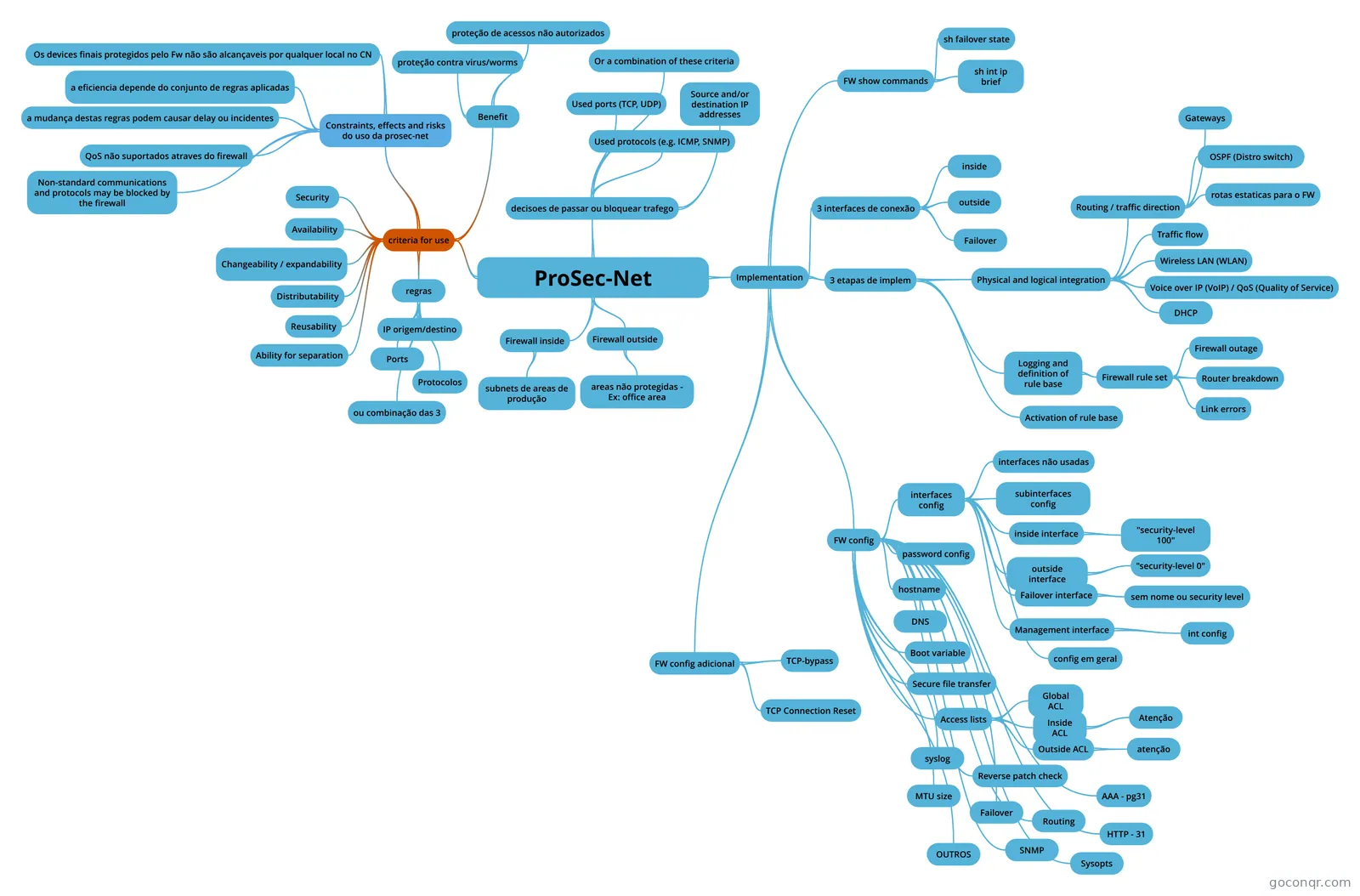
Mapa mental: ProSec-Net
Map content
ProSec-Net
- Definition ========================= The following terms are used within the document: Firewall inside This is the “secure area” which is protected through the firewalls. In this solution, the secure area can consist of more than one separately protected areas. Firewall ouside This is the unprotected area like the office – network.
- Hardware ========= This security solution is based on Cisco ASA firewalls
- Definition of the problema ===================== Without access limitation uncontrolled spread of malware and unauthorized access to production critical end devices is possible from the whole BMW corporate network.
decisoes de passar ou bloquear trafego
- Source and/or destination IP addresses
- Used ports (TCP, UDP)
- Used protocols (e.g. ICMP, SNMP)
- Or a combination of these criteria
criteria for use
- Security
- A proteção é feita via adição de regras mas nem todos os trafegos arriscados são bloquedos Tem-se que usar ferramentas adicionais: local virus protection, current patches, client hardening and so on) are needed additionally.
- Availability
- The solution uses redundant hardware. In case of a breakdown of a router or firewall the network functionality will be interrupted only for the recovery time.
- Changeability / expandability
- Due to the limited number of usable subinterfaces/VLANs and the raising number of production cells per installation, these interfaces are to be used exclusively for switch-based VLANs (1 VLAN/switch) and production cells.
- Distributability
- The hardware can be distributed to different locations
- Reusability
- rever pg 9
- Ability for separation
- rever pg 9
- Constraints, effects and risks do uso da prosec-net
- The implementation of ProSec-Net II may cause the following constraints, effects and risks:
- Os devices finais protegidos pelo Fw não são alcançaveis por qualquer local no CN
- a eficiencia depende do conjunto de regras aplicadas
- a mudança destas regras podem causar delay ou incidentes
- QoS não suportados atraves do firewall
- Non-standard communications and protocols may be blocked by the firewall
- Benefit
- With ProSec-Net II production environments can be protected by firewalls. The protected areas can be divided into smaller sections (per subnet), each separated via the firewalls and dedicated rule sets. This segmentation may reduce the effect and broadening of viruses and worms and reduces the possibility of unauthorized access.
- proteção contra virus/worms
- proteção de acessos não autorizados
- regras
- IP origem/destino
- Ports
- Protocolos
- ou combinação das 3
- Security
Implementation
- 3 interfaces de conexão
- inside
- conexão com o distribute switch
- outside
- conexão com o distribute switch
- Failover
- conexão entre FWs
- inside
- 3 etapas de implem
- Physical and logical integration
- config entre FW e distr switch
- Routing / traffic direction
- OSPF (Distro switch)
- Todas as rotas OSPF ocorrem no switch distro
- rotas estaticas para o FW
- Static routes to the firewall outside interface are directing the traffic to the secure zones through the firewalls. These static routes are redistributed to OSPF to ensure reachability from outside the distribution.
- Gateways
- The gateways of the manufacturing networks are configured on the firewalls. A static default route is pointing from the firewall to the distribution router.
- OSPF (Distro switch)
- Wireless LAN (WLAN)
- The solution can be used with WLAN building blocks.
- Voice over IP (VoIP) / QoS (Quality of Service)
- Clients using VoIP and QoS are connected to the office networks. The traffic is not influenced by the firewalls.
- DHCP
- The DHCP –requests were forwarded by the firewall. The DHCP –relay agent must be activated for each sub interface by the command dhcprelay enable <interface>
- Traffic flow
- Office / Outside-->Office / Outside não passa pelo FW Office / Outside-->secure network passa pelo FW secure network-->Office / Outside passa pelo FW(sem restrição) secure network-->secure network passa pelo FW
- Logging and definition of rule base
- Definition of rule base is done in close collaboration with the process partner based on the logging of the firewall.
- Firewall rule set
- To ensure proper functionality and redundancy it is strongly recommended to perform redundancy tests and application tests after implementation. These tests should cover all thinkable hardware failures like: -FW outage -router breakdown -link
- Firewall outage
- Disabling the active firewall, the 2nd should take over the sessions “state full”. Only some packets, but no session may be lost.
- Router breakdown
- Link errors
- to access switch, core, between distributions (1 link of channel
- Activation of rule base
- 2nd planned down time and application tests needed again
- Physical and logical integration
- FW config adicional
- TCP-bypass
- By default, all traffic that goes through the firewall is inspected using the Adaptive Security Algorithm and is either allowed or dropped based on the security policy. Using TCP-bypass traffic not meeting the RFC standards could be allowed to pass the firewall.
- Example based on TCP port 102: ====================== access-list tcp-bypass extended permit tcp any any eq 102 class-map tcp-bypass match access-list tcp-bypass policy-map global_policy class tcp-bypass set connection per-client-max 50000 per-client-embryonic-max 50000 random-sequence-number disable set connection advanced-options tcp-state-bypass
- TCP Connection Reset
- If a firewall closes a connection it sends a reset packet to the clients of the connection.
- access-list tcpreset extended permit ip host [IP] host [IP] class-map tcptimeout match access-list tcpreset policy-map global_policy class tcptimeout set connection timeout tcp 8:00:00 reset
- TCP-bypass
- FW config
- interfaces config
- inside interface
- The inside interface always has security level 100
- "security-level 100"
- outside interface
- The outside interface always has security level 0
- "security-level 0"
- interfaces não usadas
- interface GigabitEthernet0/0 shutdown no nameif no security-level no ip address
- subinterfaces config
- interface GigabitEthernet1/0.10 vlan 10 nameif vlan-10 security-level 100 ip address 10.69.64.1 255.255.255.192 standby 10.69.64.2
- config em geral
- ‘”media-type sfp” is only needed if firewall is connected using fiber
- To allow traffic between interfaces with same security level, the following command is required: “same-security-traffic permit inter-interface”
- Failover interface
- The failover interface has no name and security level assigned
- sem nome ou security level
- interface GigabitEthernet1/5 description LAN/STATE Failover Interface
- Management interface
- The management interface is only used during implementation phase
- int config
- interface Management0/0 management-only shutdown nameif management security-level 100 no ip address
- inside interface
- password config
- A local user and password is configured in case of unavailable TACACS authentication infrastructure.
- enable password [password] username [user] password [password] encrypted
- hostname
- The ability to add information to a prompt allows you to see which adaptive security appliance you are logged into. With help of the command can you see which firewall is primary / standby or active / failover directly after login.
- hostname [hostname] prompt hostname context priority state
- DNS
- dns server-group DefaultDNS domain-name w52.bmwgroup.net
- Currently no IPv6 DNS server is configured. This will be done during further steps of the IPv6 roll out projects.
- Boot variable
- boot system [drive:/file] asdm image [drive:/file]
- Secure file transfer
- Activation of secure copy file transfer capability
- "ssh scopy enable"
- Access lists
- Global ACL
- Global-access lists define which data traffic is permitted between the production ip segments and which are denied. Global access rules allow you to apply a global rule to ingress traffic without the need to specify an interface to which the rule must be applied.
- access-list global-access line 1 remark Prod-Netze Firewall dfw02rp250 access-list global-access line 2 extended permit icmp6 any6 any6 access-list global-access line 3 extended permit icmp any any
- Inside ACL
- For every inside interface there is a dedicated access list. These access lists define the traffic allowed between the secure zones within the building block.
- access-list vlan-xxx line 1 remark access-list vlan-104 access-list vlan-xxx line 2 extended permit icmp any any
- Atenção
- Inside access lists should always start with the two lines shown above (remark and permitting ICMP).
- Please don´t add the rule “deny ip any any” at the end of an inside access list. In this case the global-acl would not work!
- Outside ACL
- With help of the outside access list you define which traffic is permitted to the internal production security zones. At the end of the access list you have to deny all unspecified traffic using “deny ip any any” for IPv4 and IPv6.
- access-list outside-acl line 1 extended permit icmp6 any6 any6 access-list outside-acl line 2 extended permit tcp any6 any6 eq ssh
- atenção
- Until IPv6 is fully activated for usage, all traffic is denied except ICMP and SSH for management purposes.
- Global ACL
- syslog
- The standard syslog level is "warning". The standard facility is 22 (= LOCAL6). For all firewalls in production networks the facility is 21 (= LOCAL5). Depending on the facility, the log files on the syslog server have different access rights (facility 21 = group logging, facility 22, group prodfw) All firewalls are logging to the server - lpsyslog1.muc. Additional loggings are sent to the local StableNet agents. Prioritization of syslog messages can be change using the command “logging message”. The number of logging messages an ASA is sending per second can be limited by the logging rate-limit feature.
- logging enable logging timestamp logging list failover level alerts logging list failover message 720037 logging trap warnings logging asdm informational logging facility 23 logging device-id hostname logging host outside 160.50.76.67 logging host outside 160.48.240.80 logging message 109023 level warnings logging message 313001 level warnings logging message 709003 level errors logging message 709005 level errors logging message 709004 level errors logging message 709006 level errors logging message 105003 level errors logging message 105006 level errors logging message 105004 level errors logging message 106021 level warnings logging message 111008 level warnings logging rate-limit 500 1 level 6 logging rate-limit 500 1 level 7
- MTU size
- Standard values for the maximum transmission unit (MTU). You need the command for every firewall interface. This command should be enabled on all interfaces except the failover interface.
- Standard values for the maximum transmission unit (MTU). You need the command for every firewall interface. This command should be enabled on all interfaces except the failover interface.
- Reverse patch check
- The “ip verify reverse-path” command is a security feature performing a route lookup based on the packet source address. If this command is enabled, packets are dropped if there is no route found for the packet source address or the route found does not match the interface on which the packet arrived. This command should be enabled on all interfaces
- ip verify reverse-path interface inside ip verify reverse-path interface outside ip verify reverse-path interface vlan-xxx
- Failover
- Within the failover configuration the poll interval is adjusted to 3 secs to improve failover time. For the primary firewall use the cli command “failover lan unit primary. For the standby one please use the cli command “failover lan unit secondary”
- dfw52rp001/pri/act# sh run | i failover logging list failover level alerts logging list failover message 720037 failover failover lan unit primary failover lan interface failover GigabitEthernet1/5 failover polltime unit 3 holdtime 9 failover polltime interface 3 holdtime 15 failover key ***** failover link failover GigabitEthernet1/5 failover interface ip failover 10.69.2.93 255.255.255.252 standby 10.69.2.94
- OUTROS
- Monitor interfaces "monitor-interface [vlan-xxx]"
- arp ==== arp timeout 14400 arp permit-nonconnected
- Access groups ============= access-group outside-acl in interface outside per-user-override access-group vlan-xxx in interface vlan-xxx ....... access-group global-access global
- Time out ======== The default timeouts should only be changed, if absolutely necessary
- SSH ==== ssh 0.0.0.0 0.0.0.0 outside ssh timeout 20 ssh scopy enable ssh version 2 crypto key generate rsa modulus 1024 ssh ::/0 outside
- TELNET ======== Please don´t use this protocol on a ProSec-net security device!
- Policies and Class maps - pg 33 ====================== These commands are used to define inspect policies
- NTP ==== All firewalls synchronize their internal clock with 3 internal BMW NTP time servers. ntp server [IP NTP Server 1] source [outside] ntp server [IP NTP Server 2] source [outside] ntp server [IP NTP Server 3] source [outside]
- TFTP ====== The default tftp server is lpsyslog1.muc (160.50.76.67). tftp-server inside 160.50.76.67 /data/pixconf/[asa_name].cfg
- DHCP ====== DHCP request out of the manufacturing networks are forwarded to the DHCP server by the firewall. DHCP relay has to be enabled for every inside interface. dhcprelay enable vlan-1116 dhcprelay enable vlan-1117 dhcprelay enable vlan-1118 dhcprelay enable vlan-1119 dhcprelay enable vlan-1120 dhcprelay enable vlan-1121 dhcprelay enable vlan-1122 dhcprelay enable vlan-1123 dhcprelay enable vlan-1125 dhcprelay enable vlan-1136 dhcprelay timeout 60
- Virtual authentication ================= Virtual authentication is used to grant temporarily access to secure zones behind the ProSec-Net II firewalls.
- Service resetinbound and Service resetoutbound =======================
- Crypto ====== Default command which cannot be deleted. crypto ipsec security-association lifetime seconds 28800 crypto ipsec security-association lifetime kilobytes 4608000
- SSL certificate ============= Pleas add the “ssl certificate” for the virtual authentication feature with help of the ASDM manager.
- ASDM ====== no asdm history enable The information obtained by enabling ASDM history tracking is stored in the ASDM history buffer. You can view this information using the show asdm history command. The history information is used by ASDM for device monitoring. ASDM is not in use for monitoring purposes.
- ICMP ===== Para permitir traceroute icmp unreachable rate-limit 1 burst-size 1
- Threat-detection ============== Threat-detection is currently NOT in use due to issues seen in productive installations. Some firewalls failed over when activated.
- Tcpmss ======= Default value for the maximum TCP segment size is changed from 1380 to 1460 because of some webservers in the production (printer) which are using a greater mss size than 1380. dfw52rp001/pri/act# sh run | i sysopt sysopt connection tcpmss 1460
- Connection limitation =================== Connection limitation is used to avoid having a single client or server opening to much connections leading to an exhausting of the firewall connection table. policy-map global_policy class class-default set connection per-client-max 50000 per-client-embryonic-max 50000 random-sequence-number disable
- Routing
- Only static routing is used on the ASA firewalls. Dynamic routing is done on the distribution router.
- route [interface-name] 0.0.0.0 0.0.0.0 [default_router] 1 ipv6 route outside ::/0 [IPv6_ADDRESS]
- AAA - pg31
- The user authentication for the management access is done with TACACS. If no TACACS server is available (after a timeout of 5 seconds) the ASA accepts the local login.
- HTTP - 31
- HTTP access is necessary for various management scripts on lpsyslog1.muc, the SARA server and ASDM access (e.g. for importing SSL certificates). If access to the https-server (ASDM) is needed the host has to be configured temporarily.
- SNMP
- Only certain servers are authorized to perform SNMP requests.
- snmp-server host outside [IP] community [local community] snmp-server host outside [agent ip] community [local community] snmp-server host outside [Backup agent ip] community [local community]
- Sysopts
- By default, the ASA Firewall responds to ARP requests directed at the ASA Firewall interface IP addresses as well as to ARP requests for any static or global address defined on the ASA Firewall interface (which are proxy ARP requests). This is an unwanted behaviour and is deactivated on all interfaces.
- sysopt noproxyarp outside sysopt noproxyarp vlan-xxx ....... sysopt noproxyarp vlan-xxx
- interfaces config
- FW show commands
- sh failover state
- sh int ip brief
- 3 interfaces de conexão
Firewall inside
- subnets de areas de produção
Firewall outside
- areas não protegidas - Ex: office area
Information
- Description
- Personal Tecnologias Mind Map on ProSec-Net, created by alessandro moreira on 17/09/2016.
- Created by
- alessandro moreira
- Views
- 1
- Rating