
Mind map
SAP BW
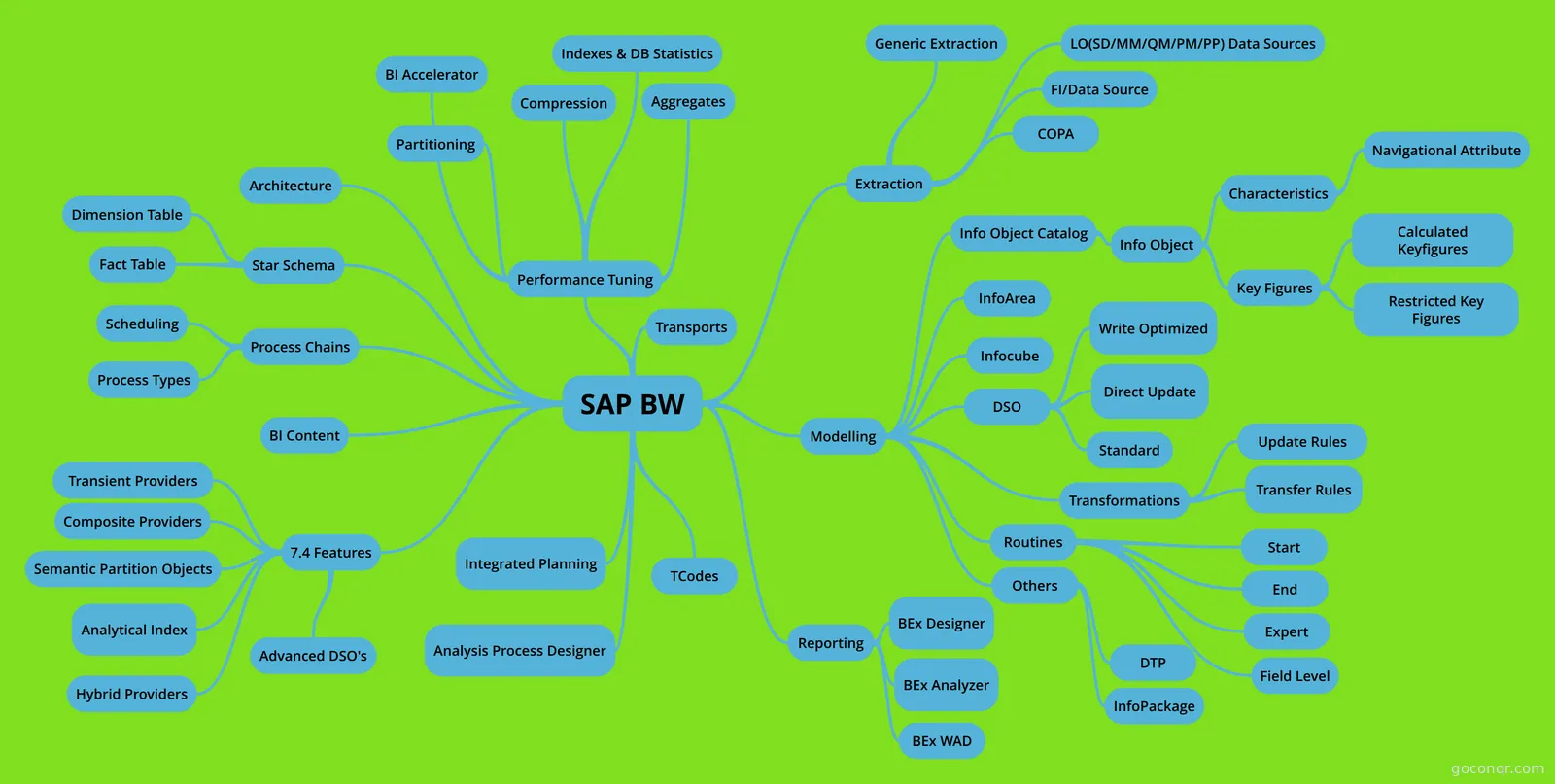
Mind map: SAP BW System Components and Features
Map content
SAP BW
Extraction
- Generic Extraction
- LO(SD/MM/QM/PM/PP) Data Sources
- FI/Data Source
- COPA
Modelling
- Infocube
- An InfoCube is a fact table and its associated dimension tables in the star schema.
- DSO
- A DataStore object serves as a storage location for consolidated and cleansed transaction data or master data on a document (atomic) level. This data can be evaluated using a BEx query. A DataStore object contains key fields (such as document number, document item) and data fields that, in addition to key figures, can also contain character fields (such as order status, customer). The data from a DataStore object can be updated with a delta update into InfoCubes (standard) and/or other DataStore objects or master data tables (attributes or texts) in the same system or across different systems.
- Standard
- Write Optimized
- Direct Update
- Transformations
- TRFs connect source objects (DataSources, DSOs, InfoCubes, InfoSets) to Data Targets (InfoProviders) of a data-staging process. They replace combination of transfer rules & update rules. The TRF process allows you to consolidate, cleanse & integrate data. You must use DTP to load data to InfoProvider.
- Update Rules
- An update rule specifies how data will be updated into their targets. The data target can be an InfoCube or an ODS object. If the update rule is applied to data from an InfoSource, the update rule's technical name will match the InfoSource's technical name. If the update rule is applied to data from an ODS object, the update rule's technical name will match the ODS object's technical name prefixed with number 8. Update Rules transform data from a communication structure into one or more data targets . In BI 7.0, transfer rule and update rule are replaced by transformation. But we still have chance to use it in BI 7.0
- Transfer Rules
- Transfer rules specify how DataSource fields are mapped to InfoSource InfoObjects. Transfer rules transform data from several transfer structures into a single communication structure. In BI 7.0, transfer rule and update rule are replaced by transformation.
- Routines
- Start
- End
- Expert
- Field Level
- Others
- DTP
- InfoPackage
- InfoArea
- InfoAreas are used to organize InfoCubes and InfoObjects. Each InfoCube is assigned to an InfoArea. Through an InfoObject Catalog, each InfoObject is assigned to an InfoArea as well.
- Info Object Catalog
- Info Object
- Characteristics
- Characteristics are descriptions of fields, such as Customer ID, Material Number, Sales Representative ID, Unit of Measure, and Transaction Date. The maximum number of characters allowed for the technical name is 9.
- Navigational Attribute
- A navigational attribute indicates a characteristic-to-characteristic relationship between two characteristics. It provides supplemental information about a characteristic and enables navigation from characteristic to characteristic during a query. The naming convention for a navigational attribute is: InfoObject_Attribute, such as 0customer_0country
- Key Figures
- Key figures are numeric values or quantities, such as Per Unit Sales Price, Quantity Sold, and Sales Revenue. The maximum number of characters allowed for the technical name is 9.
- Calculated Keyfigures
- Restricted Key Figures
- Characteristics
- Info Object
- Infocube
Reporting
- BEx Designer
- BEx Analyzer
- BEx WAD
Architecture
Star Schema
- A star schema is a technique used in data warehouse database design to help data retrieval for online analytical processing (OLAP). SAP BW use extended star schema with following advantage compare to classical star schema: Use of generated key (short number) for faster access External hierarchy Multi-language support Master data are separated. It is common to all cubes Support slowly changing dimensions Aggregates in its own tables for faster access
- Dimension Table
- Part of the Star Schema structure for InfoCubes. Dim tables contain pointers to the Fact tables & to the Master Data (SID tables).
- Fact Table
- The Fact table is the central table of the InfoCube. Here key figures & pointers to the dimension tables are stored. There are two fact tables: the F-fact table and the E-fact table. If you upload data into an InfoCube, it is always written into the F-fact table. If you compress the data, the data is shifted from the F-fact table to the E-fact table. The F-fact tables for aggregates are always empty, since aggregates are compressed automatically. After a changerun, the F-fact table can have entries as well as when you use the functionality 'do not compress requests' for Aggregates. E-fact table is optimized for Reading => good for Queries. F-fact table is optimized for Writing => good for Loads.
7.4 Features
- Transient Providers
- A Transient InfoProvider is like a Virtual InfoProvider, simply the meta data is transient rather than stale. That means that, yes, from a READ perspective it behaves like any InfoProvider. But from a WRITE perspective there is no information, i.e. it cannot be a data target. So you cannot write data into the transient InfoProvider; you can only write data directly into the tables that are accessed by the transient InfoProvider. The biggest advantage of a transient provider is that the metadata in BW is not persisted, but always generated at runtime, i.e. if the source metadata is changed the Transient Provider is adapted automatically. The Transient Provider is therefore especially helpful in ad-hoc and/or frequent changing scenarios. Transient InfoObject in the Transient Provider can reference to a “real” InfoObject and thus inherit its meta- and master data (like description, texts, display properties, display attributes and hierarchies). I.e. you can create a BEx Query on pure HANA data and model, but use a BW hierarchy and the BW hierarchy processing.
- Composite Providers
- A Composite Provider is an Info Provider, which combines data from several analytic indexes or from other Info Providers (by Join or Union), and makes this data available for reporting and analysis. ... BEx Queries can be created on Composite Providers as on any other BW Info Provider
- Semantic Partition Objects
- A semantically partitioned object is an InfoProvider that consists of several InfoCubes or DataStore objects with the same structure. Semantic partitioning is a property of the InfoProvider. You specify this property when creating the InfoProvider. Semantic partitioning divides the InfoProvider into several small, equally sized units (partitions). Features· An SPO is based on either a DSO or an InfoCube.· Each SPO is made of multiple data providers of the same type with identical structure.· Each of the underlying data providers behaves like a “regular” DSO or Cube, with its own metadata tables, data tables, data flows and sources/targets, and are independent of each other.· Each SPO will have a so called Master provider, which acts as a template based on which the part providers are built.· While defining metadata for the SPO, the definition is being made implicitly to the master provider, which is then used as a template to create the part providers· The part providers are read only, changes to them can be made only via the master provider· When a SPO is created, a reference structure keeps track of the partitions. The structure is placed in the Multi Provider for querying.· SPO Wizards create all Data Transfer Processes (DTP), transformations, filters for each data store and a process chain automatically.
- Analytical Index
- An analytic index is a data container whose data is stored in the BW Accelerator or in the SAP HANA database. The analytic index is used to generate a TransientProvider. ... Analytic indexes that are generated by SAP HANA models being published to the BW system cannot be used as data targets in Analysis Process Designer.
- Hybrid Providers
- These hybrid providers are based on the combination of DSOs and InfoCube. As part of the Hybrid architecture, new data is stored in DSO and InfoCube provides aggregate. ... In Hybrid Provider, data can be loaded from any type of source. All of the data is stored in the BW system or in the BWAccelerator.
- Advanced DSO's
- Transient Providers
Performance Tuning
- Aggregates
- An aggregate is a subset of an InfoCube. The objective when using aggregates is to reduce I/O volume.The BW OLAP processor selects an appropriate aggregate during a query run or a navigation step. If no appropriate aggregate exists, the BW OLAP processor retrieves data from the original InfoCube instead.
- BI Accelerator
- Compression
- Compressing will bringing data from different requests together into one single request (request ID 0) in Infocube. When you load data into Infocube, they are group with Requests ID. You can easily manage the data with Request ID. But the request ID have disadvantages cause the same data record (with same characteristics but different request ID) to appear more than once in the fact table. It waste the table space and affects query performance. You can eliminate these disadvantages by compressing data and bringing data from different requests together into one single request (request ID 0). Technically, Compress will move the data in F table to E table and aggregate the records with same char. automatically. It is widely used when you are sure that the data in InfoCube is correct and you won't need Request ID in the future. Be careful if you defined your own delta mechanism.
- Partitioning
- Indexes & DB Statistics
- Aggregates
Process Chains
- A process chain is a sequence of processes that are scheduled to wait in the background for an event. You can include process chains in other process chains to manage a group of them, known as meta chains. It is design at the implementation phase and one of the most important jobs in support and maintenance phase.
- Scheduling
- Process Types
- Start process Interrupt process AND (last) OR (every) EXOR (first) ABAP Programs Operating System Command Local Process Chains Process chain remote Workflow (remote) Deciding between multiple alternatives Is the previous run in the chain still active? Is the Previous Run in the Chain Still Active? Start job in SAP BusinessObjects Data Services Starting Jobs in SAP Data Services Loading process and postprocessing Execute InfoPackage Read PSA and update a data target Reading PSA and Updating a Data Target Save hierarchy (3.X) Update DataStore object data (further updating) Data export to external systems (obsolete) (Obsolete - replaced by open hub destination) Delete overlapping requests from InfoCube Data transfer process Creating a Data Transfer Process Close InfoPackage request (RDA/Push) Closing Requests Using Process Chains Set quality status/data release Trigger delta merge Triggering Delta Merge via Process Chain Start SAP HANA remote subscription Start real-time data acquisition (RDA) load process Controlling Real-Time Data Acquisition with Process Chains Stop real-time data acquisition (RDA) load process Trigger event data change (for broadcaster) Including Event Data Changes in Process Chains Data target administration Delete index (obsolete if the BW system is running on a SAP HANA database) InfoCube Performance Including InfoCubes in Process Chains Build index (obsolete if the BW system is running on a SAP HANA database) Build database statistics (obsolete if the BW system is running on a SAP HANA database) InfoCube Performance -> Database statistics section Initial filling of new aggregates (obsolete if the BW system is running on a SAP HANA database) Activating and Filling Aggregates Roll up filled aggregates/BWA indexes (obsolete if the BW system is running on a SAP HANA database) Rolling Up Data into Aggregates Rolling Up Data to a SAP BW Accelerator Index Initial activation and filling of SAP HANA/BWA indexes Activating and Filling SAP BW Accelerator Indexes Indexing BW Data in the SAP HANA Database Compress InfoCube Compressing InfoCubes Activate requests in DataStore objects (classic) Activating Data in DataStore Objects Including DataStore Objects in Process Chains Activate requests in DataStore objects (advanced) Delete all data target content Deleting the InfoCube and InfoCube Content Archive data from InfoProvider Scheduling Data Archiving Processes Using Process Chains Clean up old requests from the DataStore object (advanced) Cleaning Up Requests Using Process Chains Delete requests from the PSA Delete requests from the change log of the DataStore object (classic) Delete requests from the change log of the write-optimized DataStore object (classic) Reporting agent Exception reporting Including Packages in a Process Chain Print in background Precalculation of Web templates Precalculation of value sets Other BW processes Replicate authorizations of BW users to SAP HANA Authorizations for Generating SAP HANA Views Attribute change run For aggregates: System Response to Changes to Master Data and HierarchiesFor SAP BW Accelerator: System Response to Data Modifications: SAP BW Accelerator IndexAdjust time-dependent aggregates(obsolete if the BW system is running on a SAP HANA database)Execute planning sequenceScheduling Planning Sequences in Process ChainsSwitch real-time InfoCube/aDSO to plan modeReal-Time InfoCubesSwitch real-time InfoCube/aDSO to load modeReorganize master data attributes and textsReorganizing Master DataExecute analysis processCreating an Analysis ProcessRun SAP HANAanalysis processCreating a SAP HANA Analysis ProcessUpdate Explorer properties of BW objects(obsolete if the BW system is running on a SAP HANA database)Indexing BW Data for SAP BusinessObjects ExplorerJob in SAP CPSEvent in SAP CPSSybase IQ Partition MonitorAdministration of SAP IQ PartitionsCreating Database Statistics for Virtual TablesCreating Datab
Analysis Process Designer
Integrated Planning
BI Content
- Business Content is a complete set of BW objects developed by SAP to support the OLAP tasks. It contains roles, workbooks, queries, InfoCubes, key figures, characteristics, update rules, InfoSources, and extractors for SAP R/3, and other mySAP solutions.
TCodes
- LO Extraction RSA5-View business content data sources RSA6-View active data sources LBWE-View LO data sources LBWG-Delete setup tables SBIW-Fill setup tables LBWQ-View extraction queue RSA7-View delta queue RSA1-Replicate DS, Maintain Infopackage
Transports
Information
- Description
- My BI/BO/BW/BODS Mind Map on SAP BW, created by Suresh Kasu on 15/11/2017.
- Created by
- Suresh Kasu
- Views
- 51
- Rating