
Mind map
AWS
Map content
AWS
- usg3 451 document.getElementById("ads_pane").style.display = "none"; document.getElementById("ads_leaderboard").style.display = "none"; document.getElementById("contents_pane").style["margin-right"] = "0px";
Cloud Computing
- Cloud Computing is the use of cimputing resources over the network, delivered as a service * Solves issues of traditional computing: - Lowcos, Elastic, Flexible, Secure
- Cloud vs on-Premises
- Cloud: * No Upfront investment * Low ongoing costs* Flexcible capacity * Global reach on demand On-Premises: * Large initial Purchase * Fixed capacity * System Administration
- Saas, Paas, Iaas
- Basically how much control you have Software - Complete Product you can use Platform - You can run your apps, without managing infra Infrastructure - You manage the infrastructure
- Essential Characteristics
Regions and Availability Zones
- Region is a geographic location consists of at least two AZ's AZ is a cluster of datacenters Connected by low latency isolated from failures
- Edge Locations
- Point of presence. From there aws hosted stuff can be accessed by endusers Here are the couldfrontservers
Foundation Services
- Compute
- EC2
- Läuft auf einem Hostcomputer bei AWS
- AMI
- "Snapshot" vom Betriebssystem mit Application and so on * Root volume * Launch permissions (who can use this ami) * which volumes to attach
- Purchase Types
- On-Demand
- Pay by the hour nice for spiky workloads
- Reserved
- ready state workloads EC2, RDS, DynamoDB, Redshift, ElastiCache 1 or 3 Year Workload can also be time dependant
- Scheduled Instances
- Spot
- best hourly rate time intensive workloads, resumable, interruptable
- Dedicated
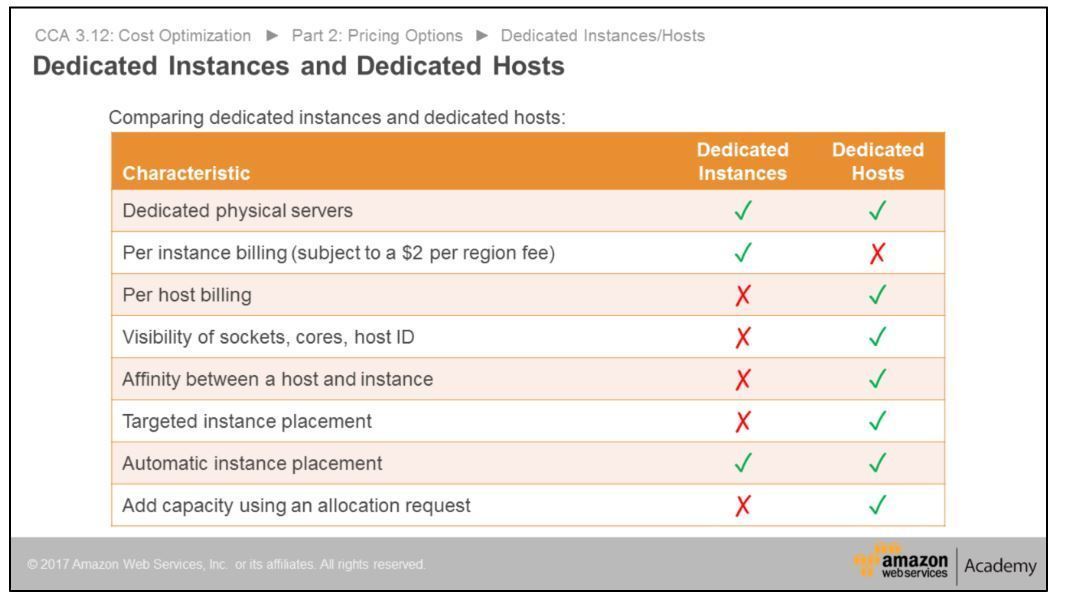
- Hardware for a singe customer
- Instances
- share hardware from the same account
- Host
- one instance, one host, no sharing
- On-Demand
- Lifecycle
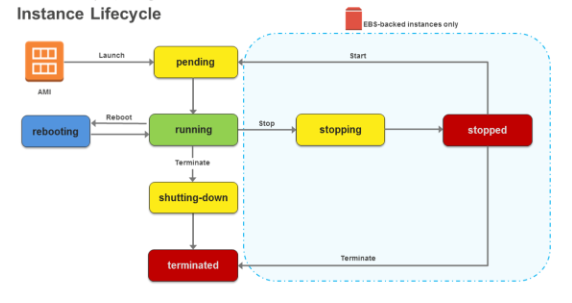
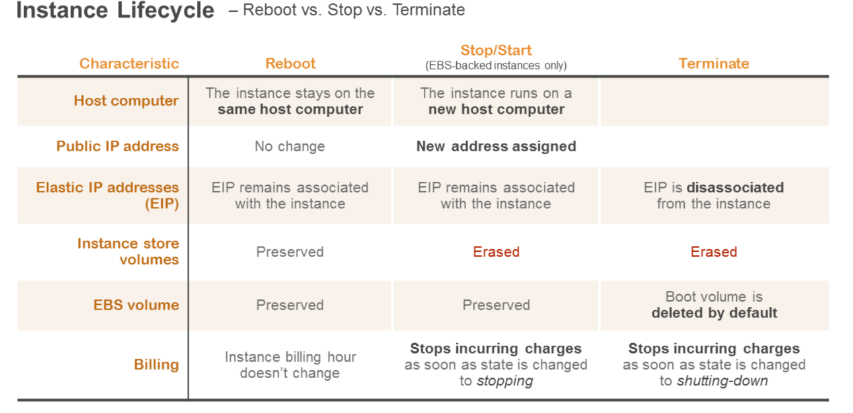
- Lifecycle: * running * reboot - Host bleibt geleich * terminated - Runter vom Host * Stopping- Nur ebs, sonst alle daten weg, kann nicht neu gestatret werden
- Instance Types
- instance User Data
- größenbeschränkt wird einmal beim start ausgeführt
- Metadata
- von der Instanz unter lokaler Adresse: 169.254.169.254/latest/metadata unter /latest/userdata ist die userdata z.B. hostname, public ipv4, security-groups usw
- Autorecovery
- EC2 Run Command
- Autoscaling
- Horizontal, Vertikal ? An CloudWatch metriken gebunden (Wie worked das?) LAB! * Can detect unhealthy instances * Can detect if AZ is unavailabe * Can register new instances with ELB - by adding them to the target group * Hrizontal Scaling: More Instances * Vertical Scaling: More power
- Triad of Services
- Autoscaling Group
- * Has to have one LC * Logical Grouping * min/max/desired * scaling policies (when to launch or terminate instances)
- Launch Configuration
- AMI, Instance type, securty groups, user data usw NOT modifyable
- Autoscaling Policy/ Alarms
- * Autoscaling uses an alarm for example on cpu utilization per time * Policy: Simple Scaling, Step scaling (Does serval adjustemts at a time) * Scheduled action: used after u predicted the workload
- EC2
- Network
- Route 53
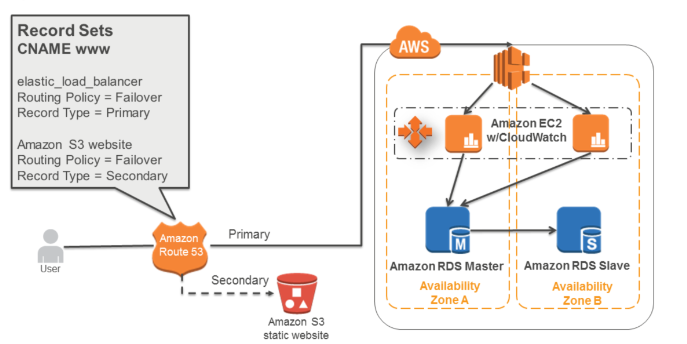
- DNS Resolver * Supports healthchecks and failover * Latency based/ Round robin/ Geolocation
- Elastic Load Balancing
- * Distributes traffic across multiple ec2s * uses Healthchecks * single point of contact for clients * Has public DNS name * Connection Draining (?)
- CLB vs ALB
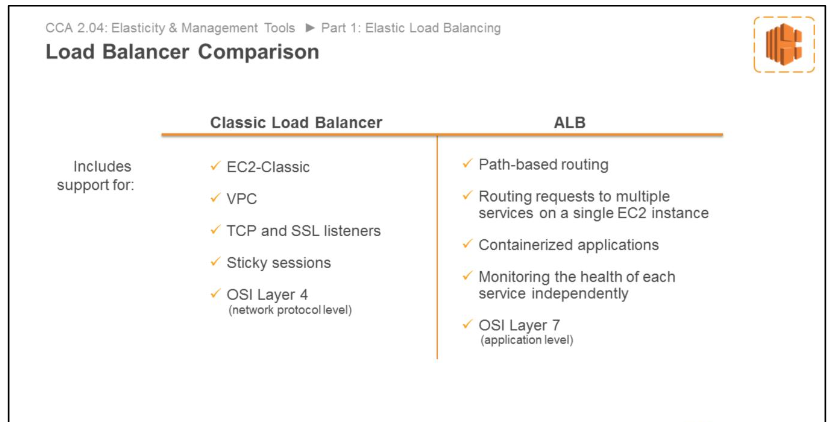
- Distributes Traffic acros multiple ec2 instances * Classic Load Balancer - routes based on TCP/SSL/HTTP - you specify listeners (protocol and port) and forward the stuff to instances * Application Load Balancer - Multi AZ required - Microservices- Routes based on content of request(HTTP) - - Routes request to /api to one api server and so on
- Targetgroups
- VPC
- Hat schon son Cider dings
- Subnets
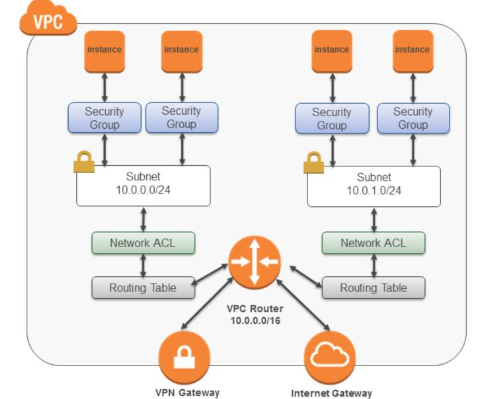
- * defines a range of ip-addresses * not over multiple az's! * First 4, and last Address is reserved for AWS - Network - Router - DNS - Future use - Broadcast !not supported!
- Public
- Has route to the igw
- Private
- No route to igw
- Security Groups
- * Instance level Firewall * Stateful - Response traffic is allowed (UDP and TCP) * Deny all incoming traffic by default * Allow all outbund by default
- Network ACL
- * optional subnet level firewall * Allow all by default * Set of Rules with numbers - Evaluated from smalles number to largest asc - First rule to match is used - Deny all rule evaluated last
- Routing Table
- * Each subnet has to have one * Has always the route 10.0.0.0/16 --> local - Innervpc routing always possible * Destination: IP on where i send packages * Target: Wich cable to take * Uses most specific rule (Longest prefix)
- VPN
- IGW
- * Needed for connections to the internet * Has to have entry in route table
- NAT
- * Allow instances to phone the internet but not the other way round * Ether EC2 or Managed - Managed automatically replicated inside AZ. Needs EIP * Should be replicated by you across az's
- VPC Peering
- * Not transitive * Send peering Request to other, accept, add routes to routetable * No overlapping CIDR * "peerer" is like own router => own symbol usg3, 74
- Direct Connect, Virtual Gateway, VPN
- CloudFront
- Außerhalb vom VPC! * Use cache conrol headers * 0 TTL - Cloudfront uses If-Modified-Since to check every time if there is a new one * Invalidate - Change object name - invalidate by hand * Delivers content by HTTPS - custom domains and certificates possible * Can used signed urls to restrict access to s3 buckets/ objects (?)
- Route 53
- Storage
- S3
- optional lifecycle roules in buckets * Consistensy: eventual consistency for Update, read-after-write consitency * Prtitions data based on prefix of key (ordner) - Use hashes do avoid overloading one partition
- Bucket
- Versioning
- once turned on, can not be completely removed but suspended
- Versioning
- Object
- identified by object key
- Encryption and Data Access
- you can control access to bucket and objects: * Bucket policies * IAM policies * Access Control Lists Optional Encryption at rest with AES-256
- Storage Classes
- Standard Infrequent Access Reduced Redundancy Storage
- Elastic Block Store
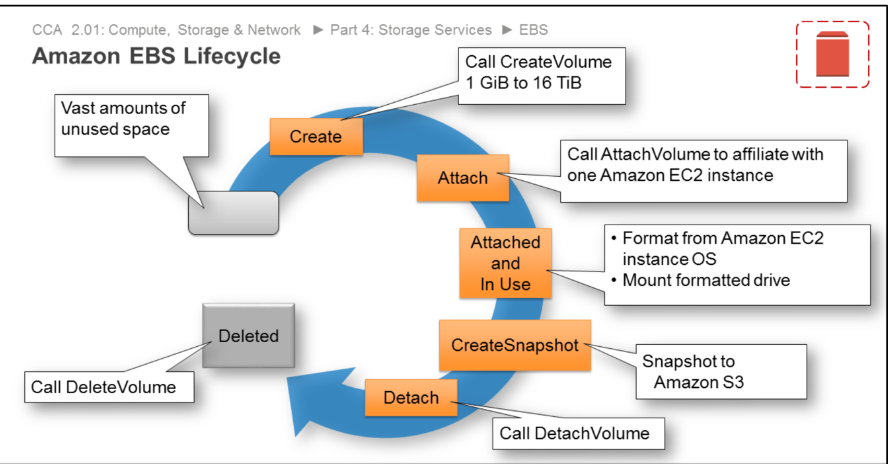
- * Can be saved using snapshots * Durable, Automatically replicated * Optional encryption at rest, io and for snapshots
- Lifecycle
- Types
- SSD backed * IOPS HDD backed * throughput
- Scope
- Glacier
- Instance Storage
- * Instancestore - Physically Connected to the Host - deletes data when EC2 instance stops or terminates
- S3
- Security and Identity
- Shared Responsibility Model
- AWS protects the cloud (of) I protect the services i use (in)
- IAM
- Authentication vs Authorization
- * authentication - Who are you - ex via login or key * Authorization - Are you allowed to do that
- Policy
- JSON document can be assigned to user, role or group Version Statement[] - sid (nicht immer !?) - action[] - Effect - Resource - Condition
- User, Group
- Roles
- Instance Profiles Application Access to AWS Resources May be assumed by users, applications and services Attach Role to instance App selects Role via Metadata Interacts with Ressources
- Best Practicies
- use roles instad of sharing credentials grant least privilege MFA Delete Root access Create individual iam users
- Authentication vs Authorization
- AWS Security Token Service
- Provides trusted users with temporary credentials
- Shared Responsibility Model
- Compute
Platform Services
- Databases
- Amazon RDS
- Fully Managed Multi AZ feature Read Replica feature MySQL, MariaDB, Aurora, PostgreSQL * Can be used to deploy single database instances * Push-Button Scaling: you can scale vertically in the admin panel * Accesscontrol, encryption, event Notification
- Backups
- * Can be done automatically once a day * Also Captures Transaction Logs to allow Point in Time Recovery
- Security
- * Runs inside a VPC * Can be secured with security groups
- Multi AZ / Redundancy
- Amazon DynamoDB
- Fully Managed Serverless (für mich) NoSQL * Automatically partitions data over multiple servers * Automatically replicates * VPC? * You can specify on read if you want eventually or stringy consistency
- Supported Operations
- Query - By Sort/prottion key Scan - Every Item
- ElastiCache
- Innerhalb einer AZ Caches DynamoDB results
- Aufbau
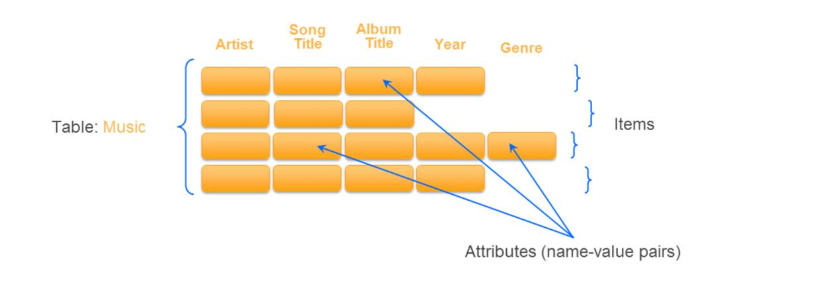
- * Partition Key - Hash determines where to store * Sort Key - How to sort the items in one partition * Item = Collection of attributes = collection of data elements
- SQL vs NoSQL
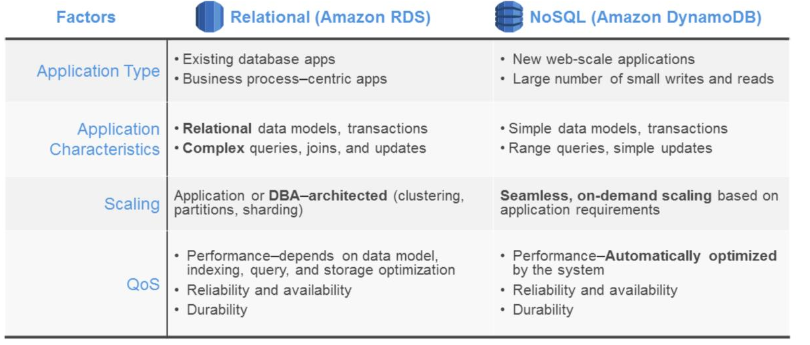
- * SQL - Fixed shema - scales vertically
- Amazon Redshift
- For huge data
- Amazon RDS
- Management Tools
- Cloud Trail
- Records API calls
- CloudWatch
- * monitoring service * coustom metrics possible * detailed Monitoring provides aggregation by ami and 1min samples * Can set alarms for metrics - to SNS or Autoscaling * Metrics are collected on hypervisor level: - EC2 - - Network (in and out), CPU, Disk ops, CPU Token - ELB - RDS
- VPC Flow Logs
- * Captures traffic flow details * publisched to CloudWatch Logs
- Cloud Trail
- Databases
?
- Single Point of Failure
- Event-Driven Scaling
- Amazon Kinesis
Cloud Economics
- Four Pillars of Cost Optimization
- Pay only for what you need when you need it This is a cycle: Choose better instancetypes, use RI Use Autoscaling, Turn off non prdouction Use Tools to analyze and monitor costs
- Right-sizing
- Choose the smallest instance type meeting the requirements
- Reserved Instances
- Increase Elasticity
- Turn off not needed instances (dev instances) Use Autoscaling
- Monitor and improve
- Use Tags: What is used By Whom for What Automate reports for instances not used enough (Downsize)
- Trused Advisor
- Follows AWS best practices
- Cost Optimization
- * idle laod balancers * underutilized EBS * unattached EIP
- Security
- * Bucket Permissions * MFA on toot Acount * Security groups
- Fault Tolerance
- * RDS Multi-AZ * EBS shnapshots * Autoscaling ressources
- Performance Improvement
- Cost Explorer
- Free Tool Shows graphs of costs
- Total Cost of Ownership
- Four Pillars of Cost Optimization
Well Architected
- Security
- * Use security at all layers * Log changes * Automate responses like sending emails if somthing is strange
- Data protection
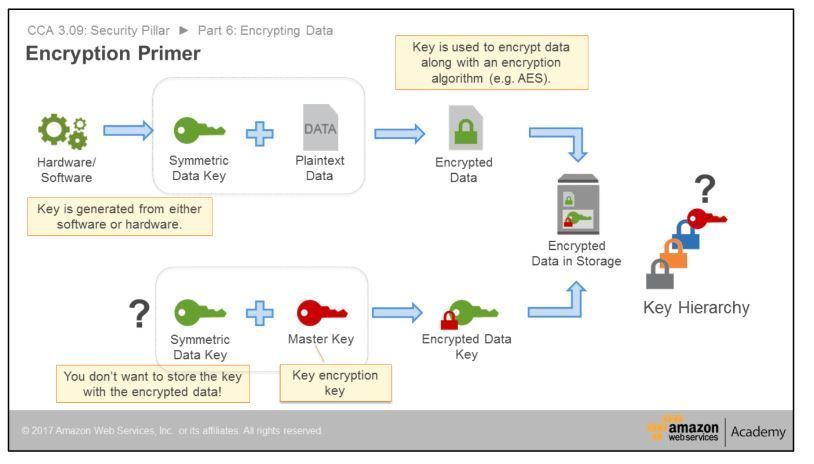
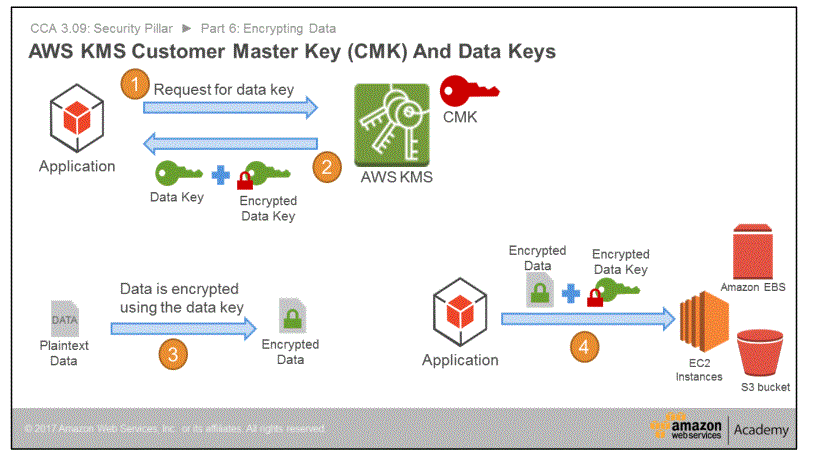
- Encryption at transit and at rest * Use KMS to mange keys
- Privilege management
- * IAM and MFA
- Infrastructure protection
- VPC
- Detective contrls
- * CloudTrail to log api calls * AWS config
- Amazon inspector
- * Aztomated security assesment
- KMS
- * Manages encription service * Generates Masterkey - That one never leaves the server - Also generates data key and encrypts it, sends both to you - You can encrypt and delete data key (keep encripted one) - send encrypted one to kms to decrypt
- AWS Directory Service
- AWS Security Token Service
- * Privodes temporary credentials for AWS * Ex for federated users and SSO in console
- SAML
- Reliability
- * How do deal with failours * How are you managing AWS Servicelimits for your account ? * How are you planning network topology on AWS * Do ypu have an escalation path to deal with technical issues? * How are you monitoring ressources * How are you executing change management?
- Disaster Recovery Strategy
- * Backup and Restore - Is klar, oder? * Pilot Light - Data replication, smaller instance ready to go, R53 failover * Fully working Low-Capacity Standby - like pilot light, but instances are running, scale up if needed * Multi-Site Active-Active
- Performance Efficiency
- * How do you select/monitor the appropriate instance types, storange solutions, database solutions... ?
- Cost optimization
- * How are you optimizing your usage of AWS services? * Did you consider data-transfer charges when designen your architecture?
- Dedicated Instances vs Dedicated hosts
- Gneral Design Principles
- * Stop guessing capacity needs - use scaling * Test at production scalce - duplicate evironment for test * Lower risk of architectual change - create testing evironment * Automate * Allow for evolutionary architectures
- Security
Decoupling
- * Improves: Fault tolerance, scaling
- Lambda
- * Stateless code * Can be used to make AWS API-Calls (Ex for scaling) * Can be used to tag new instances (Autoscaling sends events) * Runs when an event (trigger) occures * Possible Triggers: dynamo db, sns, cloudWatch, s3 * VPC?
- SOA
- Service Oriented Architecture * Service: self contained unit of functionality ==> Microservices
- SQS
- Simple Queue Service * Samples a few servers on pull. - you might not get all messages
- messages
- * Gets locked when processing * Lock expires after a time if message is not deleted by processor * moved to deadletter queu after multiple locks without delete
- queues
- Distributed and redundant on multiple servers -> at least once delivery If on delete server away, message might get delivered again
- SNS
- * Send Messages (Email, Http ...) * No recall - delivered is delivered * Uses "Topics"* * Cross AZ messages
- Fan Out
- Image upload Send notification to 3 queues with sns Worker process image from queues
- API Gateway
- Managed cache for restful api's
Troubleshooting
Patterns
- Multi-AZ Pattern
- HA Database
- Floating IP Pattern
- Floating INterface Pattern
- State-Sharing
- Scheduled Scale-Out
- Jon Observer Pattern
- Bootstrap Instance
Designing your Environment
- Choose a region
- Data Sovereignty Distance to Users Services/Features Cost Efficency
- VPC pattern
- S.39 * Use Multiple VPC. One for each service * Use multiple accounts with VPC's
- High Availability
- * Availability = time that sytstem is in functioning condition
- RPO vs RTO
- * Recovery Point Objective - How much data can you afford to lose *Recovery Time Objective - How quickly must the system recover
- Fault tolerance vs high availabiliy
- Fault tolerant: performance geht nicht runter
- Cloud Formation
- Template
- JSON Document * Description * Metadata * Parameters * Mappings * Conditions * Resources - "Depends on" possible * Outputs
- Engine
- Interpeter for templates
- Stack
- Collection of resources created by AWS CF
- Template
- Choose a region
Container
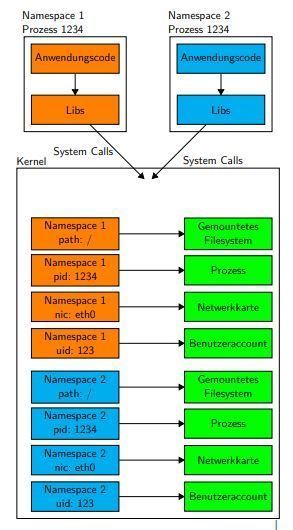
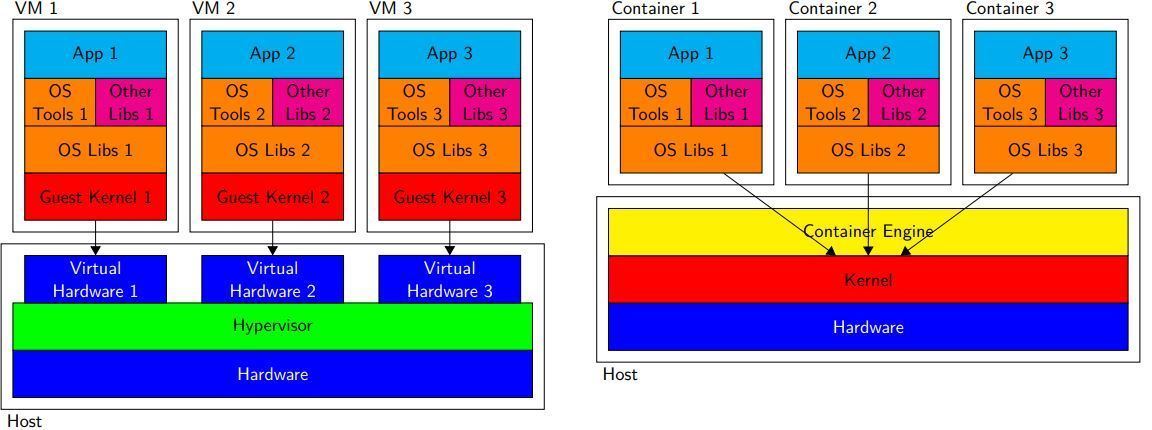
- * VM - Hypervisor stellt virtuelle Hardware zur Verfügung - VM's nutzen Hypervisor - jede VM hat eigenen Kernel usw * Container - Containerengine ermöglicht Zugriff auf Kernel - Kein Hypervisor - Zugirff auf Resourcen über id, jeder Container hat eigenen Namespace - Syscalls nutzen ebenfalls Namespace
- Images
- * Images enthalten Dateisystem, Kernel(?) usw für einen Container * Unterschiede werden nur temporär gespeichert * Commit erlaubt speichern der Daten als neues Image
- Docker
- * Verbreitete Implementierung von Containern * Images können aus Dockerfiles erstellt werden * Images können in Registries (DockerHub) verwaltet werden
- Elastic Container Registy
- * Registry service von AWS
- Elastic Container Service
- * Verwaltet Cluser von EC2-Instanzen für die Ausführung von Containern
- Task Definition
- * Definition was gestarte werden soll
- Service
- * Instanziert Task Definition zu Tasks
- ECS for Kubernetes
- ?
- Fargate
- * Ähnlich wie ECS, verwaltet Instanzen aber im Hintergrund - "mehr managed" (?)
Neuerungen
- VPC Peering
- Inter Region Inter Account
- Global Accelerator
- Anycast für Netztopologisch nächsten Emdpunkte: EIP, NLB, ALB
- Time-Sync Service
- Placementgroups: Spread
- Möglichst weit verteilt
- VPC Peering
Andere Clouds
- Alibaba
- Azure
- OpenStack/CloudStack
Images and files in the map
Information
- Description
- Mind Map on AWS, created by Moritz Goertz on 30/10/2018.
- Created by
- Moritz Goertz
- Views
- 10
- Rating