
Mind map
IMPORTAR ARCHIVOS TXT A EXCEL
Map content
IMPORTAR ARCHIVOS TXT A EXCEL
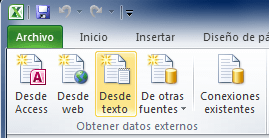
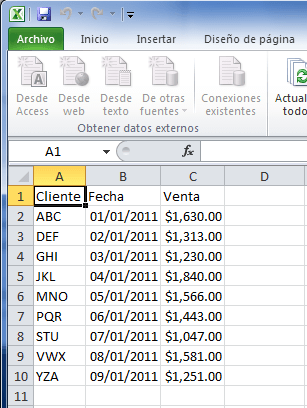
1.- Hacer clic en la ficha datos, seleccionar comando desde texto, se encuentra dentro del grupo obtener datos externos.
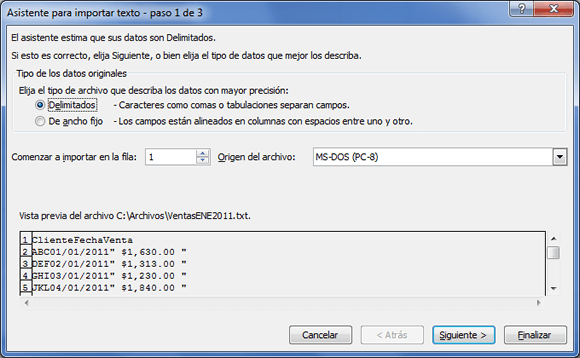
- Después seleccionar el archivo adecuado y dar clic en importar y mostrará el primer paso del asistente para importar texto.
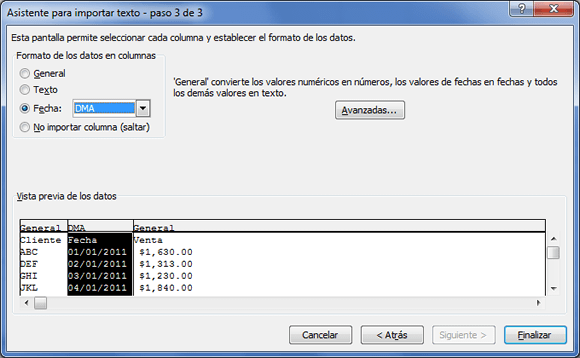
- 3.- El último paso permite especificar el tipo de datos de cada columna solo tienes 3 opciones: general, texto y fecha.
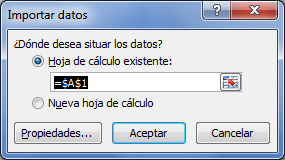
- 4.- Al hacer clic en el botón finalizar, se preguntará por la ubicación dentro de la hoja de Excel donde se colocarán los datos importados.
- Una vez indicada la celda destino deberás hacer clic en el botón Aceptar y los datos serán importados por Excel.
- Una vez indicada la celda destino deberás hacer clic en el botón Aceptar y los datos serán importados por Excel.
- 4.- Al hacer clic en el botón finalizar, se preguntará por la ubicación dentro de la hoja de Excel donde se colocarán los datos importados.
- (en este paso indicar a Excel que comience a importar a partir de alguna fila específica del archivo. Al hacer clic en el botón siguiente, Excel sugerirá el tipo de separador)
- 3.- El último paso permite especificar el tipo de datos de cada columna solo tienes 3 opciones: general, texto y fecha.
- Después seleccionar el archivo adecuado y dar clic en importar y mostrará el primer paso del asistente para importar texto.
Images and files in the map
Information
- Description
- MAPA MENTAL IMPORTAR ARCHIVOS A EXCEL
- Created by
- Maribel Hdz
- Views
- 103
- Tags
- Rating