
Mind map
1. Prepare the data
Map content
1. Prepare the data
Data Source Connection
- Over 100 native connectors
- Datasets
- Local
- Shared
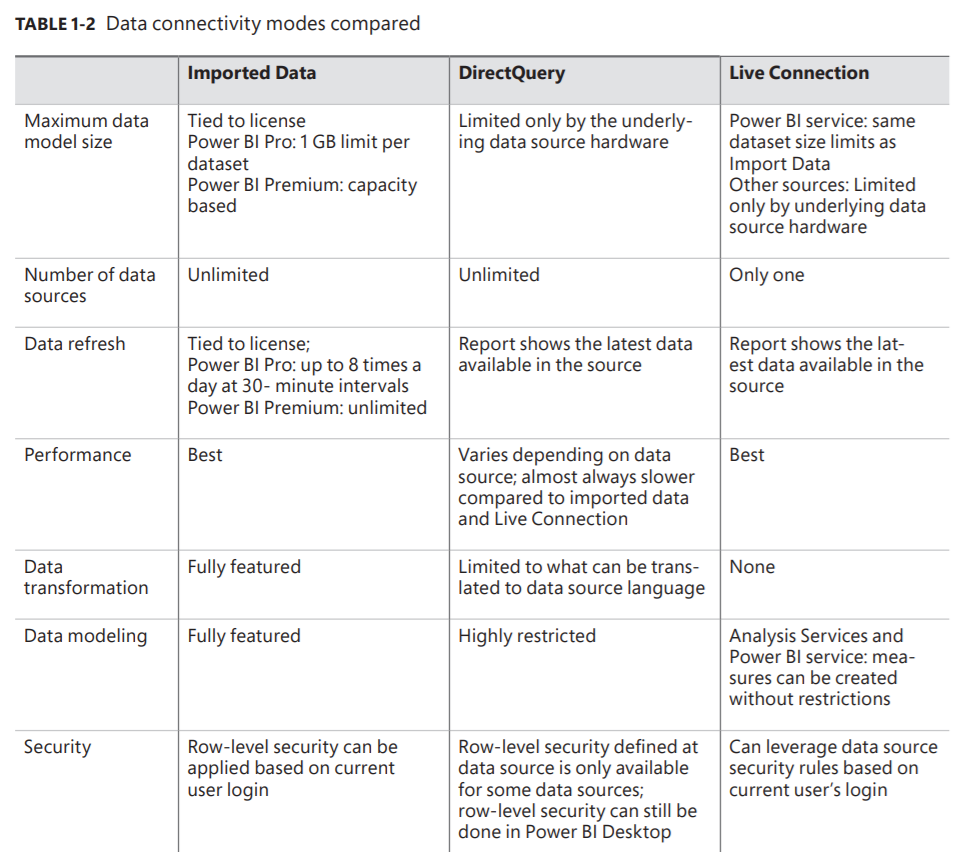
- Storage Mode
- Import
- Local compressed copy
- Caches Data
- Incremental refresh
- DirectQuery
- Live Connection
- Very Large datasets
- Real Time Data
- Import
Profiling data
- Column Quality
- Valid, error and empty values
- Column Distribution
- Bar charts
- Distinct Values
- How many differente values appears only once?
- Unique Values
- How many values occurs exactly once?
- Column Profile
- Column statistics
- Value distribution
- Column Quality
ETL
- Power Query
- First appereance: Excel 2010
- Language M; stands for "mashup"
- Case sensitive
- Clean
- Replace or Remove Values
- Change Data Types
- Merge or append tables
- Transformation
- Pivot or unpivot columns
- Add custom columns
- Use user friendly name conventions
- Load
- Power Query
Images and files in the map
Information
- Description
- Query folding: A feature of PBI that translates the user's transformations into the native language of the source (e. g. SQL). Parameters VS Functions in Power Query? Use a parameter if you just want to apply it once; use functions if you want to apply a same logic multiple times.
- Created by
- José Alejandro Llamas
- Views
- 0
- Rating