
Notes
Cloud Generics
Content of the notes (4)
Page 1
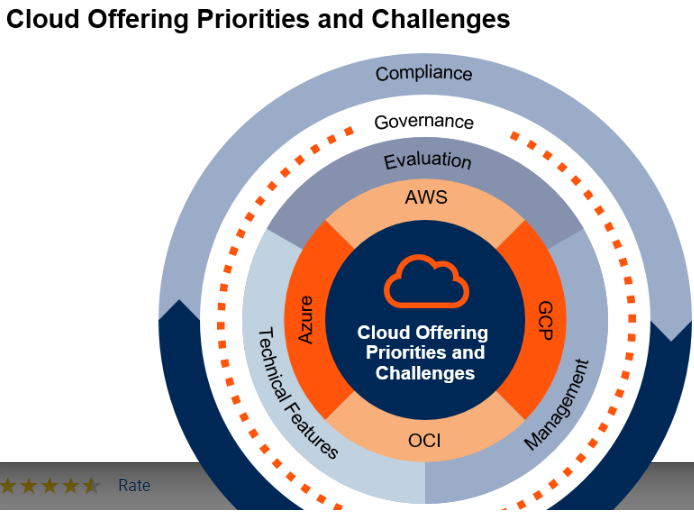
In addition, more organizations are using services from multiple cloud providers to reduce lock-in, mitigate risk and protect against service failures
Organizations must plan for evaluation and procurement processes that involve multicloud deployment scenarios, and they must invest in security, identity, governance, and management tools and processes that enable multicloud.
An understanding of key features and capabilities is also critical when it comes to cloud-native application platforms. These include container orchestration functions, application models, platform service extensions and add-ons, platform runtime support, portability options, and licensing models.
Page 2
Key Services Differences Between AWS and Azure — Availability, Network, Compute and Storage
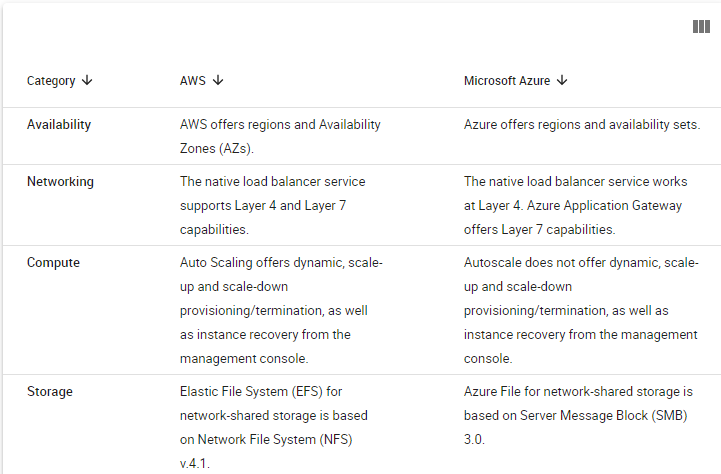
There is a fundamental architectural and design difference between Amazon Web Services (AWS) and Azure when it comes to high availability (HA). Azure only offers HA within a single logical data center in a region. In contrast, AWS implements HA across multiple logical data centers in a region.
AWS Auto Scaling offers dynamic, scale-up and scale-down provisioning, termination, and instance recovery from within the management console, whereas Azure Autoscale does not offer that functionality natively from within the management console.
AWS's Direct Connect offers more partner options than Azure ExpressRoute. However, Azure ExpressRoute offers global interregion connectivity on the Microsoft private network, whereas AWS offers interregion connectivity only in the U.S. Furthermore, Azure ExpressRoute is port-redundant by default, and AWS Direct Connect is not.
AWS's Elastic Load Balancing (ELB) cannot be assigned a static Internet Protocol (IP) address, whereas Azure's Load Balancer supports static IP addresses.
Recommendations
Cloud architects and other technical professionals involved in planning cloud initiatives:
Identify your application's availability, compute, networking and storage design criteria. This will help you level-set the differences between AWS and Azure.
Monitor your AWS and Azure monthly spend, and subscribe to discount programs like AWS Elastic Compute Cloud (EC2) Reserved Instances and Microsoft Enterprise Agreements as quickly as possible.
Choose AWS if your design criteria require HA across multiple logical data centers that are synchronously connected.
Choose Azure if your organization is looking to implement a hybrid architecture with Microsoft Azure and relies heavily on Microsoft technologies like Hyper-V/System Center/Azure Pack/Azure Stack/SQL Server 2016.
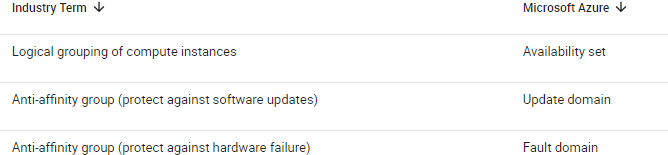
SLA adherence: To abide by the terms of AWS's SLA for compute, instances must be deployed into two separate AZs within the same region. To meet Azure's compute SLA requirements, at least two same-role VMs must be deployed in different fault domains and different update domains within the same availability set.
Fault tolerance: AWS AZs in the same region are less than 60 miles (100 kilometers) — and within 0.25 milliseconds (ms) of latency — from each other. The importance of this architecture is that it enables synchronous replication and distributed workload deployments across AZs without impacting performance (see Figure 5 for a sample AWS architecture). Organizations should consider a multiple-AZ deployment to be equal to a deployment across two data centers in an active-active configuration. It is also worth noting that most AWS services are enabled regionwide. For example, Elastic Load Balancing, Virtual Private Clouds (VPCs) and Auto Scaling are all services that span the entire region.
Page 3
Cloud Terminology:
A logical data center (zone) is composed of one or more physical data centers within the same data center campus, or within close proximity.
Reion: refers to a geography where AWS and Azure have cloud-hosting capabilities
Page 4
How to Budget, Track and Reduce Public Cloud Spending
Prework
Organizations must understand a number of prework items before jumping into Step 1 of the framework. This section details these items. Some foundational aspects of billing and cost management for public cloud services need to be analyzed before implementing the Cost Management Framework:
Understand pay-as-you-go (PAYG) versus subscription models
Understand cloud providers' pricing models
Understand pricing tiers
Understand consolidated billing
Understand tagging and why it is important
Pay-as-you-go (PAYG): Companies pay as needed, on-demand, as services are consumed and only when they are used.
Subscription model: Companies committing to a set amount of cloud spend within a specified time frame. Once that spend is exceeded, provider's default to PAYG for additional spending.
Providers approach billing based on the type of services used, which are commonly categorized as:
Compute,Storage,Network,Differentiated services,Management
Understand Cloud Providers' Pricing Models
Providers approach billing based on the type of services used, which are commonly categorized as:
Compute
Storage
Network
Differentiated services
Management
There are multiple options within each of these categories, and billing varies by provider. Providers have different compute sizes that range in price per VM and vary by hardware and type of instance selected. Storage services often have pricing tiers based on the type of storage (i.e., flash-based solid-state drives [SSDs] or less expensive hard-disk drives [HDDs]). There may be a networking charge associated with data in and/or out of the provider's data center, referred to as ingress and egress, not to mention the WAN charges for your link.
Some providers also offer services that are targeted for specific use cases and comprise a bundle of services that include compute, storage, networking and software. An example is Amazon Relational Database Service (Amazon RDS). The availability and types of services vary by provider, as will the pricing structure. Some of these services do not have an additional charge; instead they only charge for the compute, storage and networking associated with that implementation. Finally, some providers offer management services that will carry their own billing structure. In many cases, some base level of services will be free, and more advanced functionality will incur an upcharge.
To illustrate the variability in provider pricing models, let's look at the different ways in which three providers price just their compute services.
AWS offers instance options that are optimized for different workload requirements, such as:
Compute optimized, which begin with "C"
Graphics-intensive, which begin with "G"
Memory optimized, which begin with "M"
Storage optimized, which begin with "D" (HDD) or "I" (SSD)
General purpose, which begin with either "M" or "T"
Amazon pricing can be found on the Amazon EC2 Pricing site.
Microsoft offers two different compute options for VMs: basic and standard. Basic tiers have limited functionality and do not include features such as auto-scaling or load balancing. This makes the basic tier optimal for nonproduction or non-mission-critical workloads. Conversely, the standard tier takes advantage of these features and is therefore recommended by Microsoft for production workloads. Microsoft pricing can be found on the Virtual Machines Pricing site.
Google offers a few different instance types, but most deployments fall under the "N" instance family. The "N" instance type includes three options: standard, high memory and high CPU configurations. These are named n1-highmem-2 for example, where the middle character designated is a highmem instance and the No. 2 designates the number of virtual CPUs. Google allows users to select an f1-micro machine type to burst CPU when needed, but is not a permanent or sustained capacity increase. This feature is priced separately. Google pricing can be found on the Google Compute Engine Pricing site.
Understand Pricing Tiers
This section describes three different pricing approaches:
Free or trial pricing
Subscription model pricing
Cost-optimized pricing
Free or Trial Pricing
Many providers offer a free or trial model to help organizations get started using public cloud services. This is a good method for organizations to begin using the services and to begin building knowledge of the services offered, the pricing structure and the management services available. However, providers approach free pricing differently.
For example, Amazon offers a Free Tier of AWS that allows users to take advantage of a set amount of compute and storage capacity (750 hours per year for EC2, Amazon's compute instance, and 5GB for S3, Amazon's storage instance) in addition to some limited use of other services for up to a year. Microsoft and Google allow organizations to take advantage of free services up to a predefined dollar amount for a specified amount of time. Microsoft offers service credits through Microsoft subscriptions as well. Refer to the provider's free trial page for current details.
Subscription Model Pricing
Organizations can enter a subscription with the provider where they agree to use a specified capacity and may prepay for some of the capacity. By entering this contractual agreement, the provider will reduce the rate from the on-demand or PAYG model. Subscription models vary by provider, and pricing structures will also vary by service within providers.
Amazon offers Reserved Instances (RIs) within AWS where organizations agree to a set capacity or time frame, and there are different contractual time frames (one year, three years, etc.) by provider. Pricing will vary depending upon the agreement. Organizations can pay "upfront" and receive maximum discounts, or they can "partially pay upfront" and receive a reduced rate monthly. They can also select a "no upfront payment" agreement that establishes a reduced monthly rate but doesn't require an upfront payment. Savings will be the highest with the upfront payment option, and the no upfront payment agreement will return the smallest savings but still be less expensive than PAYG. Amazon also offers an RI volume discount within AWS based on total annual spend; this can return further savings.
Microsoft offers discounts through Enterprise Agreements. Organizations will receive the best pricing by using the Microsoft Enterprise Agreement, which does not require an upfront Azure commitment. Microsoft allows organizations to use services and bill annually. This option allows users to access the enterprise portal, which includes integration with a number of management services. Microsoft also offers a "pay-as-you-go" subscription, which can be confusing because it includes both "pay-as-you-go" and "subscription" in the title, but this is on-demand, PAYG pricing. Finally, organizations can also go through a Microsoft reseller, which may offer additional discounts or services atop the Microsoft Azure offering.
Google approaches pricing and subscription models differently. Rather than entering different agreements, Google discounts automatically based on sustained usage. The rates are discounted off the PAYG pricing. Sustained use discounts reward customers for continuing to use the service without requiring an upfront commitment from the customer.
VMware offers a shared resource pool model, which is a fixed cost for a pool of resources. Customers can flex in and out with many small VMs, a few larger VMs or any combination in between. The monthly bill is the same in any scenario.
Cost-Optimized Pricing
Providers offer cost-optimized instances that work off a bidding and marketplace concept. The most common examples in the industry are spot instances from AWS. Spot instances are not suited for all workloads but can return significant discounts. Spot instances are created using available provider capacity, but there is no guarantee that it will be continuously available. This means spot instances are suited for workloads that are not persistent in nature and can handle stopping and starting dynamically, such as non-time-sensitive workloads or batch workloads. Other vendors in the market currently lack similar type of offering.
Organizations can also get discounts by buying available RI capacity on the RI marketplace within AWS. The AWS Marketplace is a self-service portal where companies can buy preconfigured images and rapidly provision these images. Organizations can sell capacity they are not going to use that was purchased as an RI to help recover costs and control spend. This would be similar to subletting a room of a house. This introduces yet another level of complexity for organizations to track and manage, so it is recommended only for organizations that have sophisticated cloud spending controls in place.
Understand Consolidated Billing
Many of the providers support consolidated billing, which allows organizations to link accounts into an organizational construct. Consolidated billing creates a way for organizations to connect accounts for billing purposes so that only one bill is received rather than having a billing for every account. It doesn't change any of the underlying behaviors or privileges associated with the accounts themselves; it is strictly for billing purposes. Organizations designate a "payee" account, and the administrator of the payee account can add accounts to link. This simplifies the billing process by reducing the overall number of accounts to manage and allows organizations to apply privileges based on the linked accounts. Some organizations have worked with cloud providers to limit the ability to provision only to those linked accounts within their company.
Understand Tagging and Why It Is Important
The provider's statements show every service that has been consumed, but they are not organized in any manner. The bill is constructed as a logical progression of all services called with the "dollar entry" associated with that service. The services will each carry their own line item any time there is a cost entry associated with that service, even if the dollar amount is $0 or $0.01 (shown in U.S. currency).
In order for organizations to monitor cloud spend, these line items need to be categorized and organized in a meaningful way. The billing statements do not natively have tagging implemented and therefore cannot be easily sorted or organized. This makes it extremely difficult for the organization to determine who is spending cloud budget amounts and for what projects. Tagging resources creates a method to sort and filter utilization and, therefore, spend. Most providers support the ability to tag resources. Providers implement resource tagging differently and expose tags slightly differently into the billing engine.
As an example of tagging, AWS tagging consists of a Key/Value pair.
Figure 1. AWS Key/Value Pair Approach for Tagging
Source: Gartner (July 2015)
In Figure 1 above, two tags have been created, "Owner" and "Stack." The value is user-defined. Amazon supports up to 10 tags for each AWS resource or instance. Most major services support tagging. Microsoft also enables a key/value pair and handles tagging through resource groups and role-based access control (RBAC). The limitations on the number of tags you can create vary by provider.
Unfortunately, not all providers support tagging, and even if they do, not all provide a way to integrate tags into the billing engine. Once a resource is tagged, the metadata can be propagated into the billing engine. Excel pivot tables can be used to create more user-consumable views to sort and filter consumption. Organizations need to create processes to audit and enforce the use of tags consistently. Without tags, resources are consumed but cannot easily be managed or organized into meaningful reports.
Understand Cloud Providers' Pricing Models
Providers approach billing based on the type of services used, which are commonly categorized as:
Compute
Storage
Network
Differentiated services
Management
There are multiple options within each of these categories, and billing varies by provider. Providers have different compute sizes that range in price per VM and vary by hardware and type of instance selected. Storage services often have pricing tiers based on the type of storage (i.e., flash-based solid-state drives [SSDs] or less expensive hard-disk drives [HDDs]). There may be a networking charge associated with data in and/or out of the provider's data center, referred to as ingress and egress, not to mention the WAN charges for your link.
Some providers also offer services that are targeted for specific use cases and comprise a bundle of services that include compute, storage, networking and software. An example is Amazon Relational Database Service (Amazon RDS). The availability and types of services vary by provider, as will the pricing structure. Some of these services do not have an additional charge; instead they only charge for the compute, storage and networking associated with that implementation. Finally, some providers offer management services that will carry their own billing structure. In many cases, some base level of services will be free, and more advanced functionality will incur an upcharge.
To illustrate the variability in provider pricing models, let's look at the different ways in which three providers price just their compute services.
AWS offers instance options that are optimized for different workload requirements, such as:
Compute optimized, which begin with "C"
Graphics-intensive, which begin with "G"
Memory optimized, which begin with "M"
Storage optimized, which begin with "D" (HDD) or "I" (SSD)
General purpose, which begin with either "M" or "T"
Amazon pricing can be found on the Amazon EC2 Pricing site.
Microsoft offers two different compute options for VMs: basic and standard. Basic tiers have limited functionality and do not include features such as auto-scaling or load balancing. This makes the basic tier optimal for nonproduction or non-mission-critical workloads. Conversely, the standard tier takes advantage of these features and is therefore recommended by Microsoft for production workloads. Microsoft pricing can be found on the Virtual Machines Pricing site.
Google offers a few different instance types, but most deployments fall under the "N" instance family. The "N" instance type includes three options: standard, high memory and high CPU configurations. These are named n1-highmem-2 for example, where the middle character designated is a highmem instance and the No. 2 designates the number of virtual CPUs. Google allows users to select an f1-micro machine type to burst CPU when needed, but is not a permanent or sustained capacity increase. This feature is priced separately. Google pricing can be found on the Google Compute Engine Pricing site.
Understand Pricing Tiers
This section describes three different pricing approaches:
Free or trial pricing
Subscription model pricing
Cost-optimized pricing
Free or Trial Pricing
Many providers offer a free or trial model to help organizations get started using public cloud services. This is a good method for organizations to begin using the services and to begin building knowledge of the services offered, the pricing structure and the management services available. However, providers approach free pricing differently.
For example, Amazon offers a Free Tier of AWS that allows users to take advantage of a set amount of compute and storage capacity (750 hours per year for EC2, Amazon's compute instance, and 5GB for S3, Amazon's storage instance) in addition to some limited use of other services for up to a year. Microsoft and Google allow organizations to take advantage of free services up to a predefined dollar amount for a specified amount of time. Microsoft offers service credits through Microsoft subscriptions as well. Refer to the provider's free trial page for current details.
Subscription Model Pricing
Organizations can enter a subscription with the provider where they agree to use a specified capacity and may prepay for some of the capacity. By entering this contractual agreement, the provider will reduce the rate from the on-demand or PAYG model. Subscription models vary by provider, and pricing structures will also vary by service within providers.
Amazon offers Reserved Instances (RIs) within AWS where organizations agree to a set capacity or time frame, and there are different contractual time frames (one year, three years, etc.) by provider. Pricing will vary depending upon the agreement. Organizations can pay "upfront" and receive maximum discounts, or they can "partially pay upfront" and receive a reduced rate monthly. They can also select a "no upfront payment" agreement that establishes a reduced monthly rate but doesn't require an upfront payment. Savings will be the highest with the upfront payment option, and the no upfront payment agreement will return the smallest savings but still be less expensive than PAYG. Amazon also offers an RI volume discount within AWS based on total annual spend; this can return further savings.
Microsoft offers discounts through Enterprise Agreements. Organizations will receive the best pricing by using the Microsoft Enterprise Agreement, which does not require an upfront Azure commitment. Microsoft allows organizations to use services and bill annually. This option allows users to access the enterprise portal, which includes integration with a number of management services. Microsoft also offers a "pay-as-you-go" subscription, which can be confusing because it includes both "pay-as-you-go" and "subscription" in the title, but this is on-demand, PAYG pricing. Finally, organizations can also go through a Microsoft reseller, which may offer additional discounts or services atop the Microsoft Azure offering.
Google approaches pricing and subscription models differently. Rather than entering different agreements, Google discounts automatically based on sustained usage. The rates are discounted off the PAYG pricing. Sustained use discounts reward customers for continuing to use the service without requiring an upfront commitment from the customer.
VMware offers a shared resource pool model, which is a fixed cost for a pool of resources. Customers can flex in and out with many small VMs, a few larger VMs or any combination in between. The monthly bill is the same in any scenario.
Cost-Optimized Pricing
Providers offer cost-optimized instances that work off a bidding and marketplace concept. The most common examples in the industry are spot instances from AWS. Spot instances are not suited for all workloads but can return significant discounts. Spot instances are created using available provider capacity, but there is no guarantee that it will be continuously available. This means spot instances are suited for workloads that are not persistent in nature and can handle stopping and starting dynamically, such as non-time-sensitive workloads or batch workloads. Other vendors in the market currently lack similar type of offering.
Organizations can also get discounts by buying available RI capacity on the RI marketplace within AWS. The AWS Marketplace is a self-service portal where companies can buy preconfigured images and rapidly provision these images. Organizations can sell capacity they are not going to use that was purchased as an RI to help recover costs and control spend. This would be similar to subletting a room of a house. This introduces yet another level of complexity for organizations to track and manage, so it is recommended only for organizations that have sophisticated cloud spending controls in place.
Understand Consolidated Billing
Many of the providers support consolidated billing, which allows organizations to link accounts into an organizational construct. Consolidated billing creates a way for organizations to connect accounts for billing purposes so that only one bill is received rather than having a billing for every account. It doesn't change any of the underlying behaviors or privileges associated with the accounts themselves; it is strictly for billing purposes. Organizations designate a "payee" account, and the administrator of the payee account can add accounts to link. This simplifies the billing process by reducing the overall number of accounts to manage and allows organizations to apply privileges based on the linked accounts. Some organizations have worked with cloud providers to limit the ability to provision only to those linked accounts within their company.
Understand Tagging and Why It Is Important
The provider's statements show every service that has been consumed, but they are not organized in any manner. The bill is constructed as a logical progression of all services called with the "dollar entry" associated with that service. The services will each carry their own line item any time there is a cost entry associated with that service, even if the dollar amount is $0 or $0.01 (shown in U.S. currency).
In order for organizations to monitor cloud spend, these line items need to be categorized and organized in a meaningful way. The billing statements do not natively have tagging implemented and therefore cannot be easily sorted or organized. This makes it extremely difficult for the organization to determine who is spending cloud budget amounts and for what projects. Tagging resources creates a method to sort and filter utilization and, therefore, spend. Most providers support the ability to tag resources. Providers implement resource tagging differently and expose tags slightly differently into the billing engine.
As an example of tagging, AWS tagging consists of a Key/Value pair.
Figure 1. AWS Key/Value Pair Approach for Tagging
Source: Gartner (July 2015)
In Figure 1 above, two tags have been created, "Owner" and "Stack." The value is user-defined. Amazon supports up to 10 tags for each AWS resource or instance. Most major services support tagging. Microsoft also enables a key/value pair and handles tagging through resource groups and role-based access control (RBAC). The limitations on the number of tags you can create vary by provider.
Unfortunately, not all providers support tagging, and even if they do, not all provide a way to integrate tags into the billing engine. Once a resource is tagged, the metadata can be propagated into the billing engine. Excel pivot tables can be used to create more user-consumable views to sort and filter consumption. Organizations need to create processes to audit and enforce the use of tags consistently. Without tags, resources are consumed but cannot easily be managed or organized into meaningful reports.
Information
- Description
- Cloud Decisioning Note on Cloud Generics, created by Eric Pereira on 04/02/2019.
- Created by
- Eric Pereira · Feb 2019
- Updated
- Feb 4, 2019
- Views
- 11
- Rating