
Internet Protocols
Slides in this set (65)
-
- Point of Presence-Point of presence is an access point to the internet. An ISP may have several of these to allow good access to the internet.
- https://www.youtube.com/watch?v=vUD8U7eLbQ0 (Embed)
-
- Network access point is where different networks interconnect, such as your home network onto the internet.
- https://www.youtube.com/watch?v=qKPkSpkHMwE (Embed)
-
- The protocol used to route packets of information across the internet.
- An individual unit of data which is carried across a network, including the internet. It is made
- up of a header which identifi es the packet and a body which is the actual data message. It
- is one of the functions of the Transmission Control Protocol (TCP) to organise an internet message into packets.
- https://www.youtube.com/watch?v=zyL1Fud1Z1c (Embed)
-
Transmission control protocol.
- The protocol which takes data from a user’s application program and passes it to the IP for
- transfer across the internet. The reverse operation is performed at the destination computer,
- i.e. the TCP reassembles the data (from individual packets) and forwards them to the user’s
- application program. The close relation with the IP means that the terms are usually used in combination.
- https://www.youtube.com/watch?v=KlZ3uZiULWk (Embed)
-
- A standard protocol which allows files to be transferred between two computers on a TCP-based
- network. It is commonly used to download programs to your computer from other servers and to
- upload web pages that you have created to the server that is hosting them on the internet.
- https://www.youtube.com/watch?v=57wkPt7LbhU (Embed)
-
- Direct connection to the internet would be very costly and so ISPs provide a cost-effective
- gateway for people and organisations to get onto the internet. In the UK there are many
- ISPs, with some of the most popular ones being BT (British Telecom), Virgin Media and Sky.
- https://www.youtube.com/watch?v=7_LPdttKXPc (Embed)
-
- a computer or computer program which manages access to a centralized resource or service in a network.
-
- A client is a piece of computer hardware or software that accesses a service made available by a server. The server is often (but not always) on another computer system, in which case the client accesses the service by way of a network. The term applies to programs or devices that are part of a client–server model.
- https://www.youtube.com/watch?v=tFiXxzzdgFY (Embed)
-
- A network device that forwards data packets from one network to another. Based on the address of the destination network in the incoming packetand an internal routing table, the router determines which port (line) to send out the packet (ports typically connect to Ethernet cables).
- https://www.youtube.com/watch?v=FlUGN67D2Kk (Embed)
-
- A backbone network or network backbone is a part of computer network infrastructure that interconnects various pieces of network, providing a path for the exchange of information between different LANs or subnetworks.
-
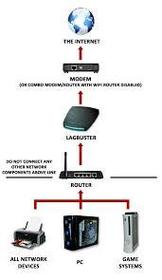
- The order of this diagram goes - client - router - ISP - internet
-
- Used by wireless-enabled
- devices (computers, mobiles,
- smartphones, etc.) to log in to
- the internet. Wireless is exactly
- what it says; there are no wires to
- connect.
- https://www.youtube.com/watch?v=-VEgfcDxc7A (Embed)
-
- A wired connection to a
- broadband supplier. Normally the
- connection is via a network card
- in the computer. Cable users have
- an ethernet connection from
- their computer to the network.
- https://www.youtube.com/watch?v=sHu5ZDxaMaI (Embed)
-
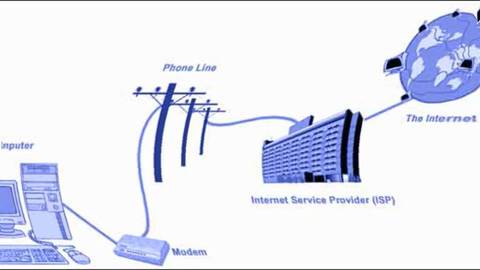
- A wired connection via a
- conventional telephone line,
- which needs a modem to convert
- signals to and from analogue for
- transmission.
-
- a link from a hypertext document to another location, activated by clicking on a highlighted word or image.
- https://www.youtube.com/watch?v=VywISSKt1eg (Embed)
-
- A web server is an information technology that processes requests via HTTP, the basic network protocol used to distribute information on the World Wide Web. The term can refer either to the entire computer system, an appliance, or specifically to the software that accepts and supervises the HTTP requests.
- https://www.youtube.com/watch?v=xHCUgiKokRM (Embed)
-
- A sequential on-screen dialog that assists the user in some manner. For example, installation programs are often called "installation wizards" because they provide a series of steps with options.

-
- Hypertext Markup Language, a standardized system for tagging text files to achieve font, colour, graphic, and hyperlink effects on World Wide Web pages.
- "an HTML file"
- https://www.youtube.com/watch?v=Xa0rC8Xo0J4 (Embed)
-
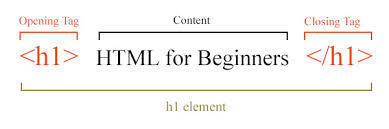
- An HTML element is an individual component of an HTML document or web page, once this has been parsed into the Document Object Model. HTML is composed of a tree of HTML elements and other nodes, such as text nodes. Each element can have HTMLattributes specified.
-
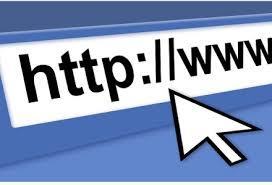
- URL is an acronym for Uniform Resource Locator and is a reference (an address) to a resource on the Internet. A URL has two main components: Protocol identifier: For the URL http://example.com , the protocol identifier is http . Resource name: For the URLhttp://example.com , the resource name is example.com .
-
- a program that searches for and identifies items in a database that correspond to keywords or characters specified by the user, used especially for finding particular sites on the World Wide Web.

- Caption: All of these are search engines.
-
- Codec is a device or program that compresses data to enable faster transmission and decompress received data.
-
- It is used as a generic term to mean computers , peripheral hardware , mobile telephones manual acting plant environment monitors and many other things.
-
- relating to or situated on the edge or periphery of something. able to be attached to and used with a computer, though not an integral part of it.
-
- A piece of a message transmitted over a packet-switching network. See under packet switching. One of the key features of a packet is that it contains the destination address in addition to the data. In IP networks,packets are often called datagrams.
-
- In computing and
- telecommunications, a byte is
- unit of digital information which
- commonly consists of eight bits.
-
- USB, short for Universal Serial Bus, is an industry standard developed in the mid-1990s that defines the cables, connectors and communications protocols used in a bus for connection, communication, and power supply between computers and electronic devices.
-
- Client-side refers to operations that are performed by the client in aclient–server relationship in a computer network. Typically, a client is a computer application, such as a web browser, that runs on a user's local computer or workstation and connects to a server as necessary.
-
- a structured set of data held in a computer, especially one that is accessible in various ways.
-
- a group of binary digits or bits (usually eight) operated on as a unit.a byte considered as a unit of memory size.
-
- USB, short for Universal Serial Bus, is an industry standard developed in the mid-1990s that defines the cables, connectors and communications protocols used in a bus for connection, communication, and power supply between computers and electronic devices.
-
- Client side processing uses the clients computer to process web page data in data exchange. One example is a roll-over imagine on a web page, which changes when the client hovers their mouse over it for so long and the image changes. One advantage is high speed and another advantage is good security. One disadvantage is computer speed , if the computer speed is poor so will loading the link.
-
- server side processing uses the web server to process webpage data. One example is a form completed online which has been filled in by the user then submitted to the server where the results are processed and stored. One advantage is that it's efficient and another advantage is that it's high speed.One disadvantage is that the security isn't good and another disadvantage is overloading. Overloading is when there are too many clients on the server.
-
- Bi-directional transmission has several meanings within data communication, but it
- is essentially about transmitting in both directions. Most recently the term has been
- applied to fi bre optics. Using the current technology, light passes in one direction
- only, so you have to add extra fi bres to the bundle to carry a signal in the opposite
- direction.
-
- This is a mode of data transmission in which a message is broken into a number of parts which are sent independently, over whatever route is optimum for each packet, and reassembled at the destination.
-
- This sends data in one direction only. A radio broadcast is a good
- example of simplex transmission.
-
- This allows two-way transmissions but the devices don’t transmit
- at the same time. A system being used to monitor and control manufacturing processes
- can use half-duplex transmissions. It will send a message to the control computer,
- which will respond with new settings, but they both cannot send messages at the
- same time. Some network systems use half-duplex to maximise bandwidth.
-
- This allows two-way communication at the same time.
- The telephone system, land or mobile, is an example of a full duplex system.
-
- a structured set of data held in a computer, especially one that is accessible in various ways.
-
- n relational databases and flat file databases, a table is a set of data elements (values) using a model of vertical columns (identifiable by name) and horizontal rows, the cell being the unit where a row and column intersect. A table has a specified number of columns, but can have any number of rows.
-
- A group of selected
- data which are associated in
- some way.
-
- A single piece of data
- within a record.
-
- A single unique
- key used to identify each record
- in a table.
-
- A field which can
- be used to cross-reference and
- access associated information
- across many tables.
-
- People who find an unattended computer which has been
- left logged in to a system may view, steal or damage information, programs or even hardware.
-
- These are small programs which can replicate themselves and
- spread from computer to computer. They are never benefi cial; usually they will make
- some changes to the system they infect and, even if they do no real damage, they
- are undesirable. They arrive by attaching themselves to fi les or email messages.
-
- These include turning off computers and locking offices when the
- systems are unattended to prevent damage by people, the environment (e.g. fire,
- flooding, electrical interference) or theft.
-
- Passwords are sequences of characters, known only
- to the computer user, which allow access to a computer, network or application.
- Passwords should always be strong so that it is hard for someone else to guess them
- or work them out.
-
- These can be set up to allow individuals to have access to only
- specific levels of an application and to prevent unauthorised users from accessing
- particular data.
-
- This is set up to intercept computer viruses before they can
- become resident on the computer. The software can isolate the virus, remove it and
- sometimes repair any damage. Equivalent security programs exist for other types of malware.
-
- This is a piece of software that monitors all data arriving at your computer
- from the internet and all data leaving your computer. It stops anything that it thinks
- is harmful or unwanted (such as viruses, spam, Trojan horses and hackers).
-
- This is used to codify data so that it cannot be read by anyone who does
- not have the key to the code. An algorithm, sometimes known as a cipher, is applied
- to the data at the transmission end and the reverse is applied at the reception end.
-
- Making a backup of data is the only way of recovering from a
- total data disaster. Many individuals and organisations back up data to Flash solid
- state storage devices or magnetic tape at night. The tapes are stored safely in a
- separate place, so that they are not destroyed by any disaster which could destroy
- the master system (fi re, earthquake, etc.). Many types of backup exist, including:
-
- provides 8 principles that govern the way data about individuals is stored and used.
-
- Introduced to protect from hackers and malicious use of viruses.
-
Copyright,designsand patentsact1998
- Protects creators of original works.
-
Freedom of information act 2000
- Provides individual the right to see information stored about them. Data can also be accessed about public bodies.
Information
- Description
- Slide Set on Internet Protocols , created by peplowl3 on 04/11/2015.
- Created by
- peplowl3 · Nov 2015
- Updated
- Feb 19, 2016
- Views
- 0
- Rating