
internet protocols Thomas Walshe
Slides in this set (74)
-
-
- Point of An access point to the internet. Normally, it is a location which contains all of the hardware which allows internet users access to the internet. An Internet Service Provider (ISP) may operate several Pops in their area to allow good access to the internet.
- copy link for the video https://www.youtube.com/watch?v=zyL1Fud1Z1c
-
- An interchange between networks within the internet. It allows ISP to interconnect with each other. In computer networking, a wireless network access point (NAP) is a device that allows wireless devices to connect to a wired network using WI-Fi, or related standards. The NAP usually connects to a router (via a wired network) as a standalone device, but it can also be an integral component of the router itself.
-
- The protocol used to route packets of information across the internet .
- An individual unit of data which is carried across a network,including the internet .It is made up of a header which identifies the packet and a body which is the actual data message. It
- is one of the functions of the Transmission Control Protocol (TCP) to organise an internet.
- https://www.youtube.com/watch?v=zyL1Fud1Z1c (Embed)
-
transmission control protocol(TCP)
- The protocol which takes data from a user’s application program and passes it to the IP for
- transfer across the internet. The reverse operation is performed at the destination computer,
- i.e. the TCP reassembles the data (from individual packets) and forwards them to the user’s
- application program. The close relation with the IP means that the terms are usually used in
- combination, i.e. TCP/IP.
-
- A standard protocol which allows files to be transferred between two computers on a TCP-based
- network. It is commonly used to download programs to your computer from other servers and to
- upload web pages that you have created to the server that is hosting them on the internet
-
internet service provider(ISP)
- Direct connection to the internet would be very costly and so ISPs provide a cost-effective
- gateway for people and organisations to get onto the internet.In the UK there are many
- ISPs, with some of the most popular ones being BT (British Telecom), Virgin Media and Sky.
-
- A computer or computer program which manages access to a centralized resource or service in a network.A computer or program which runs purely to serve the needs of other computers. It runs special server software to service the requirements of the users (clients).
- https://www.youtube.com/watch?v=TQQA8RpKxqg
- https://www.youtube.com/watch?v=TQQA8RpKxqg (Embed)
-
- A client is a piece of computer hardware or software that accesses a service made available by a server. The server is often (but not always) on another computer system, in which case the client accesses the service by way of a network. The term applies to programs or devices that are part of a client–server model.
- https://www.youtube.com/watch?v=AWFLGFV4R4c (Embed)
-
- A router[a] is a networking device that forwards data packets between computer networks. Routers perform the "traffic directing" functions on the Internet. A data packet is typically forwarded from one router to another through the networks that constitute the internetwork until it reaches its destination node.[1]
- https://www.youtube.com/watch?v=9LhkW_dkZvU (Embed)
-
- A backbone network or network backbone is a part of computer network infrastructure that interconnects various pieces of network, providing a path for the exchange of information between different LAN's or sub networks.
- https://www.youtube.com/watch?v=GYgKmF4vzVo (Embed)
-
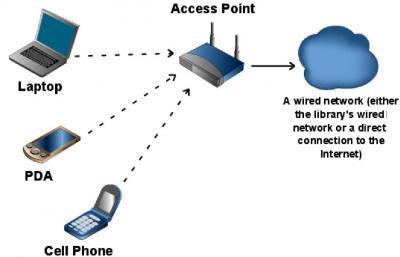
- A network diagram is used in computer telecommunication to draw a graphical chart of a network. This type of diagram is particularly useful for network engineers and designers in compiling detailed network documentation.
-
- Wireless networks are another means by which data can be exchanged between a computer and a network, including the internet. A wireless network is any network servicing computers or other devices (e.g. mobile phones), in which the connectionsdo not use cables of any kind. Wireless communication usually uses radio waves, but infra-red communication is also used.
- https://www.youtube.com/watch?v=OyUAMKYngRY (Embed)
-
- A wired connection to a broadband supplier. Normally the connection is via a network card in the computer. Cable users have an Ethernet connection from their computer to the network.
- Advantage
- Broadband connections can give better reception and are usually faster than dial-up.
- disadvantage
- Requires a base which is wired in, so itis less flexible than wireless.
- https://www.youtube.com/watch?v=QzcEgzdDhec (Embed)
-
- A wired connection via a conventional telephone line, which needs a modern to convert signals to and from analogue for transmission.
- Advantage
- You can use existing telephone circuits,which is useful in some areas.
- disadvantage
- Older technology gives poor reception at times.The conversion from digital to analogue signals can cause errors.Tends to be slower than other connection methods.
- https://www.youtube.com/watch?v=bgTxFLHcuKc (Embed)
-
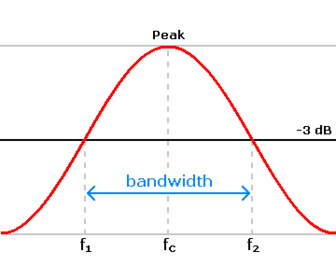
- bandwidth is a way of measuring how much data can be carried over a network.
-
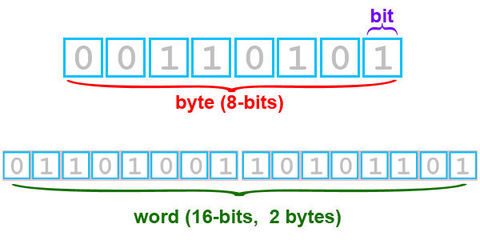
- A bit (short for binary digit) is the smallest unit of data in a computer. A bit has a single binary value, either 0 or 1.
-
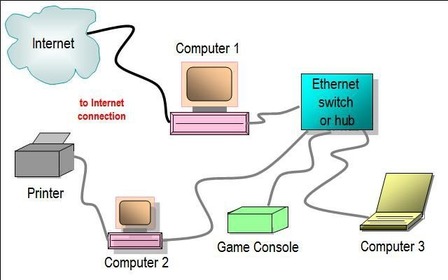
- ethernet isa system for connecting a number of computer systems to form a local area network, with protocols to control the passing of information and to avoid simultaneous transmission by two or more systems.
-
- A link (which can be text or a graphic) which takes you to another web page or location within a document. a hyper link is a link from a hypertext document to another location, activated by clicking on a highlighted word or image.
- https://www.youtube.com/watch?v=qcjBrEvwIE4 (Embed)
-
- It is the job of a web server to deliver web pages to users’ computers.A web server is an information technology that processes requests via HTTP, the basic network protocol used to distribute information on the World Wide Web.
- https://www.youtube.com/watch?v=54n_iXocB6o (Embed)
-
- A sequence of dialogue boxes which lead the user through a series of well-defined steps.A software wizard or setup assistant is a user interface type that presents a user with a sequence of dialog boxes that lead the user through a series of well-defined steps.
-
- HTML is a computer language used to create web pages. You can create HTML directly in the language itself or by using authoring software (such as Adobe ® Dreamweaver ® or Microsoft ® Expression) which uses templates and wizards to create HTML code. HTML files usually have a file name with .html` or.html as the file extension; for example, document.
- https://www.youtube.com/watch?v=x2060tAxfAk (Embed)
-
- An individual component of a HTML document.An HTML element is an individual component of an HTML document or web page, once this has been parsed into the Document Object Model. HTML is composed of a tree of HTML elements and other nodes, such as text nodes. Each element can have HTML attributes specified.
-
- A unique string of characters which makes up a web page’s address.URL is an acronym for Uniform Resource Locator and is a reference (an address) to a resource on the Internet. A URL has two main components: Protocol identifier:
- https://www.youtube.com/watch?v=SMxx9XEF6m0 (Embed)
-
- A ‘search and find’ system into which you typewhat you are looking for and a series of ‘best match’ results will then be displayed .A program that searches for and identifies items in a database that correspond to keywords or characters specified by the user, used especially for finding particular sites on the World Wide Web.
- https://www.youtube.com/watch?v=0SIXO4E5Yyg (Embed)
-
- https://www.youtube.com/watch?v=Tk8ehIY8_2A (Embed)
- A device or program used to encode or decode data.A device or program that compresses data to enable faster transmission and decompresses received data
-
- Used as a generic term to mean computers, peripheral hardware, mobile telephones, manufacturing plant, environment monitors and many other things.A computer system consists of mainly four basic units; namely input unit, storage unit, central processing unit and output unit. Central Processing unit further includes Arithmetic logic unit and control unit, as shown in the figure:. A computer performs five major operations or functions irrespective of its size and make
-
- Any device, such as a printer, attached to a computer to expand its functionality.A peripheral device is generally defined as any auxiliary device such as a computer mouse or keyboard that connects to and works with the computer in some way. Other examples of peripherals are image scanners, tape drives, microphones, loudspeakers, webcams, and digital cameras.
-
- A formatted block of data sent over the networks and the internet. A packet contains the addresses of send and destination, the dataand error checking.A network is a formatted unit of data carried by a -switched network. Computer communications links that do not support, such as traditional point-to-point telecommunications links, simply transmit data as a bit stream.
-
- – In computing and telecommunications, a byte is unit of digital information which commonly consists of eight bits.n almost all modern computers, a byte is equal to 8 bits. Large amounts of memory are indicated in terms of kilobytes
-
- universal serial bus (uSB) is a serial transmission method which was introduced to make many of the connections to a computer look the same. Nowadays USB is used in a wide variety of devices, such as mobile telephones, memory sticks and MP3 players. USB ports also supply power to some devices.
- https://www.youtube.com/watch?v=D55XDhms27s (Embed)
-
- advantages
- allow for more interactively by immediately responding to users
- execute quickly because they dont require a trip to the server
- may improve the usability of a web sites for users who browse quickly
- disadvantage
- if the client side scripting is disabled it will not function.
-
- • Efficiency: Complex code may run more efficiently, as it does not have to be
- downloaded on to the user’s computer.
- • Browser independent: The code is browser independent so therefore can be run
- on any web browser.
- • Speed: Performance is affected only by the speed of the web server. As all of the
- processing is done on the web server, the speed of your own computer is only
- significant for the downloading of the web pages. All of the other processing takes
- place on a highly resourced and speedy server.
- Disadvantages of server-side processing include:
- • Security: The exchange of data over the network may present security risks.
- • Overloading: A server needs to be able to cope with large volumes of users
-
- Bi-directional transmission has several meanings within data communication, but it is essentially about transmitting in both directions. Most recently the term has been applied to fibre optics. Using the current technology, light passes in one direction only, so you have to add extra fibres to the bundle to carry a signal in the opposite direction.
-
- Packet switching is a digital networking communications method that groups all transmitted data into suitably sized blocks, called packets, which are transmitted via a medium that may be shared by multiple simultaneous communication sessions.
- https://www.youtube.com/watch?v=3_EHaM3tr98 (Embed)
-
- simplex communication is a communication channel that sends information in one direction only. A "duplex" communication channel requires two simplex channels operating in opposite directions.
-
- For example, a walkie-talkie is a half-duplex device because only one party can talk at a time. In contrast, a telephone is a full-duplex device because both parties can talk simultaneously. Duplex modes often are used in reference to network data transmissions.
- https://www.youtube.com/watch?v=TSQXyRjGLEM (Embed)
-
- Full-duplex data transmission means that data can be transmitted in both directions on a signal carrier at the same time. For example, on a local area network with a technology that has full-duplex transmission, one workstation can be sending data on the line while another workstation is receiving data. Full-duplex transmission necessarily implies a bidirectional line (one that can move data in both directions).
- https://www.youtube.com/watch?v=TSQXyRjGLEM (Embed)
-
- A database is a system for managing a collection of data. Data about a particular type of thing – for example, customers or products – is stored in a table . You can think of a table as a grid. Every row in the table holds information about a single item; this is also called a record . Every column holds information about a property of the items in the table, such as a customer’s name or an item’s price – these properties are called fields
-
- A two-dimensional representation of data in a database.A table is a means of arranging data in rows and columns. The use oftables is pervasive throughout all communication, research and data analysis. Tables appear in prictural ornamentation, traffic signs and many other places.nt media, handwritten notes, computer software, archite
-
- A group of selected data which are associated in some way.In computer science, a record (also called struct or compound data)[page needed] is a basic data structure. A record is a collection of elements, possibly of different data types, typically in fixed number and sequence. The elements of records may also be called fields or members.
-
- A single piece of data within a record.In computer science, data that has several parts, known as a record, can be divided into fields. Relational databases arrange data as sets of database records, also called rows. Each record consists of several fields; the fields of all records form the columns.
-
- A primary key, also called a primary keyword, is a key in a relational database that is unique for each record. It is a unique identifier, such as a driver license number, telephone number (including area code), or vehicle identification number (VIN). A relational database must always have one and only one primary key.
-
- A field which can be used to cross-reference and access associated information across many tables.The main characteristics of a relational database are: it is built from a set of unique tables (also called relations) a table contains data about just one entity. tables must have a primary key. tables are linked by primary and foreign keys.
-
- A database management system (DBMS) is a computer software application that interacts with the user, other applications, and the database itself to capture and analyse data. A general-purpose DBMS is designed to allow the definition, creation, querying, update, and administration of databases.
-
- SQL is a standardized query language for requesting information from a database. The original version called SEQUEL (structured English query language) was designed by an IBM research center in 1974 and 1975.SQL was first introduced as a commercial database system in 1979 by Oracle Corporation.
-
- A data manipulation language (DML) is a family of syntax elements similar to a computer programming language used for selecting, inserting, deleting and updating data in a database. Performing read-only queries of data is sometimes also considered a component of DML
-
- Short for Data Definition Language, DDL is a computer language that is used to define data structures. In Database Management Systems (DBMS), it is used to specify a database scheme as a set of definitions (expressed in DDL).
-
- These are small programs which can replicate themselves and spread from computer to computer. They are never benefit cial; usually they will make some changes to the system they infect and, even if they do no real damage, they are undesirable. They arrive by attaching themselves to files or email messages.
-
- People who find an unattended computer which has been left logged in to a system may view, steal or damage information, programs or even hardware.
-
- A Trojan horse, or Trojan, in computing is any malicious computer program which misrepresents itself to appear useful, routine, or interesting in order to persuade a victim to install it.Trojan, in computing is A hostile, intrusive or annoying piece of software or
- program code. any malicious computer program which misrepresents itself to appear useful, routine, or interesting in order to persuade a victim to install it.this a an example of malware
-
- This is a type of threat which attempts to gain access to passwords, financial details and other such privileged information. Often this is done by email messages pretending to come from trusted websites, instant messaging or socialnetworks. Normally they try to divert you to a website which looks original and which asks for information about you.
-
- These include turning off computers and locking offices when the systems are unattended to prevent damage by people, the environment (e.g. fire, flooding, electrical interference) or theft
-
- Passwords are sequences of characters, known onlyto the computer user, which allow access to a computer, network or application. Passwords should always be strong so that it is hard for someone else to guess them or work them out.
-
- These can be set up to allow individuals to have access to only specific levels of an application and to prevent unauthorised users from accessing particular data.
-
- This is set up to intercept computer viruses before they can become resident on the computer. The software can isolate the virus, remove it and sometimes repair any damage. Equivalent security programs exist for other types of malware.
-
- This is a piece of software that monitors all data arriving at your computer from the internet and all data leaving your computer. It stops anything that it thinks is harmful or unwanted (such as viruses, spam, Trojan horses and hackers.
-
- This is used to codify data so that it cannot be read by anyone who does not have the key to the code. An algorithm, sometimes known as a cipher, is applied to the data at the transmission end and the reverse is applied at the reception end
-
- Making a backup of data is the only way of recovering from a the master system (fire, earthquake, etc.). Many types of backup total data disaster. Many individuals and organisations back up data to Flash ® solid state storage devices or magnetic tape at night. The tapes are stored safely in a separate place, so that they are not destroyed by any disaster which could destroy
-
- provides 8 principles that govern the way data about individuals is stored and used.processing of data on identifiable living people. It is the main piece of legislation that governs the protection of personal data in the UK.
- https://www.youtube.com/watch?v=vHvd6HaPq_s (Embed)
-
- introduced to protect from hackers and malicious use of viruses.The Computer Misuse Act is designed to protect computer users against wilful attacks and theft of information. Offences under the actinclude hacking, unauthorised access to computer systems and purposefully spreading malicious and damaging software (malware), such as viruses.
- https://www.youtube.com/watch?v=uXIAwZvQJ3Y (Embed)
-
Copyright,Design and patents Act 1988
- protects creators of original works.Copyright, Designs and Patents Act 1988. The Copyright, Designs and Patents Act 1988, is the current UK copyright law. It gives the creators of literary, dramatic, musical and artistic works the right to control the ways in which their material may be used.
- https://www.youtube.com/watch?v=otC_R97O-vo (Embed)
-
Freedom Of Information Act 2000
- provides individual the right to see information stored about them.data can also be accessed about public bodies.
- public authorities are obliged to publish certain information about their activities; and
- members of the public are entitled to request information from public authorities.
- https://www.youtube.com/watch?v=50oddI3nUe0 (Embed)
-
- The Data Protection Act requires you to process personal data fairly and lawfully. This section explains how to comply with this requirement, and gives examples of good practice in handling personal data. The requirement to process personal data fairly and lawfully is set out in the first data protection principle and is one of eight such principles at the heart of data protection. The main purpose of these principles is to protect the interests of the individuals whose personal data is being processed. They apply to everything you do with personal data, except where you are entitled to an exemption.
-
used for limited specifically stated purposes
- Other sections of this guide explain that you may only process personal data if you have a legitimate basis for doing so, and that any processing must be fair and lawful. This section explains the Data Protection Act’s additional requirement that you specify the purpose or purposes for which you obtain personal data, and that anything you do with the data must be compatible with this (or, as the Data Protection Act says, “not … in any manner incompatible” with it.)
-
used in a way that is adequate, relevant and not excessive. accurate
- he Data Protection Act requires you to ensure you only collect the personal data you need for the purposes you have specified. You are also required to ensure that the personal data you collect is sufficient for the purpose for which it was collected.
- These requirements of data adequacy and data minimisation are covered by principle 3 of the Data Protection Act. It is the first of three principles, along with principles 4 and 5, covering information standards.
-
kept for no longer than is absolutely necessary
- e last of the three information standards principles, principle 5 requires you to retain personal data no longer than is necessary for the purpose you obtained it for. This principle has close links with both principles 3 and 4. Ensuring personal data is disposed of when no longer needed will reduce the risk that it will become inaccurate, out of date or irrelevant.
- This section answers some common questions about how long personal data should be kept. It sets out briefly the duties of organisations in this regard, and gives examples of good practice in managing the retention of personal data.
-
handled according to people's data protection rights.
- The Data Protection Act gives rights to individuals in respect of the personal data that organisations hold about them. The Act says that: Personal data shall be processed in accordance with the rights of data subjects under this Act.
-
- This part of the guide offers an overview of what the Data Protection Act requires in terms of security, and aims to help you decide how to manage the security of the personal data you hold. We cannot provide a complete guide to all aspects of security in all circumstances and for all organisations, but this part identifies the main points. We also provide details of other sources of advice and information about security.
- There is no “one size fits all” solution to information security. The security measures that are appropriate for an organisation will depend on its circumstances, so you should adopt a risk-based approach to deciding what level of security you need.
Information
- Description
- Slide Set on internet protocols Thomas Walshe, created by walshet on 04/11/2015.
- Created by
- walshet · Nov 2015
- Updated
- Feb 19, 2016
- Views
- 0
- Rating