
How to do the Counter
Slides in this set (10)
-
- World
- Actor
- We are going to use the example of the a ship and Iceberg in the Ocean world.
-
Code for the World (At the top)
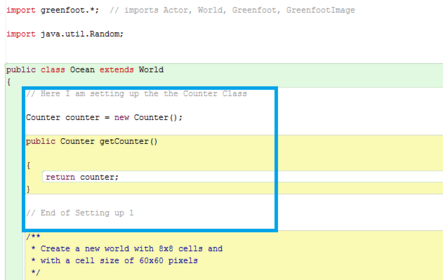
- Caption: This blue box is adding the counter to the world. Therefore with this reference, the world can link with the actor and the counter. BEWARE NO BRACKETS
-
Code for the World (Near bottom)
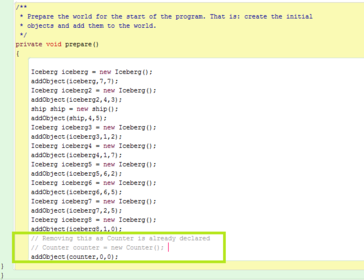
- Caption: This part is especially important. If this is forgotten, the counter WILL NOT WORK.
-
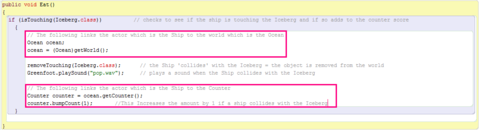
- Caption: Pay attention to the pink boxes. These links to the world are important as without them, the actor will not be able to work with the counter
-
Version 2 - Different GREENFOOT
- This Greenfoot is for the Newer version.
-
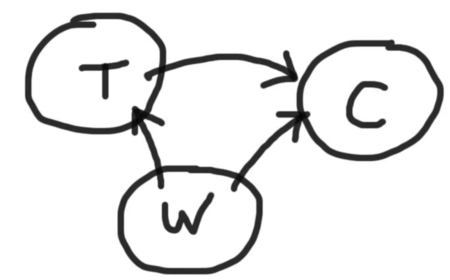
- Caption: This is a key concept when programming Greenfoot. This is that the various Actors and the World - using references - can communicate or talk to each other. They cannot communicate without references.
-
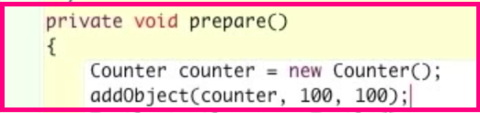
- Caption: This is to go in the prepare section in the World. This is adding the Counter object - manually - into the world. This can be done automatically by dragging the counter where you want it and pressing "Save the World".
-
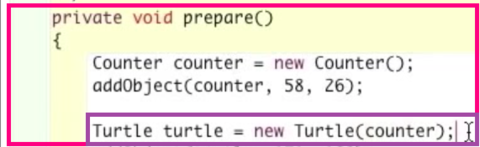
- Caption: If you could please pay attention to the purple box. The reason the word "counter" is placed in the brackets for when the Turtle is being created is that when that is done, a reference for the counter to the turtle is being created. Now the turtle will know and recognize the counter, therefore it can tell the counter to update a score if needed, when the parameter is updated on to its own class area for coding and programming.
-
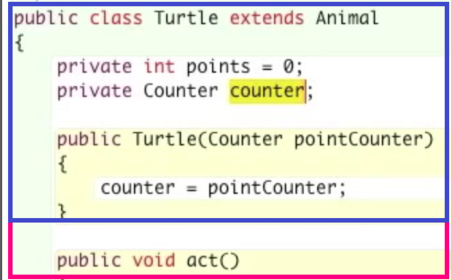
- Caption: This makes the final reference to the Counter. The blue box is focusing on the code while the pink box is focusing on the position of the code. It is before the "act" function.
-
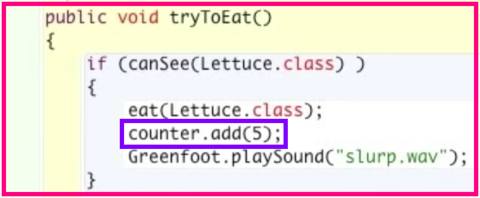
- Caption: Please focus on the purple box. This is telling the counter to add 5 when the Actor - the turtle in this case - eats another Actor - the Lettuce.
Information
- Description
- User has deleted their subject information Slide Set on How to do the Counter, created by Deleted user on 15/09/2016.
- Created by
- Deleted user · Sep 2016
- Updated
- Sep 16, 2016
- Views
- 14
- History
-
- Created by Leann McLeod · May 3, 2016
- Copied by Leann McLeod · Sep 15, 2016
- Rating